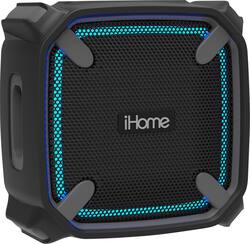
iHome - Weather Tough 3 Portable Bluetooth Speaker - Gray/Black
- Key Specs
- Speaker Pairing: true (Wirelessly connect the speaker to another compatible speaker for a more immersive sound experience or multi-room audio. Pairing may require use of an app or additional setup.)
- Speakerphone: true
- Wireless: true
- Rechargeable: true
- USB Device Charging: true
- General
- Product Name: Weather Tough 3 Portable Bluetooth Speaker
- Brand: iHome
- Model Number: IBT371BG
- Color: Gray/Black
- Audio
- High Resolution Audio: false (Hear music the way musicians and sound technicians intended it to be heard. Products that support hi-res audio deliver audio signals with a dynamic range and bandwidth far greater than that of a standard CD so you'll be able to enjoy pure music with outstanding sound quality. The device supports high-resolution audio signals, which more closely resemble the quality of music as it was originally recorded, with more texture and detail than can be heard via typical music streaming services or CDs.)
- Number of Speakers: 1
- Speaker Pairing: true (Wirelessly connect the speaker to another compatible speaker for a more immersive sound experience or multi-room audio. Pairing may require use of an app or additional setup.)
- Radio Tuner: false
- Voice
- Speakerphone: true
- Connectivity
- Wireless: true
- Wireless Connectivity: Bluetooth (The manner in which a device sends data to another device over a short distance without the use of wires or cables.)
- Headphone Jack: false (The device features an interface that allows for the connection of headphones.)
- Auxiliary Input: false
- Features
- Protective Qualities: Water resistant
- Maximum Depth of Water Resistance: 3.3 feet (Measurement of the maximum depth of water in which the product is able to resist some degree of water penetration.)
- Controls: Power on/off, volume, call answer
- Remote Control Included: false
- Digital Display: false
- Light Type: N/A
- Lighting Type: Party
- Clip-on: false
- Power
- Rechargeable: true
- Battery Life (up to): 8 hours (Battery life will vary depending on the product configuration, product model, applications loaded on the product, power management setting of the product and the product features used by the customer. As with all batteries, the maximum capacity of this battery will decrease with time and usage.)
- Battery Charge Time: 4 hours (Battery charge time will vary depending on the product configuration, product model, applications loaded on the product, power management setting of the product and the product features used by the customer. Charging time will likely decrease with time and usage of the battery.)
- Battery Chemistry: Lithium-ion
- USB Device Charging: true
- Fast Charging: false (Quick charge technologies typically use higher voltages and/or charging interfaces to fill a device's battery capacity faster than standard charging speeds.)
- Warranty
- Manufacturer's Warranty - Parts: Not Available
- Manufacturer's Warranty - Labor: Not Available
- Other
- UPC: 047532911824
Party on during rugged adventures with this 5W Bluetooth iHome Weather Tough speaker. Its buoyant cabinet floats if placed in water, and its accent lighting has five color-changing modes to suit the party's mood. The rear-firing passive subwoofers on this waterproof, shockproof iHome Weather Tough speaker get the bass pumping.
- Connect wirelessly from a distance: Pair this speaker with your smartphone, tablet or other Bluetooth-enabled device.
- Rich sound you can carry in the palm of your hand: This portable device can slip into your bag to bring your music, movies and games to life on the go.
- Rechargeable lithium-ion battery: Play your favorite tunes for up to 8 hours on a full charge.
- 5W RMS system power: Delivers crisp, robust sound to complement your favorite music.
- Shock- and waterproof construction: In a floatable design enables safe submersion in up to 3.3' of water. IP67 rated.
- Built-in microphone: Accepts hands-free calls through the speaker.
- Carry the speaker wherever you go: Carrying strap helps minimize damage while you are out and about, whether you are heading on a trip or firing up the grill in the yard.
Whats Included
- iHome Weather Tough 3 Portable Bluetooth Speaker
- Carrying strap; charging cable
Q: My speaker does not have ant volume- even if directly plug in with an aux cord.
A: The iBT371 does not have an aux cord. This unit connected via Bluetooth. Please contact our Support Team at 1-800-288-2792 so we can verify the model number and better assist you.
Q: Are you able to turn the lights off on this item?
A: Yes, the lights can be turned off.
A: Yes. The iBT371 is compatible with iOS and Android device, but can only be paired to one device at a time. Charge the iBT371 for 4 hours. Turn it on, press and hold the Bluetooth button for 10 seconds until you hear a beep. This will clear out the old paired device. Then you can pair your new phone. Our Support Team would be happy to walk you through the process. Give us a call at 1-800-288-2792. We are here to help.
Q: Can I use a lenovo laptop to stream music?
A: The iHome iBT371 Weather Tough 3 Portable Speaker will connect to any device with bluetooth technology. Please check the specs of your Lenovo laptop.
A: Yes, you can pair and andriod phone with this speaker.
A: I recommend checking the adapter. Test the adapter with another compatible product requiring the same voltage. I would also test the cable. Often times, the accessories may be preventing proper charging. If you have any further questions, please feel free to contact us at 1-800-288-2792; M-F between 8AM-10PM EST. Best Regards, iHome Support
Q: How do you know when the iHome speaker is fully charged?
A: I’ve noticed that in the years of the making of the iBT371 that they’ve changed the indication of the battery light charging and being fully charged. For my iBT371 speaker, the guide/Manuel states that it flashes red when at low battery and flashes red when charging. When the light becomes a solid red it means it’s fully charged. Other iBT371 I’ve research and other owners of the speaker say that it flashes red at low battery, goes solid red when charging and turns off when fully charged.
Q: can this connect with amazon echo?
A: Yes, you can connect it using the Alexa app. • Open Alexa app • Select "Device" • Select "Echo & Alexa" • Select "Echo" or the device he wants • Select "Bluetooth" • Select "Pair a New Device" • Turn ON the iBT371. • Press and hold the Bluetooth button for 2 seconds • Select "iHome iBT371" in the Alexa app