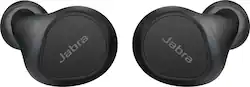
Jabra - Elite 7 Pro True Wireless Noise Canceling In-Ear Headphones - Black
- Key Specs
- Noise Cancelling (Active): true
- Sound Mode: Mono, Stereo
- Connection Type: Wireless
- Wireless Connectivity: Bluetooth (The manner in which a device sends data to another device over a short distance without the use of wires or cables.)
- True Wireless: true (These headphones not only lack wires between the device and headphones, they also lack wires between the headphones themselves. (true wireless is really only possible with in-ear headphones))
- Maximum Wireless Range: 30 feet
- Water Resistant: true (Resists some degree of water penetration.)
- Built-In Microphone: true
- Carrying Case: true
- Microphone Features: Noise cancelling, Fixed
- Headphone Fit: In-Ear
- Battery Life: 8 hours (Battery life will vary depending on the product configuration, product model, applications loaded on the product, power management setting of the product and the product features used by the customer. As with all batteries, the maximum capacity of this battery will decrease with time and usage.)
- Battery Charge Time: 2.33 hours (Battery charge time will vary depending on the product configuration, product model, applications loaded on the product, power management setting of the product and the product features used by the customer. Charging time will likely decrease with time and usage of the battery.)
- Works With: Siri (Compatible with or able to be connected to other smart devices or applications.)
- Voice Assistant Built-in: Amazon Alexa, Google Assistant (A digital assistant built into the device that uses voice commands to answer questions and control smart devices.)
- Ear Tip Sizes Included: Small, Medium, Large
- General
- Product Name: Elite 7 Pro True Wireless Noise Canceling In-Ear Headphones
- Brand: Jabra
- Ear Tip Sizes Included: Small, Medium, Large
- Model Number: 100-99172000-02
- Color: Black
- Audio
- Noise Cancelling (Active): true
- Sound Isolating: true
- Environmental Noise Control: true (A technology that automatically or manually adjusts, or eliminates, ambient background sound to allow conversational voices to be heard clearer.)
- Minimum Frequency Response: 20 hertz (Describes the maximum range of frequencies or musical tones a product can reproduce, from very low tones to very high treble tones. The minimum frequency or musical tone the speaker can reproduce. High treble tones have higher frequencies while low tones and deep bass have lower frequencies.)
- Maximum Frequency Response: 20 kilohertz (Describes the maximum range of frequencies or musical tones a product can reproduce, from very low tones to very high treble tones. The maximum frequency or musical tone the speaker can reproduce. High treble tones have higher frequencies while low tones and deep bass have lower frequencies.)
- Sound Mode: Mono, Stereo
- Driver Size: 6 millimeters
- Connectivity
- Connection Type: Wireless
- Wireless Connectivity: Bluetooth (The manner in which a device sends data to another device over a short distance without the use of wires or cables.)
- True Wireless: true (These headphones not only lack wires between the device and headphones, they also lack wires between the headphones themselves. (true wireless is really only possible with in-ear headphones))
- Bluetooth Version: 5.2 (The Bluetooth specification formalized by the Bluetooth Special Interest Group. All versions of the Bluetooth standard are backwards compatible with previous versions.)
- Maximum Wireless Range: 30 feet
- Features
- Water Resistant: true (Resists some degree of water penetration.)
- Waterproof: true (Designed or treated to be impervious to water in certain situations. Products are tested under controlled laboratory conditions and then assigned an Ingress Protection (IP) rating to denote the degree of protection from water ingress. The level of protection may decrease over time with natural wear of the product.)
- Built-In Microphone: true
- Carrying Case: true
- Microphone Features: Noise cancelling, Fixed
- Controls: Call, Mute, Track selection, Voice assistant
- Bone Conducting Technology: true
- Maximum Talk Time: 30 hours
- Design
- Headphone Fit: In-Ear
- Power
- Rechargeable: true
- Battery Life: 8 hours (Battery life will vary depending on the product configuration, product model, applications loaded on the product, power management setting of the product and the product features used by the customer. As with all batteries, the maximum capacity of this battery will decrease with time and usage.)
- Battery Charge Time: 2.33 hours (Battery charge time will vary depending on the product configuration, product model, applications loaded on the product, power management setting of the product and the product features used by the customer. Charging time will likely decrease with time and usage of the battery.)
- Battery Capacity: 705 milliampere hours (The amount of energy stored in the battery.)
- Charging Accessory Included: Cable, Cradle
- Battery Life Provided by Charging Case: 30 hours
- Fast Charging: Yes (Quick charge technologies typically use higher voltages and/or charging interfaces to fill a device's battery capacity faster than standard charging speeds.)
- Charging Interface(s): USB-C (The connection for transmitting power to charge the device.)
- Compatibility
- Works With: Siri (Compatible with or able to be connected to other smart devices or applications.)
- Voice Assistant Built-in: Amazon Alexa, Google Assistant (A digital assistant built into the device that uses voice commands to answer questions and control smart devices.)
- Other
- UPC: 615822014670
Jabra Elite 7 Pro true wireless earbuds have MultiSensor Voice™ technology, which combines 4 powerful microphones, an advanced Voice Pick Up (VPU) sensor in each Bluetooth earbud, and unique Jabra algorithms. Automatically activating when it’s windy, Jabra MultiSensor Voice™ uses bone conduction technology to transmit your voice through vibrations in your jaw, for wind noise cancellation and clear calls anywhere. Thanks to the adjustable Active Noise Cancellation, the ultra-compact earphones with rich and powerful sound lets you fully immerse yourself in your music. Multipoint connects to 2 devices at once, lets you seamlessly switch between devices, and is available as a firmware update via the Jabra Sound+ app. Also test your hearing in the Jabra Sound+ app, and tailor your music to suit your individual hearing profile. Hear your surroundings while on a call with the HearThrough technology - use left or right earbud alone with Bluetooth Mono Mode - Each offers up to 8 hours battery and 30 hours with the case.
- Jabra MultiSensor Voice technology: Uses a revolutionary combination of four microphones, a voice pick up unit (VPU) and bone conduction technology to deliver crystal clear calls.
- Adjustable Active Noise Cancellation (ANC) and HearThrough technology: Allows you to control your surroundings for a better listening experience.
- Multipoint and Mono mode: Connect to 2 devices at once with Bluetooth® Multipoint and seamlessly switch between devices. You can also use the earbuds either as a pair or independently though mono mode.
- True wireless earbuds: Let you listen to your favorite tracks, so you won't be held back by wires.
- 30-hour battery life: Boasting up to 8 hours in the buds, a total of 30 hours with the sleek charging case, and the fast charge feature, these earbuds allow you to never worry about being caught out by low battery again.
- Water and dust protection: Engineered for durability with IP57 rated water and dust protection and a 2-year warranty.
- Exceptional call quality: Elite 7 Pro are loaded with four microphones for crystal-clear calls. That means wherever you go, you can chat and make plans and be heard clearly.
- Alexa built-in and Google Assistant: You can ask for directions, play your favorite tunes, and instantly pair to your device without even breaking stride.
Whats Included
- Jabra Elite 7 Pro True Wireless Noise Canceling In-Ear Earbuds
- Charging cradle
- Three sets of silicon Ear Gels
- USB-C cable
- Owner's manual
A: Yes. The 1/28/2022 firmware update added this feature. I waited until this promise was delivered before purchasing
A: If I’m understanding your question well enough, Multi-Point actually has been included with this headset, but you MUST download the Jabra Sound+ app. Then, when you download it, you might have to do a firmware update. The most recent firmware update allows Multi-Point. The app should automatically ask you to do a firmware update. If you agree, at first, you will have to keep your earbuds outside the case. When that is done, the app will ask you to place the earbuds in the case. From there, close the lid, and then a purple light will show on the case. This means that the firmware is updating. Do not open the case until the purple light quits flashing. Wait about 15 second when it fully stops then you can open the case and multipoint should be on them. Note: when the light is purple during the firmware update, it could last 15-20 minutes, so you may have to be a little patient. I hope this helps. God bless.
A: You can actually choose either tone or voice guidance. But you will need the Jabra Sound+ app. If you have it, go to “Headset Settings”. Then, it will take you to a page where it will say “Headset Configuration”. Finally go to “Headset Feedback” when you scroll down a little bit. It’s basically the third one down. After you’re there, you will have three options: “Voice Guidance”, second “Tone Guidance”, and the last one will be “No Guidance”. I hope this helps. God bless!
Q: How to find my fit to check the fit
A: Download the jabra Sound+ app available in the google Playstore and Apple store. When first paired it it will automatically run a fit check. To access Fit Check: - Open the app - Click the gear icon (upper right on screen) -Click "Personalize My Headset" -Click "Myfit" It is also recommended (and run on first pairing) to run the "MySound" test. This will test for your hearing sensitivity to a spectrum of sound frequencies, and automatically adapt your personak sound profile.
A: Hello JC- To mute/unmute the microphone during a call, press the Left or the Right button. In mono earbud mode, press the button of the earbud you are using to mute/unmute the microphone. Thank you for your question!
A: It’s likely the bone sensing mics. The next time your on a call, try gently pressing both buds against your ears. Obviously not a solution, and these buds are crap for calling, but if it works is a good sign that it’s the bone conducting feature not working with your ear shape.
A: The Sound+ app prompts you to register for a free 2 year dust and water protection warranty
A: Ive had no issue. These are an upgrade from my samsung buds which would occasionally come loose and almost fall out while running.