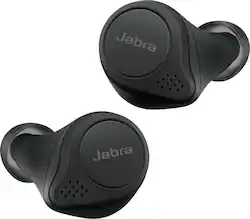
Jabra - Elite 75t True Wireless Active Noise Cancelling In-Ear Headphones - Black
- Key Specs
- Noise Cancelling (Active): true
- Sound Mode: Stereo
- Connection Type: Wireless
- Wireless Connectivity: Bluetooth (The manner in which a device sends data to another device over a short distance without the use of wires or cables.)
- True Wireless: true (These headphones not only lack wires between the device and headphones, they also lack wires between the headphones themselves. (true wireless is really only possible with in-ear headphones))
- Maximum Wireless Range: 33 feet
- Water Resistant: true (Resists some degree of water penetration.)
- Built-In Microphone: true
- Carrying Case: true
- Headphone Fit: In-Ear
- Battery Life: 5.5 hours (Battery life will vary depending on the product configuration, product model, applications loaded on the product, power management setting of the product and the product features used by the customer. As with all batteries, the maximum capacity of this battery will decrease with time and usage.)
- Battery Charge Time: 2.2 hours (Battery charge time will vary depending on the product configuration, product model, applications loaded on the product, power management setting of the product and the product features used by the customer. Charging time will likely decrease with time and usage of the battery.)
- Works With: Siri, Google Assistant, Amazon Alexa (Compatible with or able to be connected to other smart devices or applications.)
- General
- Product Name: Elite 75t True Wireless Active Noise Cancelling In-Ear Headphones
- Brand: Jabra
- Ear Cushions: true
- Model Number: 100-99090001-14
- Color: Black
- Audio
- Noise Cancelling (Active): true
- Sound Isolating: true
- Minimum Frequency Response: 20 hertz (Describes the maximum range of frequencies or musical tones a product can reproduce, from very low tones to very high treble tones. The minimum frequency or musical tone the speaker can reproduce. High treble tones have higher frequencies while low tones and deep bass have lower frequencies.)
- Maximum Frequency Response: 20 kilohertz (Describes the maximum range of frequencies or musical tones a product can reproduce, from very low tones to very high treble tones. The maximum frequency or musical tone the speaker can reproduce. High treble tones have higher frequencies while low tones and deep bass have lower frequencies.)
- Sound Mode: Stereo
- Driver Size: 6 millimeters
- Connectivity
- Connection Type: Wireless
- Wireless Connectivity: Bluetooth (The manner in which a device sends data to another device over a short distance without the use of wires or cables.)
- True Wireless: true (These headphones not only lack wires between the device and headphones, they also lack wires between the headphones themselves. (true wireless is really only possible with in-ear headphones))
- Bluetooth Version: 5.0 (The Bluetooth specification formalized by the Bluetooth Special Interest Group. All versions of the Bluetooth standard are backwards compatible with previous versions.)
- Maximum Wireless Range: 33 feet
- Features
- Water Resistant: true (Resists some degree of water penetration.)
- Built-In Microphone: true
- Carrying Case: true
- Controls: Call, Volume
- Maximum Talk Time: 5.5 hours
- Design
- Headphone Fit: In-Ear
- Power
- Rechargeable: true
- Battery Life: 5.5 hours (Battery life will vary depending on the product configuration, product model, applications loaded on the product, power management setting of the product and the product features used by the customer. As with all batteries, the maximum capacity of this battery will decrease with time and usage.)
- Battery Charge Time: 2.2 hours (Battery charge time will vary depending on the product configuration, product model, applications loaded on the product, power management setting of the product and the product features used by the customer. Charging time will likely decrease with time and usage of the battery.)
- Battery Life Provided by Charging Case: 18.5 hours
- Charging Interface(s): USB (The connection for transmitting power to charge the device.)
- On/Off Switch: Automatic
- Compatibility
- Works With: Siri, Google Assistant, Amazon Alexa (Compatible with or able to be connected to other smart devices or applications.)
- Other
- UPC: 615822012768
Filter out the world with Jabra Elite 75t Active Noise Cancellation (ANC) true wireless earbuds. These earbuds are engineered for a secure fit and have an IP55-rating with a 2-year extended warranty against dust and water damage. Up to 24 hours of battery time (ANC on) with the pocket-friendly charging case, and fast charge feature provides up to an hour of battery in 15 minutes. 4-built-in microphones for clear calls and HearThrough mode can be enabled to so there's no need to remove earbuds in order to hear your surroundings. Use the Jabra Sound+ app to activate ANC the first time you use it and enable toggling between ANC and HearThrough via your earbud button.
- Truly-wireless earphones: Get in the zone, filter out background noise and stay focused on your music with Active Noise Cancellation (ANC). Download Jabra Sound+ App to enable.
- Rechargeable battery: Offers up to 5.5 hours use on a charge (ANC on)
- Built-in microphone: Enables simple hands-free chatting via a compatible device.
- Bluetooth 5.0 interface: Enables simple wireless pairing with your Bluetooth-enabled device. Supports HFP, HSP, SPP, A2DP and AVRCP Bluetooth profiles.
- In-ear design: Fits securely and directs music into your ears for full, uninterrupted audio.
- Headset controls: Include volume, answer/end and play/pause.
- 6mm drivers: Deliver powerful sound.
- 20Hz - 20kHz headset frequency response: Along with a 100Hz - 10kHz microphone frequency response ensures faithful sound reproduction.
- Stereo design: Delivers crisp tones.
Whats Included
- Jabra Elite 75t
- Charging case, 3 pairs of EarGels
Q: Can each connect to your phone or will it be a slave master connection again?
A: Hi there, Mikee- We are so happy to announce that you will be able to use both ear buds independently through an update via the Jabra Sound+ app in 2020. If you have any other questions, please feel free to reach out to us: https://www.jabra.com/support#/. We are here for you!
Q: Does music pause when you take one earbud out?
A: Hi josephine, thanks for your question! The Jabra Elite 75t does have the auto-pause feature available through the Sound+ app. When enabled, audio will pause once one earbud is removed.
A: Hi AkWingnut! You can raise the volume in your earbuds by pressing on the button on the right earbud, and lower it by pressing the button on your left earbud. To skip tracks, you are going to want to press the button on tour left earbud two times while listening to music. To go back a track, press the button on your left earbud three times while listening to music. Lastly, to pause and play music, you can press on the button on your right earbud.
A: Hold both buttons down on the earbuds for 3 to 5 seconds. This will put it into pairing mode.
Q: what is the difference between jabra elite 75T and jabra elite active 75T?
A: The water and dust resistance on the active pair is a little better. Other than that I don't believe there is any sound or feature difference.
A: Used these once so far for flying. I’m happy with them. Not completely silent but work very well and is darn close
Q: How do you pair multiple devices at once?
A: Disclaimer: Whichever device is the one you're using for the assistant make sure that you pair it last. That will be what I refer to as the second device. Place the right earbud in your ear. You will keep it there throughout the entire process. So starting from the point of having the first device paired and connected you turn off the the right earbud by long pressing it. While keeping the earbud in your ear you long press it again until the earbud says it's ready to be paired. Then you go into the Bluetooth settings of the second device and pair and connect. It'll say device connected. Once it pairs and connects to the second device you might have to reconnect to the first device. Once you reconnect the first device the earbuds will say two devices connected. You're finished. Now going forward if the earbuds are in range it'll connect to both devices. It's really stable once you establish connection.
Q: how do i pre-order these it is not available on Best Buys page it just says coming soon.
A: @jabra but you get that the black which are only available at Best Buy you cannot pre order at the link you posted...





















