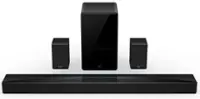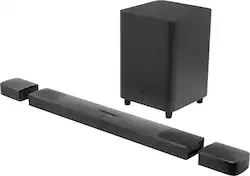
JBL - 9.1-Channel Soundbar with Wireless Subwoofer and Dolby Atmos/DTS:X - Black
- Key Specs
- Wireless Connectivity: Bluetooth, Wi-Fi (The manner in which a device sends data to another device over a short distance without the use of wires or cables.)
- Wireless Subwoofer Connectivity: true
- App Compatible: true (The product can be connected to a program or software application on a mobile device, which then receives collected data from the product.)
- Wall Mountable: true (The product is able to be secured to a wall. Some products are designed ready to mount, while others may require additional hardware/accessories for installation.)
- Works With: Google Assistant, Siri (Compatible with or able to be connected to other smart devices or applications.)
- General
- Brand: JBL
- Model Number: JBLBAR913DBLKAM
- Product Name: 9.1-Channel Soundbar with Wireless Subwoofer and Dolby Atmos/DTS:X
- Color: Black
- Audio
- Number of Channels: 9.1 (The number of discrete channels of sound output. This can be a single number or multiple numbers separated by decimal(s). The first number is the primary, horizontally directed audio channels. The number after the first decimal, if applicable, is the number of subwoofer outputs or channels. The number after the second decimal, if applicable, is the number of height or atmospheric channels designed to immerse the listener by producing overhead sound effects.)
- Surround Sound Supported: DTS:X, Dolby Atmos (Surround sound systems use multiple audio channels and speakers to create an immersive sound experience for the listener. There are also various proprietary technologies that imitate this kind of sound via a device's built-in speakers or soundbar.)
- High Resolution Audio: true (Hear music the way musicians and sound technicians intended it to be heard. Products that support hi-res audio deliver audio signals with a dynamic range and bandwidth far greater than that of a standard CD so you'll be able to enjoy pure music with outstanding sound quality. The device supports high-resolution audio signals, which more closely resemble the quality of music as it was originally recorded, with more texture and detail than can be heard via typical music streaming services or CDs.)
- Minimum Frequency Response: 34 hertz (Describes the maximum range of frequencies or musical tones a product can reproduce, from very low tones to very high treble tones. The minimum frequency or musical tone the speaker can reproduce. High treble tones have higher frequencies while low tones and deep bass have lower frequencies.)
- Maximum Frequency Response: 20 kilohertz (Describes the maximum range of frequencies or musical tones a product can reproduce, from very low tones to very high treble tones. The maximum frequency or musical tone the speaker can reproduce. High treble tones have higher frequencies while low tones and deep bass have lower frequencies.)
- RMS Power: 820 watts (The maximum amount of continuous power the device is able to handle.)
- Connectivity
- Wireless Connectivity: Bluetooth, Wi-Fi (The manner in which a device sends data to another device over a short distance without the use of wires or cables.)
- Wireless Subwoofer Connectivity: true
- Audio Only Inputs: 1 x Optical digital audio, 1 x USB-A
- Number of HDMI Inputs (Total): 1
- Network Connector(s): 1 x LAN
- Number of USB Inputs: 1
- Number of Optical Audio Inputs: 1
- Number of HDMI Outputs (Total): 1
- Video
- High Dynamic Range Format: Dolby Vision (There are a few HDR formats that tell the TV or other HDR-compatible product how to best utilize its capabilities to display HDR content. HDR technology can support one or multiple formats, each with various benefits to picture quality.)
- Video Pass-through: 2160 (4K), HDR (Devices with this feature allow video signals to travel from their source to a target device without alteration. For example, a receiver with 4K pass-through would allow 4K video signal from a Blu-ray player to pass to a target TV with surround sound; without the pass-through ability, the receiver would not allow both 4K video and surround sound to be transmitted simultaneously.)
- Features
- App Compatible: true (The product can be connected to a program or software application on a mobile device, which then receives collected data from the product.)
- Wall Mountable: true (The product is able to be secured to a wall. Some products are designed ready to mount, while others may require additional hardware/accessories for installation.)
- Speaker
- Subwoofer: Included
- Number of Tweeters: 3
- Tweeter Size: 0.75 inches
- Number of Drivers: 6
- Number of Woofers: 1
- Woofer Size: 10 inches
- Dimensions
- Product Height: 2.4 inches (The out of box height of the item. Height is measured as the vertical distance from the bottom of the item to the top as it would be primarily used or placed.)
- Product Width: 34.8 inches (The out of box width of the item. Width is measured as the horizontal distance from one side of the item to the other as it would be primarily used or placed.)
- Product Depth: 4.7 inches (The out of box depth of the item. Depth is measured as the distance from the front of the item to the back as it would be primarily used or placed.)
- Product Weight: 8 pounds (The out of box weight of the item.)
- Subwoofer Height: 17.3 inches
- Subwoofer Width: 12 inches
- Subwoofer Depth: 12 inches
- Subwoofer Weight: 24.5 pounds
- Included
- Remote Control Included: true
- Cable(s) Included: HDMI, Power
- Mounting Hardware Included: true
- Certifications Listings & Approvals
- ENERGY STAR Certified: false (Devices carrying the ENERGY STAR service mark, such as computer products and peripherals, kitchen appliances, and other products, generally use 20% to 30% less energy than required by federal standards.)
- Compatibility
- Works With: Google Assistant, Siri (Compatible with or able to be connected to other smart devices or applications.)
- Other
- UPC: 050036364782
Upgrade your home theater with this JBL BAR 9.1-channel soundbar system. The powerful 820W output offers an immersive movie and music experience, while Bluetooth, Airplay 2 and Chromecast connectivity lets you stream audio smoothly. This JBL BAR 9.1-channel soundbar system has detachable speakers with rechargeable batteries for flexible placement, and Dolby Atmos technology delivers quality surround sound.
- Immerse yourself in music: With Apple AirPlay 2 and Google Chromecast, you can stream high-definition music, radio, and podcasts with a simple finger tap.
- Bluetooth wireless streaming: Makes it easy to enjoy tracks stored on a compatible Bluetooth-enabled device (not included).
- Wi-Fi: Stream via your Wi-Fi network to expand your sound system.
- Real surround sound: Instantly enjoy a true, cinematic 9.1 surround experience.
- Outputs: Includes one HDMI ARC output.
- 820W output power: Let the immersive, powerful sound take your viewing or gaming experience to the next level.
- Wall-mountable design: Enables versatile placement options.
- Thrilling bass: Punchy, precise bass from a mighty 10" wireless subwoofer brings the action to your action movies and the emotion to your music.
- Four racetrack drivers with two up-firing full-range drivers and three 0.75" tweeters: Enhance the frequency range of audio playback to ensure crisp voices and dynamic soundtracks.
- Inputs: Includes one Ethernet, one optical digital, one USB, and one HDMI ports.
- Ultimate sound experience: Built-in Dolby Atmos, DTS:X, and four up-firing speakers bounce sound up to the ceiling back down to you for an awesome, true 3D sound experience.
- Ultra HD 4K pass-through with Dolby Vision: Incredible 4K video resolution deserves incredible sound. The JBL Bar 9.1 soundbar makes the ultimate dynamic duo when paired with your TV.
- Immerse yourself in music: With Apple AirPlay 2 and Google Chromecast, you can stream high-definition music, radio, and podcasts with a simple finger tap.
- Bluetooth wireless streaming: Makes it easy to enjoy tracks stored on a compatible Bluetooth-enabled device (not included).
- Wi-Fi: Stream via your Wi-Fi network to expand your sound system.
- Real surround sound: Instantly enjoy a true, cinematic 9.1 surround experience.
- Outputs: Includes one HDMI ARC output.
- 820W output power: Let the immersive, powerful sound take your viewing or gaming experience to the next level.
- Wall-mountable design: Enables versatile placement options.
- Thrilling bass: Punchy, precise bass from a mighty 10" wireless subwoofer brings the action to your action movies and the emotion to your music.
- Four racetrack drivers with two up-firing full-range drivers and three 0.75" tweeters: Enhance the frequency range of audio playback to ensure crisp voices and dynamic soundtracks.
- Inputs: Includes one Ethernet, one optical digital, one USB, and one HDMI ports.
- Ultimate sound experience: Built-in Dolby Atmos, DTS:X, and four up-firing speakers bounce sound up to the ceiling back down to you for an awesome, true 3D sound experience.
- Ultra HD 4K pass-through with Dolby Vision: Incredible 4K video resolution deserves incredible sound. The JBL Bar 9.1 soundbar makes the ultimate dynamic duo when paired with your TV.
Whats Included
- JBL BAR 9.1-Channel 820W Soundbar System with 10" Wireless Subwoofer and Dolby Atmos, 4K and HDR Support
- Remote with two batteries
- Power cords
- HDMI cable
- 2 x L-shape wall-mount brackets
- 2 x U-shape wall-mount brackets
- 4 x side caps
- Owner's manual
- JBL BAR 9.1-Channel 820W Soundbar System with 10" Wireless Subwoofer and Dolby Atmos, 4K and HDR Support
- Remote with two batteries
- Power cords
- HDMI cable
- 2 x L-shape wall-mount brackets
- 2 x U-shape wall-mount brackets
- 4 x side caps
- Owner's manual
A: The surround speakers of our JBL Bar 9.1 can be recharged through USB connection aside from directly connecting to the soundbar.
A: as the other poster mentioned, ear level as you are sitting down, about a foot to the left and right of the couch, there is a diagram in the instruction manual that indicates proper placement. I got some TV dinner folding tables and placed books to increase the height and roughly placed them and listened to movies music to ensure I placed them where it would sound good in my living room. Then I mounted them to the wall. Good luck and enjoy your new soundbar!!
A: I have had the same problem a few times. It may not be the bar but the TVs ARC connection. I have Directv and at least once a week I also have to reset that to as I have no picture. Maybe try emailing JBL support. Love the bar though.
A: The HDMI-ARC port on your TV should be used while the HDMI-CEC function is on. This will make your TV send the audio going down to the soundbar. Please check the manual of your TV to enable CEC.
Q: How would this work on vaulted ceilings?
A: Our JBL Bar 9.1 will work the same even with vaulted ceilings.
A: You will just get more sound coming from the front instead of having surround sound.
Q: Do I have the option of pairing an additional subwoofer?
A: Thanks for taking the time in providing your feedback with our JBL Bar 9.1. This unit is a standalone system and it's not possible to add/ connect other speakers or soundbars with it.
A: I have high ceilings and it truly bounces the sound up and out so it fills your room.