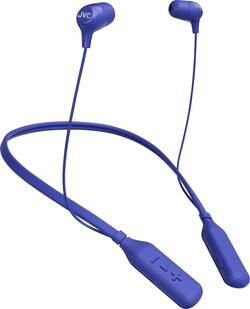
JVC - HA FX39BT Marshmallow Wireless In-Ear Headphones - Blue
- Key Specs
- Sound Mode: Stereo
- Connection Type: Wireless
- Wireless Connectivity: Bluetooth (The manner in which a device sends data to another device over a short distance without the use of wires or cables.)
- True Wireless: false (These headphones not only lack wires between the device and headphones, they also lack wires between the headphones themselves. (true wireless is really only possible with in-ear headphones))
- Maximum Wireless Range: 33 feet
- Water Resistant: false (Resists some degree of water penetration.)
- Built-In Microphone: true
- Carrying Case: false
- Headphone Fit: In-Ear
- Battery Life: 14 hours (Battery life will vary depending on the product configuration, product model, applications loaded on the product, power management setting of the product and the product features used by the customer. As with all batteries, the maximum capacity of this battery will decrease with time and usage.)
- Battery Charge Time: 3 hours (Battery charge time will vary depending on the product configuration, product model, applications loaded on the product, power management setting of the product and the product features used by the customer. Charging time will likely decrease with time and usage of the battery.)
- Ear Tip Sizes Included: Medium, Small
- General
- Product Name: HA FX39BT Marshmallow Wireless In-Ear Headphones
- Brand: JVC
- Ear Cushions: true
- Ear Tip Sizes Included: Medium, Small
- Model Number: HA-FX39BTA
- Audio
- Sound Isolating: true
- Minimum Frequency Response: 20 hertz (Describes the maximum range of frequencies or musical tones a product can reproduce, from very low tones to very high treble tones. The minimum frequency or musical tone the speaker can reproduce. High treble tones have higher frequencies while low tones and deep bass have lower frequencies.)
- Maximum Frequency Response: 20 kilohertz (Describes the maximum range of frequencies or musical tones a product can reproduce, from very low tones to very high treble tones. The maximum frequency or musical tone the speaker can reproduce. High treble tones have higher frequencies while low tones and deep bass have lower frequencies.)
- Sound Mode: Stereo
- Driver Size: 8.5 millimeters
- Connectivity
- Connection Type: Wireless
- Wireless Connectivity: Bluetooth (The manner in which a device sends data to another device over a short distance without the use of wires or cables.)
- True Wireless: false (These headphones not only lack wires between the device and headphones, they also lack wires between the headphones themselves. (true wireless is really only possible with in-ear headphones))
- Bluetooth Version: 3.0 + HS (The Bluetooth specification formalized by the Bluetooth Special Interest Group. All versions of the Bluetooth standard are backwards compatible with previous versions.)
- Maximum Wireless Range: 33 feet
- Features
- Water Resistant: false (Resists some degree of water penetration.)
- Built-In Microphone: true
- Carrying Case: false
- Bone Conducting Technology: false
- Design
- Headphone Fit: In-Ear
- Style: Travel
- Power
- Rechargeable: true
- Battery Life: 14 hours (Battery life will vary depending on the product configuration, product model, applications loaded on the product, power management setting of the product and the product features used by the customer. As with all batteries, the maximum capacity of this battery will decrease with time and usage.)
- Battery Charge Time: 3 hours (Battery charge time will vary depending on the product configuration, product model, applications loaded on the product, power management setting of the product and the product features used by the customer. Charging time will likely decrease with time and usage of the battery.)
- Other
- UPC: 046838076138
Talk on the phone hands-free with these JVC wireless headphones. They have memory foam earpieces that form a seal to minimize background noise, and their 14-hour battery life lets you use them all day without recharging. These JVC wireless headphones have a three-button remote to make calls, control volume and skip through tracks.
- In-ear design: Fits securely and directs music into your ears for full, uninterrupted audio.
- Bluetooth 3.0 interface: Enables simple wireless pairing with your Bluetooth-enabled device. Supports HFP, HSP, A2DP and AVRCP Bluetooth profiles.
- Noise isolation: Helps minimize background sounds.
- Rechargeable battery: Offers up to 14 hours of use on a charge.
- In-line microphone: Lets you enjoy hands-free calls.
- 8.5mm drivers: Deliver powerful sound.
- 20Hz - 20kHz frequency response: For faithful sound reproduction.
- Stereo design: Delivers crisp tones.
Whats Included
- JVC HA-FX39BT Marshmallow
- 2 pairs of ear tips (small, medium)
Q: How long does it take to charge fully
A: I use mine for 6-7 hours and they fully charge in about 1 hour or less. The small led next to the play button turns off once they are fully charged. It’s red when you first plug them in.
A: The beeps lets you know the battery is running low, normally at 10% of headset battery. If this continues with a 50 percent battery, that doesn't sound normal. You might have to send this in for inspection if under warranty
A: Kyle thank you for asking. They are not supposed to sound like that. Please check the tips and make sure they are clear of debris. then please switch sides and see if the low volume is an issue in the headphone or could it possible be a difference in ear sensitivity. If the problem persists please make sure they have a full charge then re-pair them to your source. If you have the ability please try pairing them to a different source to make sure its not a source or Media issue. Last but not least of the issue persists please return them to where you purchused them for an exchange. I have never heard of this issue with our headphones before, but there is a first time for everything.
A: Try right clicking on the sound icon, go to sound and recording devices and see if it's on the list...if there right click on it and select set as default device...hope that helps
A: These headphones can be used with any standard Bluetooth compliant device. They can be paired with one device at a time.
A: take it back, the battery is bad.