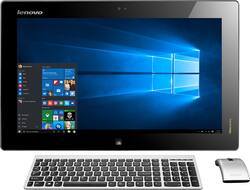
Lenovo - 19.5" Portable Touch-Screen All-in-One Computer - Intel Core i3 - 4GB Memory - 500GB Hard Drive - Black
- Key Specs
- Screen Size: 19.5 inches (Size of the screen, measured diagonally from corner to corner.)
- Processor Model: Intel 4th Generation Core i3 (Your computer's processor is like its brain. Working in combination with system memory, the power of the processor determines the complexity of software you can run, how many programs you can have open at the same time, and how fast those programs will run. Most computers feature an AMD, Intel or Snapdragon processor.)
- Storage Type: HDD
- Total Storage Capacity: 500 gigabytes
- System Memory (RAM): 4 gigabytes (Random-access memory (RAM) is a computing device's short-term data storage, which allows active information to be accessed quickly. The size and type of RAM determines how efficiently the device can handle large amounts of information at one time. For example, gaming or video editing requires more RAM for optimal performance.)
- General
- Product Name: 19.5" Portable Touch-Screen All-in-One Computer - Intel Core i3 - 4GB Memory - 500GB Hard Drive
- Brand: Lenovo
- Model Number: IDEACENTRE FLEX 20 - 57318965
- Display
- Screen Size: 19.5 inches (Size of the screen, measured diagonally from corner to corner.)
- Multi-Touch Screen: true (A screen that recognizes multiple points of contact, allowing for intuitive navigation functions such as pinch to zoom.)
- Processor
- Processor Brand: Intel
- Processor Model: Intel 4th Generation Core i3 (Your computer's processor is like its brain. Working in combination with system memory, the power of the processor determines the complexity of software you can run, how many programs you can have open at the same time, and how fast those programs will run. Most computers feature an AMD, Intel or Snapdragon processor.)
- Processor Model Number: Intel Core i5
- Storage
- Storage Type: HDD
- Total Storage Capacity: 500 gigabytes
- Hard Drive Capacity: 500 gigabytes (The amount of data that can be stored on the device's mechanical hard drive. Hard disk drives (HDDs) typically have larger capacities than solid state drives (SSDs) but may have slower speeds.)
- Hard Drive RPM: 5400 revolutions per minute (A hard drive's data is stored on disks, or platters, that spin while transferring information to the host system. The higher the RPM, the faster the hard drive's performance.)
- Memory
- System Memory (RAM): 4 gigabytes (Random-access memory (RAM) is a computing device's short-term data storage, which allows active information to be accessed quickly. The size and type of RAM determines how efficiently the device can handle large amounts of information at one time. For example, gaming or video editing requires more RAM for optimal performance.)
- Type of Memory (RAM): DDR3 SDRAM (Each type of RAM delivers a different level of speed, bandwidth, energy efficiency and performance.)
- System Memory RAM Expandable To: 0 gigabytes (Adding more random-access memory (RAM) to a computer speeds up performance and improves efficiency. Upgrades to memory are limited by the number of expansion slots for additional RAM and existing RAM installed on the device.)
- Compatibility
- Operating System: Windows 8 (The operating system manages all software and hardware, including files, memory and connected devices. Most importantly, it lets you interact with your device and your programs in a visual way; otherwise, you'd be typing computer code to get anything done.)
- Operating System Architecture: 64-bit (An operating system (OS) manages computer hardware, software resources, and programs in conjunction with the system's processor. 64-bit operating systems can handle more data at once than 32-bit systems, resulting in faster speeds, more effiency, and overall improved performance.)
- Features
- Media Card Reader: false (A hardware device that allows for access to data on a memory card and enables the transfer of its files to a computer. These devices may have one or multiple slots for various types of memory cards, and may be integrated into the computer or available as an external device.)
- Dimensions
- Product Height: 12.3 inches (The out of box height of the item. Height is measured as the vertical distance from the bottom of the item to the top as it would be primarily used or placed.)
- Product Width: 20.1 inches (The out of box width of the item. Width is measured as the horizontal distance from one side of the item to the other as it would be primarily used or placed.)
- Product Depth: 0.8 inches (The out of box depth of the item. Depth is measured as the distance from the front of the item to the back as it would be primarily used or placed.)
- Certifications Listings & Approvals
- ENERGY STAR Certified: true (Devices carrying the ENERGY STAR service mark, such as computer products and peripherals, kitchen appliances, and other products, generally use 20% to 30% less energy than required by federal standards.)
- EPEAT Qualified: false (The Electronic Product Environmental Assessment Tool (EPEAT) was designed to provide an environmental assessment tool for purchasers. In order to qualify for EPEAT, a product must meet all 23 required criteria.)
- Included
- Included Software: Adobe Reader; Amazon Kindle and more
- Other
- UPC: 888228978178


Learn more about the New Windows


- Portable all-in-one PC with internal battery doubles as a large-scale tablet: Set it up at your desk as a full-power touch-screen PC, then unplug it to enjoy and share movies, games and apps from anywhere.
- 19.5" 10-point multitouch screen: Capacitive display responds to finger touches instead of pressure, recognizing a light swipe but not a standard stylus. Frameless design.
- 4th Gen Intel® Core™ i3-4010U mobile processor: Smart dual-core, four-way processing performance.
- 4GB system memory for basic multitasking: Adequate high-bandwidth RAM to smoothly run multiple applications and browser tabs all at once.
- 500GB hard drive for serviceable file storage space: Holds your growing collection of digital photos, music and videos. 5400 rpm spindle speed for standard read/write times.
- Built-in HD webcam with microphone: Makes it easy to video chat with family and friends or teleconference with colleagues over Skype or other popular applications. 720p resolution.
- 2 USB 3.0 ports maximize the latest high-speed devices: USB 3.0 ports are backward-compatible with USB 2.0 devices (at 2.0 speeds).
- Wireless network connectivity: Built-in high-speed wireless LAN connects to your network on the most common Wi-Fi standards.
- Bluetooth 4.0 interface syncs with compatible devices: Wirelessly transfer photos, music and other media between the laptop and your Bluetooth-enabled cell phone or MP3 player, or connect Bluetooth wireless accessories.
- Frameless Adjustable, collapsible stand for upright and tabletop modes: Display tilts from 15° to 80° so you can find a comfortable viewing angle. Also you can lay it flat on a table or in your lap.
- Multiple users can access the screen at the same time: The Aura interface enables 2 or more users to enjoy fun apps and multimedia on one screen.
- Wireless keyboard and wireless mouse reduce cable clutter: Island-style keyboard features chiclet keys. Mouse offers reliable optical tracking.
- Microsoft Windows 8 operating system: Designed for touch, mouse and keyboard, so you can choose how you get around. Use the touch screen to easily zoom and customize your new Start screen, or restore the familiar Windows desktop experience.
- Software package included: Adobe Reader. YouCam. Lenovo Companion.
- Built-in stereo speakers: Dolby® Home Theater v4 provides immersive audio and maximizes volume output without distortion.
- Note:: This all-in-one computer does not include a built-in DVD/CD drive.
Whats Included
- Lenovo 19.5" Portable Touch-Screen All-in-One Computer - Intel Core i3 - 4GB Memory - 500GB Hard Drive
- Power cord
- Wireless USB keyboard and wireless optical mouse
- Software: Adobe Reader; Amazon Kindle and more
- Owner's manual
Q: Does any one know if this model has the anti glare screen.
A: I also hate the anti glare screen and the way it feels.
Q: what is the difference between these 2 laptops?
A: The first computer you listed was the Ideacentre flex 20 - 57318965, which has a length of 20.1 inches and weighs 11.5 lbs. The second computer which you listed as the Flex 20 - 57323540 which has a width of 20.5 inches, and weighs 7.7 lbs. So, I would say, the second is a little wider and very much lighter than the first model you were looking at. Hence the difference.
Q: Does anyone know how to open this unit?
A: There are videos online and well documented. It is a cumbersome process and not for the faint of heart. Also, you can only upgrade the hard drive. RAM is soldered on the board.
A: I believe the resolution on this model, reaches 1366x768. Some models will reach 1440x900, but I do not think this model does.
Q: does the flex 20 support Intel WIDI?
A: No based on internet research the Lenovo Flex 20 does not support WIDI. Updating to Windows 8.1 does not resolve the issue as well. However, you can upgrade the card to a Intel 7260AC wireless card and then update the drivers and the "wireless display" option under devices>project. So you can get WIDI but only by purchasing the Intel 7260AC wireless card,.
Q: Bought this for Mom, Touch Screen often fails
A: I had a similar problem with mine, when it sleeps and blacks out the screen it would not respond to either the key board or the touch. I fixed the settings so that it does not sleep. Go to your account picture in the app/start menu, right click on it and select "change account picture", it will go to a screen that has an arrow by the word "Accounts" click on the arrow this will take you to a screen that says "PC Settings", choose: "PC and devices". On the list presented choose "Lock Screen" go to the right side of the screen and scroll down to make sure the question "When my PC is inactive, show the lock screen instead of turning off the screen" is set to ON. Also the following question "turn off screen after slide show has played" should be set to Don't turn off. This should fix the touch screen issue.