Lenovo - 300 Wireless Combo Keyboard and Mouse - US English - USB Type A Wireless RF 2.40 GHz Keyboard - English (US) - Unknown
FREE shipping to
More Buying Options
Related Item

Specifications
- Form FactorFull-sizeConnection TypeWireless
- Key Specs
- Form Factor: Full-size (The size, arrangement, and physical configuration of the product.)
- Connection Type: Wireless
- General
- Brand: Lenovo
- Product Name: Lenovo 300 Wireless Combo Keyboard and Mouse - US English - USB Type A Wireless RF 2.40 GHz Keyboard - English (US)
- Color: Unknown
- Functions
- Form Factor: Full-size (The size, arrangement, and physical configuration of the product.)
- Connectivity
- Connection Type: Wireless
- Compatibility
- Operating System Compatibility: Not Applicable
- Dimensions
- Product Height: 1.9 inches (The out of box height of the item. Height is measured as the vertical distance from the bottom of the item to the top as it would be primarily used or placed.)
- Product Width: 6 inches (The out of box width of the item. Width is measured as the horizontal distance from one side of the item to the other as it would be primarily used or placed.)
- Product Depth: 19.2 inches (The out of box depth of the item. Depth is measured as the distance from the front of the item to the back as it would be primarily used or placed.)
- Product Weight: 1.65 ounces (The out of box weight of the item.)
- Warranty
- Warranty - Parts: 1 year
- Warranty - Labor: 1 year
- Other
- UPC: 195892023807
Lenovo 300 Wireless Combo Keyboard and Mouse is ideal for flexible working environment. It features a compact keyboard that is easy to store on lockers when not in use. The ambidextrous mouse complements the ensemble with precise sensor for smooth navigation.
- Lenovo 300 Wireless Combo Keyboard and Mouse - US English: Lenovo 300 Wireless Combo Keyboard and Mouse is ideal for flexible working environment. It features a compact keyboard that is easy to store on lockers when not in use. The ambidextrous mouse complements the ensemble with precise sensor for smooth navigation.
Whats Included
- 300 Wireless Combo Keyboard and Mouse - US English USB-A Receiver 1 x AA Battery 1 x AAA Battery Warranty and Product Information Document
A: Hey Mary, This keyboard and mouse can connect to your laptop via USB. If you're experiencing issues with your keyboard, we recommend ensuring you have the latest software by checking for updates, as this could correct the issue. To do so, first, open the Settings app > Select the Windows update tab > Select the Check for updates button, applying all available updates. Next, open the Lenovo Vantage app > on the homepage, select the Check for updates button, following on-screen prompts to apply all available updates here as well. If after the available updates are applied and the system restarts, yet the issue persists, in-depth troubleshooting will be necessary to fix the problem. We recommend contacting Lenovo Support here: 877-453-6686, for further assistance. Please feel free to reach out to us with any other questions!
Q: Is this set compatible with a Lenovo IdeaCentre Tower 8 Desktop?
A: Hey there, You shouldn't have an issue connecting this keyboard and mouse to the IdeaCentre Tower. Please feel free to reach out to us with any other questions!
Compare similar products
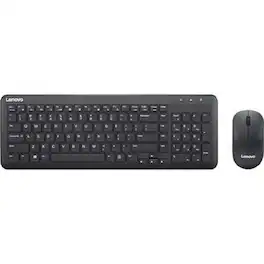
Lenovo 300 Wireless Combo Keyboard and Mouse is ideal for flexible working environment. It features a compact keyboard that is easy to store on lockers when not in use. The ambidextrous mouse complements the ensemble with precise sensor for smooth navigation.
Lenovo Essential Wireless Combo Keyboard & Mouse 4X31R64453

MK540 Advanced is an instantly familiar wireless keyboard and mouse combo built for precision, comfort and reliability. The full-size keyboard features a familiar key shape, size, and feeling – optimized for precision and noise reduction. The palmrest and adjustable tilt legs keep you comfortable for long stretches and the contoured mouse is designed to fit perfectly into either palm. Plug and play your keyboard and mouse with one tiny USB receiver with Logitech Unifying technology. You’ll get a reliable – and encrypted – wireless connection up to 32.8 ft away with virtually no delays or dropouts.

Type and click across computers effortlessly with the Logitech MK955 Signature Slim Wireless Keyboard and Mouse Combo made out of recycled plastic. Make work-life magic with customization and shortcuts that keep you in control of your wireless mouse and keyboard. Enjoy fast, precise scrolling and a familiar laptop-style keyboard feel that allows you to work even smarter with the Logi Options+ App’s custom shortcuts. Quiet keyboard typing and mouse clicking give you more focus and less disturbance to others. Connect wirelessly with Bluetooth or the included Logi Bolt USB receiver, and stay concentrated for longer with up to 36 months of battery life for the wireless keyboard and 24 months for the wireless mouse for larger hands.
| Pros for Lenovo - 300 Wireless Combo Keyboard and Mouse - US English - USB Type A Wireless RF 2.40 GHz Keyboard - English (US) - Unknown | |||
|---|---|---|---|
| There were no pros for this product— | There were no pros for this product— | Keyboard Quality, Ease of use, Wireless, Price, Battery Life | There were no pros for this product— |
| Cons for Lenovo - 300 Wireless Combo Keyboard and Mouse - US English - USB Type A Wireless RF 2.40 GHz Keyboard - English (US) - Unknown | |||
| There were no cons for this product— | There were no cons for this product— | Connection, Lag | There were no cons for this product— |
Specs
Reviews
This product doesn't have any reviews yet.








