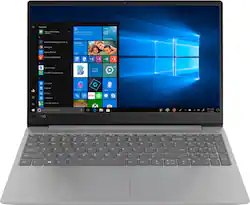
Lenovo - IdeaPad 330S 15.6" Laptop - Intel Core i5 - 8GB Memory - 128GB Solid State Drive
- Key Specs
- Screen Size: 15.6 inches (Size of the screen, measured diagonally from corner to corner.)
- Screen Resolution: 1920 x 1080 (Full HD) (Screens come in a range of resolutions (measured in pixels, horizontal x vertical). The higher the resolution, the greater the picture quality.)
- Touch Screen: false (Touch-screen devices make navigating more intuitive. Using a touch-screen display, you can do things such as tap to select, hold and drag to move items, swipe to scroll, and pinch to zoom.)
- Processor Model: Intel 8th Generation Core i5 (Your computer's processor is like its brain. Working in combination with system memory, the power of the processor determines the complexity of software you can run, how many programs you can have open at the same time, and how fast those programs will run. Most computers feature an AMD, Intel or Snapdragon processor.)
- Storage Type: SSD
- Total Storage Capacity: 128 gigabytes
- System Memory (RAM): 8 gigabytes (Random-access memory (RAM) is a computing device's short-term data storage, which allows active information to be accessed quickly. The size and type of RAM determines how efficiently the device can handle large amounts of information at one time. For example, gaming or video editing requires more RAM for optimal performance.)
- Backlit Keyboard: false (Integrated lights allow for visibility of the keys in low-light conditions.)
- General
- Product Name: IdeaPad 330S 15.6" Laptop - Intel Core i5 - 8GB Memory - 128GB Solid State Drive
- Brand: Lenovo
- Model Number: 81F5018TUS
- Display
- Screen Size: 15.6 inches (Size of the screen, measured diagonally from corner to corner.)
- Screen Resolution: 1920 x 1080 (Full HD) (Screens come in a range of resolutions (measured in pixels, horizontal x vertical). The higher the resolution, the greater the picture quality.)
- Touch Screen: false (Touch-screen devices make navigating more intuitive. Using a touch-screen display, you can do things such as tap to select, hold and drag to move items, swipe to scroll, and pinch to zoom.)
- Processor
- Processor Brand: Intel
- Processor Model: Intel 8th Generation Core i5 (Your computer's processor is like its brain. Working in combination with system memory, the power of the processor determines the complexity of software you can run, how many programs you can have open at the same time, and how fast those programs will run. Most computers feature an AMD, Intel or Snapdragon processor.)
- Processor Model Number: 8250U
- Storage
- Storage Type: SSD
- Total Storage Capacity: 128 gigabytes
- Solid State Drive Capacity: 128 gigabytes (The amount of data that can be stored on the device's solid state drive (SSD). SSD is a flash-based storage with faster speeds than a hard disk drive (HDD).)
- Memory
- System Memory (RAM): 8 gigabytes (Random-access memory (RAM) is a computing device's short-term data storage, which allows active information to be accessed quickly. The size and type of RAM determines how efficiently the device can handle large amounts of information at one time. For example, gaming or video editing requires more RAM for optimal performance.)
- Type of Memory (RAM): DDR4 SDRAM (Each type of RAM delivers a different level of speed, bandwidth, energy efficiency and performance.)
- System Memory RAM Speed: 2400 megahertz (How fast the information-storing hardware operates. The faster the RAM, the faster memory can be transferred to other system components. Ultimately, faster RAM improves operational efficiency.)
- System Memory RAM Expandable To: 12 gigabytes (Adding more random-access memory (RAM) to a computer speeds up performance and improves efficiency. Upgrades to memory are limited by the number of expansion slots for additional RAM and existing RAM installed on the device.)
- Compatibility
- Operating System: Windows 10 Home in S mode (The operating system manages all software and hardware, including files, memory and connected devices. Most importantly, it lets you interact with your device and your programs in a visual way; otherwise, you'd be typing computer code to get anything done.)
- Operating System Architecture: 64-bit (An operating system (OS) manages computer hardware, software resources, and programs in conjunction with the system's processor. 64-bit operating systems can handle more data at once than 32-bit systems, resulting in faster speeds, more effiency, and overall improved performance.)
- Connectivity
- Headphone Jack: true (The device features an interface that allows for the connection of headphones.)
- Power
- Power Supply Input: USB 3.0
- Power Supply Maximum Wattage: 45 watts
- Battery Cells: 2-cell
- Expansion
- Number Of Internal 2.5" Bays: 1
- Camera
- Front-Facing Camera: true
- Front Facing Camera Video Resolution: 720p (Refers to the number of pixels, both horizontally and vertically, used by the camera facing the user to capture video. The higher the resolution the finer the video detail that can be seen.)
- Built-In Microphone: true
- Features
- Backlit Keyboard: false (Integrated lights allow for visibility of the keys in low-light conditions.)
- Touchpad Type: Multi-touch
- Media Card Reader: true (A hardware device that allows for access to data on a memory card and enables the transfer of its files to a computer. These devices may have one or multiple slots for various types of memory cards, and may be integrated into the computer or available as an external device.)
- Speaker Type: Stereo speakers
- Casing Material: Aluminum
- Dimensions
- Product Height: 0.76 inches (The out of box height of the item. Height is measured as the vertical distance from the bottom of the item to the top as it would be primarily used or placed.)
- Product Width: 14.1 inches (The out of box width of the item. Width is measured as the horizontal distance from one side of the item to the other as it would be primarily used or placed.)
- Product Depth: 9.6 inches (The out of box depth of the item. Depth is measured as the distance from the front of the item to the back as it would be primarily used or placed.)
- Certifications Listings & Approvals
- ENERGY STAR Certified: false (Devices carrying the ENERGY STAR service mark, such as computer products and peripherals, kitchen appliances, and other products, generally use 20% to 30% less energy than required by federal standards.)
- EPEAT Qualified: false (The Electronic Product Environmental Assessment Tool (EPEAT) was designed to provide an environmental assessment tool for purchasers. In order to qualify for EPEAT, a product must meet all 23 required criteria.)
- Included
- Numeric Keypad: true
- Other
- UPC: 193268633285
Lenovo IdeaPad 330S laptop: Be more productive with this Lenovo IdeaPad laptop. The Intel Core processor provides a 40 percent performance boost, allowing faster download times, greater gaming capabilities and effortless multitasking. Save files easily with 8GB of storage, and immerse yourself in movies and videos thanks to the Ultra HD graphics on this Lenovo IdeaPad laptop.
- Runs the latest Windows operating system: Includes Windows 10 Home in S Mode, to do the things you want with protection you can count on and performance that lasts. Learn more ›
- 15.6" Full HD display: The 1920 x 1080 resolution boasts impressive color and clarity. IPS technology for wide viewing angles. Energy-efficient LED backlight.
- 8th Gen Intel® Core™ i5-8250U mobile processor: Ultra-low-voltage platform. Quad-core, eight-way processing provides maximum high-efficiency power to go.
- 8GB system memory for advanced multitasking: Substantial high-bandwidth RAM to smoothly run your games and photo- and video-editing applications, as well as multiple programs and browser tabs all at once.
- 128GB solid state drive (SSD): While offering less storage space than a hard drive, a flash-based SSD has no moving parts, resulting in faster start-up times and data access, no noise, and reduced heat production and power draw on the battery.
- Intel® UHD Graphics 620: On-processor graphics with shared video memory provide everyday image quality for Internet use, basic photo editing and casual gaming.
- Weighs 4.12 lbs. and measures 0.76" thin: Thin and light design with DVD/CD drive omitted for improved portability. 2-cell lithium-ion battery.
- Aluminum chassis: Offers a sleek look.
- HDMI output expands your viewing options: Connect to an HDTV or high-def monitor to set up two screens side by side or just see more of the big picture.
- Built-in media reader for simple photo transfer: Supports SD, MultiMediaCard, SDHC and SDXC memory card formats.
- Next-generation wireless connectivity: Connects to your network or hotspots on all current Wi-Fi standards. Connect to a Wireless-AC router for speed nearly 3x faster than Wireless-N.
- Built-in HD webcam with dual array microphone: Makes it easy to video chat with family and friends or teleconference with colleagues over Skype or other popular applications.
- Additional port: Headphone/microphone combo jack.
Whats Included
- Lenovo IdeaPad 330S 15.6" Laptop - Intel Core i5 - 8GB Memory - 128GB Solid State Drive
- 2-cell battery
- Power adapter
Q: Is it possible for the owner to upgrade the ram and, if so, how difficult is it? Max Ram?
A: Yes. You must purchase DDR4-2400 SODIMM laptop memeory for it work well with the built in memory. The person who said a "CERTIFIED TECHNICIAN" must upgrade it is only saying that to either boost "THE GEEK SQUAD"'s revenue or is trying to cover their backside. It is actually very easy to upgrade. Remove the 10 screws holding the bottom on, pull at the plastic carefully up by the display hinge, and the bottom will pop off. There is a small metal black panel by the existing hard drive. Under that panel is the M.2 slot for a new hard drive and the DDR4 slot for a single memory chip to be installed. There are 3 screw that hold that metal panel in place, along with 3 small squeeze clips. The squeeze clips do not require any tools to remove, just gently pulling straight up. Take not of the 3 screws you are removing cause they are different than the bottom panel screws. Once you have that panel off, just clip in your new memory chip, making sure you have the notch aligned properly, and snap it in place. Then re-assemble by following the instructions above in reverse order. Same instructions apply for installing a new M.2 drive. And this DOES take the NVMe type for even better performance. Even though it is only an I-3 core processor, it actually does a really good job with the simple stuff, and pretty good with some of the more complex.
Q: Does this laptop have Windows 10?
A: Yes, this model ships with Windows 10 Home 64-bit operating system.
Q: can this computer run roblox?
A: Yes, it can run Roblox.
Q: Does this have disk drive input?
A: This model has a 128GB solid state hard drive. This model does not have a CD/DVD drive built in.
Q: Windows 10 Home in S mode ?
A: I volunteer helping a lot of people (friends, church, elderly in retirement homes) with their computer issues. I have been able to figure out shortcuts and various ways to help them get around problems. However, this one is new. An elderly friend purchased a new laptop from Best Buy and asked my help in setting it up, adding Chrome and Firefox, putting on her own antivirus, plus a few other things. I was able to set up the machine skirting the “Microsoft Account” (that should not be a requirement), and got it setup using a local account. Then we discovered that her new laptop has “Win10 S Mode”. Windows Store requires an account. How do I disable S Mode without an account? She does not want a MS account, and does not want a Store account, she just wants to install her own stuff.
Q: Is this a good computer for a college student taking online classes?
A: That will really depend on the programs you will need to use with your computer. We recommend you check the requirements and compatibility of the software you will need to use on your new computer, before you invest. Be sure your new computer will do the work you want to do, before you invest in any new computer. The Lenovo IdeaPad 330s-15 laptop is a mid-level, moderate use configuration, with its Intel Core i3-8130U processor. This Dual-Core processor has a base speed of 2.2GHz and a boost speed of up to 3.4GHz. This configuration has 4GB of DDR4-2400MHz RAM and a 128GB solid state hard drive. This model ships with Windows 10 S-Mode operating system. Windows 10 S-Mode provides added security by only allowing APPs available ( and therefore certified by Microsoft) at the Microsoft Store. If you don't need the added security or you need to install APPs not available at the Microsoft Store, you can switch to standard Windows 10 Home 64-bit Operating System, at no additional cost. The IdeaPad 330s-15 is good with Microsoft Office type programs, internet browsing and other moderate work. If this describes your computing needs, the IdeaPad 330s-15 would be a good choice for you.
Q: What generation is the processor?
A: Model number 81F5018EUS ships with the 8th Gen Intel Core i3-8130U mobile processor.
Q: How much does it weight? Is it portable?
A: This laptop is portable. I find it incredibly light, and often forget it's in the bag and send myself into a panic thinking I left it somewhere.


















