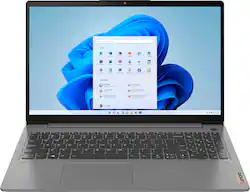
Lenovo - Ideapad 3 15.6" FHD Touch Screen Laptop - Intel Core i5 11th Gen - 12GB Memory - 256GB SSD
- Key Specs
- Screen Size: 15.6 inches (Size of the screen, measured diagonally from corner to corner.)
- Screen Resolution: 1920 x 1080 (Full HD) (Screens come in a range of resolutions (measured in pixels, horizontal x vertical). The higher the resolution, the greater the picture quality.)
- Touch Screen: true (Touch-screen devices make navigating more intuitive. Using a touch-screen display, you can do things such as tap to select, hold and drag to move items, swipe to scroll, and pinch to zoom.)
- Processor Model: Intel 11th Generation Core i5 (Your computer's processor is like its brain. Working in combination with system memory, the power of the processor determines the complexity of software you can run, how many programs you can have open at the same time, and how fast those programs will run. Most computers feature an AMD, Intel or Snapdragon processor.)
- Storage Type: SSD
- Total Storage Capacity: 256 gigabytes
- System Memory (RAM): 12 gigabytes (Random-access memory (RAM) is a computing device's short-term data storage, which allows active information to be accessed quickly. The size and type of RAM determines how efficiently the device can handle large amounts of information at one time. For example, gaming or video editing requires more RAM for optimal performance.)
- Graphics: Intel Iris Xe Graphics (Often referred to as a "graphics processing unit" (GPU), this device is responsible for displaying image content and decoding/encoding video content in programs and games.)
- Backlit Keyboard: true (Integrated lights allow for visibility of the keys in low-light conditions.)
- General
- Product Name: Lenovo Ideapad 3 15.6" FHD Touch Screen Laptop - Intel Core i5 11th Gen - 12GB Memory - 256GB SSD
- Brand: Lenovo
- Model Number: 82H801DQUS/82H8018SUS
- Year of Release: 2021
- Display
- Display Type: LCD
- Screen Size: 15.6 inches (Size of the screen, measured diagonally from corner to corner.)
- Screen Resolution: 1920 x 1080 (Full HD) (Screens come in a range of resolutions (measured in pixels, horizontal x vertical). The higher the resolution, the greater the picture quality.)
- Touch Screen: true (Touch-screen devices make navigating more intuitive. Using a touch-screen display, you can do things such as tap to select, hold and drag to move items, swipe to scroll, and pinch to zoom.)
- Processor
- Processor Brand: Intel
- Processor Model: Intel 11th Generation Core i5 (Your computer's processor is like its brain. Working in combination with system memory, the power of the processor determines the complexity of software you can run, how many programs you can have open at the same time, and how fast those programs will run. Most computers feature an AMD, Intel or Snapdragon processor.)
- Processor Model Number: 1135G7
- Storage
- Storage Type: SSD
- Total Storage Capacity: 256 gigabytes
- Solid State Drive Capacity: 256 gigabytes (The amount of data that can be stored on the device's solid state drive (SSD). SSD is a flash-based storage with faster speeds than a hard disk drive (HDD).)
- Solid State Drive Interface: NVMe (Connects the solid state drive to the host system. PCI and SATA interfaces are the most common; PCI interfaces are typically faster, but SATA interfaces are compatible with a wider range of systems.)
- Memory
- System Memory (RAM): 12 gigabytes (Random-access memory (RAM) is a computing device's short-term data storage, which allows active information to be accessed quickly. The size and type of RAM determines how efficiently the device can handle large amounts of information at one time. For example, gaming or video editing requires more RAM for optimal performance.)
- Type of Memory (RAM): DDR4 (Each type of RAM delivers a different level of speed, bandwidth, energy efficiency and performance.)
- System Memory RAM Speed: 3200 megahertz (How fast the information-storing hardware operates. The faster the RAM, the faster memory can be transferred to other system components. Ultimately, faster RAM improves operational efficiency.)
- Number Of Memory Slots: 1
- Graphics
- Graphics Type: Integrated (Dedicated graphics uses a separate graphics card for processing video images. Because it does not use memory from the system's RAM, there is no extra burden on the CPU and graphics are processed more efficiently. Integrated graphics shares system RAM to process video images.)
- GPU Brand: Intel
- Graphics: Intel Iris Xe Graphics (Often referred to as a "graphics processing unit" (GPU), this device is responsible for displaying image content and decoding/encoding video content in programs and games.)
- Compatibility
- Operating System: Windows 11 Home in S Mode (The operating system manages all software and hardware, including files, memory and connected devices. Most importantly, it lets you interact with your device and your programs in a visual way; otherwise, you'd be typing computer code to get anything done.)
- Operating System Architecture: 64-bit (An operating system (OS) manages computer hardware, software resources, and programs in conjunction with the system's processor. 64-bit operating systems can handle more data at once than 32-bit systems, resulting in faster speeds, more effiency, and overall improved performance.)
- Connectivity
- Number of DisplayPort Outputs (Total): 1
- Headphone Jack: true (The device features an interface that allows for the connection of headphones.)
- Number Of Ethernet Ports: 1
- Power
- Power Supply Maximum Wattage: 65 watts
- Battery Cells: 3-cell
- Camera
- Front-Facing Camera: true
- Front Facing Camera Video Resolution: 720p (Refers to the number of pixels, both horizontally and vertically, used by the camera facing the user to capture video. The higher the resolution the finer the video detail that can be seen.)
- Built-In Microphone: true
- Features
- Backlit Keyboard: true (Integrated lights allow for visibility of the keys in low-light conditions.)
- Touchpad Type: Buttonless Mylar® 10-point Touch
- Media Card Reader: true (A hardware device that allows for access to data on a memory card and enables the transfer of its files to a computer. These devices may have one or multiple slots for various types of memory cards, and may be integrated into the computer or available as an external device.)
- Audio Technology: Dolby Audio
- Cable Lock Slot: None
- Casing Material: Aluminum
- Dimensions
- Product Height: 0.78 inches (The out of box height of the item. Height is measured as the vertical distance from the bottom of the item to the top as it would be primarily used or placed.)
- Product Width: 9.98 inches (The out of box width of the item. Width is measured as the horizontal distance from one side of the item to the other as it would be primarily used or placed.)
- Product Depth: 14.26 inches (The out of box depth of the item. Depth is measured as the distance from the front of the item to the back as it would be primarily used or placed.)
- Product Weight: 3.74 pounds (The out of box weight of the item.)
- Certifications Listings & Approvals
- ENERGY STAR Certified: false (Devices carrying the ENERGY STAR service mark, such as computer products and peripherals, kitchen appliances, and other products, generally use 20% to 30% less energy than required by federal standards.)
- EPEAT Qualified: false (The Electronic Product Environmental Assessment Tool (EPEAT) was designed to provide an environmental assessment tool for purchasers. In order to qualify for EPEAT, a product must meet all 23 required criteria.)
- Included
- Optical Drive Type: None (An optical disk drive (ODD) uses a laser light to read data from or write data to an optical disc. These discs include CDs, DVDs, and Blu-ray Discs. This allows you to play music or watch movies using prerecorded discs.)
- Numeric Keypad: true
- Other
- UPC: 195891976289
Engineered for long-lasting performance, the Lenovo™ IdeaPad™ 3 delivers powerful performance with the latest Intel 11th Generation Processors with Intel™ Iris Xe Graphics, in a laptop that's perfect for your everyday tasks, with features that you can depend on.
- Windows 11 Home in S Mode Operating System: Windows 11 has all the power and security of Windows 10 with a redesigned and refreshed look. It also comes with new tools, sounds, and apps. Every detail has been considered. All of it comes together to bring you a refreshing experience on your PC.
- 15.6" Full-HD 10-point multitouch screen: The 1920 x 1080 resolution boasts impressive color and clarity. IPS technology for wide viewing angles. Energy-efficient LED backlight.
- 11th Gen Intel® Core™ i5-1135G7 mobile processor: Ultra-low-voltage platform. Quad-core, eight-way processing provides maximum high-efficiency power to go.
- 12GB system memory for full-power multitasking: Plenty of high-bandwidth RAM to smoothly run your games and photo- and video-editing applications, as well as multiple programs and browser tabs all at once.
- 256GB Solid State Drive (NVMe TLC): Save files fast and store more data. With massive amounts of storage and advanced communication power, NVMe TLC SSDs are great for major gaming applications, multiple servers, daily backups, and more.
- Intel® Iris Xe Graphics: On-processor graphics with shared video memory provide everyday image quality for Internet use, basic photo editing and casual gaming.
- Modern aluminum design: Creates a sleek, modern look with clean lines and provides a rigid but lightweight frame.
- Weighs 3.74lbs. and measures 0.78" thin: Thin and light design with DVD/CD drive omitted for improved portability. 3-cell lithium polymer battery.
- Wireless/Wired connectivity (WiFi 6 - 802.11 ax): Flexible, dual-band connectivity w/ greater reliability thanks to two data streams and antennas. Connect to a Wi-Fi router to experience GB Wi-Fi speeds nearly 3X faster vs. standard Wi-Fi 5 w/ improved responsiveness for even more devices.
- HDMI output expands your viewing options: Connect to an HDTV or high-def monitor to set up two screens side by side or just see more of the big picture.
- Built-in HD webcam with Privacy Shutter: Makes it easy to video chat with family and friends or teleconference with colleagues over Skype or other popular applications. Slide the Privacy Shutter closed for peace of mind when you’re not using your webcam.
- Backlit keyboard for easy typing in dim or dark locations: Touchpad with scroll and multitouch capability.
- Arctic Grey: Adds subtle style to the laptop's lid.
- Basic software package included: 30-days trial of Microsoft Office.
- Additional Ports: Headphone/microphone combo jack.
Whats Included
- Ideapad 3i 15"
- Charger
- User Guide
Q: What kind of ports does this have and how many of each
A: The Lenovo IdeaPad 3 15 Laptop, model number 82H801DQUS, ships with these ports: 1x Power connector, 1x Card reader, 1x USB 3.2 Gen 1, 1x USB-C 3.2 Gen 1 (support data transfer only), 1x HDMI 1.4b, 1x Headphone / microphone combo jack (3.5mm), 1x USB 2.0.
A: Yes. The Lenovo IdeaPad 3 15 Laptop, model number 82H8018SUS, ships with a Backlit, English (US) standard QWERTY keyboard with 10-Key Numeric Pad included. Just hold down the Fn Key then tap the Spacebar: Once to turn on the backlight, twice to increase the backlight intensity and three times to turn off the backlight.
A: Although there is no ethernet port on this Lenovo IdeaPad 3 15 Laptop, model number 82H801DQUS/82H8018SUS, since it has WiFi capability built in, you can still connect this laptop to an ethernet network cable by using a USB to ethernet adapter like this one: https://www.bestbuy.com/site/insignia-usb-to-ethernet-adapter-white/6418345.p?skuId=6418345. If you leave your laptop computer plugged in all of the time, we recommend you turn on Battery Conservation Mode from within the Lenovo Vantage APP. This APP will only allow the battery to charge to 60 Percent capacity, to help prolong the overall life of the internal battery, when it remains plugged in, all of the time.
Q: What is the difference between 82H801DQUS And 82H801SUS ?
A: The Lenovo IdeaPad 3 15 model number 82H801DQUS, is available now and ships with Windows 10 S-Mode 64-bit Operating System. The Lenovo IdeaPad 3 15 model number 82H801SUS will ship with Windows 11 S-Mode 64-bit Operating System installed and will be available once Windows 11 OEM models are available.
A: Switching out of S mode in Windows Windows in S mode is designed for security and performance, exclusively running apps from the Microsoft Store. If you want to install an app that isn't available in the Microsoft Store, you'll need to switch out of S mode. Switching out of S mode is one-way. If you make the switch, you won't be able to go back to Windows in S mode. There's no charge to switch out of S mode. 1 On your PC running Windows in S mode, open Settings Gear-shaped Settings icon > Update & Security Circular arrows Sync icon > Activation. 2 In the Switch to Windows Home or Switch to Windows Pro section, select Go to the Store. (If you also see an "Upgrade your edition of Windows" section, be careful not to click the "Go to the Store" link that appears there.) 3 On the Switch out of S mode (or similar) page that appears in the Microsoft Store, select the Get button. After you see a confirmation message on the page, you'll be able to install apps from outside of the Microsoft Store.
Q: Will this laptop support two external monitors via a USB-C Docking Station?
A: No. The Lenovo IdeaPad 3 15 Laptop, model number 82H8018SUS, ships with 1x USB-C 3.2 Gen 1 (support data transfer only) port. You could use a universal USB 3.0 docking station like this one with two monitor support: https://www.bestbuy.com/site/j5create-usb-3-0-mini-docking-station-silver/5901250.p?skuId=5901250
Q: Does this laptop have an operating system? It shows none in the specs.
A: Yes. The Lenovo IdeaPad 3 15 Laptop, model number 82H801DQUS, ships with Windows 10 S-Mode 64-bit Operating System. Windows 10 S-Mode provides added security by only allowing APPs available ( and therefore certified by Microsoft) at the Microsoft Store. If you don't need the added security or you need to install APPs not available at the Microsoft Store, you can switch to standard Windows 10 Home 64-bit Operating System, at no additional cost.
A: The Lenovo IdeaPad 3 15 Laptop, model number 82H8018SUS, ships with a backlit Keyboard. Hold down the Fn Key and tap the Spacebar: Once to turn on the keyboard backlight, twice to increase the backlight intensity, and three times to turn off the backlighting.





















