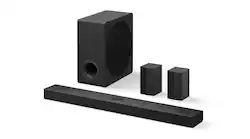
LG - 5.1.3-Channel S80TR Home Theater Soundbar with Wireless Subwoofer and Rear Speakers, Dolby Atmos, WOW Orchestra - Black
- Key Specs
- Wireless Connectivity: Bluetooth, Wi-Fi (The manner in which a device sends data to another device over a short distance without the use of wires or cables.)
- Wireless Subwoofer Connectivity: true
- App Compatible: true (The product can be connected to a program or software application on a mobile device, which then receives collected data from the product.)
- Indoor or Outdoor Use: Indoor
- Wall Mountable: true (The product is able to be secured to a wall. Some products are designed ready to mount, while others may require additional hardware/accessories for installation.)
- Works With: Amazon Alexa, Google Home (Compatible with or able to be connected to other smart devices or applications.)
- General
- Brand: LG
- Model Number: S80TR
- Product Name: 5.1.3-Channel S80TR Home Theater Soundbar with Wireless Subwoofer and Rear Speakers, Dolby Atmos, WOW Orchestra
- Color: Black
- Audio
- Number of Channels: 5.1.3 (The number of discrete channels of sound output. This can be a single number or multiple numbers separated by decimal(s). The first number is the primary, horizontally directed audio channels. The number after the first decimal, if applicable, is the number of subwoofer outputs or channels. The number after the second decimal, if applicable, is the number of height or atmospheric channels designed to immerse the listener by producing overhead sound effects.)
- Surround Sound Supported: Dolby Atmos, DTS:X, Dolby TrueHD, Dolby Digital Plus, Dolby Digital, DTS Digital Surround, DTS-HD Master Audio, DTS-HD High Resolution Audio (Surround sound systems use multiple audio channels and speakers to create an immersive sound experience for the listener. There are also various proprietary technologies that imitate this kind of sound via a device's built-in speakers or soundbar.)
- High Resolution Audio: true (Hear music the way musicians and sound technicians intended it to be heard. Products that support hi-res audio deliver audio signals with a dynamic range and bandwidth far greater than that of a standard CD so you'll be able to enjoy pure music with outstanding sound quality. The device supports high-resolution audio signals, which more closely resemble the quality of music as it was originally recorded, with more texture and detail than can be heard via typical music streaming services or CDs.)
- Connectivity
- Wireless Connectivity: Bluetooth, Wi-Fi (The manner in which a device sends data to another device over a short distance without the use of wires or cables.)
- Wireless Subwoofer Connectivity: true
- Satellite Speakers: Included (Using satellite speakers in conjunction with a soundbar allows for a surround sound experience; the soundbar can serve as a center channel speaker while satellites provide rear channel audio or additional front channel audio.)
- HDMI Audio Return Channel (ARC): eARC
- Audio Only Inputs: 1 x USB-A
- Number of HDMI Inputs (Total): 1
- Number of USB Inputs: 1
- Number of Optical Audio Inputs: 1
- Number of HDMI Outputs (Total): 1
- Video
- High Dynamic Range Format: Dolby Vision, HDR 10 (There are a few HDR formats that tell the TV or other HDR-compatible product how to best utilize its capabilities to display HDR content. HDR technology can support one or multiple formats, each with various benefits to picture quality.)
- Video Pass-through: 2160 (4K), HDR (Devices with this feature allow video signals to travel from their source to a target device without alteration. For example, a receiver with 4K pass-through would allow 4K video signal from a Blu-ray player to pass to a target TV with surround sound; without the pass-through ability, the receiver would not allow both 4K video and surround sound to be transmitted simultaneously.)
- Features
- App Compatible: true (The product can be connected to a program or software application on a mobile device, which then receives collected data from the product.)
- Indoor or Outdoor Use: Indoor
- Wall Mountable: true (The product is able to be secured to a wall. Some products are designed ready to mount, while others may require additional hardware/accessories for installation.)
- Speaker
- Subwoofer: Included
- Dimensions
- Product Height: 2.5 inches (The out of box height of the item. Height is measured as the vertical distance from the bottom of the item to the top as it would be primarily used or placed.)
- Product Width: 39.3 inches (The out of box width of the item. Width is measured as the horizontal distance from one side of the item to the other as it would be primarily used or placed.)
- Product Depth: 5.3 inches (The out of box depth of the item. Depth is measured as the distance from the front of the item to the back as it would be primarily used or placed.)
- Product Weight: 9.9 pounds (The out of box weight of the item.)
- Subwoofer Height: 16.02 inches
- Subwoofer Width: 7.9 inches
- Subwoofer Depth: 15.9 inches
- Subwoofer Weight: 22.1 pounds
- Included
- Remote Control Included: true
- Cable(s) Included: HDMI
- Mounting Hardware Included: true
- Certifications Listings & Approvals
- ENERGY STAR Certified: false (Devices carrying the ENERGY STAR service mark, such as computer products and peripherals, kitchen appliances, and other products, generally use 20% to 30% less energy than required by federal standards.)
- Warranty
- Warranty - Parts: 1 Year Parts & Labor
- Warranty - Labor: 1 Year Parts & Labor
- Compatibility
- Works With: Amazon Alexa, Google Home (Compatible with or able to be connected to other smart devices or applications.)
- Other
- UPC: 195174083567
Pairs perfectly with LG OLED B4, C4 and G4 series TVs. Your entertainment high five! Immerse yourself in every scene with exceptional cinematic surround sound. The S80TR projects powerful, realistic audio through 5 channels, as well as wireless rear speakers, elevating your best TV setup to new levels of impressiveness. Experience entertainment that sounds as outstanding as it looks.
- WOW Orchestra: Create the perfect harmony using the audio from the LG TV and LG Soundbar to produce the ultimate listening experience. Feel every detail of sound. Use the LG TV and LG Soundbar speakers at the same time¹ while using one remote to adjust the settings interchangeably.
- WOW Interface: Now, convenience is in your hand. Control your LG Soundbar and your LG TV with one remote¹. Adjust the volume and audio settings, check the connection status and even select a sound mode on the screen, all from the TV remote.
- WOWCAST Built-in with Wireless Dolby Atmos: Experience the power of Dolby Atmos² and DTS:X³ surround sound without any visible wires. A new built-in experience that connects your LG TV and LG Soundbar wirelessly for a sleek look—with no lag or loss in audio quality.
- Enhance Your Game Play: Sound that keeps up with an instantaneous response time, allowing you to enjoy a gaming experience that is smooth and lag-free with a passthrough refresh rate up to 120Hz.
- Higher Dimensional Audio: Get ready for an unforgettable cinematic sound experience. This 5.1.3-channel soundbar has an impressive combination of an up-firing center speaker, a powerful subwoofer and wireless rear speakers. Dolby Atmos¹ and DTS:X² technologies create a spatial audio dome that fills even the largest rooms.
- True Wireless Connectivity: Now there’s a surround sound system for rooms of all shapes and sizes. Our new rear speakers have true wireless connectivity—that means no special receiver needed. Not only do they deliver an immersive audio experience, they can be positioned anywhere and calibrated accordingly. These speakers only need to connect to an outlet—it’s literally plug and play.
- Enhanced Dialogue Clarity: Our exclusive up-firing center channel focuses on dialogue clarity so you can hear every conversation with detail. The soundbar delivers a wider and richer soundstage, filling the room with pure acoustic bliss.
- Surround Yourself with Sound: Push the boundary of the entertainment experience. Step into the scene and feel like you are a part of the action with Immersive 3D Spatial Sound⁴—a virtual dome that delivers a more immersive cinematic experience.
- Advanced AI Room Calibration: This LG Soundbar is ready to give you some space with AI room calibration. Using the built-in microphone, your soundbar precisely measures the dimensions of the room where it’s installed. AI then analyzes this spatial information and optimizes audio settings accordingly. You get a richer, deeper and clearer surround sound experience, with no distortion or delay, as well as flexibility in how you set up your speakers.
- Upgrade Your Sound: Create a wider soundstage to fill your room for a richer immersion of surround sound⁵. Leverage all speakers to convert 2-channel audio into a multi-channel experience.
- Say It, We'll Play It: Choose your go-to voice assistant such as Alexa or Google Assistant and control your favorite features like Airplay 2, Chromecast and more through your LG Soundbar⁶.
- WOW Orchestra: Create the perfect harmony using the audio from the LG TV and LG Soundbar to produce the ultimate listening experience. Feel every detail of sound. Use the LG TV and LG Soundbar speakers at the same time¹ while using one remote to adjust the settings interchangeably.
- WOW Interface: Now, convenience is in your hand. Control your LG Soundbar and your LG TV with one remote¹. Adjust the volume and audio settings, check the connection status and even select a sound mode on the screen, all from the TV remote.
- WOWCAST Built-in with Wireless Dolby Atmos: Experience the power of Dolby Atmos² and DTS:X³ surround sound without any visible wires. A new built-in experience that connects your LG TV and LG Soundbar wirelessly for a sleek look—with no lag or loss in audio quality.
- Enhance Your Game Play: Sound that keeps up with an instantaneous response time, allowing you to enjoy a gaming experience that is smooth and lag-free with a passthrough refresh rate up to 120Hz.
- Higher Dimensional Audio: Get ready for an unforgettable cinematic sound experience. This 5.1.3-channel soundbar has an impressive combination of an up-firing center speaker, a powerful subwoofer and wireless rear speakers. Dolby Atmos¹ and DTS:X² technologies create a spatial audio dome that fills even the largest rooms.
- True Wireless Connectivity: Now there’s a surround sound system for rooms of all shapes and sizes. Our new rear speakers have true wireless connectivity—that means no special receiver needed. Not only do they deliver an immersive audio experience, they can be positioned anywhere and calibrated accordingly. These speakers only need to connect to an outlet—it’s literally plug and play.
- Enhanced Dialogue Clarity: Our exclusive up-firing center channel focuses on dialogue clarity so you can hear every conversation with detail. The soundbar delivers a wider and richer soundstage, filling the room with pure acoustic bliss.
- Surround Yourself with Sound: Push the boundary of the entertainment experience. Step into the scene and feel like you are a part of the action with Immersive 3D Spatial Sound⁴—a virtual dome that delivers a more immersive cinematic experience.
- Advanced AI Room Calibration: This LG Soundbar is ready to give you some space with AI room calibration. Using the built-in microphone, your soundbar precisely measures the dimensions of the room where it’s installed. AI then analyzes this spatial information and optimizes audio settings accordingly. You get a richer, deeper and clearer surround sound experience, with no distortion or delay, as well as flexibility in how you set up your speakers.
- Upgrade Your Sound: Create a wider soundstage to fill your room for a richer immersion of surround sound⁵. Leverage all speakers to convert 2-channel audio into a multi-channel experience.
- Say It, We'll Play It: Choose your go-to voice assistant such as Alexa or Google Assistant and control your favorite features like Airplay 2, Chromecast and more through your LG Soundbar⁶.
Whats Included
- LG S80TR Soundbar
- Remote with 2 AA batteries
- Wall Mount Bracket
- Warranty Card
- HDMI Cable
- LG S80TR Soundbar
- Remote with 2 AA batteries
- Wall Mount Bracket
- Warranty Card
- HDMI Cable
Product Manuals
Disclaimers
- ¹Dolby, Dolby Atmos and the double-D symbol are registered trademarks of Dolby Laboratories.
- ²For DTS patents, see http://patents.dts.com. Manufactured under license from DTS, Inc. or its affiliates. DTS trademarks and logos are registered trademarks or trademarks of DTS, Inc. in the United States and other countries. ALL RIGHTS RESERVED
- ³Only available on select LG TV and LG Soundbar models.
- ⁴Immersive 3D Spatial Sound is available in CINEMA/AI Sound Pro Mode of select LG Soundbars.
- ⁵Available in all sound modes except Bass Blast.
- ⁶Some features require 3rd-party subscription or account. Google is a trademark of Google LLC. Amazon, Alexa, and all related marks are trademarks of Amazon.com, Inc. or its affiliates. Apple and Airplay are registered trademarks of Apple Inc.
- ¹Dolby, Dolby Atmos and the double-D symbol are registered trademarks of Dolby Laboratories.
- ²For DTS patents, see http://patents.dts.com. Manufactured under license from DTS, Inc. or its affiliates. DTS trademarks and logos are registered trademarks or trademarks of DTS, Inc. in the United States and other countries. ALL RIGHTS RESERVED
- ³Only available on select LG TV and LG Soundbar models.
- ⁴Immersive 3D Spatial Sound is available in CINEMA/AI Sound Pro Mode of select LG Soundbars.
- ⁵Available in all sound modes except Bass Blast.
- ⁶Some features require 3rd-party subscription or account. Google is a trademark of Google LLC. Amazon, Alexa, and all related marks are trademarks of Amazon.com, Inc. or its affiliates. Apple and Airplay are registered trademarks of Apple Inc.
Q: Does this soundbar support high resolution audio?
A: Yes, this soundbar supports high resolution audio.
Q: Can I control this soundbar with a voice assistant?
A: Yes, you can use Google Assistant or Alexa to control this soundbar.
Q: What is the total number of HDMI inputs on this soundbar?
A: This soundbar has a single HDMI input.
Q: How many channels does this LG soundbar have?
A: This LG soundbar has 5.1.3 channels.
Q: Does this soundbar come with a subwoofer?
A: Yes, the subwoofer is included with this soundbar.
Q: What type of wireless connectivity does this soundbar have?
A: This soundbar is equipped with Bluetooth wireless connectivity.
A: Hi there! Thank you for reaching out with your questions about the LG S80TR Sound Bar. Let's address each one: EQ Settings: The LG S80TR offers multiple EQ modes, including Standard, AI Sound Pro, Bass Blast, Bass Blast+, Cinema, Clear Voice, Game, Music, and Sports. These settings allow you to customize the sound output to match your preferences or the type of content you're enjoying. WF: This typically refers to the woofer level control, allowing you to adjust the bass output from the subwoofer. R: This generally represents the rear speaker levels, enabling you to balance the surround sound effect by adjusting the volume of the rear speakers. Rear Speakers in Bass Boost Mode: The rear speakers should work across all sound modes, not just in Bass Boost mode. If you find that the rear speakers are only functioning in Bass Boost mode, this could be a setup or configuration issue. We recommend checking the sound bar settings via the remote or app to ensure the rear speakers are enabled for all modes. You can also try resetting the system to factory settings and reconfiguring it to see if that resolves the issue. https://www.lg.com/us/sound-bars/lg-s80tr-sound-bar#pdp_specs If the problem persists or if you need further assistance, please send us a private message on Social Media @LGUSSupport. Our team is ready to help you get the best experience from your LG sound bar. We appreciate your feedback and are here to assist you further! —Renzo
A: Hi there! Thank you for considering the LG S80TR sound bar. We understand your question regarding the connections needed for this system to work with your TV. To get the best performance from the S80TR, it will need to be connected to your TV. You can do this using several connection options, including: HDMI eARC: This provides a high-quality audio return channel, making it easy to connect and control your sound bar. Optical Input: You can also connect via the optical input if your TV supports it. LG TV Sound Sync: This allows for seamless integration with compatible LG TVs for a hassle-free setup. Additionally, the S80TR features wireless connectivity options like Bluetooth and Wi-Fi, allowing for easy streaming and use with compatible devices. For a truly immersive experience, pairing it with an LG OLED B4, C4, or G4 Series TV is highly recommended, as it enhances the soundstage through our WOW Orchestra technology. https://www.lg.com/us/sound-bars/lg-s80tr-sound-bar#pdp_specs If you have any further questions or need assistance with your purchase, please send us a private message on Social Media @LGUSSupport, and our team will be delighted to assist you! We appreciate your interest in our products! —Renzo














