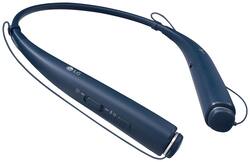
LG - TONE Pro HBS-780 Wireless In-Ear Behind-the-Neck Headphones - Blue
- Key Specs
- Sound Mode: Stereo
- Connection Type: Wireless
- Wireless Connectivity: Bluetooth (The manner in which a device sends data to another device over a short distance without the use of wires or cables.)
- True Wireless: false (These headphones not only lack wires between the device and headphones, they also lack wires between the headphones themselves. (true wireless is really only possible with in-ear headphones))
- Maximum Wireless Range: 33 feet
- Built-In Microphone: true
- Carrying Case: false
- Headphone Fit: In-Ear
- General
- Product Name: TONE Pro HBS-780 Wireless In-Ear Behind-the-Neck Headphones
- Brand: LG
- Ear Cushions: true
- Model Number: HBS-780.ACBBBLI
- Audio
- Sound Isolating: false
- Sound Mode: Stereo
- Connectivity
- Connection Type: Wireless
- Wireless Connectivity: Bluetooth (The manner in which a device sends data to another device over a short distance without the use of wires or cables.)
- True Wireless: false (These headphones not only lack wires between the device and headphones, they also lack wires between the headphones themselves. (true wireless is really only possible with in-ear headphones))
- Bluetooth Version: 4.1 (The Bluetooth specification formalized by the Bluetooth Special Interest Group. All versions of the Bluetooth standard are backwards compatible with previous versions.)
- Maximum Wireless Range: 33 feet
- Features
- Built-In Microphone: true
- Carrying Case: false
- Controls: Call, Volume
- Body Metrics Measured: Not Applicable
- Bone Conducting Technology: false
- Design
- Headphone Fit: In-Ear
- Style: Travel
- Other
- UPC: 815425020027
Talk on your phone hands-free with this LG Tone Pro headset. It has dual MEMS microphones, so you can have clear conversations, and its Tone & Talk 2.0 feature reads your text messages and lets you record voice memos. This LG Tone Pro headset has a convenient talk time of up to 16 hours.
- In-ear design: Fits securely and directs music into your ears for full, uninterrupted audio.
- Bluetooth 4.1 interface: Enables simple wireless pairing with your Bluetooth-enabled device. Supports HFP, HSP, A2DP and AVRCP Bluetooth profiles.
- Rechargeable battery: Offers up to 16 hours of use and lasts up to 720 hours on standby mode.
- In-line microphone: Lets you enjoy hands-free calls.
- Stereo design: Delivers crisp tones.
- Lightweight design: Provides lasting comfort while listening.
Whats Included
- LG TONE Pro HBS-780
- 2 EarGels ear tips (small)
Q: Does it vibrate around your neck when receiving a call?
A: The LG TONE PRO™ Wireless Stereo Headset, Model # HBS-780 will vibrate for incoming calls as long as the Vibration function has not been turned off...^IFV
Q: Is there an announcement for incoming text messages with the option to read them for you?
A: When you receive a call on your phone while it is paired to the LG TONE PRO™ Wireless Stereo Headset, Model # HBS-780, the headset will vibrate to alert you of the incoming call if the vibration function is turned on. The LG Tone & Talk™ app supports various functions, including text & voice directions and calling and can be used on Android™ smartphones. It will also read your recent messages. To install it, you can scan the QR code in the owner's manual that comes with the headset using your phone or go to the Google Play™ store and search for “LG Tone & Talk.” and download that to your phone...^IFV
A: No, this does not have outside speakers.
Q: HOW IS THE MICROPHONE ON THIS HEADSET. HOW DOES IT COMPARE TO OTHER HEAD SETS
A: Great noise reduction compared to other products
Q: How do I mute the microphone?
A: Simultaneously slide and hold the Volume jog switch into the volume up (+) direction, and slide and hold the Previous/Next jog switch into the (<<) position for one second. ^AC
Q: Can you pair it with an iPad
A: Yes you can. I just tried it now and it paired up quickly and easily with my iPad. Also paired up with an iPhone, Samsung Galaxy S7 and a Windows laptop with no issues.
A: Yes mine are doing the same thing.




















