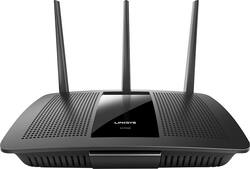
Linksys - AC1900 Dual-Band WiFi 5 Router
- Key Specs
- Wi-Fi Mesh System: false (A single wireless network consisting of a main router (connected directly to a modem) that connects to a series of satellite modules or nodes placed around the home. Routers with this capability promote stronger, faster wireless signals as well as increase Wi-Fi coverage by reducing interference and eliminating dead zones.)
- General
- Product Name: AC1900 Dual-Band WiFi 5 Router
- Brand: Linksys
- Model Number: EA7500
- Security
- Data Encryption: true
- Encryption Type: WEP, WPA2-Enterprise, WPA2-Personal (The security protocols or certification programs that protect the Wi-Fi network.)
- Firewall Type: None (The method the firewall uses to filter and process data to increase network security, primarily by blocking malicious traffic requests while allowing legitimate traffic through.)
- Parental Controls: true (Allows user to block unwanted content, signals, channels, networks, etc. from being received or accessed.)
- Network
- Band Technology: Tri (Refers to the number of frequency bands used to wirelessly transmit an internet signal. For example, dual-band devices may use one 2.4 and one 5 GHz band, while tri-band devices may use one 2.4 and two 5 GHz bands. Multiple bands also provide more flexibility for designating connected devices to specific band use.)
- Ethernet Standard: 10/100/1000 (Each standard is a variation of the IEEE 802.3 set of computer networking technologies known as Ethernet. New versions evolved to include higher bandwidth, different physical media, and other new and improved features. Standards are often denoted by speeds (in Megabits per second). For example, a 10/100/1000 Ethernet port transmits at 10 Mbps, 100 Mbps, and 1000 Mbps (1 Gbps).)
- Number Of Connected Devices: 12
- Number of Antennas: 3
- Frequency Band: 2.4 GHz, 5.0 GHz (Bands may be grouped into categories such as low- and high-band VHF (Very High Frequency), low- and high-band UHF (Ultra High Frequency), or certain frequency channels (measured in MHz or GHz). Generally, higher frequencies transmit information faster but have shorter range than lower frequencies.)
- Wireless Networking Standard: Wi-Fi 5 (The wireless networking standard used by the device. Each iteration of the standard developed by the Wi-Fi Alliance corresponds to an existing IEEE 802.11 protocol; for example, standard 802.11ac (or AC) is termed Wi-Fi 5. Refers specifically to the standard the device is designed to use, but ultimately determines product interoperability and backward compatibility including previous versions.)
- Wireless Standard: AC, N (The wireless networking protocol used by the device. Each iteration of the protocol is based on the 802.11 standard developed by the Institute of Electrical and Electronics Engineers (IEEE) Standards Association. Denoted by letters following 802.11 (802.11a, 802.11ac, etc.), each version, published in alphabetical order, encompasses all previous versions.)
- Number of 2.4Ghz Streams: 1 (A router's streams are like lanes on a highway. The more streams a router has, the less traffic congestion. Because the 2.4 GHz band is used to transmit wireless signals to a wide variety of devices, there is often high amounts of traffic on that stream. But with multiple streams, each can be designated to a specific device for optimal performance. For example, if one 2.4 GHz stream is assigned to one device, such as a desktop computer, it leaves the remaining streams open for guest users, devices that use more data, or devices with specific band compatibility.)
- Number of 5.0Ghz Streams: 1 (A router's streams are like lanes on a highway. The more streams a router has, the less traffic congestion. The 5.0 GHz band provides high speed, short-range data transmission and typically has less traffic than the 2.4 GHz band. With multiple streams, each can be designated to a specific device for optimal performance. For example, if one 5.0 GHz stream is assigned to one device, such as a streaming media player, it leaves the remaining streams open for guest users, devices that need less data, or devices with specific band compatibility.)
- Wi-Fi Mesh System: false (A single wireless network consisting of a main router (connected directly to a modem) that connects to a series of satellite modules or nodes placed around the home. Routers with this capability promote stronger, faster wireless signals as well as increase Wi-Fi coverage by reducing interference and eliminating dead zones.)
- Ethernet Switch: true (Connects multiple devices to expand the Local Area Network (LAN).)
- Certifications Listings & Approvals
- ENERGY STAR Certified: false (Devices carrying the ENERGY STAR service mark, such as computer products and peripherals, kitchen appliances, and other products, generally use 20% to 30% less energy than required by federal standards.)
- Features
- Wireless: true
- Ports
- Number Of WAN Ports: 1 (Number of devices able to be connected to the Wide Area Network (WAN). This type of port may simply be labeled "Internet," and it allows the device to share its internet connection with all devices connected to it via LAN ports.)
- Port Type(s): RJ-45, USB (USB 2.0 connects external drives, gaming controllers, smartphones, MP3 players and other accessories.USB 3.0 transfers data faster than USB 2.0, but only when used with USB 3.0 devices.USB Type-C provides fast speeds and versatile power, featuring connectors with identical ends that plug in upside down or right side up. Adapters allow for video as well as backward compatibility.Thunderbolt provides ultra-high bandwidth for fast data transfer between devices featuring a Thunderbolt or MiniDisplayPort connection.HDMI allows you to connect a projector or display HD media on your HDTV or monitor.Media card slots allow you to transfer photos from your digital camera or camcorder.)
- Speed
- Gigabit Ethernet Speed: true (Supports the gigabit Ethernet networking standard, which has a data rate of at least one gigabit per second, or 1,000 Mbps.)
- Compatibility
- System Requirements: Internet Explorer® versions 8 and newer; Safari® 5 (for Mac ®); Firefox® 8; Google Chrome™ (The software that a product must have for it to be able to integrate with another product.)
- Dimensions
- Product Height: 2.2 inches (The out of box height of the item. Height is measured as the vertical distance from the bottom of the item to the top as it would be primarily used or placed.)
- Product Length: 7.24 inches (The out of box length of the item. Length is measured as the longest dimension of the item.)
- Product Width: 10.12 inches (The out of box width of the item. Width is measured as the horizontal distance from one side of the item to the other as it would be primarily used or placed.)
- Product Weight: 20.74 pounds (The out of box weight of the item.)
- Warranty
- Manufacturer's Warranty - Parts: 1 year
- Manufacturer's Warranty - Labor: 1 year
- Other
- UPC: 745883704262
Your household wants to play, stream and work online all at once. With this Linksys router, you can do it all without buffering or other interruptions. Use the Smart Wi-Fi app to get started, control, and monitor your home network from anywhere.
- Next-Gen AC Wi-Fi: Enjoy online entertainment and complete home office tasks with data speeds of up to 1900 Mbps and a dual-band 2.4GHz/5.0GHz frequency.
- MU-MIMO technology: Work and play online simultaneously. You won’t have to worry about slowdown or interference, even when multiple devices are in use.
- Beamforming technology: Get clearer coverage. Targeted Wi-Fi signals will stream directly to each device.
- 3 detachable antennas: Expand your home network’s range. You’ll enjoy superior Wi-Fi coverage throughout a medium-sized house.
- Smart Wi-Fi app: Monitor and manage your Wi-Fi network from anywhere, using your smartphone or tablet. Create a guest network, set up parental controls, and prioritize devices that need more speed.
- Built-in Ethernet and USB connections: Connect computers, hard drives, printers, and more wired devices with 4 Gigabit LAN ports, 1 Gigabit WAN port, and 2 USB ports.
- WPA2-personal and WPA2-enterprise security: With 64/128-bit WEP encryption to keep your information protected.
- System requirements: Internet Explorer versions 8 and newer, Safari 5 (for Mac), Firefox 8, or Google Chrome.
Whats Included
- 3 Antennas
- CD-ROM with Documentation Quick Start Guide
- Ethernet Cable
- Linksys AC1900 Dual-Band WiFi 5 Router
- Power Adapter
Q: is this router easy to set up??
A: Yes set up was a breeze. I work in networking and it only took 5 minutes to set it up with all of the advanced features. You just plug in the router and open a webpage type in the ip address and it basically gives you a step by step walk through.
Q: Is this router a good choice for a large house (5,000 sq ft)?
A: My home is 3k square feet and no issues have been noted. What I'd recommend if you do find some dead spots is to purchase a wall wifi outlet extender. All you do is plug it into an electrical outlet , sync it with your main router via online guidance and whenever you're in that dead spot room you allow for your devices to automatically connect to it for continued wifi connection. It's a one time deal as your devices will remember wifi connections after you connect to them once..
Q: Is a Linksys EA 6400 router ok with a modem or should I buy a Xfinity TG862g router?
A: Personally, I bought a modem under $100. You will make your money if you plan on having internet more than 10 months. There are nice modems for $75-$100 that may even be better than what Xfinity offers. This is of course a personal choice but I don't like renting things like these when I can just own it and get more out of it. Your EA6400 should work well with a new modem. You will need to call Xfinity to set up your own modem but that should be an easy process. Hope this helps!
Q: Can this router provide signal to a Samsung Smart TV?
A: Yes it should be able to provide a signal to any smart tv. I use mine for my LG smart TV and it works great.
Q: Does this router support more than 12 devices connected to wifi at a time?
A: Hi. Yes, the router can support more than 12 wireless devices.
Q: Does this router really weigh 20 lbs?
A: Most definitely not, it seems to weigh less than or equal to a pound (if I had to guess)
A: Hi, Sheaux. The Linksys EA7500 Smart Wi-Fi router should work with your ISP but, it should be connected to a modem or modem/router (gateway) via Ethernet cable.
Q: Is this router compatible with AT&T internet?
A: Hi. Yes, as long as you already have a modem from your internet provider.



















