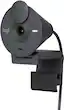
Logitech - Brio 300 1920x1080p USB-C Webcam with Privacy Shutter - Graphite
Logitech - Brio 300 1920x1080p USB-C Webcam with Privacy Shutter - Graphite
More Buying Options
Related Item

Specifications
- Video ResolutionFull HD (1080p)
- Key Specs
- Video Resolution: Full HD (1080p) (Refers to the number of pixels, both horizontally and vertically, used to capture the video. The higher the resolution the finer the video detail that can be seen.)
- General
- Brand: Logitech
- Model Number: 960-001497
- Product Name: Brio 300 1920x1080p USB-C Webcam with Privacy Shutter
- Color: Graphite
- Camera
- Video Resolution: Full HD (1080p) (Refers to the number of pixels, both horizontally and vertically, used to capture the video. The higher the resolution the finer the video detail that can be seen.)
- Maximum Video Frame Rate: 1080p (Full HD) @ 30 FPS (The maximum frequency at which consecutive images can be captured by a video recording device.)
- Megapixels: 2 megapixels (Measures the amount of graphic resolution that the product can capture.)
- Image Resolution (Display): 1920 x 1080 (Refers to the number of pixels, both horizontally and vertically, used to either capture an image or display it. The higher the resolution the finer the image details.)
- Autofocus: false (Allows the camera to automatically focus through the lens, rather than by adjusting the lens manually.)
- Field of View (Diagonal): 70 degrees
- Digital Zoom: 1x (A digital zoom is accomplished electronically, with no adjustment of the camera's optics, and no optical resolution gained in the process. The existing data is not enhanced or added to, merely displayed at a lower resolution, thereby giving an illusion of an enlarged image.)
- Features
- Integrated Microphone: true
- Mount Type: Clip-on
- Privacy Shutter: true
- Plug And Play Operation: true (The product can work when first used or connected, without reconfiguration or adjustment by the user.)
- 360 Degrees Rotation: false (The product is capable of turning freely about an axis, incorporating horizontal points of view covering 360 degrees.)
- Connectivity
- System Requirements: Required: Available USB-C port. Compatible with Windows 10 or later, macOS 10.15 or later, Chrome OS (The software that a product must have for it to be able to integrate with another product.)
- Connectivity: USB-C
- Cable Length: 5 feet
- Dimensions
- Product Height: 2.58 inches (The out of box height of the item. Height is measured as the vertical distance from the bottom of the item to the top as it would be primarily used or placed.)
- Product Width: 2.09 inches (The out of box width of the item. Width is measured as the horizontal distance from one side of the item to the other as it would be primarily used or placed.)
- Product Depth: 1.78 inches (The out of box depth of the item. Depth is measured as the distance from the front of the item to the back as it would be primarily used or placed.)
- Product Weight: 0.17 pounds (The out of box weight of the item.)
- Warranty
- Warranty - Parts: 1 year
- Warranty - Labor: None
- Other
- UPC: 097855181053
Say hello to better video meetings. Place Brio 300 at your best angle for an eye-to-eye connection. Look natural thanks to 1080p resolution and auto light correction for low-light situations. A noise-reducing mic suppresses background noise so others can hear you clearly. Spin the easy-to-use privacy shutter to cover the lens between calls. Brio 300 is certified for Microsoft Teams, Google Meet, and Zoom, so you can enjoy hassle-free meetings.
- Be your best self on every video call: Full HD 1080p webcam resolution provides natural image quality, so you look like the real you on all meeting apps.
- Auto light correction: RightLight 2 technology automatically compensates for poor video lighting conditions so you can be seen clearly.
- Sound like you: The mono noise reduction mic suppresses background sound so everyone on the call can hear you easily.
- Spin for instant privacy: Spin the webcam privacy shutter to block the camera lens when you don’t need to be on screen.
- Made for meetings: Brio Webcam 300 is compatible with most video conferencing platforms and certified for Zoom, Microsoft Teams and Google Meet.
- Logi Tune: Enjoy the free app to customize your video experiences such as adjusting color and image quality.
- More sustainable: Brio 300 is made with 62% post-consumer recycled plastic for a better future.**
Whats Included
- Brio 300 with attached USB-C cable
- User documentation
Q: What type of connection does this webcam use?
A: The Logitech Brio 300 webcam connects via a USB-C port.
Q: What is the video resolution of this webcam?
A: The Logitech Brio 300 webcam has a Full HD 1080p video resolution.
Q: Does this webcam have a built-in microphone?
A: Yes, the Logitech Brio 300 has an integrated noise-reducing microphone.
Q: Is this webcam compatible with popular video conferencing platforms?
A: The Brio 300 is compatible with most video conferencing platforms and is certified for use with Zoom, Microsoft Teams, and Google Meet.
Q: How does the Logitech Brio 300 handle low-light conditions?
A: This webcam uses RightLight 2 technology to automatically adjust for poor lighting, ensuring you're clearly visible.
Q: Can this webcam be used with a Chromebook?
A: While the webcam is compatible with Chrome OS, the Logi Tune software is not available for Chromebooks.
Q: Can I turn off the microphone and still record/stream/go live?
A: Hey! Yes, the Logitech - Brio 300 webcam does have a built-in microphone. The microphone can be disabled while still recording or streaming. You can typically control the microphone through the software you are using to record or stream.
A: The Logitech Brio 300 webcam cannot rotate a full 90° downward; it has a limited tilt range, so it won’t point straight down from a tripod mount.
Compare similar products

Say hello to better video meetings. Place Brio 300 at your best angle for an eye-to-eye connection. Look natural thanks to 1080p resolution and auto light correction for low-light situations. A noise-reducing mic suppresses background noise so others can hear you clearly. Spin the easy-to-use privacy shutter to cover the lens between calls. Brio 300 is certified for Microsoft Teams, Google Meet, and Zoom, so you can enjoy hassle-free meetings.

Logitech C920s is a budget-friendly, work-from-anywhere webcam that delivers a professional video meeting experience. It includes features designed to make you look and sound great in your next meeting. A 78º diagonal field of view perfectly frames you and your space, while autofocus adjusts smoothly and precisely. RightLight 2 technology automatically adjusts to your lighting situation even in low-light or backlit conditions. And dual integrated mics accurately capture your voice from multiple angles for greater nuance. If you’re streaming or recording, use Logitech’s Capture app to edit and customize. Flip down the lens cover at any point to protect your privacy.

Logitech Pro Webcam Ultra Wide Angle brings pro-quality HD video and stereo audio to desktop video meetings, live feeds, webinars and more. Enjoy the widest field of view (90-degrees) in a business webcam, ultra-clear HD 1080p video and smoother video via in-camera H.264/SVC UVC 1.5 encoding. Pro Webcam delivers the most professional desktop video collaboration experience yet.

Brio 4K is an advanced webcam that helps you meet like a pro in every video call. Stream crystal-clear video up to 4K with beautiful colors and RightLight 3 auto light correction, or get up to 90 fps high frame rates at 720p. Also features autofocus, adjustable field of view, and 5x digital zoom. Brio 4K is certified for Zoom, and Google Meet, enables fast and secure facial recognition for Windows Hello, and is compatible with other popular applications. Low-carbon aluminum for camera housing and a minimum 38% post-consumer recycled plastic in the plastic components makes Brio 4K a choice you’ll feel good about.
| Pros for Logitech - Brio 300 1920x1080p USB-C Webcam with Privacy Shutter - Graphite | |||
|---|---|---|---|
| Image Quality, Setup, Ease of Use, Privacy Shutter, Connectivity | Video Quality, Overall Performance, Setup, Ease of Use, Privacy Feature | Video Quality, Overall Performance, Ease of Use, Setup, Field of View | Image Quality, Ease of Use, Setup, Field of View |
| Cons for Logitech - Brio 300 1920x1080p USB-C Webcam with Privacy Shutter - Graphite | |||
| Mounting Options | Focus, Compatibility, Cable Length, Autofocus, Field of View | Compatibility, Cable Length, Color Accuracy, Lighting, Rotation | Compatibility, Focus, Connectivity, Software, Price |
Specs
Reviews
Top Mentions
- Image Quality (57)
- Setup (14)
- Privacy Shutter (12)
- Mounting Options (11)
Customer Images
The vast majority of our reviews come from verified purchases. Reviews from customers may include My Best Buy members, employees, and Tech Insider Network members (as tagged). Select reviewers may receive discounted products, promotional considerations or entries into drawings for honest, helpful reviews.
- Rated 5 out of 5 stars
Nice quality for the price
Purchased this camera to be able to do remote physician and therapy visits from home. Picture is clear, non-pixelated and great quality for the price. Would highly recommend for anyone looking for a moderately priced camera for home or remote office use. The only downside was that the monitor I have doesn't really have an anchor point so I did have to secure it in place with some "Command Strip" Velcro. There could be some improvements done in that area.
This review is from Logitech - Brio 300 1920x1080p USB-C Webcam with Privacy Shutter - Graphite
RichardL Posted
- Rated 5 out of 5 stars
Easily one of the best webcams!
Logitech Brio 300 Full HD webcam is easily one of the best webcams available in the market. It’s super easy to use and produces video of high quality. Here are some key features and reasons why it’s one of the best. Installation ------------- Installation process is very simple - just plug-and-play. Connect it to any of the USB-C port on your computer and it is good to go. Also, you can install Logi Tune app to customize video experience with color adjustments and image quality settings. Video Quality -------------- This is a 1080p 30 fps 2MP Full HD webcam and provides a clear and natural video image. Video at the other end is crisp and clear. One of its amazing feature is the Auto-light correction, which produces a relatively clear video even under poor lighting conditions. Mic Quality ------------ I am pleasantly surprised by the quality of its mic. It produces a clear and true sound and the people at the other end could hear me loud and clear. This is most useful when connecting to a PC that does not have an in-built mic. When used with a laptop with mic or with a headset with mic, this doesn’t impede. Features --------- This comes with a privacy shutter to block the camera when not in use. This is especially helpful when logging into meetings accidentally with video-on. Also, there is a LED indicator that glows when the webcam is in use. Use-case --------- One may wonder, I have a laptop with camera, then why a webcam? I always use my monitor as my main display. And laptop is angled to the side. During video calls it always seem I never face the camera. By connecting a webcam, I can look into the monitor and still face the camera straight. Also, for computers without camera, this is a must have. This doubles as a mic as well. Compatibility -------------- I have used this webcam with Google Meet, Microsoft teams and Zoom and had no issues on any of these applications. This works with Windows OS, Mac OS and Chrome OS. Connectivity ------------- The connector is a USB-C type rather than the regular USB. This may work to one’s benefit or vice-versa depending on the available ports on your computer. One of my laptops has 2 USB ports and 1 USB-C port whereas the other one has 1 USB and 2 USB-Cs. So, I use a USB Hub with USB-C port. USB to USB-C convertor also works to connect it to a USB port if needed. Conclusion ----------- Overall, I am quite happy and satisfied with this webcam and I have absolutely no hesitation to recommend it.
This review is from Logitech - Brio 300 1920x1080p USB-C Webcam with Privacy Shutter - Graphite
Kalai Posted
- Rated 4 out of 5 stars
Certainly an upgrade to any laptop webcam.
First, I commend Logitech for being environmentally conscious. While the camera’s funnel shape design and speckled color may not appeal to all, I’ve grown fond of it overtime. I found the design language is rather functional in many aspects but lacking in others. I certainly welcome the lid-based privacy cover which not all have. The mount is easy to place virtually anywhere on top of most screens, but unfortunately there is no tripod screw for alternate positioning. It’s also strange that the camera can only move up and down but not side to side, which makes one stay always in the center view. This camera has a USB-C only cable connection, and unfortunately does not come with a USB-A adapter, as some others include at this price range, so please keep that in mind when considering. Also, the 5ft cable might be a bit too short, and can barely reach my under-the-table tower from my 32” monitor. The picture quality is decent. It is certainly ten times better than most laptops. The 1080p/30Hz cam does a good job in showing clear pictures in a well-lit environment. There is only minimal noise in shadowy or black areas. There is only a slight ghosting effect when moving fast. Unfortunately, there is a lot of graininess in darker environments, so I strongly recommend using a forward-facing light or lamp. If you place the light on one side, it can make the entire picture look washed out. The cam has good viewing angles for showing more than one person. Another thing to note is that there is no auto-focus at all, so one must keep at least 4ft away to stay in focus. The single mono microphone is rather good. While it lacks a bit of body and bass, it does capture voices very well and clearly -even above 10 feet away from it. Unfortunately, it also captures a lot of ambient noise, so be careful when pounding on those keyboards. I recommend downloading the Logitech Logi Tune app for your Mac or Windows PC. There, you can easily manage some basic picture controls such as brightness and exposure, as well as adding filters. In the end, I think this is a budget-friendly upgrade to any basic laptop webcam and works well with all major online meeting platforms. However, if you are looking for a more professional result, such as in streaming or webcasting, perhaps looking into a higher end set up may be a better option.
This review is from Logitech - Brio 300 1920x1080p USB-C Webcam with Privacy Shutter - Graphite
insomniak1 Posted