Logitech - C930e Full HD 1080p Business Webcam - Black
FREE shipping to
More Buying Options

Specifications
- Video ResolutionFull HD (1080p)
- Key Specs
- Video Resolution: Full HD (1080p) (Refers to the number of pixels, both horizontally and vertically, used to capture the video. The higher the resolution the finer the video detail that can be seen.)
- General
- Brand: Logitech
- Model Number: 960-000971
- Product Name: C930e Full HD 1080p Business Webcam
- Color: Black
- Camera
- Video Resolution: Full HD (1080p) (Refers to the number of pixels, both horizontally and vertically, used to capture the video. The higher the resolution the finer the video detail that can be seen.)
- Maximum Video Frame Rate: 1080p (Full HD) @ 30 FPS (The maximum frequency at which consecutive images can be captured by a video recording device.)
- Megapixels: 3 megapixels (Measures the amount of graphic resolution that the product can capture.)
- Image Resolution (Display): 1920 x 1080 (Refers to the number of pixels, both horizontally and vertically, used to either capture an image or display it. The higher the resolution the finer the image details.)
- Autofocus: true (Allows the camera to automatically focus through the lens, rather than by adjusting the lens manually.)
- Field of View (Diagonal): 90 degrees
- Digital Zoom: 4x (A digital zoom is accomplished electronically, with no adjustment of the camera's optics, and no optical resolution gained in the process. The existing data is not enhanced or added to, merely displayed at a lower resolution, thereby giving an illusion of an enlarged image.)
- Features
- Integrated Microphone: true
- Microphone Pattern: Omnidirectional (Refers to how the device receives sound from different directions and captures it. Multi-directional patterns capture sound from multiple sources while a single direction pattern focuses on sound from a single source.)
- Noise Cancelling: true
- Mount Type: Clip-on
- Privacy Shutter: true
- Plug And Play Operation: true (The product can work when first used or connected, without reconfiguration or adjustment by the user.)
- 360 Degrees Rotation: false (The product is capable of turning freely about an axis, incorporating horizontal points of view covering 360 degrees.)
- Connectivity
- System Requirements: Windows 8 or later, macOS 10.7 or later, ChromeOS Version 29.0.1547.70 and higher. 2 GB RAM or more needed for 1080p video streaming, 1 GB is typically needed for streaming 720p. (The software that a product must have for it to be able to integrate with another product.)
- Connectivity: USB-A
- Cable Length: 5 feet
- Dimensions
- Product Height: 1.7 inches (The out of box height of the item. Height is measured as the vertical distance from the bottom of the item to the top as it would be primarily used or placed.)
- Product Width: 3.7 inches (The out of box width of the item. Width is measured as the horizontal distance from one side of the item to the other as it would be primarily used or placed.)
- Product Depth: 2.8 inches (The out of box depth of the item. Depth is measured as the distance from the front of the item to the back as it would be primarily used or placed.)
- Product Weight: 0.36 pounds (The out of box weight of the item.)
- Warranty
- Warranty - Parts: 3 year limited
- Warranty - Labor: None
- Other
- UPC: 097855095985
C930e is an advanced HD 1080p webcam certified for business that delivers high-resolution video in virtually any environment, including low-light and harshly backlit settings. H.264 video compression and a generously wide 90° field of view help make C930e the next best thing to being there in person.
- Delivers professional video-conferencing experience: HD 1080p/30 fps video enhanced by RightLight 2 and a high-precision lens deliver rich video quality along with the premium image sensor.
- Wide field of view with 4x zoom: With a generous 90° diagonal field of view, HD autofocus, pan, tilt, and 4x HD zoom, C930e frames you and your workspace perfectly with the highest level of detail.
- Noise-cancelling dual mics: Features dual integrated omnidirectional mics that capture audio clearly from up to one meter away so conversations always sound natural and clear.
- High quality, low bandwidth: Supports H.264 with Scalable Video Coding (SVC) and UVC 1.5 encoding to minimize dependence on computer and network resources to produce remarkably clear video at all times.
- Take control with Logi Tune app: The Logi Tune Desktop app simplifies personal device control with zoom in/out, color presets, color adjustments, set manual focus, and easy firmware updates.
- Certified for Business: Certified for Skype for Business and Microsoft Teams. Certifications and compatibility with other popular applications include Google Meet, Zoom and more.
- Versatile mounting options: Securely mount C930e wherever it works best—laptop, display or tabletop—with the adjustable clip or affix to your own tripod with the integrated thread.
- Attachable privacy shade: A flippable lens shade is included with C930e to protect the lens and assure privacy and peace of mind when the webcam is not in use.
Whats Included
- Camera with attached 5 ft (1.5 m) USB-A cable
- Attachable privacy shutter
- User documentation
Q: Can I use this webcam with a tripod?
A: Yes, you can attach this webcam to a tripod using the integrated thread.
Q: Does this webcam have a built-in microphone?
A: Yes, this webcam has an integrated microphone.
Q: How long is the cable for this webcam?
A: The cable for this webcam is 5 feet long.
Q: What is the maximum video frame rate of the webcam?
A: The maximum video frame rate is 1080p (Full HD) at 30 frames per second.
Q: Does this webcam have autofocus?
A: Yes, this webcam has an autofocus feature.
Q: What is the field of view for this webcam?
A: This webcam has a 90-degree diagonal field of view.
Q: CAN THIS WORK WITH A SAMSUNG SMART TV - SO I CAN DO ZOOM CALLS USING MY TV AS A MONITOR/CAMERA
A: No, the Logitech C930e webcam will not work with a Samsung Smart TV. The required OS version are as follows - Windows 8 or later - macOS 10.7 or later - ChromeOS Version 29.0.1547.70 and higher - 2 GB RAM or more needed for 1080p video streaming - 1 GB is typically needed for streaming 720p - USB-A port - Compatible with Microsoft DirectShow - Works with popular calling platforms - All UVC apps - H.264 for Skype for Business
Q: can this attach to a hp desktop and does it have a usb port connection
A: Yes. I have a HP desktop. Didn't need to buy a cable or anything additional.
Compare similar products
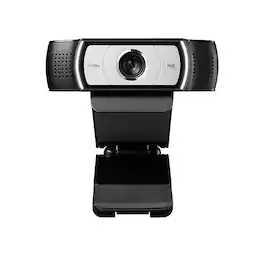
C930e is an advanced HD 1080p webcam certified for business that delivers high-resolution video in virtually any environment, including low-light and harshly backlit settings. H.264 video compression and a generously wide 90° field of view help make C930e the next best thing to being there in person.

Logitech C920s is a budget-friendly, work-from-anywhere webcam that delivers a professional video meeting experience. It includes features designed to make you look and sound great in your next meeting. A 78º diagonal field of view perfectly frames you and your space, while autofocus adjusts smoothly and precisely. RightLight 2 technology automatically adjusts to your lighting situation even in low-light or backlit conditions. And dual integrated mics accurately capture your voice from multiple angles for greater nuance. If you’re streaming or recording, use Logitech’s Capture app to edit and customize. Flip down the lens cover at any point to protect your privacy.

Logitech Pro Webcam Ultra Wide Angle brings pro-quality HD video and stereo audio to desktop video meetings, live feeds, webinars and more. Enjoy the widest field of view (90-degrees) in a business webcam, ultra-clear HD 1080p video and smoother video via in-camera H.264/SVC UVC 1.5 encoding. Pro Webcam delivers the most professional desktop video collaboration experience yet.

Live stream with outstanding clarity with the Logitech C922 webcam, designed and built for streamers who take their game seriously. With a choice of 30 fps at 1080p or the hyperfast 60 fps at 720p, you can record or go live with vibrant, true-to-life video on channels like Twitch and YouTube. Broadcast masterfully with reliable no-drop audio, autofocus, and a 78° diagonal field of view. Two omni-directional microphones accurately capture your voice from multiple angles for greater nuance. Go pro with features for XSplit, or customize your stream with Logitech Capture.
| Pros for Logitech - C930e Full HD 1080p Business Webcam - Black | |||
|---|---|---|---|
| There were no pros for this product— | Video Quality, Overall Performance, Ease of Use, Setup, Privacy Feature | Video Quality, Overall Performance, Ease of Use, Setup, Field of View | Overall Performance, Video Quality, Ease of Use, Setup, Resolution |
| Cons for Logitech - C930e Full HD 1080p Business Webcam - Black | |||
| There were no cons for this product— | Focus, Autofocus, Cable Length, Compatibility, Field of View | Compatibility, Cable Length, Lighting, Color Accuracy, Rotation | Compatibility, Focus, Autofocus, Software, Frame Rate |
Specs
Reviews
Customer Images
The vast majority of our reviews come from verified purchases. Reviews from customers may include My Best Buy members, employees, and Tech Insider Network members (as tagged). Select reviewers may receive discounted products, promotional considerations or entries into drawings for honest, helpful reviews.
- Rated 5 out of 5 stars
Great quality and easy setup
Very easy to set up. Literally just plug it in and (if needed) go to the Windows Control Panel to set it as your default camera and mic. It literally took me as long to get it out of the box and shipping materials as it did to get it running on my computer. Solid video quality. Solid mic audio. It does exactly what I needed for work Zoom calls.
This review is from Logitech - C930e Full HD 1080p Business Webcam - Black
Posted by GNDLewis
- Rated 5 out of 5 stars
Perfect Webcam for Work and Streaming
I recently upgraded to this Logitech webcam, and I couldn’t be happier with the quality! The video is crisp and clear, even in low lighting, and the autofocus works seamlessly. The built-in microphone is surprisingly good, picking up my voice clearly without too much background noise. Setup was effortless—just plug and play! Whether for work meetings, virtual hangouts, or streaming, this webcam delivers professional-quality results. Definitely worth every penny! Highly recommend.
This review is from Logitech - C930e Full HD 1080p Business Webcam - Black
Posted by ZanR
- Rated 5 out of 5 stars
Great webcam for lots of video calls.
To give you an idea, I spend between 1.5 and 4 hours a day on video calls. This is a great widescreen webcam - fantastic resolution (enough that I have to turn on zoom for the sake of coworkers) and it does well. I bought a separate stand and sat it between my dual curved monitors and it works perfectly. I've used it with OBS to record how-to's and it performs admirable in different lighting conditions.
This review is from Logitech - C930e Full HD 1080p Business Webcam - Black
Posted by JohnA