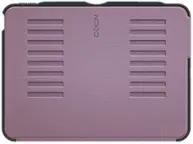
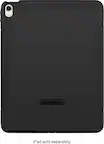
Logitech - Combo Touch iPad Air 13-inch - Latest Model (M2 & M3), iPad Air (5th gen) Keyboard Case with Detachable Keyboard - Oxford Gray
Color
Oxford Gray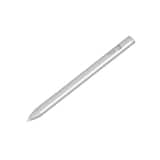 Logitech - Crayon Digital Pencil for All Apple iPads (2018 releases and later) with USB-C ports - Silver$56.99$69.99
More Buying Options
Related Item

About This Item
- Key Specs
- Model Compatibility: Apple iPad Air (M3) 13" 2025, Apple iPad Air (M2) 13" 2024
- Operating System Compatibility: Apple iPadOS
- General
- Brand: Logitech
- Model Number: 920-012608
- Product Name: Combo Touch iPad Air 13-inch - Latest Model (M2 & M3), iPad Air (5th gen) Keyboard Case with Detachable Keyboard
- Color: Oxford Gray
- Compatibility
- Brand Compatibility: Apple
- Model Compatibility: Apple iPad Air (M3) 13" 2025, Apple iPad Air (M2) 13" 2024
- Operating System Compatibility: Apple iPadOS
- Connectivity
- Wireless: true
- Features
- Plug and Play Operation: false
- Touchpad: true
- Adjustable Tilt: true
- Included
- Number Of Keys: 92
- Palm Rest Included: false (null)
- Dimensions
- Product Height: 0.59 inches (The out of box height of the item. Height is measured as the vertical distance from the bottom of the item to the top as it would be primarily used or placed.)
- Product Width: 11.22 inches (The out of box width of the item. Width is measured as the horizontal distance from one side of the item to the other as it would be primarily used or placed.)
- Product Depth: 8.89 inches (The out of box depth of the item. Depth is measured as the distance from the front of the item to the back as it would be primarily used or placed.)
- Product Weight: 24.19 ounces (The out of box weight of the item.)
- Warranty
- Warranty - Parts: 1 year
- Warranty - Labor: None
- Other
- UPC: 097855195210
Type, sketch, view and read with the Combo Touch keyboard case. A flexible kickstand and a full-size, detachable keyboard give you multiple use modes for any task. Take iPad further with a bigger trackpad that gives you superior, intuitive tracking experience with familiar Multi-Touch gesture controls.
- Compatibility: iPad Air 13-inch (M2 & M3)(2024 & 2025) - A2898, A2899, A2900
- Use-your-way Modes: Multiple use modes and infinite possibilities; switch it up to type, sketch, watch videos, read, or hop on a video call without removing your iPad Air from the keyboard case.
- Flexible kickstand, Detachable Keyboard: Find your perfect angle for the task at hand with the ultra-flexible kickstand; detach the keyboard to sketch, watch or read with total freedom.
- Large Multi-Touch trackpad: It’s the biggest trackpad yet, giving you that intuitive tracking experience; familiar Multi-Touch gesture controls let you swipe, pinch, double-tap, and more.
- Secure, form-fit protection: The uniquely sturdy, yet lightweight iPad keyboard case keeps your iPad safe from scuffs and scratches, so you can take it anywhere with total peace of mind
- Type away, day or night: The adjustable wireless backlit keyboard glows elegantly with precise lighting, so your mood-lit work sessions are even more enjoyable than ever.
- Smart Connector: Seamless, instant, secure connectivity on your Combo Touch iPad Pro keyboard case with no charging required—it’s powered by your iPad.
- More sustainable: Plastic parts in Combo Touch include certified post-consumer recycled plastic (Oxford Grey: 24%)*.
Whats Included
- Combo Touch Keyboard Case
Disclaimers
- *Excludes electronic (EE) components, cables and packaging. This percentage only applies to Oxford Gray model.
Q: Does it hold the pencil as well, in the case?
A: No it does not
Q: What is the battery life of iPad Air 13” keyboard case
A: The Logitech Combo Touch for iPad Air 13-inch (M2 chip) Keyboard Case doesn't have a separate battery. It draws power directly from the iPad's battery. Therefore, its battery life is directly tied to the iPad's battery life.
A: Hey! This model does not need any software to control the app. To get that issue resolved, we recommend reaching out to our social care team via email at [email protected] with your - Name: - Email Address: - Country: - Product Name: - Brief description of issue:
A: its just the case
Q: does the combo touchpad also have any unput connectors for a mouse? Paul Wilson
A: Yes it does have the connectors for a mouse-WiFi
Q: What is the material on the exterior of the case? Is it textile?
A: Plastic no textile surface
Reviews
Customers are saying
Customers have good things to say about the Combo Touch iPad Air keyboard case, particularly praising the keyboard quality, protective case, and ease of use. The kickstand is also appreciated for its flexibility, and the snug fit of the case is a plus. Some customers mention the product is a good value. However, a few customers noted that the case adds some weight to the iPad.
Customer Images
The vast majority of our reviews come from verified purchases. Reviews from customers may include My Best Buy members, employees, and Tech Insider Network members (as tagged). Select reviewers may receive discounted products, promotional considerations or entries into drawings for honest, helpful reviews.



Compare similar products

Type, sketch, view and read with the Combo Touch keyboard case. A flexible kickstand and a full-size, detachable keyboard give you multiple use modes for any task. Take iPad further with a bigger trackpad that gives you superior, intuitive tracking experience with familiar Multi-Touch gesture controls.

Magic Keyboard is the perfect companion for iPad Air. It delivers an amazing typing experience and a trackpad for precision tasks in a sleek, portable design. The keyboard includes a 14‑key function row, a USB‑C connector for pass‑through charging, and front and back protection for your iPad. The floating cantilever design smoothly adjusts to multiple viewing angles and a large glass trackpad expands how you can work with iPadOS.

Balance Folio is a slim and chic tablet case. Providing superior durability and protection, an interior liner helps protect your screen against scuffs and abrasions on your tablet, while the outer shell shields against bumps and dents when dropped up to 4 feet. A secure latch closure also keeps everything in place for peace of mind in the event of a fall.

Flip into joy with Flip Folio, the iPad case featuring a stowable keyboard and front and back protection. You can type anywhere, any way you like—or stash the keyboard away and just relax. Find the right angle with adjustable viewing angles, plus portrait and landscape modes for iPad. Dock your iPhone, or connect to your TV for even more options. Now available for iPad Pro and iPad Air.
| Pros for Logitech - Combo Touch iPad Air 13-inch - Latest Model (M2 & M3), iPad Air (5th gen) Keyboard Case with Detachable Keyboard - Oxford Gray | |||
|---|---|---|---|
| Fit, Keyboard Quality, Case Protection, Ease of use, Kickstand | Ease of Use, Overall Performance, Connectivity, Design, Attachment | Protection, Fit, Weight, Stand, Screen Angle | Protection, Build Quality, Keyboard Design, Portability, Battery Life |
| Cons for Logitech - Combo Touch iPad Air 13-inch - Latest Model (M2 & M3), iPad Air (5th gen) Keyboard Case with Detachable Keyboard - Oxford Gray | |||
| Weight | Backlit Keys | Build Quality | Weight, Magnet Strength |