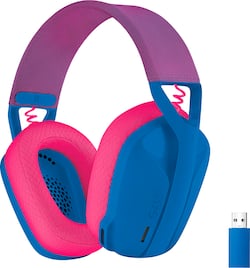
Logitech - G435 Wireless Dolby Atmos Over-the-Ear Gaming Headset for PC, PS4, PS5, Nintendo Switch, Mobile with Built-in Mic - Blue
- Key Specs
- Noise Cancelling (Active): false
- Sound Mode: Dolby Atmos
- Connection Type: Wireless
- Wireless Connectivity: Bluetooth, Radio Frequency (RF) (The manner in which a device sends data to another device over a short distance without the use of wires or cables.)
- True Wireless: false (These headphones not only lack wires between the device and headphones, they also lack wires between the headphones themselves. (true wireless is really only possible with in-ear headphones))
- Maximum Wireless Range: 33 feet
- Water Resistant: false (Resists some degree of water penetration.)
- Built-In Microphone: true
- Carrying Case: false
- Microphone Features: Fixed
- Headphone Fit: Over-the-Ear
- Adjustable Headband: true
- Battery Life: 18 hours (Battery life will vary depending on the product configuration, product model, applications loaded on the product, power management setting of the product and the product features used by the customer. As with all batteries, the maximum capacity of this battery will decrease with time and usage.)
- Compatible Platform(s): Windows, Mac, PlayStation 5, PlayStation 4, Nintendo Switch
- Voice Assistant Built-in: No (A digital assistant built into the device that uses voice commands to answer questions and control smart devices.)
- General
- Product Name: G435 Wireless Dolby Atmos Over-the-Ear Gaming Headset for PC, PS4, PS5, Nintendo Switch, Mobile with Built-in Mic
- Brand: Logitech
- Model Number: 981-001061
- Color: Blue
- Audio
- Noise Cancelling (Active): false
- Sound Isolating: false
- Minimum Frequency Response: 20 hertz (Describes the maximum range of frequencies or musical tones a product can reproduce, from very low tones to very high treble tones. The minimum frequency or musical tone the speaker can reproduce. High treble tones have higher frequencies while low tones and deep bass have lower frequencies.)
- Maximum Frequency Response: 20 kilohertz (Describes the maximum range of frequencies or musical tones a product can reproduce, from very low tones to very high treble tones. The maximum frequency or musical tone the speaker can reproduce. High treble tones have higher frequencies while low tones and deep bass have lower frequencies.)
- Impedance: 45 ohms (Describes the resistance of an electric signal throughout the system. Devices with low impedance require less power to deliver optimal signals but are more at risk for damage from overloading. Higher impedance requires more power but is more protected from overload damage.)
- Sensitivity: 83.1 decibels adjusted
- Volume Limiting Function: true
- Sound Mode: Dolby Atmos
- Driver Size: 40 millimeters
- Connectivity
- Connection Type: Wireless
- Wireless Connectivity: Bluetooth, Radio Frequency (RF) (The manner in which a device sends data to another device over a short distance without the use of wires or cables.)
- True Wireless: false (These headphones not only lack wires between the device and headphones, they also lack wires between the headphones themselves. (true wireless is really only possible with in-ear headphones))
- Maximum Wireless Range: 33 feet
- Features
- Water Resistant: false (Resists some degree of water penetration.)
- Waterproof: false (Designed or treated to be impervious to water in certain situations. Products are tested under controlled laboratory conditions and then assigned an Ingress Protection (IP) rating to denote the degree of protection from water ingress. The level of protection may decrease over time with natural wear of the product.)
- Built-In Microphone: true
- Carrying Case: false
- Microphone Features: Fixed
- Controls: Volume, Mute
- Lighting Type: None
- Design
- Headphone Fit: Over-the-Ear
- Style: Gaming
- Adjustable Headband: true
- Foldable Design: false
- Power
- Rechargeable: true
- Battery Life: 18 hours (Battery life will vary depending on the product configuration, product model, applications loaded on the product, power management setting of the product and the product features used by the customer. As with all batteries, the maximum capacity of this battery will decrease with time and usage.)
- Charging Accessory Included: Cable
- Charging Interface(s): USB-C (The connection for transmitting power to charge the device.)
- Compatibility
- Compatible Platform(s): Windows, Mac, PlayStation 5, PlayStation 4, Nintendo Switch
- Voice Assistant Built-in: No (A digital assistant built into the device that uses voice commands to answer questions and control smart devices.)
- Material
- Ear Cushion Material: memory foam
- Headband Material: Plastic
- Warranty
- Manufacturer's Warranty - Parts: 2 Years
- Manufacturer's Warranty - Labor: None
- Other
- UPC: 097855168221
Play doesn’t end when the game does. You play games, play music, and play with friends. It’s who you are. All the time. That’s why we designed the G435 Headset for every aspect of your life. The combo of gaming-grade LIGHTSPEED wireless and Bluetooth give you the freedom to wirelessly connect to your PC, phone and other devices. Its 40 mm drivers deliver incredible sound while the dual beamforming mics eliminate the mic arm and background noise. Play never ends with G435.
- Immersive sound: This cool and colorful headset delivers carefully balanced, high-fidelity audio with 40 mm drivers; compatibility with Dolby Atmos, Tempest 3D AudioTech and Windows Sonic for a true surround sound experience.
- Long battery life: No need to stop the game to recharge thanks to G435's up to 18 hours of battery life, allowing you to keep playing, talking to friends, and listening to music all day.
- Superior voice quality: Be heard loud and clear thanks to the built-in dual beamforming microphones that eliminate the need for a mic arm and reduce background noise.
- Versatile: Logitech G435 is the first headset with LIGHTSPEED wireless and low latency Bluetooth connectivity, providing more freedom of play on PC, smartphones, PlayStation and Nintendo Switch gaming devices.
- Lightweight design: With a lightweight construction, this wireless gaming headset weighs only 5.8 oz (165 g), making it comfortable to wear all day long.
- Total comfort: G435 small gaming headset fits a wide range of people but is designed for younger players with memory foam ear cushions and sizing for smaller head sizes.
- Safer: An optional max volume limiter at less than 85 decibels can be activated to protect eardrums during extended use.
- More sustainable: The plastic parts are made from a minimum 22% post-consumer recycled plastic. Uses FSC -certified paper for responsible packaging. Certified carbon neutral: the carbon impact of the product and packaging has been reduced to zero.*
Whats Included
- G435 Headset
- LIGHTSPEED Wireless USB-A receiver
- USB-C to USB-A charging cable
- User Documentation
Q: Is it comfortable for glasses users?
A: Hi, the G435 is a great choice to use if you wear glasses! The headset is super lightweight and comfortable at 165 grams. The ear cups use a memory foam like material that not only keeps your ears from sweating, but also helps with blocking outside noise. -N from Logitech
Q: Is this wireless headset mic comparable with Nintendo switch
A: No. I purchased and then returned for that very reason. The microphone is not compatible.
Q: Does this product will connect with a smart TV thru one of the USB ports and the Lightspeed adapter?
A: Hello! Unfortunately, most TVs' USB ports are meant for file transfer (photos, videos, etc) not for audio. Your smart TV should have Bluetooth so I would recommend using the Bluetooth feature on the G435 headset.
A: Hello! Unfortunately, the G435 is not compatible with Xbox. - Maggie from Logitech G
A: Hello, Sandra! Make sure that your G435 is in Bluetooth mode by either making sure that the light that's flashing is dark blue or holding down the mute microphone button for about 4 seconds. Next, if the light is dark blue and not cyan, you'll want to hold the mute and power buttons for about 3 seconds until the light starts rapidly flashing. Then you will want to go into your Bluetooth settings on your phone to find and pair the device. If you have already done this, I would then recommend plugging your headset into a computer and checking if there is a software update. Here is the link to the update tool https://support.logi.com/hc/en-us/articles/4407898529687-Download-G435-Gaming-Headset. After you have updated your headset, try these steps again. If you are still having issues, please contact our support team here https://support.logi.com/hc/en-us/requests/new?ticket_form_id=360000621393 so they can further assist you. - Maggie from Logitech G
A: i have the same issue sometimes you have to press and hold the mic button and that usually fixes it for me. Also make sure itnis charged
A: The battery will drain. Something I figured out pretty quickly because it seemed to be dead whenever I put it on.
A: yes that is normal behavior.. you cant use both simultaneously. if you plug in the dongle, it expects lightspeed.


















