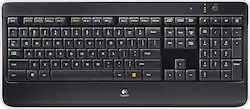
Logitech - K800 Full-size Wireless Illuminated Keyboard - Black
- Key Specs
- Lighting Type: Single color
- Form Factor: Full-size (The size, arrangement, and physical configuration of the product.)
- Keyboard Technology: Membrane (Type of technology that detects a key press.)
- Connection Type: Wireless
- General
- Product Name: K800 Full-size Wireless Illuminated Keyboard
- Brand: Logitech
- Model Number: 920-002359
- Color: Black
- Features
- Lighting Type: Single color
- Numeric Keypad: true
- Touchpad: false
- Keyboard Type: Programmable
- Palm Rest: true
- Spill Resistant: false (Designed to resist some degree of accidental liquid spill. The level of spill-resistance is indicated by the product manufacturer, but the degree of protection may not be guaranteed after normal wear of the product.)
- Keyboard Features: Illuminated, ultra-thin keyboard
- Foldable: false
- Functions
- Form Factor: Full-size (The size, arrangement, and physical configuration of the product.)
- Number Of Keys: 107
- Keyboard Technology: Membrane (Type of technology that detects a key press.)
- Dedicated Macro Keys: false (Perform shortcuts of key sequences to carry out commands with a single key. Key sequences may include key strokes, mouse actions, and/or menu actions.)
- Adjustable Tilt Function: true
- Multimedia Keys: true
- Internet Keys: true
- Number Of Programmable Keys: 12
- Connectivity
- Connection Type: Wireless
- Wireless Connectivity: Radio Frequency (RF) (The manner in which a device sends data to another device over a short distance without the use of wires or cables.)
- Compatibility
- Operating System Compatibility: Windows
- Plug and Play Operation: true
- System Requirements: Available USB port; Windows 10, 11 or later (The software that a product must have for it to be able to integrate with another product.)
- Power
- Battery Size: N/A (The battery size required for operation.)
- Number of Batteries Required: 3
- Battery Chemistry: Lithium-ion
- Batteries Included: false (Indicates whether the product comes with the required batteries for its operation.)
- On/Off Switch: true
- Dimensions
- Product Height: 0.98 inches (The out of box height of the item. Height is measured as the vertical distance from the bottom of the item to the top as it would be primarily used or placed.)
- Product Width: 17.4 inches (The out of box width of the item. Width is measured as the horizontal distance from one side of the item to the other as it would be primarily used or placed.)
- Product Weight: 17 ounces (The out of box weight of the item.)
- Mouse
- Mouse Included: false
- Other
- UPC: 097855065353
Customize your computer with this Logitech wireless keyboard. Laser-etched backlit keys let you work in virtually any lighting conditions, while the proximity sensors detect your hands to power on the backlights. The PerfectStroke system allows for whisper-quiet, responsive typing. Featuring a unifying receiver, this Logitech wireless keyboard lets you connect one or many mice with just one USB port.
- Key design is enhanced for comfort: Incurve keys are concave to fit the shape of your fingertips, and the PerfectStroke key system distributes weight across each key to make keystrokes smooth and fluid.
- Illuminated keys: The keys are laser-etched so the character on each key is illuminated.
- Backlight responds to environment: The keyboard turns the backlight on when your hands are near. The light automatically brightens or dims based on the level of light in the room, or you can manually adjust its brightness.
- Keyboard controls: Include enhanced function keys, multimedia and audio control, and Internet.
- Sleek and compact design: With sleek lines, a clear edge, and low-profile keys, this keyboard adds style to your workspace.
- Recharging is easy: The keyboard can be recharged using the included micro USB cable, and it can be used while charging.
- Logitech Advanced 2.4GHz wireless connection: The keyboard wirelessly connects to the included Unifying nano-receiver, which plugs into your computer's USB port and works across an array of Unifying-compatible wireless devices.
- Compatible with Windows: For use with your existing computer.
- More sustainable: Certified carbon neutral: the carbon impact of the product and packaging has been reduced to zero.
Whats Included
- Logitech K800 Wireless Illuminated Keyboard
- Logitech Unifying receiver
- Micro-USB charging cable
- Owner's manual
- Receiver extender cable
Q: Does this keyboard work with a Mac?
A: Yep, I'm using this on a Mac right now. No problems.
Q: Can you adjust the length of time that the keys stay lit ?
A: No time adjustment. That would be a cool option. I often type in a darkened room and that would be helpful. Keep in mind that if you move your hand within an inch of the keyboard it lights up.
A: If it uses the Logitech Unifying software one dongle will pair up to 6 devices with the one receiver.
Q: Is the illumination show light from behind each entire key or just the letters?
A: If I understand your question correctly, the keys are solid black but the letters/key name are white allowing the light to shine through the letters/key names only. I hope that helps.
Q: How do I use the keyboard while it's charging? I plugged it into my laptop, and it won't type.
A: Even when charging it still only communicates via the Bluetooth dongle. Make sure the included dongle is plugged in to your computer and the keyboard is turned on (switch in the top right corner).
A: The K800 keyboard functions while plugged in recharging. You can NOT remove the rechargeable battery on the latest model.
Q: is the keyboard Linux compatible ?
A: Yes as per www.linuxlookup.com/review/logitech_illuminated_keyboard_review
Q: Functions
A: You can hold down the CTRL key and use the + or - keys to zoom in or out. I don't think that's a feature unique to this keyboard. You should be able to do that on just about any system. Hope this helps!














