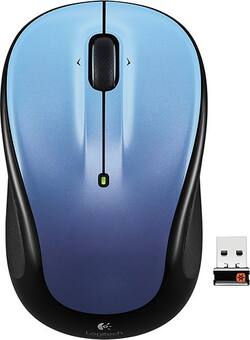
Logitech - M325 Wireless Optical Mouse - Moody Blue
- Key Specs
- Number of Buttons (Total): 5
- General
- Product Name: M325 Wireless Optical Mouse
- Brand: Logitech
- System Requirements: Windows 8, Windows 7, Windows Vista, Windows RT, Windows XP, Mac OS X 10.5 or later, Linux kernel 2.6+ (The software that a product must have for it to be able to integrate with another product.)
- Model Number: 910-004159
- Features
- Mouse Type: Optical
- Performance
- Mouse Operation: Button(s) with scroll wheel
- Handedness: Ambidextrous
- Number of Buttons (Total): 5
- Connectivity
- Operating System Compatibility: Mac, Windows
- Power
- Battery Size: AA (The battery size required for operation.)
- Number of Batteries Required: 1
- Batteries Included: true (Indicates whether the product comes with the required batteries for its operation.)
- Dimensions
- Product Height: 3.7 inches (The out of box height of the item. Height is measured as the vertical distance from the bottom of the item to the top as it would be primarily used or placed.)
- Product Length: 1.6 inches (The out of box length of the item. Length is measured as the longest dimension of the item.)
- Product Width: 2.2 inches (The out of box width of the item. Width is measured as the horizontal distance from one side of the item to the other as it would be primarily used or placed.)
- Product Weight: 3 ounces (The out of box weight of the item.)
- Warranty
- Manufacturer's Warranty - Parts: 3 years limited
- Manufacturer's Warranty - Labor: 1 year
- Other
- UPC: 097855105899
Logitech M325 Wireless Mouse: This mouse's scroll wheel is ribbed, and the round, contoured body comes with rubber grips, so it's comfortable to use with your left or right hand.
- Logitech Advanced Optical Tracking technology: Improved LED light positioning makes this optical mouse more responsive and accurate.
- Logitech Advanced 2.4GHz wireless connection: Wirelessly connects to the included Unifying nano-receiver, which plugs in to your computer's USB port and works across an array of Unifying-compatible wireless devices.
- 5-button design, including the scroll wheel's tilt function: The scroll wheel is ribbed for extra grip and includes a tilt function to go back or forward while surfing the Web.*
- Contoured build: Ambidextrous, contoured shape with rubber grips, so this mouse can be used comfortably whether you're right- or left-handed.
Whats Included
- Logitech M325 Wireless Optical Mouse
- 1 AA battery
- Logitech Unifying receiver
- Owner's manual
A: The part you're referring to is called a "receiver" or "nano-receiver". You can purchase it separately, just Google "Logitech Unifying USB Receiver" and make sure what you pick is specified for your mouse model.
Q: Is green light supposed to be solid or go off after a few seconds?
A: The green light doesn't stay on, it does that to conserve battery power. When you've downloaded the software, you can program one of the buttons to show the battery level. Also, anytime it's been sitting long enough to go to sleep it will show the battery level when you wake it up. Of course like you said when you turn it off and turn it back on the light turns on to show you the battery level and then turns itself back off. The battery indicator ALSO works when you unplug it from the cord while it's on. I hope I'm clear enough to be understood in my answer :) Have fun!
Q: what does flashing red light mean?
A: Time to replace the battery/batteries.
Q: work with windows 10 desktop pc ?
A: Yes it does
A: Did you check a space where the battery is? There is a USB receiver, so you can put it in your computer.
Q: Is it possible to use more than one M325?
A: The device is normally paired to the unified receiver so no need to worry about cross talk. I use multiple Logitech devices in the same office with unified receivers and none on them pick up what the other is doing (they are 4ft apart). Just as an FYI, there is a unified tool/software from Logitech (http://support.logitech.com/software/unifying) that helps you sync or pair your device with another receiver. It will also show the paired devices if you really want to see what device you USB receiver is set to use.
Q: Will this mouse work with an Apple iMac?
A: Yes, this product is compatible with Windows, Mac and Linux operating systems.
Q: Is this a mini or regular sized mouse? I want to use it with a desktop not a laptop.
A: The dimensions are 3.7 x 2.2 x 1.5 inches.




















