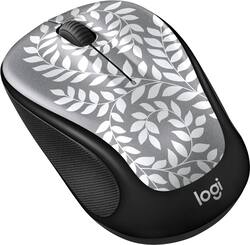
Logitech - M325c Color Collection Wireless Optical Mouse Nano Receiver - Himalayan Fern
- Key Specs
- Lighting Type: None
- Maximum Sensitivity: 1000 dots per inch (Mouse sensitivity is measured in dots per inch (DPI). The higher the DPI, the more sensitive the mouse is and may be more useful for high-density pixel screens. Lower DPI typically means more precision and accuracy in mouse movement.)
- Number of Buttons (Total): 5
- General
- Product Name: M325c Color Collection Wireless Optical Mouse Nano Receiver
- Brand: Logitech
- System Requirements: Linux Kernel 2.6 or later, Apple MacOS X 10.5 or later, Google Chrome OS, Microsoft Windows 7 / 8 / RT / 10 (The software that a product must have for it to be able to integrate with another product.)
- Model Number: 910-005658
- Features
- Mouse Type: Standard
- Lighting Type: None
- Performance
- Mouse Operation: Button(s)
- Handedness: Ambidextrous
- Tracking Method: Optical (There are several types of computer mice, optical and laser being among the most common. Optical mice detect less detail and provide more precise and accurate movement. Laser mice detect more detail and can be used on a wider variety of surfaces, but are more sensitive to small movements.)
- Maximum Sensitivity: 1000 dots per inch (Mouse sensitivity is measured in dots per inch (DPI). The higher the DPI, the more sensitive the mouse is and may be more useful for high-density pixel screens. Lower DPI typically means more precision and accuracy in mouse movement.)
- Number of Buttons (Total): 5
- Connectivity
- Wireless Connectivity: Radio Frequency (RF) (The manner in which a device sends data to another device over a short distance without the use of wires or cables.)
- Maximum Wireless Range: 32.8 feet
- Operating System Compatibility: Chrome, Linux, Mac, Windows
- Power
- Mouse Power Source: Battery-powered
- Rechargeable Battery (Mouse): false
- Battery Size: AA (The battery size required for operation.)
- Number of Batteries Required: 1
- Batteries Included: true (Indicates whether the product comes with the required batteries for its operation.)
- Dimensions
- Product Height: 1.5 inches (The out of box height of the item. Height is measured as the vertical distance from the bottom of the item to the top as it would be primarily used or placed.)
- Product Width: 2.2 inches (The out of box width of the item. Width is measured as the horizontal distance from one side of the item to the other as it would be primarily used or placed.)
- Product Weight: 93 grams (The out of box weight of the item.)
- Other
- UPC: 097855148445
Make surfing the internet fun with this Logitech M325C wireless mouse. This mouse's two-axis scroll wheel moves the cursor fluidly across the screen with minimal effort and makes it effective on many surfaces. This Logitech M325C wireless mouse utilizes the 2.4 wireless technology and connects securely to the transceiver from up to 330 feet away.
- 18-month battery life: Click and scroll in style for up to 18 months on a single, pre-installed battery. Auto sleep kicks in when not in use to save battery.
- 10m wireless range: Responsive and secure link between mouse and receiver from up to 33 feet (10m) away.*
- Logitech Advanced 2.4 GHz wireless connection: Wirelessly connects to the included Unifying nano-receiver, which plugs in to your computer's USB port and works across an array of Unifying-compatible wireless devices.
- Logitech Advanced Optical Tracking technology: Improved LED light positioning makes this optical mouse more responsive and accurate.
- 5 buttons: Provide access to frequently used commands and functions for powerful control while gaming.
- Tiltable scroll wheel: Tilt the wheel to move backward or forward more easily and use the speed wheel to navigate the web with ease.
- Portable style that clicks: Comfortable enough to use for hours at the desk but portable enough to be carried in your handbag or to your next meeting.
- Works across all operating systems: Universally compatible and work across Windows, Mac, Chrome OS and Linux.
Whats Included
- Logitech M325c Color Collection
- USB wireless receiver
- 1 AA battery
Product Manuals
Q: Does this mouse need a USB port or is it Bluetooth enabled?
A: The mouse is wireless but you do have to plug in the USB to your laptop or computer. Unfortunately, it is not Bluetooth. The USB is extremely small and fits inside the mouse when you are moving about.
Q: Is this compatible with a Dell Laptop?
A: This product is compatible with any computing device that has a USB type A (standard port) and has software support for a mouse.
Q: How does this compare to the M310 mouse from Logitech?
A: Have used both the M310 and the M317 and, frankly, haven't noticed any difference in the performance of either one.
Q: How long is the USB cord? My ports are on the left hand side of my computer, and I am right handed.
A: Hello Bee, the M325c wireless mouse comes with a USB dongle that receives your mouse's movements without a cord. That being said, you'll be able to use the mouse on the left hand side without any issues. Have a good day.
A: Looking at my receipt from Best Buy, the adapter I purchased was a Insignia USB Type C, #NS-PU396CA Adapter and it works well. I do remember when I first hooked everything up, that it did not work. You have to take the little chip that comes with the mouse and really push it hard into the USB adapter. Hope this helps.
A: The M325c only comes with the nano receiver. The regular M325 comes with the unifying receiver.
Q: Can I use this with MacBook Air?
A: It works with my macbook air. I recently purchased this for mine...and my macbook air is a few years old if that helps. As long as your software version is up to date you should be good.



















