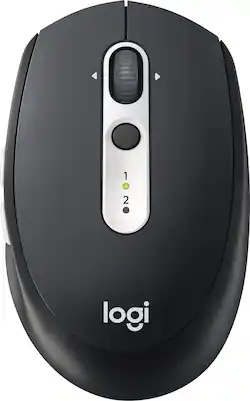
Logitech - M585 Bluetooth Optical Mouse - Wireless - Graphite
- Key Specs
- Maximum Sensitivity: 1000 dots per inch (Mouse sensitivity is measured in dots per inch (DPI). The higher the DPI, the more sensitive the mouse is and may be more useful for high-density pixel screens. Lower DPI typically means more precision and accuracy in mouse movement.)
- Number of Buttons (Total): 7
- Connection Type: Wireless
- General
- Product Name: M585 Bluetooth Optical Mouse
- Brand: Logitech
- System Requirements: Windows 10, 11 or later, Linux (No software support), Chrome OS, macOS 10.5 or later, iPadOS 13.4 or later, Android 5.0 or later (The software that a product must have for it to be able to integrate with another product.)
- Model Number: 910-005012
- Color: Graphite
- Features
- Mouse Type: Standard
- Performance
- Mouse Operation: Button(s)
- Mouse Grip Style: Standard (In comparison to many palm and claw grips, ergonomic grip mice are designed for a specific handedness and put the hand and wrist in a position to promote comfort. Customizable grips feature buttons/keys that can be configured to perform specific actions and may also have customizable calibration and sensitivity settings.)
- Handedness: Right-handed
- Tracking Method: Optical (There are several types of computer mice, optical and laser being among the most common. Optical mice detect less detail and provide more precise and accurate movement. Laser mice detect more detail and can be used on a wider variety of surfaces, but are more sensitive to small movements.)
- Maximum Sensitivity: 1000 dots per inch (Mouse sensitivity is measured in dots per inch (DPI). The higher the DPI, the more sensitive the mouse is and may be more useful for high-density pixel screens. Lower DPI typically means more precision and accuracy in mouse movement.)
- Minimum Sensitivity: 1000 dots per inch (Mouse sensitivity is measured in dots per inch (DPI). The higher the DPI, the more sensitive the mouse is. Lower DPI typically means more precision and accuracy in mouse movement, but higher DPI may be useful for high-density pixel screens.)
- Number of Buttons (Total): 7
- Number of Thumb Buttons: 2
- Number of Programmable Buttons: 5
- Adjustable Weight: false
- Connectivity
- Connection Type: Wireless
- Wireless Connectivity: Radio Frequency (RF), Bluetooth (The manner in which a device sends data to another device over a short distance without the use of wires or cables.)
- Maximum Wireless Range: 33 feet
- Operating System Compatibility: Windows, Mac, Chrome, Linux, Apple iPadOS, Android
- Plug and Play Operation: true
- Power
- Mouse Power Source: Battery-powered
- On/Off Switch: true
- Rechargeable Battery (Mouse): false
- Number of Batteries Required: 1
- Batteries Included: true (Indicates whether the product comes with the required batteries for its operation.)
- Included
- Mouse Pad Included: false
- Dimensions
- Product Height: 1.6 inches (The out of box height of the item. Height is measured as the vertical distance from the bottom of the item to the top as it would be primarily used or placed.)
- Product Length: 4.1 inches (The out of box length of the item. Length is measured as the longest dimension of the item.)
- Product Width: 2.5 inches (The out of box width of the item. Width is measured as the horizontal distance from one side of the item to the other as it would be primarily used or placed.)
- Product Weight: 101 grams (The out of box weight of the item.)
- Warranty
- Manufacturer's Warranty - Parts: 1 year
- Manufacturer's Warranty - Labor: None
- Other
- UPC: 097855129031
Navigate quickly between windows with this Logitech wireless mouse. The precise scroll wheel is grooved to provide a better grip, and two customizable thumb buttons let you program your most-used functions. This Logitech wireless mouse includes a special FLOW interface that lets you move between two different computers without lifting your hand.
- Optical technology: LED lights scan the surface beneath the mouse to detect movement with a fair amount of accuracy, suitable for everyday computing and browsing.
- Logitech Flow technology: Seamlessly control two computers with one mouse and copy-paste text, images and files between them (Mac and Windows PC only).
- Wirelessly connects to your computer with Bluetooth: This mouse connects to your computer without using wires or taking up a USB port.
- 7 buttons: Provide access to frequently used commands and functions for powerful control.
- Scroll wheel: Enables smooth, fast movement.
- Maximum of 1000 dpi: Lets you find the perfect sensitivity.
- Compatible with most versions of Windows: Works with most PCs.
- More sustainable: Certified carbon neutral: the carbon impact of the product and packaging has been reduced to zero.
Whats Included
- Logitech M585 Bluetooth Optical Mouse
- USB wireless receiver
Q: Why do lights flash on 1 and 2 It's not working
A: You need to press once to select which channel you want (1 or 2). then hold the button down. it will flash faster indicating that it is attempting to pair. Check the control panel/bluetooth on your device to complete pairing. Nothing wrong with the mouse.
Q: Hi! This mouse work on macbook pro laptop?
A: The mouse will work but I wouldn't recommend it for a mac. The problem isn't with the mouse but the Bluetooth functionality of the mac. You will have to turn the Bluetooth off and on to get the mouse to connect after coming out of "sleep" mode.
A: Yes. I use it with my Samsung Tab A all the time as well as with a Logitech Bluetooth keyboard
Q: can this be used with 2 computers? (multi-device)
A: I have it paired with my laptop and my tablet and can toggle between the two with one button click.
A: Hi Claudia, please down load Logitech Options software. This will allow you to change the function of the buttons. https://support.logi.com/hc/en-us/articles/360025297893
A: No, this is not a silent mouse. If I remember correctly, you want the M590 which is the same mouse but silent.
A: Hi Pd2021, the M585 is flow compatible and will pair with the above mentioned devices. The M585 only has the ability to pair to 2 devices though. However, you can move the USB dongle between computers when you need it on a computer that offers a USB. The M720 is another mouse that works with flow and can pair with 3 devices for a reasonable price. Hope this information helps you in picking out a mouse for your set up!
Q: Will this work with my Inspiron 15 3000?
A: Yes, the M585 mouse will work with the Inspiron 15 3000. The system requirements are as follows: Windows | Mac | Chrome® OS | Linux® | iPadOs | Works with Surface™


















