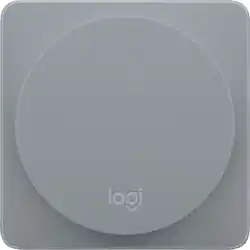
Logitech - Pop Add-On Wireless Smart Home Switch - Alloy
Model: 915-000276
SKU: 5578731
This item is no longer available in new condition. See similar items below
- Key Specs
- Wireless Connectivity: Wi-Fi (The manner in which a device sends data to another device over a short distance without the use of wires or cables.)
- Power Source: Battery-powered
- Number Of Sensors Included: 1
- General
- Product Name: Pop Add-On Wireless Smart Home Switch
- Brand: Logitech
- Model Number: 915-000276
- Color: Alloy
- Connectivity
- Wireless: true
- Wireless Connectivity: Wi-Fi (The manner in which a device sends data to another device over a short distance without the use of wires or cables.)
- Product Group(s) Controlled: Whole Home
- Compatibility
- App Compatible: true (The product can be connected to a program or software application on a mobile device, which then receives collected data from the product.)
- Operating System Compatibility: Android, Apple iOS
- Environmental
- Indoor Or Outdoor Use: Indoor (Indicates the appropriate environment product was designed to be used in.)
- Features
- Backlit Control Panel: false (Integrated lights allow for visibility of the control panel in low-light conditions.)
- Power
- Power Source: Battery-powered
- Dimensions
- Product Height: 0.35 inches (The out of box height of the item. Height is measured as the vertical distance from the bottom of the item to the top as it would be primarily used or placed.)
- Product Width: 2.36 inches (The out of box width of the item. Width is measured as the horizontal distance from one side of the item to the other as it would be primarily used or placed.)
- Product Depth: 2.36 inches (The out of box depth of the item. Depth is measured as the distance from the front of the item to the back as it would be primarily used or placed.)
- Product Weight: 0.082 pounds (The out of box weight of the item.)
- Included
- Number Of Sensors Included: 1
- Other
- UPC: 097855123107
Add to your smart home options with this Logitech Pop add-on home switch. This versatile switch works with the Pop home switch starter kit to operate lights and electronics with the touch of a button. Mount this Logitech Pop add-on home switch to a wall, dresser or desk, or carry it with you for one-touch control.
- Works with Pop Home Switch Starter Pack: Add smart home control to any room. (Pop Home Switch Starter Pack required/sold separately.)
- Simple smart home control for the whole family: Anyone at home can control multiple smart home devices wirelessly with one press of a switch.
- Versatile customizable control: Assign three "Recipes" per switch for different combinations of smart lighting, music and more.
- Multiple mounting options: Stick the switch on a wall, counter top, or take it from room to room for smart home control anywhere around the house.
- Controls smart lighting: Turns smart lights on/off to your preset brightness, warmth and color levels. (Works with Philips Hue, LIFX, Insteon, Lutron lighting)
Whats Included
- Pop Add-On Wireless Smart Home Switch
- Mounting tape
- Owner's manual
Q: Can I directly connect the pop to my iPad as an external switch control?
A: You connect the Pop Switch to the Pop Bridge (not included with this), which you then connect to either the Pop app or - if your Pop Bridge is compatible with it - your Apple HomeKit setup. You then configure the button within either the Pop app or the Apple Home app. Hope this helps.



















