Logitech - Slim Combo Keyboard Folio Case for Apple® 10.5" iPad® Pro and iPad® Air - Black
- Key Specs
- Model Compatibility: Apple iPad Air (3rd Generation) 10.5" 2019, Apple iPad Pro 10.5"
- General
- Product Name: Slim Combo Keyboard Folio Case for Apple® 10.5" iPad® Pro and iPad® Air
- Brand: Logitech
- Model Number: 920-008420
- Color: Black
- Compatibility
- Brand Compatibility: Apple
- Model Compatibility: Apple iPad Air (3rd Generation) 10.5" 2019, Apple iPad Pro 10.5"
- Design
- Case Style: Keyboard folio
- Design: Combo
- Play-Through Design: true (Allows use of the enclosed device while it remains in its case.)
- Camera Cutout(s): true
- Features
- Integrated Stand: true
- Port Style: Open
- Warranty
- Manufacturer's Warranty - Parts: 1 year
- Manufacturer's Warranty - Labor: 1 year
- Other
- UPC: 097855128966
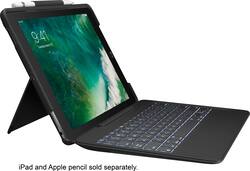
Prop your 10.5-inch iPad Pro for many purposes with this Logitech Slim Combo case. Its four viewing modes include hands-on reading, hands-free horizontal viewing, FaceTime vertical positioning and typing with the included detachable full-size keyboard. This Logitech Slim Combo case has a built-in Apple Pencil holder to secure your digital pen.
- Designed for use with Apple 10.5-Inch Ipad Pro: To protect and complement your tablet.
- Plastic material and high performance technical fabric with PU coating: Provide durability, safe your device against unwanted scratches and spills.
- Full-size keyboard with backlit keys and smart iOS shortcuts: Give you the most laptop-like typing experience on iPad Pro.
- A protective cover and detachable keyboard supports 4 use modes: Including Typing, Viewing, FaceTime, and Reading which give you amazing versatility to be productive, creative, connected, relaxed.
- Connect like a Pro: Batteries are not included, because you will never need them. Place your iPad Pro into Smart Connector and your keyboard instantly pairs and powers on.
- All the right angles: Two micro hinges ensure that Slim Combo smoothly reclines within 50 degrees range and stays in place once you have got that perfect setting.
- A home for Apple Pencil: Slim Combo's Apple Pencil holder makes sure it's always by your side. Slide your Apple Pencil into the holder - where it would not get lost, or in the way.
Whats Included
- Logitech Slim Combo Keyboard Folio Case for Apple® 10.5-Inch Ipad® Pro
- Owner's manual
Q: Is this keyboard better than the smart keyboard that Apple is promoting to go with the 10.5?
A: In my opinion yes! The Apple version offers no protection for the back of the iPad and is not inexpensive. While it is a little more thick with keyboard attached it offers superior body and screen protection. The keyboard is easily detached to use the protected iPad and the angel adjustment for table top viewing and FaceTime is FAR BETTER than other options.
A: It connects the same way as the apple keyboard cover, via the smart connectors on the side.
A: This has only soft rubber pads that come in contact with the screen, and it has not in any way scratched my screen. The design keeps the actual keyboard quite a ways (maybe 1/8") away from the screen when it is closed up. On the other hand, the quality of construction on the keyboard is very poor and mine became non-functional after about 3 - 4 hours of total typing time over the first 15 days of ownership. The inner-workings of the keyboard appear to have bowed up and are pushing the space bar and adjacent keys up so that the space bar is stuck on all the time. I've filed a warranty claim.
Q: can you fold the keyboard behind the screen for a vertical view?
A: No you can’t. That was one of the things I didn’t like about it. I had to remove it if I wanted to draw or to focus on just the iPad.
Q: Is this cover a Smart Cover.
A: If by SmartCover you mean does it work off my iPad, the answer is “Yes”. This is my third iPad and the third time I’ve had to buy a Keyboard Case. Having said that, this case is, by far, the best I’ve had. Not only does it get its power directly from my iPad, but the keyboard can quickly be removed when not need - it’s held to the iPad with magnets. The keyboard is large enough for almost anyone to type easily. The pull out back of the iPad-side has a stand that works with or without the keyboard attached. I hope I answered your questions. The IT Salesperson who sold me this case set up my iPod so I could see for myself what it looked like and could do. That’s what really sold me.
A: The case works fine with our Air. We like it and it had no problems connecting to the iPad.
Q: Does this come with the ipad digital pencil?
A: THIS PRODUCT DOES NOT INCLUDE A DIGITAL PENCIL OR STYLUS. ONLY SUPPLIED WITH THE SMART KEYBOARD AND IPAD PROTECTION FOR THE BACK OF YOUR IPAD ITSELF.
Q: Will this work with the 7th generation iPad?
A: I purchased a 7th generation iPad and this keyboard/case combo and it works beautifully. I especially love the way the keyboard lights up.