Lorex - Connect 2K Wi-Fi Smart Lightbulb Pan-Tilt Security Camera - White
Related Item

Highlights
- Key Specs
- Video Camera Resolution: 2K (1440p) (Refers to the number of pixels, both horizontally and vertically, used to capture video/images. The higher the resolution the finer the detail that can be seen.)
- Field Of View: 97 degrees (The area of a target, measured as an angle from the location of viewing, that can be observed.)
- Night Vision: true
- Number Of Cameras Included: 1
- Camera Power Source: Light socket
- Wireless Connectivity: Wi-Fi, Bluetooth (The manner in which a device sends data to another device over a short distance without the use of wires or cables.)
- Maximum Operating Temperature: 122 degrees fahrenheit (The highest recommended ambient (surrounding) temperature in which the product can ideally operate stated by the manufacturer. Generally long-term exposure of the product to temperatures more than the maximum can result in ineffective operation.)
- Storage Type: Memory card
- Indoor Or Outdoor Use: Indoor and outdoor (Indicates the appropriate environment product was designed to be used in.)
- Minimum Operating Temperature: -4.0 degrees fahrenheit (The lowest recommended ambient (surrounding) temperature in which the product can ideally operate stated by the manufacturer. Generally long-term exposure of the product to temperatures less than the minimum can result in ineffective operation.)
- Audio Communication: 2-way (1-way communication devices allow a user to hear detected audio, while 2-way communication adds the ability for a user to talk back through the device.)
- General
- Brand: Lorex
- Model Number: SL301A-46W-AA1
- Product Name: Connect 2K Wi-Fi Smart Lightbulb Pan-Tilt Security Camera
- Color: White
- Camera
- Video Camera Resolution: 2K (1440p) (Refers to the number of pixels, both horizontally and vertically, used to capture video/images. The higher the resolution the finer the detail that can be seen.)
- Camera Resolution: 2560 x 1440, 1280 x 720 (Refers to the number of pixels, both horizontally and vertically, used to capture video/images. The higher the resolution the finer the detail that can be seen.)
- Field Of View: 97 degrees (The area of a target, measured as an angle from the location of viewing, that can be observed.)
- Night Vision: true
- Camera Movement: Pan, Tilt
- Number Of Cameras Included: 1
- Day/Night Mode: true (Captures images/video with optimal clarity by automatically adjusting settings to various light levels.)
- IP Camera: true (An Internet Protocol (IP) camera is able to record and display image/video data via the internet, without need for a local recording device.)
- Image Sensor Type: CMOS (CCD and CMOS are the two main technologies used in image sensors. CCD, the older of the two types, turns analog light signals into digital pixels. This conversion happens without distortion, resulting in high-quality images. Newer CMOS sensors use transistors at each pixel to move electrical charges. CMOS sensors are typically less expensive, but also require more light to create distortion-free images.)
- Infrared Cut Off Filter: true (Often referred to as an IR or heat-absorbing filter, this camera feature is designed to block infrared light during the day to produce optimally lit images, while still allowing for night vision capabilities in low light.)
- Focal Length Control: Fixed focal (Fixed cameras do not allow for adjustments to the focal length, and typically provide a wide angle view. Vari-focal cameras allow manual adjustments, while motorized zoom cameras can be adjusted from either the camera or control center.)
- Power
- Camera Power Source: Light socket
- Compatibility
- App Compatible: true (The product can be connected to a program or software application on a mobile device, which then receives collected data from the product.)
- Compatibility: Lorex Connect
- Operating System Compatibility: Apple iOS, Android
- Voice Assistant Built-in: No (A digital assistant built into the device that uses voice commands to answer questions and control smart devices.)
- Connectivity
- Camera Connectivity: Wireless (Security system cameras can be set up in several ways. Wired cameras require cables for power and footage transmission, while wire-free cameras don't need cables for either. Wireless cameras still require cables for receiving power but are able to transmit footage via a wireless network.)
- Wireless Connectivity: Wi-Fi, Bluetooth (The manner in which a device sends data to another device over a short distance without the use of wires or cables.)
- Network Connectivity: None (The manner in which a device sends data to another device over a long distance using a cellular network.)
- Wireless Networking Standard: Wi-Fi 6 (The wireless networking standard used by the device. Each iteration of the standard developed by the Wi-Fi Alliance corresponds to an existing IEEE 802.11 protocol; for example, standard 802.11ac (or AC) is termed Wi-Fi 5. Refers specifically to the standard the device is designed to use, but ultimately determines product interoperability and backward compatibility including previous versions.)
- Wireless Standard: AX (The wireless networking protocol used by the device. Each iteration of the protocol is based on the 802.11 standard developed by the Institute of Electrical and Electronics Engineers (IEEE) Standards Association. Denoted by letters following 802.11 (802.11a, 802.11ac, etc.), each version, published in alphabetical order, encompasses all previous versions.)
- Frequency Band: 2.4 GHz, 5.0 GHz (Bands may be grouped into categories such as low- and high-band VHF (Very High Frequency), low- and high-band UHF (Ultra High Frequency), or certain frequency channels (measured in MHz or GHz). Generally, higher frequencies transmit information faster but have shorter range than lower frequencies.)
- Encryption Type: WEP, WPA, WPA2, WPA3 (The security protocols or certification programs that protect the Wi-Fi network.)
- Recording & Playback
- Streaming Video: true (The ability to transmit a live video feed from the product.)
- Video Recording Capability: true
- Records Audio: true
- Subscription: Optional but not included
- Performance
- Maximum Operating Temperature: 122 degrees fahrenheit (The highest recommended ambient (surrounding) temperature in which the product can ideally operate stated by the manufacturer. Generally long-term exposure of the product to temperatures more than the maximum can result in ineffective operation.)
- Indoor Or Outdoor Use: Indoor and outdoor (Indicates the appropriate environment product was designed to be used in.)
- Protective Qualities: Weather resistant
- Minimum Operating Temperature: -4.0 degrees fahrenheit (The lowest recommended ambient (surrounding) temperature in which the product can ideally operate stated by the manufacturer. Generally long-term exposure of the product to temperatures less than the minimum can result in ineffective operation.)
- Storage
- Storage Type: Memory card
- Memory Card Type: microSD card
- Lighting
- Lighting Type: Motion activated, Manual, App-controlled
- Features
- Audio Communication: 2-way (1-way communication devices allow a user to hear detected audio, while 2-way communication adds the ability for a user to talk back through the device.)
- Audio-Only Option: false
- Alarm Type: Audible
- Alarm Location: On camera
- Dimensions
- Product Height: 7.19 inches (The out of box height of the item. Height is measured as the vertical distance from the bottom of the item to the top as it would be primarily used or placed.)
- Product Width: 3.15 inches (The out of box width of the item. Width is measured as the horizontal distance from one side of the item to the other as it would be primarily used or placed.)
- Product Depth: 2.58 inches (The out of box depth of the item. Depth is measured as the distance from the front of the item to the back as it would be primarily used or placed.)
- Product Weight: 0.672 pounds (The out of box weight of the item.)
- Display
- Color Display: false
- Warranty
- Warranty - Parts: 2 year limited
- Warranty - Labor: no warranty
- Other
- UPC: 695529063607
Enjoy quick, easy home security—just screw the camera into a standard light socket and connect via the Lorex Connect app. Brighter smart lighting, adjustable color temperature, and Wi-Fi 6 provide faster setup and smarter protection with no clutter or complicated wiring.
- Adjustable Color Temperature from Warm White to Cool White: Iluminate your space with a powerful, multi-directional 600-lumen LED light featuring a dimmable design. Customize brightness for any mood or setting, and choose between warm white (2000K) and cool white (6500K) to perfectly match your environment and lighting preferences.
- Personalized Activation, Smarter Alerts.: Lights turn on instantly with motion detection to enhance visibility and deter intruders. Set smart Sunrise/Sunset or custom schedules to match your routine. Real-time alerts identify people or vehicles, so you always know what’s happening around your home.
- Easy Installation - Just Screw It In.: Enjoy fast and easy installation by simply screwing the device into any standard light socket—no wiring or tools needed. Choose Wi-Fi 6 for top speed, 2.4GHz for better range, or 5GHz for faster nearby connection. With the Lorex Connect app, you’ll be connected and ready to go in minutes.
- 2K Clarity & Color Night Vision: Experience sharp 2K resolution and vibrant full-color video even in low light. When it’s completely dark, switch to infrared mode for clear black-and-white footage. Whether day or night, you’ll never miss a detail.
- Live View Auto-Tracking: During Live View, the camera automatically zooms in and tracks people as they move, keeping all the action clearly in frame. Recorded footage stays in full-frame view, so you never miss any details.
- Communicate with Ease, Anytime with Two-Way Talk: Hear and speak in real time using the built-in two-way talk through the Lorex Connect app. Whether checking on pets, talking to family, or giving instructions to visitors, clear audio lets you communicate easily—no matter where you are.
- More Coverage with Pan-Tilt: Cover more ground with the pan-tilt feature that lets you see multiple angles from one camera. Monitor larger areas and follow activity smoothly—no need to move the camera manually.
- Siren for Active Deterence: Stop threats instantly using the built-in siren. It doesn’t just record — it actively deters intruders in real time for your peace of mind.
- Compatible With Lorex Connect App: Seamless integration with all new Lorex Connect App. Provides real-time alerts, live streaming, and easy footage management on iOS and Android devices.
Whats Included
- 2K Wi-Fi Smart Lightbulb Camera
- Lorex Warning Decal
A: No, it doesn’t use the classic app. I wouldn’t personally buy one that uses the classic app due to data privacy concerns
Compare similar products
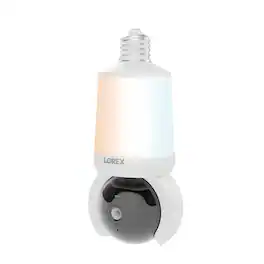
Enjoy quick, easy home security—just screw the camera into a standard light socket and connect via the Lorex Connect app. Brighter smart lighting, adjustable color temperature, and Wi-Fi 6 provide faster setup and smarter protection with no clutter or complicated wiring.

Illuminate your peace of mind. Light up your space while keeping a watchful eye, day and night with the Lorex 2K Lightbulb security camera. With 2K Resolution, bright LED lightbulb, 360-Degree Pan-Tilt capabilities and Person and Vehicle AI Detection, you will have complete coverage of every corner.

Protect your home day and night with Wyze Bulb Cam, the 2-in-1 outdoor security camera and smart LED light bulb. Capture clear 2K HD video with color night vision, receive instant motion alerts, and control your lighting from anywhere with the Wyze app. Easy to install, fits most fixtures, and supports local video storage—no subscription needed.
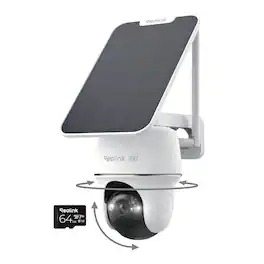
The Reolink Argus PT Ultra B440 4K 8MP Solar Wireless Wi-Fi Pan and Tilt Security Camera is ideal when you need full coverage of large outdoor areas - but don't have an electrical outlet. When Auto-Tracking is enabled, this battery security camera will "follow" people, animals and vehicles automatically. You can also use your Reolink smartphone app to move the camera manually in a full range of motion. 4K ultra-high definition (8-megapixel) resolution means your footage is crisp and un-pixelated - even when zoomed in on faces or license plates! Person/Vehicle/Animal detection algorithms greatly reduce false alerts. Trail camera records locally to an included 64GB SD card (up to 512GB max). Mount camera and solar panel to outdoor walls, ceilings, eaves or even trees. Perfect for light-commercial and residential properties with reliable Wi-Fi.
| Pros for Lorex - Connect 2K Wi-Fi Smart Lightbulb Pan-Tilt Security Camera - White | |||
|---|---|---|---|
| Setup Ease, Motion Detection, Picture Quality, Pan and Tilt, Coverage | Motion Detection, Camera Quality, Ease of use, Night Vision, Storage | Setup Ease, Image Quality | Overall Performance |
| Cons for Lorex - Connect 2K Wi-Fi Smart Lightbulb Pan-Tilt Security Camera - White | |||
| Connectivity | Size | There were no cons for this product— | There were no cons for this product— |
Specs



Reviews
Customers are saying
Customers are enthusiastic about the 2K Wi-Fi Smart Lightbulb Pan-Tilt Camera. The product is praised for its simple and straightforward setup process. Users also highlight the camera's impressive picture quality, noting its clarity and detail.
Customer Images
The vast majority of our reviews come from verified purchases. Reviews from customers may include My Best Buy members, employees, and Tech Insider Network members (as tagged). Select reviewers may receive discounted products, promotional considerations or entries into drawings for honest, helpful reviews.
- Rated 4 out of 5 stars
Innovative product that has potential
I love trying new, technically advanced devices. When I first noticed Lorex’s 2K Wi-Fi smart bulb with camera, I thought it was a neat idea. Having a pan and tilt camera attached to a socket light bulb was something I never thought of combining. I wanted to see how it would perform by testing in my garage first. Could it detect my vehicle, and could the camera follow when it detected motion? Setup I was able to get the device setup easily. Once I installed the smart lightbulb camera in my garage to test things out, I connected it to my Wi-Fi. To my surprise, it connected right away. I then was met with an automatic update. I couldn't find the firmware revisions on the website, so I just assumed it made the device perform better. I combed through the settings and options in the Lorex Connect app to familiarize myself with the app layout. The smart lightbulb camera allows you to adjust the color temperature, have a 2-way conversation, and activate the siren based on the alert you desire. All meaningful options. Lorex Connect App Since the smart lightbulb camera is one of the newer devices in the lineup, I needed to download the Lorex Connect app. This app is not to be confused with the Classic version. I was able to choose the types of alerts and select thumbnail images to show based on the event. Adding a micro-SD card also added the ability to capture events on the smart lightbulb camera. The cloud-based subscription isn't available as of the time of this review. Pros: Able to screw the lightbulb camera in a socket. The lightbulb has Wi-Fi 6 built-in with 2k resolution. Able to pan/tilt the smart camera. Can be placed wherever a socket is available. Color night-vision. Cons: Light bulb not dimmable. No Google Assistant or Alexa compatibility No IP water rating Audio sounds muffled when conversing Lifespan of bulb Takes an extended time to load camera when moving to another light socket Things to consider Lorex recommends installing the smart lightbulb camera in a sheltered area if placed outside. Still unclear about the wet rating of the device. I scanned the website to check and I couldn't locate any info on it. All in all, this is a good smart device that has the potential to improve over time with some additional software updates. Some areas of improvements are: AI detection accuracy and Smart Home compatibility. I think adding/updating these two features will improve the overall user experience. Overall, I think the Lorex Smart bulb with camera would be a good choice that allows monitoring in a cost-effective way. Having the ability to add a micro-SD card allows the comfort of having video stored locally. This is a win in my book.
No, I would not recommend this to a friendkriserikka Posted
- Rated 4 out of 5 stars
A Smart Lightbulb That Watches Your Back
Let’s be honest—home security can feel overwhelming. Between complicated setups, ugly cameras bolted to walls, and wiring nightmares, it’s easy to put it off. But what if your security camera looked like… well, just a regular lightbulb? That’s exactly what the Lorex 2K Wi-Fi Smart Lightbulb Camera pulls off—and it actually works really well. It’s a Camera… That Screws In Like a Lightbulb Seriously—no drilling, no electrician, no fuss. You just unscrew your old bulb, screw this one in, and you’re halfway to having eyes on your space. I set mine up in under 10 minutes while my coffee was still hot. The app walks you through the rest: connect to Wi-Fi, name your camera, and boom—you’re live. Even my tech-wary parents could handle it (and they still use a flip phone). See Every Corner—Without Moving a Muscle One thing that surprised me? The pan-and-tilt feature. Most plug-in or bulb cameras stare in one direction, leaving blind spots. But this little guy can swivel left, right, up, and down—all from your phone. Want to check if the dog’s on the couch? Swipe. Wonder if the front door’s locked? Tilt down and peek. You can even set it to slowly scan the room automatically. It feels like having a security guard who never blinks. Sharp Day or Night—No Grainy Guesswork The 2K video quality is crisp enough that I could read the label on a cereal box across the room. And at night? The infrared night vision kicks in smoothly—no spooky green tint, just clear black-and-white footage. I tested it after dark, and yes, you can still recognize faces (sorry, sneaky teenagers). A Few Real-World Quirks to Know It’s not perfect, though. The biggest gotcha? If someone flips the light switch off, the camera goes dark too. So it’s best in a fixture controlled only by smart switches—or a spot where no one fiddles with the switch (like a porch or garage). Also, avoid hanging it from a swaying pendant light. Wind or bumps can make the image wobble, which gets annoying fast. Stick it in a ceiling fixture or stable lamp for best results. Bonus: It’s Also a Light! (Sort Of) Yes, it lights up—but don’t expect stadium-level brightness. It’s more like a soft ambient glow, great for hallways or as a nightlight. If you need serious illumination, you’ll probably want another bulb nearby. Still, having both functions in one sleek unit keeps things tidy. Is It Worth It? For the price, absolutely. You’re getting high-res video, remote pan/tilt control, night vision, and dead-simple setup—all disguised as something that belongs in your home anyway. If you’ve been putting off home security because it felt too complicated or invasive, this might be your “aha” moment. Final Thought The Lorex Smart Lightbulb Camera isn’t trying to be flashy—it’s practical, clever, and quietly effective. It won’t replace a full security system for high-risk situations, but for everyday peace of mind? It’s one of the smartest (and simplest) upgrades I’ve made to my home. And hey—if it stops one package thief or catches my cat plotting world domination, it’s already paid for itself.
No, I would not recommend this to a friendGoor00inTX Posted
- Rated 4 out of 5 stars
A creative solution, but needs some fine tuning
The Lorex 2K Wi-Fi Smart Lightbulb Pan and Tilt Camera is a very creative and smart way to easily add a security camera to any location that has a light fixture with an E26 base, which is your standard household bulb. I have mine installed front porch light fixture. Initial setup is very easy, and it requires you to download the Lorex Connect app. After you're connected you will most likely need to update the firmware. After this, you're all set to go. You can monitor vehicles, people, sounds, and any motion at all. This camera will also track the motion and you have the option to have a bounding box showing what the camera is tracking. You can adjust the sensitivity of the detections to help prevent false alarms. You can also enable or disable the built in light to go on with detected motion. You can also disable the light altogether, which is perfect for my situation, because I have permanent outdoor lights around the perimeter of the front of my house. The biggest draw for me to this camera is that it uses a mico SD card to store your videos and doesn't require a subscription to a cloud service. That's one of my biggest turn offs for security cameras. In fact, there is no option for a cloud service at the time of testing. I really like this camera in general, but there are some issues I hope gets resolved with future updates. One being the most important to me is that the camera doesn't always go back the it's preset position. It will be close, but if you setup detection zones, it will not line up correctly when it doesn't return to the right position. Another big issue I have found is that when streaming video playback of detections on my phone, it will stutter depending on the motion of the camera. The more the camera pans and tilts, the more it stutters. I tried streaming in SD instead, and it only made a small difference. I have other cameras that have this feature, and this is not an issue at all with any of them.
No, I would not recommend this to a friendkwilks3 Posted