Magic Keyboard with Numeric Keypad and Touch ID for Mac models with Apple silicon (Lightning Port) - Silver/White
Color
Silver/WhiteFREE shipping to
Related Item

Specifications
- Form FactorFull-sizeConnection TypeWireless
- Key Specs
- Form Factor: Full-size (The size, arrangement, and physical configuration of the product.)
- Connection Type: Wireless
- General
- Brand: Apple
- Model Number: MK2C3LL/A
- Product Name: Magic Keyboard with Numeric Keypad and Touch ID for Mac models with Apple silicon (Lightning Port)
- Color: Silver/White
- Features
- Numeric Keypad: true
- Keyboard Features: Touch ID
- Functions
- Form Factor: Full-size (The size, arrangement, and physical configuration of the product.)
- Multimedia Keys: true
- Connectivity
- Connection Type: Wireless
- Wireless Connectivity: Bluetooth (The manner in which a device sends data to another device over a short distance without the use of wires or cables.)
- Compatibility
- Operating System Compatibility: Mac
- System Requirements: Mac with Apple silicon using macOS 11.4 or later (The software that a product must have for it to be able to integrate with another product.)
- Dimensions
- Product Height: 0.43 inches (The out of box height of the item. Height is measured as the vertical distance from the bottom of the item to the top as it would be primarily used or placed.)
- Product Width: 16.48 inches (The out of box width of the item. Width is measured as the horizontal distance from one side of the item to the other as it would be primarily used or placed.)
- Product Depth: 17.58 inches (The out of box depth of the item. Depth is measured as the distance from the front of the item to the back as it would be primarily used or placed.)
- Product Weight: 12.96 ounces (The out of box weight of the item.)
- Mouse
- Mouse Included: false
- Warranty
- Warranty - Parts: 1 year
- Warranty - Labor: 1 year
- Other
- UPC: 194252543948
Magic Keyboard is now available with Touch ID, providing fast, easy, and secure authentication for logins and purchases.
Whats Included
- Apple Magic Keyboard with Touch ID and Numeric Keypad for Mac models with Apple silicon White
- USB-C to Lightning Cable
- Apple Magic Keyboard with Touch ID and Numeric Keypad for Mac models with Apple silicon White
- USB-C to Lightning Cable
Q: What type of connectivity does this keyboard use?
A: This keyboard uses Bluetooth for wireless connectivity.
Q: How much does this keyboard weigh?
A: This keyboard weighs 12.96 ounces.
Q: What interface does this keyboard use for connectivity?
A: This keyboard uses Bluetooth for connectivity.
Q: Is this keyboard compatible with Mac operating systems?
A: Yes, this keyboard is compatible with Mac operating systems, specifically macOS 11.4 or later on Mac models with Apple silicon.
Q: How is this keyboard connected?
A: This is a wireless keyboard.
Q: Does this keyboard have a numeric keypad?
A: Yes, this Magic Keyboard model has a dedicated numeric keypad.
Q: Does this keyboard come with a mouse?
A: No, a mouse is not included with this keyboard.
Q: Is this keyboard compatible with Mac?
A: Yes, this keyboard is compatible with Mac operating systems.
Compare similar products
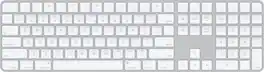
Magic Keyboard is now available with Touch ID, providing fast, easy, and secure authentication for logins and purchases.
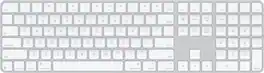
Magic Keyboard is available with Touch ID, providing fast, easy, and secure authentication for logins and purchases. Magic Keyboard with Touch ID and Numeric Keypad delivers a remarkably comfortable and precise typing experience. It features an extended layout, with document navigation controls for quick scrolling and full-size arrow keys, which are great for gaming. The numeric keypad is also ideal for spreadsheets and finance applications. It’s wireless and features a rechargeable battery that will power your keyboard for about a month or more between charges. It pairs automatically with your Mac, so you can get to work right away. It features a USB-C port and includes a woven USB-C Charge Cable that lets you pair and charge by connecting to a USB-C port on your Mac.

Magic Keyboard is now available with Touch ID, providing fast, easy, and secure authentication for logins and purchases.

Magic Keyboard with Numeric Keypad features an extended layout, with document navigation controls for quick scrolling and full-size arrow keys for gaming. A scissor mechanism beneath each key allows for increased stability, while optimized key travel and a low profile provide a comfortable and precise typing experience. The numeric keypad is also great for spreadsheets and finance applications. And the built-in, rechargeable battery is incredibly long-lasting, powering your keyboard for about a month or more between charges.
| Pros for Magic Keyboard with Numeric Keypad and Touch ID for Mac models with Apple silicon (Lightning Port) - Silver/White | |||
|---|---|---|---|
| There were no pros for this product— | Keyboard Quality, Touch ID, Battery Life, Design, Ease of Use | Touch ID, Keyboard Quality, Battery Life, Ease of use, Connectivity | Battery Life, Ease of use, Numeric Keypad, Wireless, Overall Performance |
| Cons for Magic Keyboard with Numeric Keypad and Touch ID for Mac models with Apple silicon (Lightning Port) - Silver/White | |||
| There were no cons for this product— | Adjustability | Price | Price, Key Travel |
Specs
Reviews
Customer Images
The vast majority of our reviews come from verified purchases. Reviews from customers may include My Best Buy members, employees, and Tech Insider Network members (as tagged). Select reviewers may receive discounted products, promotional considerations or entries into drawings for honest, helpful reviews.
- Rated 5 out of 5 stars
Best of the best!
I can’t get enough of using this Apple Magic Keyboard; it feels right while typing on it, the numeric keyboard is placed perfectly on the right side of the keyboard as it should be, and the keys are soft to the touch with a slight faint tap noise that is not irritating to the ears. The setup was easy; plug in to charge fully, unplug, and you are ready to go to type the day away. Another thing that I should mention, I love how light it is, virtually ways like nothing.
This review is from Magic Keyboard with Numeric Keypad and Touch ID for Mac models with Apple silicon (Lightning Port) - Silver/White
Posted by TheeShopper
- Rated 4 out of 5 stars
Phenomenal with a Catch
The Apple Keyboard offers excellent tactility, a well-built design, and a sleek appearance. Its impressive battery life enhances its overall appeal. However, the absence of backlighting, considering the price point, is a notable drawback. Despite this caveat, it does offer Touch ID which in my book makes up for what it lacks.
This review is from Magic Keyboard with Numeric Keypad and Touch ID for Mac models with Apple silicon (Lightning Port) - Silver/Black
Posted by CCHoward
- Rated 3 out of 5 stars
I hate Apple. . .But. . .
If you hate they keyboard you got with your iMac because it doesn't have a 10-key, this will fix that. The quality is typical Apple (terribly overpriced and impossible to repair on your own.). My gripe with Apple's design crew is that to get more battery life, they refuse to backlight their keyboards, so if you want to type in low light situations, forget about it and turn up the lights. This keyboard seems to focus a lot more on form than function. Sure, it looks great in a spartan office (like you see in all the print ads) but unless it is sitting firmly on a flat desktop typing can be like juggling peeled grapes with wet hands. Speaking of touch, I admit I'm an old school typist. Grew up on a Royal manual, then IBM Ball Selectric, then to IBM style computer keyboards. I am having a hard time typing accurately by touch with Apple's idea of what pressing a key should feel and sound like. I also hate typing on my phone. But I digress. Overall the build get's an A- (Solid chassis but no backlight, and I don't like the "feel" of the keys) The VALUE get's a D (If you knew what it actually costs Apple to build their products, you would find yourself in a moral dilemma. They are kind of the only show in town, just the way they built their tech empire.) No body reads these reviews, so if you made it this far I hope I entertained you. p/s: I stand by my review.
This review is from Magic Keyboard with Numeric Keypad and Touch ID for Mac models with Apple silicon (Lightning Port) - Silver/Black
Posted by Daiv
