Skip to contentGo to Product Search
Main Content

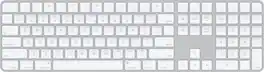
Magic Keyboard with Numeric Keypad and Touch ID for Mac models with Apple silicon (Lightning Port) - Silver/White

Model: MK2C3LL/A
SKU: 12941389
Sold & shipped by

Customers are saying

Customers express satisfaction with the overall performance, the convenient Touch ID feature, and the impressive battery life of this keyboard. Users also frequently highlight the ease of connectivity, the inclusion of a numeric keypad, and the sleek, slim design. While the product is highly regarded for its functionality and ease of use, some users have noted a desire for an adjustable tilt feature.

Generated by AI based on customer reviews.

Features

  • Magic Keyboard with Touch ID and Numeric Keypad delivers a remarkably comfortable and precise typing experience

  • It features an extended layout, with document navigation controls for quick scrolling and full-size arrow keys, which are great for gaming

  • The numeric keypad is also great for spreadsheets and finance applications

  • It’s wireless and rechargeable, with an incredibly long-lasting internal battery that will power your keyboard for about a month or more between charges¹

  • It pairs automatically with your Mac, so you can get to work right away

  • And it includes a woven USB-C to Lightning Cable that lets you pair and charge by connecting to a USB-C port on your Mac

  • ¹ Testing conducted by Apple in March and April 2021 using preproduction Magic Keyboard with Touch ID and Numeric Keypad units, firmware, and software paired with preproduction 24-inch iMac systems with Apple M1 chip.

  • Testing consisted of full battery discharge while engaging the device on a paired iMac using automated equipment. Battery life depends on device settings, usage, and other factors.

Specifications

  • Form Factor
    Full-size
    Connection Type
    Wireless
Sponsored

Reviews

Customers are sayingCustomers express satisfaction with the overall performance, the convenient Touch ID feature, and the impressive battery life of this keyboard. Users also frequently highlight the ease of connectivity, the inclusion of a numeric keypad, and the sleek, slim design. While the product is highly regarded for its functionality and ease of use, some users have noted a desire for an adjustable tilt feature.
This summary was generated by AI based on customer reviews.
  • Overall Performance (90)
  • Touch ID (80)
  • Battery Life (41)
  • Connectivity (37)
  • Numeric Keypad (27)
  • Tilt (7)

Customer Images

The vast majority of our reviews come from verified purchases. Reviews from customers may include My Best Buy members, employees, and Tech Insider Network members (as tagged). Select reviewers may receive discounted products, promotional considerations or entries into drawings for honest, helpful reviews.

  • Rated 5 out of 5 stars

    Apple Magic Keyboard with Touch ID /Numeric Keypad

    This keyboard is flawless, sleek, and stays powered up with or without USB C to Lightning power connection. Key board keep long lasting charge. I would definitely recommend it. It works with my 2013 iMac and all new models, by adapting the lightning connector as needed. Bluetooth connectivity is awesome. It is the best in its class. Downside is that the keyboard isn’t backlit. Not cheap in price but very well built.

    This review is from Magic Keyboard with Numeric Keypad and Touch ID for Mac models with Apple silicon (Lightning Port) - Silver/White

    Posted by JoelP

  • Rated 5 out of 5 stars

    Love the Touch ID, it's easy to set up

    The Magic keyboard with Touch ID is great, what else can you expect from Apple. Love the Touch ID, it's easy to set up and easy to use. Personally, I find it a little bit uncomfortable. I feel like it's too wide, but that's just a personal preference. The keyboard is excellent.

    This review is from Magic Keyboard with Numeric Keypad and Touch ID for Mac models with Apple silicon (Lightning Port) - Silver/White

  • Rated 4 out of 5 stars

    Almost Perfect: Major Flaw Included

    In terms of Feel, it does take some getting use to because the keyboard lies nearly flat instead of having a more pronounced angle. After about a week, I was rolling. On certain surfaces, it will slide on the table while typing. I learned how to adjust my typing posture. No lazy hands or fingers allowed. I thought the Touch ID would be a game-changer with my Mac Mini. It's really not. I still have to type in my Password when booting up. And I can just as easily hit "Enter" to confirm my Passwords instead of using my fingerprint. The major Con to this keyboard is the absence of backlit keys. I don't know how a $200 keyboard wouldn't come standard with backlit keys, but this one doesn't have them. A huge disappointment because keyboards nearly half the price come with backlit keys. What saves this keyboard is the Design and Feel of typing. I haven't found a great comparable Brand to this one including options from Logitech. Close, but not enough. And yes, keep your Lightning Cable because you'll need it to Charge this keyboard. Would I recommend this keyboard? Even with the best typing experience I've ever had, I cannot. At this price point with no backlit keys is a deal breaker. A mistake that a Brand like Apple should not make.

    This review is from Magic Keyboard with Numeric Keypad and Touch ID for Mac models with Apple silicon (Lightning Port) - Silver/White

    Posted by EricJ

  • Rated 5 out of 5 stars

    Best of the best!

    I can’t get enough of using this Apple Magic Keyboard; it feels right while typing on it, the numeric keyboard is placed perfectly on the right side of the keyboard as it should be, and the keys are soft to the touch with a slight faint tap noise that is not irritating to the ears. The setup was easy; plug in to charge fully, unplug, and you are ready to go to type the day away. Another thing that I should mention, I love how light it is, virtually ways like nothing.

    This review is from Magic Keyboard with Numeric Keypad and Touch ID for Mac models with Apple silicon (Lightning Port) - Silver/White

    Posted by TheeShopper

  • Rated 4 out of 5 stars

    Premium Keyboard, but missing some "key" Features

    Coming from a mechanical keyboard, it has been a been a bit of challenge, but this is a well built unit. It works flawlessly, easy to set up and is pretty much your only option if you have a new M1 Mac and want to use touch ID. That being said, would be nice if it was backlit, had some feet in the front to tilt the keyboard more, and was able to sync to more than one device like the logitech.

    This review is from Magic Keyboard with Numeric Keypad and Touch ID for Mac models with Apple silicon (Lightning Port) - Silver/White

    Posted by COS45

Compare similar products

Magic Keyboard with Numeric Keypad and Touch ID for Mac models with Apple silicon (Lightning Port) - Silver/White

Magic Keyboard is now available with Touch ID, providing fast, easy, and secure authentication for logins and purchases.
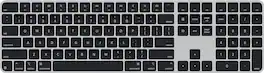
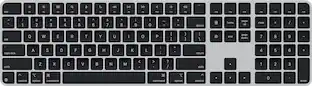
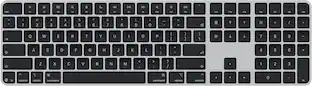
Magic Keyboard with Touch ID and Numeric Keypad for Mac models with Apple silicon (USB-C) - Black Keys

Magic Keyboard is available with Touch ID, providing fast, easy, and secure authentication for logins and purchases. Magic Keyboard with Touch ID and Numeric Keypad delivers a remarkably comfortable and precise typing experience. It features an extended layout, with document navigation controls for quick scrolling and full-size arrow keys, which are great for gaming. The numeric keypad is also ideal for spreadsheets and finance applications. It’s wireless and features a rechargeable battery that will power your keyboard for about a month or more between charges. It pairs automatically with your Mac, so you can get to work right away. It features a USB-C port and includes a woven USB-C Charge Cable that lets you pair and charge by connecting to a USB-C port on your Mac.

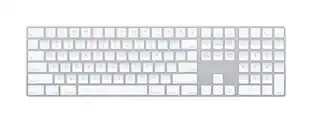
Apple - Magic Keyboard full size with Numeric Keypad (Lightning Port) - Silver/White

Magic Keyboard with Numeric Keypad features an extended layout, with document navigation controls for quick scrolling and full-size arrow keys for gaming. A scissor mechanism beneath each key allows for increased stability, while optimized key travel and a low profile provide a comfortable and precise typing experience. The numeric keypad is also great for spreadsheets and finance applications. And the built-in, rechargeable battery is incredibly long-lasting, powering your keyboard for about a month or more between charges.

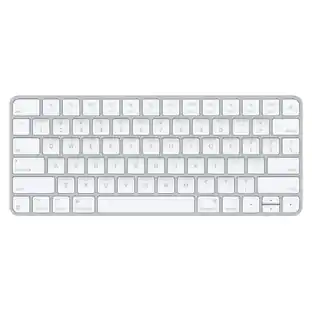
Magic Keyboard (USB-C) with Touch ID for Mac models with Apple silicon - White

Magic Keyboard is now available with Touch ID, providing fast, easy, and secure authentication for logins and purchases. Magic Keyboard with Touch ID delivers a remarkably comfortable and precise typing experience. It’s also wireless and rechargeable, with an incredibly long-lasting internal battery that will power your keyboard for about a month or more between charges. It pairs automatically with your Mac, so you can get to work right away. It features a USB-C port and includes a woven USB-C Charge Cable that lets you pair and charge by connecting to a USB-C port on your Mac.

Pros for Magic Keyboard with Numeric Keypad and Touch ID for Mac models with Apple silicon (Lightning Port) - Silver/White
Overall Performance, Touch ID, Battery Life, Connectivity, Numeric KeypadTouch ID, Battery Life, Keyboard Quality, Design, Ease of UseNumeric Keypad, Battery Life, Overall Performance, Ease of use, WirelessTouch ID, Battery Life, Connectivity, Build Quality, Fingerprint Reader
Cons for Magic Keyboard with Numeric Keypad and Touch ID for Mac models with Apple silicon (Lightning Port) - Silver/White
TiltAdjustabilityPrice, Key TravelBacklighting, Size

Specs

Questions & Answers

  • How much does this keyboard weigh?

    This keyboard weighs 12.96 ounces.

    This question and answer was generated by AI based on customer and product data.
  • What interface does this keyboard use for connectivity?

    This keyboard uses Bluetooth for connectivity.

    This question and answer was generated by AI based on customer and product data.
  • Is this keyboard compatible with Mac operating systems?

    Yes, this keyboard is compatible with Mac operating systems, specifically macOS 11.4 or later on Mac models with Apple silicon.

    This question and answer was generated by AI based on customer and product data.
  • Does this keyboard have a numeric keypad?

    Yes, this Magic Keyboard model has a dedicated numeric keypad.

    This question and answer was generated by AI based on customer and product data.
  • Does this keyboard come with a mouse?

    No, the Magic Keyboard does not include a mouse.

    This question and answer was generated by AI based on customer and product data.
Ask a question
No content
Sponsored