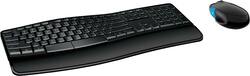
Microsoft - Ergonomic Full-size Wireless Sculpt Comfort Desktop USB Keyboard and Mouse Bundle - Black
- Key Specs
- Lighting Type: None
- Adjustable Weight System: false (Customize the mouse by adding or removing weights to find the optimal balance, control, and flexibility.)
- Form Factor: Ergonomic, Full-size (The size, arrangement, and physical configuration of the product.)
- Keyboard Technology: Optical (Type of technology that detects a key press.)
- Key Switch Behavior: Linear (Refers to the mechanisms under the keycaps on a keyboard that enable you to type faster and more precisely. Linear switches move straight up and down without any sound or bump. Tactile switches provide a noticeable bump in the key press, and no sound. Clicky switches provide a bump in the key press and "clicky" sound.)
- Connection Type: Wireless
- General
- Product Name: Ergonomic Full-size Wireless Sculpt Comfort Desktop USB Keyboard and Mouse Bundle
- Brand: Microsoft
- Model Number: L3V-00001
- Color: Black
- Features
- Lighting Type: None
- Numeric Keypad: true
- Touchpad: false
- Keyboard Type: Keypad
- Palm Rest: true
- Spill Resistant: false (Designed to resist some degree of accidental liquid spill. The level of spill-resistance is indicated by the product manufacturer, but the degree of protection may not be guaranteed after normal wear of the product.)
- Keyboard Features: Split spacebar with backspace functionality, Four-way scrolling, Customizable Windows touch tab
- Foldable: false
- Adjustable Weight System: false (Customize the mouse by adding or removing weights to find the optimal balance, control, and flexibility.)
- Functions
- Form Factor: Ergonomic, Full-size (The size, arrangement, and physical configuration of the product.)
- Number Of Keys: 104
- Keyboard Technology: Optical (Type of technology that detects a key press.)
- Dedicated Macro Keys: false (Perform shortcuts of key sequences to carry out commands with a single key. Key sequences may include key strokes, mouse actions, and/or menu actions.)
- Adjustable Tilt Function: false
- Key Switch Behavior: Linear (Refers to the mechanisms under the keycaps on a keyboard that enable you to type faster and more precisely. Linear switches move straight up and down without any sound or bump. Tactile switches provide a noticeable bump in the key press, and no sound. Clicky switches provide a bump in the key press and "clicky" sound.)
- Multimedia Keys: true
- Internet Keys: false
- Connectivity
- Connection Type: Wireless
- Wireless Connectivity: Bluetooth, Wi-Fi (The manner in which a device sends data to another device over a short distance without the use of wires or cables.)
- Maximum Wireless Range: 32.8 feet
- Number Of USB Port(s): 1 (The total number of USB ports including all generations and versions.)
- Compatibility
- Operating System Compatibility: Windows
- Plug and Play Operation: true
- System Requirements: Windows 7 or 8; 150MB available hard drive space; USB port (The software that a product must have for it to be able to integrate with another product.)
- Power
- Battery Size: AA (The battery size required for operation.)
- Number of Batteries Required: 4
- Battery Chemistry: Alkaline
- Batteries Included: true (Indicates whether the product comes with the required batteries for its operation.)
- On/Off Switch: false
- Dimensions
- Product Height: 1.3 inches (The out of box height of the item. Height is measured as the vertical distance from the bottom of the item to the top as it would be primarily used or placed.)
- Product Width: 8.4 inches (The out of box width of the item. Width is measured as the horizontal distance from one side of the item to the other as it would be primarily used or placed.)
- Product Depth: 17.8 inches (The out of box depth of the item. Depth is measured as the distance from the front of the item to the back as it would be primarily used or placed.)
- Product Weight: 28.8 ounces (The out of box weight of the item.)
- Product Height (Mouse): 1.4 inches (The out of box height of the item. Height is measured as the vertical distance from the bottom of the item to the top as it would be primarily used or placed.)
- Product Length (Mouse): 4.4 inches (The out of box length of the item. Length is measured as the longest dimension of the item.)
- Product Width (Mouse): 2.7 inches (The out of box width of the item. Width is measured as the horizontal distance from one side of the item to the other as it would be primarily used or placed.)
- Product Weight (Mouse): 4.8 grams (The out of box weight of the item.)
- Mouse
- Mouse Included: true
- Mouse Operation: Button(s), Scroll wheel
- Mouse Type: Standard
- Connection Type (Mouse): Wireless
- Wireless Connectivity (Mouse): Bluetooth, Wi-Fi (The manner in which a mouse sends data to another device over a short distance without the use of wires or cables.)
- Maximum Sensitivity: 1000 dots per inch (Mouse sensitivity is measured in dots per inch (DPI). The higher the DPI, the more sensitive the mouse is and may be more useful for high-density pixel screens. Lower DPI typically means more precision and accuracy in mouse movement.)
- Minimum Sensitivity: 0 dots per inch (Mouse sensitivity is measured in dots per inch (DPI). The higher the DPI, the more sensitive the mouse is. Lower DPI typically means more precision and accuracy in mouse movement, but higher DPI may be useful for high-density pixel screens.)
- Number of Buttons: 6
- Number of Thumb Buttons: 0
- Number of Programmable Buttons: 0
- Handedness: Ambidextrous
- Maximum Wireless Range (Mouse): 33 feet
- Rechargeable Battery (Mouse): false
- Battery Chemistry (Mouse): Alkaline
- Battery Size (Mouse): AA (The battery size required for operation.)
- Warranty
- Warranty - Parts: 3 years limited
- Warranty - Labor: 3 years limited
- Other
- UPC: 885370595895
Microsoft Sculpt Comfort Desktop Wireless Keyboard and Mouse: Enjoy comfortable control over your PC with this keyboard and mouse, which wirelessly connect to your computer from up to 32.8 feet away using the included 2.4GHz USB transceiver. The keyboard features a contoured design with comfort-curve keys and a detachable palm rest to fully support your hand and wrist during use.
- 2.4GHz wireless connection: The mouse and keyboard connect to your computer using a USB transceiver and work up to 32.8 feet away.
- Compatible with most versions of Windows: Works across a variety of Windows computers.
- With BlueTrack technology, your mouse works on a variety of surfaces: This mouse's blue beam is 4 times larger than a standard laser, and it captures a high-contrast image of whatever surface it's on for precise accuracy.
- 6-button mouse design includes a Windows Touch tab: The Windows button supports swipe functionality to help you navigate the Start screen.
- 4-way tilt-and-scroll wheel: The mouse's scroll wheel can be used for simple up, down, left and right navigation.
- Contoured keyboard design with comfort-curve keys: Lets you type comfortably and accurately. Windows 8 shortcut keys offer quick, easy access to commonly used functions.
- Split space bar with backspace functionality: Helps you type efficiently using the keyboard.
- Detachable palm rest and adjustable keyboard legs: Promote neutral wrist positioning for comfortable typing.
- 2.4GHz wireless connection: The mouse and keyboard connect to your computer using a USB transceiver and work up to 32.8 feet away.
- Compatible with most versions of Windows: Works across a variety of Windows computers.
- With BlueTrack technology, your mouse works on a variety of surfaces: This mouse's blue beam is 4 times larger than a standard laser, and it captures a high-contrast image of whatever surface it's on for precise accuracy.
- 6-button mouse design includes a Windows Touch tab: The Windows button supports swipe functionality to help you navigate the Start screen.
- 4-way tilt-and-scroll wheel: The mouse's scroll wheel can be used for simple up, down, left and right navigation.
- Contoured keyboard design with comfort-curve keys: Lets you type comfortably and accurately. Windows 8 shortcut keys offer quick, easy access to commonly used functions.
- Split space bar with backspace functionality: Helps you type efficiently using the keyboard.
- Detachable palm rest and adjustable keyboard legs: Promote neutral wrist positioning for comfortable typing.
Whats Included
- Microsoft Sculpt Comfort Desktop Wireless USB Keyboard and Mouse
- 2.4GHz USB transceiver
- 2 AA alkaline batteries, 2 AAA alkaline batteries
- Owner's manual
- Microsoft Sculpt Comfort Desktop Wireless USB Keyboard and Mouse
- 2.4GHz USB transceiver
- 2 AA alkaline batteries, 2 AAA alkaline batteries
- Owner's manual
A: Hold down both sides of the space bar to turn off and on the backspace function of the left space bar.
A: No. The dongle is hardcoded to the exact keyboard/mouse and can't be replaced separately.
Q: Why does the mousse sometimes vibrate and then the screen changes?
A: The blue button on the side is a swipe up and swipe down function by touch. Swipe up with the side of your thumb advances a page, swipe down is the back button. Disable the function and it will still vibrate. I hate this mouse. I threw it away.
Q: Are they keys mushy soft-touch or do they have some click & feedback?
A: They have click & feedback.
Q: Just to clarify, does it come with the mouse? Keyboard and Mouse correct?
A: Yes sir, a mouse is included in this bundle. Specifically the Sculpt Ergonomic Comfort Mouse P/N: x823468-001
Q: Is this keyboard quiet or do the keys click loudly?
A: I have found it to be very quite unless I strike the keys with greater force,
Q: Is this keyboard compatible with a desktop MAC
A: No, this is not compatible with a Mac desktop.
Q: Is there a CAPS lock indicator light?
A: None, there is no CAPS lock indicator light.














