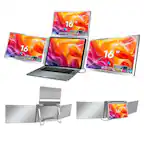
Mobile Pixels - Duex Float 2 Pro 16" Portable Monitor (Mini HDMI, USB) - Black
More Buying Options
Related Item

Highlights
- Key Specs
- Refresh Rate: 120Hz (The number of frames per second the device can produce natively without enhancement. Higher rates help produce smooth, seamless pictures.)
- Maximum Resolution: 2560 x 1600 (Maximum resolution refers to the highest number of pixels that a screen can process and display. Higher resolution signals produce more detailed images.)
- Panel Type: IPS (Technology that affects response time and image quality.)
- Synchronization Technology: Not Applicable (Generally, these technologies allow syncing between a computer/console game's frame rate and the device's refresh rate for a smoother display without tearing.)
- Screen Size: 16 inches (Size of the screen, measured diagonally from corner to corner.)
- Display Connector(s): 1 x Mini HDMI (The number and type of connectors used to connect to an external display.)
- General
- Brand: Mobile Pixels
- Model Number: 101-1011P03
- Product Name: Mobile Pixels Duex Float 2 Pro 16" Portable Monitor (Mini HDMI, USB)
- Color: Black
- Operating System Compatibility: Windows
- Display
- Refresh Rate: 120Hz (The number of frames per second the device can produce natively without enhancement. Higher rates help produce smooth, seamless pictures.)
- Maximum Resolution: 2560 x 1600 (Maximum resolution refers to the highest number of pixels that a screen can process and display. Higher resolution signals produce more detailed images.)
- Contrast Ratio: 1200:1 (Measured difference between a displayed image's brightest whites and darkest blacks. The larger the first number, the more detail and color that can be displayed.)
- Display Type: LCD
- Panel Type: IPS (Technology that affects response time and image quality.)
- Synchronization Technology: Not Applicable (Generally, these technologies allow syncing between a computer/console game's frame rate and the device's refresh rate for a smoother display without tearing.)
- Aspect Ratio: 16:10 (The measurement of the width of a screen compared to the height of a screen, expressed as a ratio.)
- Curved Screen: false
- Brightness: 350 candela per square meter (A measure of the total light output.)
- Screen Size: 16 inches (Size of the screen, measured diagonally from corner to corner.)
- High Dynamic Range (HDR): false (An HDR-compatible 4K TV or other HDR-compatible product displays HDR video content when it's available from sources like 4K Ultra HD Blu-ray Discs and 4K streaming services.)
- Connectivity
- Number of HDMI Inputs (Total): 1
- Display Connector(s): 1 x Mini HDMI (The number and type of connectors used to connect to an external display.)
- Number of USB Ports (Total): 1
- USB Ports: 1 x USB-C (The number and type of USB ports the product has.)
- Compatibility
- Wall Mountable: false (The product is able to be secured to a wall. Some products are designed ready to mount, while others may require additional hardware/accessories for installation.)
- Features
- Built-In Webcam: false
- Integrated Speaker(s): true
- Dimensions
- Product Height Without Stand: 9.1 inches
- Product Width: 0.6 inches (The out of box width of the item. Width is measured as the horizontal distance from one side of the item to the other as it would be primarily used or placed.)
- Product Weight: 2.9 pounds (The out of box weight of the item.)
- Stand Included: false
- Certifications Listings & Approvals
- ENERGY STAR Certified: false (Devices carrying the ENERGY STAR service mark, such as computer products and peripherals, kitchen appliances, and other products, generally use 20% to 30% less energy than required by federal standards.)
- EPEAT Qualified: false (The Electronic Product Environmental Assessment Tool (EPEAT) was designed to provide an environmental assessment tool for purchasers. In order to qualify for EPEAT, a product must meet all 23 required criteria.)
- Warranty
- Warranty - Parts: 2 Years Limited Warranty
- Warranty - Labor: 2 Years Limited Warranty
- Other
- UPC: 810130760725
We’ve taken everything you loved about Duex Float and made it even better. Duex Float 2 isn’t just a second screen, it’s a productivity powerhouse that fits into your workflow. Use it as your secondary monitor as a extended display or mirrored display. Achieve a healthy ergonomic alignment while working on the go. You can also flip the screen and easily share content with someone in front of you, whether it’s a presentation to your team at work. Use the built-in kickstand and turn Duex Float into a independent display. Perfect for gaming or viewing documents.
- Contrast ratio: 1200:1
- Brightness: 350
- 2K Quad HD/QHD: 2560 x 1600
- IPS technology: Experience stunning colors across the entire display with the IPS panel
- Refresh rate: 120Hz
- Response time: 8ms
- Built-in dual speakers: Engineered with dual integrated speakers, Duex Float 2 Series blends outstanding screen performance with stereo sound for an immersive multimedia experience.
Whats Included
- Mobile Pixels Duex Float 2 Pro 16" Portable Monitor (Mini HDMI, USB)
- 1× Duex Float 2 Pro
- 1× USB-C cable with USB-A adapter
- 1× mini HDMI to HDMI cable
- 4× Laptop Magnets
Q: What is the contrast ratio of this portable monitor?
A: The contrast ratio of this portable monitor is 1200:1.
Q: What type of panel is used in this portable monitor?
A: This portable monitor uses an IPS panel.
Q: Does this portable monitor have built-in speakers?
A: Yes, this portable monitor has built-in dual speakers.
Q: What is the refresh rate of this portable monitor?
A: The refresh rate of this portable monitor is 120Hz.
Q: What is the maximum resolution supported by this monitor?
A: The monitor supports a maximum resolution of 2560 x 1600.
Q: Is there an HDMI input port on this monitor?
A: Yes, there is one Mini HDMI input port on this monitor.
Q: What is the response time of this portable monitor?
A: The response time of the portable monitor is 8ms.
Q: Will this only work "on-top" of my laptop???
A: undefined
Compare similar products

We’ve taken everything you loved about Duex Float and made it even better. Duex Float 2 isn’t just a second screen, it’s a productivity powerhouse that fits into your workflow. Use it as your secondary monitor as a extended display or mirrored display. Achieve a healthy ergonomic alignment while working on the go. You can also flip the screen and easily share content with someone in front of you, whether it’s a presentation to your team at work. Use the built-in kickstand and turn Duex Float into a independent display. Perfect for gaming or viewing documents.

We’ve taken everything you loved about Duex Float and made it even better. Duex Float 2 isn’t just a second screen, it’s a productivity powerhouse that fits into your workflow. Use it as your secondary monitor as a extended display or mirrored display. Achieve a healthy ergonomic alignment while working on the go. You can also flip the screen and easily share content with someone in front of you, whether it’s a presentation to your team at work. Use the built-in kickstand and turn Duex Float into a independent display. Perfect for gaming or viewing documents.
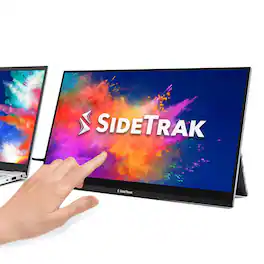
The SideTrak Solo Pro 15.8" Touchscreen Portable Monitor brings intuitive interaction to your dual-screen setup. Its responsive 10-point multi-touch interface makes scrolling, editing, and navigating smooth and simple. With Full HD resolution, HDR mode, and an anti-glare finish, it’s great for everything from graphic design to presentations. This lightweight monitor connects via USB-C or HDMI and works with Windows, Chrome, Linux, and Mac (touch not supported on Mac). No drivers needed—just plug in and start creating.

Boost your productivity with this ASUS 15.6-inch ZenScreen portable monitor. The 178-degree viewing angle provides consistent picture quality, while the anti-glare coating helps reduce eye strain and increase visibility. This flicker-free ASUS 15.6-inch ZenScreen portable monitor features a USB-C port that can connect to various devices, and the Full HD panel produces stunning visuals.
| Pros for Mobile Pixels - Duex Float 2 Pro 16" Portable Monitor (Mini HDMI, USB) - Black | |||
|---|---|---|---|
| There were no pros for this product— | There were no pros for this product— | There were no pros for this product— | Portability, Screen Size, Weight, Quality, Resolution |
| Cons for Mobile Pixels - Duex Float 2 Pro 16" Portable Monitor (Mini HDMI, USB) - Black | |||
| There were no cons for this product— | There were no cons for this product— | Touchscreen | Stand, Compatibility, Battery Life |
Specs
Reviews
This product doesn't have any reviews yet.