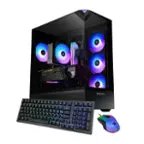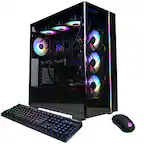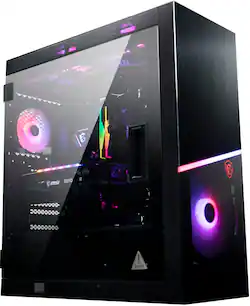
MSI - Infinite RS Gaming Desktop - Intel Core i7-11700KF - 16GB Memory - NVIDIA GeForce RTX 3060Ti - 1TB SSD+3TB HDD
- Key Specs
- Processor Model: Intel 11th Generation Core i7 (Your computer's processor is like its brain. Working in combination with system memory, the power of the processor determines the complexity of software you can run, how many programs you can have open at the same time, and how fast those programs will run. Most computers feature an AMD, Intel or Snapdragon processor.)
- Storage Type: HDD, SSD
- Total Storage Capacity: 4000 gigabytes
- System Memory (RAM): 16 gigabytes (Random-access memory (RAM) is a computing device's short-term data storage, which allows active information to be accessed quickly. The size and type of RAM determines how efficiently the device can handle large amounts of information at one time. For example, gaming or video editing requires more RAM for optimal performance.)
- Graphics Type: Dedicated (Dedicated graphics uses a separate graphics card for processing video images. Because it does not use memory from the system's RAM, there is no extra burden on the CPU and graphics are processed more efficiently. Integrated graphics shares system RAM to process video images.)
- Graphics: NVIDIA GeForce RTX 3060 Ti (Often referred to as a "graphics processing unit" (GPU), this device is responsible for displaying image content and decoding/encoding video content in programs and games.)
- General
- Product Name: MSI Infinite RS Gaming Desktop - Intel Core i7-11700KF - 16GB Memory - NVIDIA GeForce RTX 3060Ti - 1TB SSD+3TB HDD
- Brand: MSI
- Model Number: InfRS11TG234
- Year of Release: 2021
- Processor
- Processor Brand: Intel
- Processor Model: Intel 11th Generation Core i7 (Your computer's processor is like its brain. Working in combination with system memory, the power of the processor determines the complexity of software you can run, how many programs you can have open at the same time, and how fast those programs will run. Most computers feature an AMD, Intel or Snapdragon processor.)
- Processor Model Number: 11700KF
- Storage
- Storage Type: HDD, SSD
- Total Storage Capacity: 4000 gigabytes
- Solid State Drive Capacity: 1000 gigabytes (The amount of data that can be stored on the device's solid state drive (SSD). SSD is a flash-based storage with faster speeds than a hard disk drive (HDD).)
- Hard Drive Capacity: 3000 gigabytes (The amount of data that can be stored on the device's mechanical hard drive. Hard disk drives (HDDs) typically have larger capacities than solid state drives (SSDs) but may have slower speeds.)
- Solid State Drive Interface: NVMe (Connects the solid state drive to the host system. PCI and SATA interfaces are the most common; PCI interfaces are typically faster, but SATA interfaces are compatible with a wider range of systems.)
- Hard Drive Interface: SATA (Connects the hard drive to the host system for transferring data between the hard disk cache and system memory. IDE and SATA interfaces are primarily used for personal computing, while larger servers and workstations typically use SAS or SCSI.)
- Memory
- System Memory (RAM): 16 gigabytes (Random-access memory (RAM) is a computing device's short-term data storage, which allows active information to be accessed quickly. The size and type of RAM determines how efficiently the device can handle large amounts of information at one time. For example, gaming or video editing requires more RAM for optimal performance.)
- Type of Memory (RAM): DDR4 (Each type of RAM delivers a different level of speed, bandwidth, energy efficiency and performance.)
- Number of Memory Sticks Included: 2
- Graphics
- Graphics Type: Dedicated (Dedicated graphics uses a separate graphics card for processing video images. Because it does not use memory from the system's RAM, there is no extra burden on the CPU and graphics are processed more efficiently. Integrated graphics shares system RAM to process video images.)
- GPU Brand: NVIDIA
- Graphics: NVIDIA GeForce RTX 3060 Ti (Often referred to as a "graphics processing unit" (GPU), this device is responsible for displaying image content and decoding/encoding video content in programs and games.)
- Advanced Graphics Rendering Technique(s): Ray tracing (Imaging technology designed to improve graphics rendering.)
- Compatibility
- Operating System: Windows 10 Home (The operating system manages all software and hardware, including files, memory and connected devices. Most importantly, it lets you interact with your device and your programs in a visual way; otherwise, you'd be typing computer code to get anything done.)
- Motherboard Form Factor: ATX (Physical size of the motherboard, which can determine how many PCIe slots are available. Smaller board means fewer slots and features.)
- Connectivity
- Display Connector(s): 3 x DisplayPort 1.4, 1 x HDMI 2.1 (The number and type of connectors used to connect to an external display.)
- Number of HDMI Outputs (Total): 1
- Number of DisplayPort Outputs (Total): 3
- USB Ports: 4 x USB-A 2.0, 7 x USB-A 3.2, 1 x USB-C 3.2 (The number and type of USB ports the product has.)
- Number of USB Ports (Total): 11
- Wireless Connectivity: Bluetooth, Wi-Fi (The manner in which a device sends data to another device over a short distance without the use of wires or cables.)
- Number Of Ethernet Ports: 1
- Cooling
- CPU Cooling System: Liquid
- Power
- Power Supply Maximum Wattage: 750 watts
- Expansion
- Number Of Internal 2.5" Bays: 3
- Number Of Internal 5.25" Bays: 4
- Certifications Listings & Approvals
- ENERGY STAR Certified: true (Devices carrying the ENERGY STAR service mark, such as computer products and peripherals, kitchen appliances, and other products, generally use 20% to 30% less energy than required by federal standards.)
- EPEAT Qualified: false (The Electronic Product Environmental Assessment Tool (EPEAT) was designed to provide an environmental assessment tool for purchasers. In order to qualify for EPEAT, a product must meet all 23 required criteria.)
- Included
- Optical Drive Type: None (An optical disk drive (ODD) uses a laser light to read data from or write data to an optical disc. These discs include CDs, DVDs, and Blu-ray Discs. This allows you to play music or watch movies using prerecorded discs.)
- Keyboard Included: true
- Mouse Included: true
- Other
- UPC: 824142266779
MSI desktops contain MSI quality components from top to bottom. From the power supply to the motherboard to the graphics card, to liquid cooling. These standard, non-proprietary PC components make it easy to upgrade down the line, extending the lifespan of the system considerably. Adding storage for games and increasing FPS by replacing the graphics card will be easy to do when the time comes. MSI Infinite RS Gaming Desktop: Get in the game with this MSI Infinite RS Gaming DesktopThe NVIDIA GeForce RTX 3060 ti graphics card makes visually intensive games come to life in exquisite detail, and the 1 TB SSD loads large titles in seconds. This MSI Infinite RS Gaming Desktop has an Intel Core i7 11th gen processor and 16GB of RAM that easily handle multiple applications simultaneously. Featuring MSI's exclusive Dragon CPU liquid cooler with up to a 240mm radiator, the Infinite RS allows for maximum heat dissipation and handles the most hardware intensive games without breaking a sweat.
- Intel Core i7-11700F: This Infinite RS is equipped with 11th gen Intel Core i7 processor.
- 16 GB DDR4 3200Mhz: 16GB DDR4 (2 x 8GB) 3600 MHz RGB. 4x DDR4 3200MHz U-DIMM Slots, up to 128GB
- NVIDIA GeForce RTX 3060 Ti: Packed with the latest Nvidia Geforce RTX 3060 Ti, this desktop is built for Esports and delivers an exceptional gaming experience.
- Wireless Communication: WiFi 6 (802.11ax) 2.4Gbps Dual Band 2.4GHz, 5GHz
- Rear Port: 1 x USB 3.2 Gen1 Type-C (rear) 3 x USB 3.2 Gen1 Type-A (rear) 2 x USB 2.0 (rear)
- Front Port: 1 x USB 3.2 Gen2 Type-C (front) 4 x USB 3.2 Gen1 Type-A (front)
- Rear Port: 1 x USB 3.2 Gen2x2 Type-C (rear) 1 x USB 3.2 Gen2 Type-A (rear) 2 x USB 3.2 Gen1 Type-A (rear) 4 x USB 2.0 Type-A (rear)
- Expansion: 4 x PCIe x16 (1x PCIe 4.0/3.0, 1x PCIe 3.0 x4, 2x PCIe 3.0 x1) 2 x M.2 (1x PCIe 4.0 x4, 1x PCIe 3.0 x4/SATA) 6 x SATA 6Gb/s 1 x TPM connector 3 x 2.5", 4 x 3.5" or 2.5"
Q: Can the RAM in this unit be upgraded to 2 16GB sticks?
A: Yes, the Infinite RS can be upgraded up to a maximum of 64 GB of memory.
A: The Infinite RS is equipped with XPG 16GB DDR4 (2 x 8GB) 3600 MHz RGB. The maximum spec of memory the motherboard can support is 4x DDR4 3200MHz U-DIMM Slots, up to 128GB.
Q: What is the rotation speed of the internal HDD?
A: 5400RPM, check the spec list, it’s listed there too.
A: The Infinite RS 11TG-234 is equipped with a 750 gold power supply.
A: I played Mechwarrior 5 on 4K resolution with the most demanding graphics settings. Using MSI's Frozr AI cooling app, the fans never ran faster than 52% speed, the CPU temp hovered around 62 degrees Celsius, and the GPU temp remained under 72 degrees Celsius after an hour of play.
Q: What cable(s) would I need to hook up a second monitor?
A: All you need are hdmi cables the pc does not take vga cables sadly
A: To boot into bios, tap delete while the system is booting up and then you are able to access the bios.