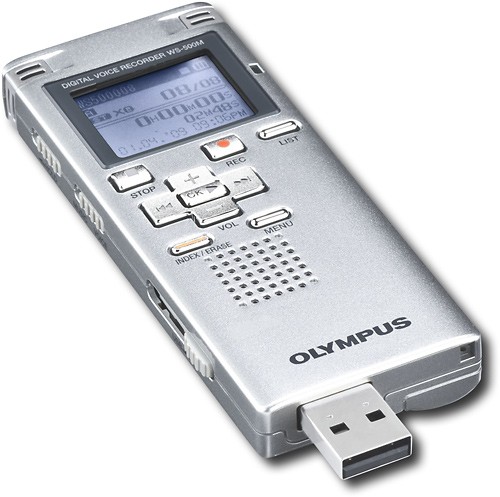
Olympus - Digital Voice Recorder
This item is no longer available in new condition.
See similar items below.
Description
Features
Voice-operated recording
Activates the recorder only when audible sound is present, conserving tape and eliminating soundless passages.
Up to 545 hours of recording time in LP mode
For reliable recording.
Built-in stereo microphones
For clear audio.
Music player
Allows you to play your favorite tunes.
Direct PC link
For quick and easy downloading of audio files.
Earphones
For private listening.
Battery charge function
Keeps your recorder charged and ready to go.
What's Included
Olympus Digital Voice Recorder
Rechargeable AAA Ni-MH battery
Earphones, USB cable
Owner's manual
Other
- FormatDigital
- Maximum Recording TimeUp to 545 hours (in LP mode)
- Voice-to-Print SoftwareNo
- Removable MemoryNo
- <a href="javascript:winopengld('1087340511721','pcmcat38200050027','cat12080')">Voice Activated</a>Yes
- UPC050332169074
Customer reviews
Rating 3.7 out of 5 stars with 3 reviews
(3 customer reviews)to a friend
Rated 4 out of 5 stars
High Quality, easy-to-use Recorder
Posted .This reviewer received promo considerations or sweepstakes entry for writing a review.Very high quality sound recording, ready to use right out of the box, relatively intuitive (though some of the features require some referencing of the manual). Definitely worth the price.
I would recommend this to a friendRated 5 out of 5 stars
Great quality, no problems.
Posted .This reviewer received promo considerations or sweepstakes entry for writing a review.I'm a videographer who tapes legal depositions. I use this to record backup audio to give to the court reporters at the end of the day. I run a line from my mixer into the mic in on the recorder. Perfect quality. At the end of the depo, I pop out the USB and download it directly onto the reporter's laptop. Nothing could be easier. Only downside is the rechargeable battery that comes with it. The charge doesn't last long. I just bought a pack of AAA batteries and now I'm set.
I would recommend this to a friendRated 2 out of 5 stars
So So unit
Posted .This reviewer received promo considerations or sweepstakes entry for writing a review.I purchased this for school, so I could record and play back lectures. I used it for the first time today and I guess I need an exterior mic, as when I played it back I could barely hear the instructor I was sitting right up front and the classroom is not big and the door was closed. I already spent $100.00. I guess either I'm going to have to purchase a mic for an additional cost or return it and see if I can find something better! I Also it doesn't come with detailed instructions you either have to download it from Olympus 72 pages or pay $10.00 for a copy. It does come with basic instructions so if you are a electronic brainiac you might be fine with what comes with it. Over all I'm not happy with this unit.
No, I would not recommend this to a friend
Q: QuestionIs there a way to pause the recording and resume it?I am looking for a recorder for school. We normally get a break halfway through class. I am looking for one that I can pause to keep it all in one file. If this is not the one, would you recommend another? Preferably under $100.
Asked by Anonymous.
- A:Answer The WS-500M does have a pause recording (PAUSE REC) feature. While recording a file, press the record button (REC) to pause recording. When you are ready to resume recording, press the record button (REC) again. If the recorder is left in PAUSE REC mode, it will time out after 60 minutes.
Answered by OlympusProductSpecialist

Q: QuestionHow can I edit the recording?Recorder recorded in WMA and I downloaded a frseeware converter and turned it into MP3. I want to cut out parts of the recording and post them but there is no software I can find for this. Do I need a different model or brand? I tried using software I have for Sony digital voice recorder but recording was rejected even tho it was in MP3 format.
Asked by fenwinkel.
- A:Answer Please contact us via our toll free Technical Support line so that we can properly investigate the matter and offer assistance to you. You may reach us at 1-888-553-4448 / Monday-Friday 9:00 A.M. to 9:00 PM. Eastern Time.
Answered by OlympusProductSpecialist
Q: QuestionWhat kind of program do you need for your PC to use this recorder?I have been trying to use this recorder and have plugged the USB into my computer, but nothing happens.
Asked by Amaryllis.
- A:Answer The recorder does not require software, it is a mass storage device. To access files, attach the unit to the computer and locate the My Computer icon. Locate the removable disk that represents the recorder. This disk will contain all of the Folders located on the recorder. Simply identify the recording and drag and drop them onto your computer. The files are WMA (Windows Media Audio), simply click the files to launch Windows Media Player.
Answered by OlympusProductSpecialist
Q: Questiontranscribing digital audio files into a word processorcan you recommend the best software to transcribe digital audio files downloaded onto a PC into a word processing program?
Asked by Anonymous.
- A:Answer Please call our digital technical support hotline at 888-553-4448 and, at the prompt, select Option 4. A representative will be able to better assess your needs and provide assistance.
Answered by OlympusProductSpecialist