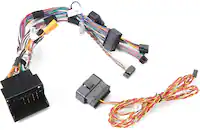
PAC - Steering Wheel Control Interface for Select Vehicles - Black/Blue
FREE shipping to
More Buying Options
Related Item

About This Item
- General
- Brand: PAC
- Model Number: SWI-CP5
- Product Name: Steering Wheel Control Interface for Select Vehicles
- Color: Black/Blue
- Compatibility
- Vehicle Compatibility: Select Acura, Audi, BMW, Buick, Cadillac, Chevrolet, Chrysler, Dodge, Ford, GMC, Honda, Hyundai, Jaguar, Jeep, Kia, Land Rover, Lexus, Mazda, Mercedes, Mercury, Mitsubishi, Nissan, Pontiac, Porsche, RAM, Saab, Subaru, Suzuki, Toyota, and more
- Product Compatibility: Stereo/receiver
- Product Type: Interface
- Dimensions
- Product Height: 0.75 inches (The out of box height of the item. Height is measured as the vertical distance from the bottom of the item to the top as it would be primarily used or placed.)
- Product Length: 14 inches (The out of box length of the item. Length is measured as the longest dimension of the item.)
- Product Width: 0 inches (The out of box width of the item. Width is measured as the horizontal distance from one side of the item to the other as it would be primarily used or placed.)
- Product Weight: 0.75 pounds (The out of box weight of the item.)
- Warranty
- Warranty - Parts: 1 year
- Warranty - Labor: None
- Other
- UPC: 609098813860
Retain your vehicle’s built-in steering wheel controls (SWC) when replacing your factory radio with this Steering Wheel Control Interface for Select Vehicles by PAC. The SWI-CP5 is a simple-to-use module that can be configured in a number of ways including DIP switches, directly from a USB-connected PC, through button learning, and more. Wiring and vehicle configuration switch settings are provided through the ControlPRO web application and mobile applications for smartphones and tablets.
- Compatible in vehicles equipped with LAN, LIN, CAN, Class II, Analog, or Serial Data SWC: For use in vehicles with either data or analog SWC.
- Retains factory features and functions: Including steering wheel controls (SWC), rear seat controls (RSC), and retained accessory power (RAP) when installing an aftermarket radio.
- Retains memory: Even if power is lost.
- Tricolor LED indicators: Alert users to the module’s status.
- Audible feedback: Provides confirmation of successful programming.
- Versatile programmability: Configure using the smartphone, PC or web applications, through a USB flash drive, or manually.
Q: Can the interface be configured using a smartphone or tablet?
A: Yes, you can configure the interface using a smartphone or tablet. The wiring and vehicle configuration switch settings are accessible through mobile applications for these devices.
Q: Is the interface compatible with most aftermarket stereos?
A: This steering wheel control interface is compatible with most aftermarket stereos.
Q: What accessories are included with the interface?
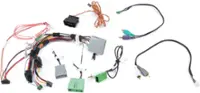
A: The steering wheel control interface includes a harness as an additional accessory.
Q: Does the interface support analog signals?
A: This steering wheel control interface is compatible with analog signal types.
Q: What are the different ways to configure the interface?
A: The SWI-CP5 interface offers configuration through DIP switches, USB connection to a PC, button learning, and by using the ControlPRO web and mobile applications.
Reviews
The vast majority of our reviews come from verified purchases. Reviews from customers may include My Best Buy members, employees, and Tech Insider Network members (as tagged). Select reviewers may receive discounted products, promotional considerations or entries into drawings for honest, helpful reviews.
Compare similar products
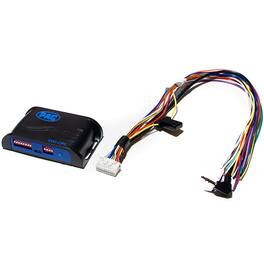
Retain your vehicle’s built-in steering wheel controls (SWC) when replacing your factory radio with this Steering Wheel Control Interface for Select Vehicles by PAC. The SWI-CP5 is a simple-to-use module that can be configured in a number of ways including DIP switches, directly from a USB-connected PC, through button learning, and more. Wiring and vehicle configuration switch settings are provided through the ControlPRO web application and mobile applications for smartphones and tablets.

Keep your built-in steering wheel controls when upgrading to an aftermarket radio with this steering wheel control interface by PAC. The SWI-CP2 is compatible with a wide range of popular vehicles and motorcycles. Save time during installation with an easy three-step setup process using the ControlPRO app for smartphones.

Control an aftermarket radio from your steering wheel with the help of this Maestro ADS-MSW universal analog steering wheel interface that allows you to program 2 unique radio functions for each button. Plastic and copper materials ensure durability.

Easily replace the factory radio in your GM vehicle with this all-in-one Radio Replacement and Steering Wheel Control Interface with OnStar Retention by PAC. The RadioPRO5 RP5-GM31 interface comes pre-loaded with amplifier and OnStar retention, steering wheel control software, navigation-based output signals and more to help simplify aftermarket radio installation while retaining your vehicle’s factory features. Antenna adapter not included.
| Pros for PAC - Steering Wheel Control Interface for Select Vehicles - Black/Blue | |||
|---|---|---|---|
| There were no pros for this product— | There were no pros for this product— | Ease of use, Installation, Steering Wheel Controls, Compatibility, Overall Performance | Ease of use, Installation, Steering Wheel Control, Sound Quality, OnStar Retention |
| Cons for PAC - Steering Wheel Control Interface for Select Vehicles - Black/Blue | |||
| There were no cons for this product— | There were no cons for this product— | Price, Instructions, Programming | Price, Instructions, Antenna Adapter, Volume |