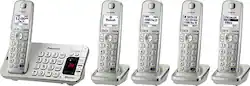
Panasonic - KX-TGE275S Link2Cell DECT 6.0 Expandable Cordless Phone System with Digital Answering System - Silver
- Key Specs
- Speakerphone: true
- Bluetooth Enabled: true (The device is capable of communicating with another device via Bluetooth, provided they are within the required range of each other. A Bluetooth-enabled device must also be the same Bluetooth version or higher than the accessory it is intended to pair with.)
- Expandable: true
- Frequency: DECT 6.0 Digital (A measurement of the electromagnetic radio waves a device emits.)
- Answering System Included: true
- General
- Product Name: KX-TGE275S Link2Cell DECT 6.0 Expandable Cordless Phone System with Digital Answering System
- Brand: Panasonic
- Keypad Location: Base and handset
- Model Number: KX-TGE275S
- Features
- Backlit Keypad: true (Integrated lights allow for visibility of the keys in low-light conditions.)
- Volume Control: true
- Intercom: true (Allow two or more people to carry on a conversation over a wired circuit.)
- Call Waiting: true
- Caller ID: true
- New-Message Indicator: true
- Remote Access: true
- Wall Mountable: true (The product is able to be secured to a wall. Some products are designed ready to mount, while others may require additional hardware/accessories for installation.)
- Call Conferencing: true
- Call Functions
- Flash Function: true
- Hold Button: true
- Included
- Handsets Included: true
- Number Of Expansion Base Stations Included: 1
- Number Of Expansion Handsets Included: 5
- Compatibility
- Hearing Aid Compatible: true
- Expansion Handset Compatibility: Panasonic KX-TGEA20
- Number Of Expansion Handsets Supported: 6
- Number Of Expansion Base Stations Supported: 1
- Storage
- Caller ID Memory: 50 gigabytes
- Total Record Time: 18 minutes
- Certifications Listings & Approvals
- ENERGY STAR Certified: true (Devices carrying the ENERGY STAR service mark, such as computer products and peripherals, kitchen appliances, and other products, generally use 20% to 30% less energy than required by federal standards.)
- Other
- UPC: 885170181465
Panasonic Link2Cell KX-TGE275S Bluetooth-Enabled Cordless Phone with 5 Handsets: Experience the ease of having a cell phone that connects to your home phone with this Bluetooth-enabled phone system. By syncing up to 2 cell phones to your home phone via Bluetooth, you'll never have to carry your cell phone with you, or drain its battery, while at home. Instead, use the 5 cordless handsets to make and receive cell and landline calls throughout the house. Pair with a wireless headset (sold separately) for hands-free communication.
Learn more about the features of Bluetooth-enabled cordless phones.
- No landline required with automatic Bluetooth connectivity: Sync up to 2 smart phones to your home phone system so that you don't have to carry your cell phone, or drain its battery, while moving or working around the house.
- Make and receive cellular and landline calls with 5 cordless handsets: Never miss a call or text alert to your cell phone while at home. Place the 5 cordless handsets throughout the house for your calling and answering convenience.
- Large 1.8" white backlit handset display: Easily read phone numbers, text alerts and more with the LCD display.
- Communicate across the house with the built-in intercom: The handset-to-handset and handset-to-base intercoms make it easy to get in touch with people inside your home.
- Find out who's calling with traditional and Talking Caller ID: Read the display or listen to the audio transmission of the name and number of the caller while across the room. Store a caller-ID history of up to 50 names and numbers.
- Seamless integration of your phonebook directory: Copy your phonebook from your cell phone to store the name and number of up to 3,000 contacts on your cordless phone.
- Headset leaves your hands free: Use the headset jack on the handset and base, or sync your Bluetooth headset to your phone system so that you can multitask while on a call. Compatible with Panasonic telephone headsets (sold separately).
- Expand your phone system with up to 6 handsets: Add extra handsets for up to 6 total cordless phones in your home. Compatible with Panasonic model KX-TGEA20 accessory handset (sold separately).
- Mountable design: Customize the placement of your phones in your home with wall-mountable options.
- Quiet mode silences your ringer: Turn off your ringer at night or when you are not to be disturbed. Calls and messages will still be logged.
- Stay connected during power outages: A powerful battery backup system lets you continue usage even when the power goes out.
- Find misplaced items with the key detector: Attach the key detector to your car key ring or other easily misplaced items, then use any of your telephone handsets to set an alarm to track down the lost item.
Whats Included
- 4 handset chargers
- 5 handsets with NiMH AAA rechargeable batteries
- Belt clip
- KX-TGE275S Link2Cell DECT 6.0 Cordless Phone System
- Owner's manual
Q: What kind of wall phone jack does the base require? Thanks.
A: I don't know if it has a name, but this phone uses the "normal" type of phone jack that every phone I've ever owned uses. It "clicks" when you slide it into the jack correctly. Only the base needs the phone jack, but all the phones require a normal electrical outlet.
Q: Do these phones have the talking caller id
A: This will have talking caller ID.
Q: Can you add more extensions to this system? If so, how many extension phones will it support?
A: Yes, you can add more handsets for a total of 6.
Q: Is this compatible with the IPhone X?
A: undefined
Q: Does this set support 2 different landlines?
A: No it does not
Q: does this system have call blocker?
A: Yes it does and can hold up to 250 blocked numbers.
Q: Can you connect a bluetooth headset to this set?
A: Yes, you can link cell phone and/or a headset.
A: Yes, push the button beneath the words "menu" on the phone handset screen, then navigate with the center navigation key by pushing the down arrow (labeled CID) to "settings", hit the select button, and navigate with the down arrow again until you see "ring adjustments", hit select and navigating again with the down arrow to choose "ringer tone", hit select, then navigate through all the choices for rings by using the down arrow and you will hear snippets of each one, use the up arrow to go to a previous ring tone, when you find one you like hit "save" and voila! I have 5 "tones" and 10 "melodies" from which to select. I think one may select different tones for each handset but I am not certain. You also will notice the ability to make a particular handset silent or have a lower volume ring tone, among other things, in the ringer adjustments category. I am no whiz at this but stumbled upon "ring tones" when trying to keep one handset silent in the guest room.