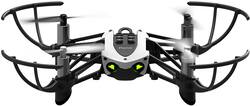
Parrot - MAMBO Quadcopter - Black
- General
- Product Name: MAMBO Quadcopter
- Brand: Parrot
- Assembly Required: Partial
- Recommended Minimum Age: 14 years
- Product Set: Base
- Model Number: 47546BBR
- Color: Black
- Color Category: Black
- Flight
- Autonomous Flight Modes: Follow user, Landing, Low battery auto-landing
- Maximum Altitude (Above Sea Level): 65 feet
- Number of Rotors: 4
- Camera
- Integrated Camera: true
- First Person View (FPV): false
- Field of View: 120 degrees
- Camera Gimbal: Included (A support that pivots and stabilizes the camera.)
- Autofocus: false (Allows the camera to automatically focus through the lens, rather than by adjusting the lens manually.)
- Image Stabilization: Digital (This feature helps reduce image/video blur or distortion that may occur from unsteady motion.)
- Digital Zoom: None (A digital zoom is accomplished electronically, with no adjustment of the camera's optics, and no optical resolution gained in the process. The existing data is not enhanced or added to, merely displayed at a lower resolution, thereby giving an illusion of an enlarged image.)
- Optical Zoom: None (The optical zoom uses a combination of lenses that magnify the image prior to it being registered at high resolution by the imaging sensor.)
- Burst Mode: false (Also referred to as continuous shooting. This feature captures multiple shots in rapid succession.)
- Video Encoding Formats: H.264 (The process of preparing the video for output, where the digital video is encoded to meet proper formats and specifications for recording and playback with the use of a compatible device.)
- Image File Format(s): JPEG (Standardized software format(s) of storing digital images. The type of format chosen for capturing and compressing the image can determine quality, level of detail, and storage space required.)
- Image Sensor Type: CMOS (CCD and CMOS are the two main technologies used in image sensors. CCD, the older of the two types, turns analog light signals into digital pixels. This conversion happens without distortion, resulting in high-quality images. Newer CMOS sensors use transistors at each pixel to move electrical charges. CMOS sensors are typically less expensive, but also require more light to create distortion-free images.)
- Environmental
- Indoor Or Outdoor Use: Indoor and outdoor (Indicates the appropriate environment product was designed to be used in.)
- Minimum Operating Temperature: 32 degrees fahrenheit (The lowest recommended ambient (surrounding) temperature in which the product can ideally operate stated by the manufacturer. Generally long-term exposure of the product to temperatures less than the minimum can result in ineffective operation.)
- Maximum Operating Temperature: 100 degrees fahrenheit (The highest recommended ambient (surrounding) temperature in which the product can ideally operate stated by the manufacturer. Generally long-term exposure of the product to temperatures more than the maximum can result in ineffective operation.)
- Compatibility
- Mobile Device Holder: false
- Operating System Compatibility: Android, Apple iOS
- Features
- Integrated GPS: No
- Records Audio: false
- Landing Gear/Legs Included: Landing Legs
- Storage
- Memory Card Compatibility: None (The type of memory card(s) recommended for use with the product.)
- Memory Card Included: false (Indicates whether a memory card is included.)
- Power
- Interface(s): USB (Refers to the types of connections that devices use to interact and communicate with each other.)
- Warranty
- Manufacturer's Warranty - Parts: 1 Year
- Manufacturer's Warranty - Labor: 1 Year
- Other
- UPC: 3520410038082
The Parrot Mambo minidrone comes equipped with two new accessories that help turn the sky into a playground! Fire miniature balls at moving objects with the Cannon, or move objects through the air using the Transporter claw. You can also enjoy acrobatic tricks and flips in flight. This super robust and easy to handle Minidrone will measure up to all your challenges.
Fly Responsibly:
Before takeoff, update all software and firmware, and read the instructions thoroughly.
See the FAA website for registration requirements and information about flying a drone safely: https://www.faa.gov/uas/getting_started/. Additional state or local requirements may apply. Check your local jurisdiction. The following websites may help you make informed decisions about flying your drone: www.knowbeforeyoufly.org and www.modelaircraft.org.
- Cannon or the Grabber equips accessory: You can equip the drone gun with 6 balls magazine (one shot every 1.5 seconds) or grabber which may catch up to 0.15 oz. object.
- Multidirectional controls: Offer easy maneuverability and flexible navigation.
- Intelligent flight system: 3-axis accelerometer and 3-axis gyroscope with vertical ultrasound sensor.
- 300,000 pixels camera: For bright and crisp snapshots.
- Rechargeable 550mAh lithium-polymer battery: The rechargeable 550mAh lithium-polymer battery provides up to 9 minutes (without accessories) of flight time per charge.
- Fly even further with Parrot Flypad: Optimized for a perfect connection up to 200 ft. flights.
- Simple flight control from your compatible smartphone or tablet: The Freeflight app also puts you in the cockpit, with display functions such as auto return home, takeoff and land, directional and camera controls, and even a button for flips.
- Fly Responsibly:: The following website may help you make informed decisions about flying your drone: KnowBeforeYouFly.org. Additional state or local requirements may apply. Check your local jurisdiction.
Whats Included
- Balls (50 pcs)
- Cannon
- Drone Mambo
- Grabber
- Quickstart guide
- USB cable
Q: Can u see through the camera while flying? Like can i fly using the camer
A: You can see through the camera while you fly, but I don't think I'd try to fly that way. I fly in an area with lots of trees and obstacles though. You can see what the camera sees if you buy the controller (Highly recommend you buy the controller.) and put your phone in the mount on top. I've bought something like 7 drones in the past 6 weeks. Some were so bad that I just took them back. (none of the ones I bought at BesBuy got taken back) I have three different Parrot drones and they are by far my favorites!
Q: does it include cannon and grapper
A: Yes, the cannon, grabber, and 50 balls are included.
Q: Does the drone have a camera
A: Yes it does not have fpv and the camera is on the belly of it. Picture quality is somewhat decent.
Q: How far up does it fly and how big is it
A: The product measures 5.2 x 1.6 x 5.2 inches. This drone has a 200 ft range.
Q: Does the camera have good resolution?
A: Not really. It has a pointing down camera but very bad resolution
Q: How much flight time on one charge
A: About 1 hour
Q: Can you use code to fly it?
A: Yes - using Swift Playgrounds (apple) it can be programmed easily. Simply download Swift Playgrounds to your ipad, open the app, click on "add playgrounds" and you will see a playground for Mambo drones - select that and it has a tutorial and an area you can do whatever you want.
Q: Can two be flown in the same area at once?
A: Yes, i race my kids all the time.