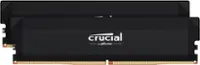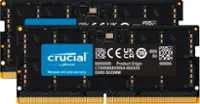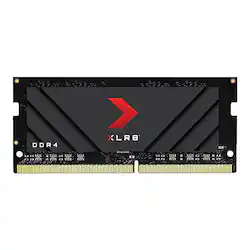
PNY - XLR8 Gaming 16GB 3200MHz DDR4 DRAM (PC4-25600) CL20 1.2V SODIMM Notebook/Laptop Memory - Black
- Key Specs
- Type of Memory (RAM): DDR4
- Form Factor: Laptop (The type of computer the memory is configured to fit in.)
- Speed: 3200 megahertz
- Latency: 20 (Refers to the amount of time between the moment a memory request is initiated and the moment the request is retrieved by a processor, commonly written as a series of 4 numbers, or timings. Each timing measures the performance of the module according to a specific parameter. Generally, the lower the numbers, the faster the RAM can respond to requests.)
- CAS Latency: 20 (Column Address Strobe (CAS) Latency refers to the number of clock cycles (for synchronous DRAM) or nanoseconds (for asynchronous DRAM) between the moment an instruction or command is initiated and the moment the data result is available. Generally, the lower the numbers, the better.)
- Lighting Type: None
- Performance Profile(s): Intel XMP 2.0
- Memory Capacity (per Module): 16 gigabytes (Refers to the maximum amount of data that can be stored on the memory module.)
- Memory Capacity (Total): 16 gigabytes (Refers to the maximum total amount of data that can be stored on all included memory modules.)
- General
- Brand: PNY
- Model Number: MN16GSD43200X
- Product Name: PNY XLR8 Gaming 16GB 3200MHz DDR4 DRAM (PC4-25600) CL20 1.2V SODIMM Notebook/Laptop Memory
- Color: Black
- Memory Capacity (per Module): 16 gigabytes (Refers to the maximum amount of data that can be stored on the memory module.)
- Number Of Modules: 1
- Memory Capacity (Total): 16 gigabytes (Refers to the maximum total amount of data that can be stored on all included memory modules.)
- Compatibility
- Type of Memory (RAM): DDR4
- Pin Configuration: 260
- Memory Format: SODIMM (Memory module size that determines what size device the memory stick will fit.)
- Form Factor: Laptop (The type of computer the memory is configured to fit in.)
- Minimum System Requirements: Windows 10 and older
- Operating System Compatibility: Windows
- Speed
- Memory Speed Rating: PC4-25600 (The RAM's bandwidth rating. The numbers refer to generation and transfer speed and are typically separated with a hyphen. For example, PC3-12800 would indicate that the module is 3rd generation and has a theoretical bandwidth of 12,800 megabytes per second (MBs). The higher the second number, the faster the speed.)
- Speed: 3200 megahertz
- Latency: 20 (Refers to the amount of time between the moment a memory request is initiated and the moment the request is retrieved by a processor, commonly written as a series of 4 numbers, or timings. Each timing measures the performance of the module according to a specific parameter. Generally, the lower the numbers, the faster the RAM can respond to requests.)
- CAS Latency: 20 (Column Address Strobe (CAS) Latency refers to the number of clock cycles (for synchronous DRAM) or nanoseconds (for asynchronous DRAM) between the moment an instruction or command is initiated and the moment the data result is available. Generally, the lower the numbers, the better.)
- Features
- Buffered or Registered: Unbuffered (Registered (buffered) memory modules are classified by the addition of a register between the memory controller and DRAM modules. When compared to conventional unbuffered (unregistered) memory, this type provides more stability with less electrical load on the controller, making it a common choice for use in robust applications, such as servers.)
- Data Integrity Check: Non-ECC (Error-correcting code (ECC) memory helps to maintain data integrity within a computer system, protecting it from potential crashes as well as losses or changes to data due to undetected errors. Systems that use ECC have an additional chip on the RAM that acts as the error check.)
- Memory Channels: Single (Multi-channel memory increases the rate of data transfer between the DRAM memory and memory controller by adding more channels of communication. The more channels, the more memory bandwidth.)
- Lighting Type: None
- Fan Included: false
- Performance Profile(s): Intel XMP 2.0
- Power
- Voltage: 1.2 volts (Amount of power needed to support an electrical current.)
- Warranty
- Warranty - Parts: Limited lifetime
- Warranty - Labor: Limited lifetime
- Other
- UPC: 751492645599
PNY XLR8 Gaming DDR4 Notebook Memory upgrade is ideal for PC enthusiasts and gamers, providing the extreme performance necessary for today’s increasingly demanding applications and intense laptop Gaming. XLR8 Gaming DDR4 Notebook Memory is the perfect upgrade solution: easy to install and easy overclocking.
- Performance: Extreme performance DDR4 Desktop Memory designed for laptop gamers and performance enthusiasts.
- Superior Gaming: Quicker response times and better visuals for a better gaming experience.
- XMP 2.0 Support: Easy overclocking to run at top speed for maximal performance.
- Performance: Exceptional 3200MHz performance, and backwards compatible with lower frequencies.
- Users: Designed for laptop gamers and performance enthusiasts.
Whats Included
- 1x XLR8 Gaming 16GB 3200MHz DDR4 DRAM (PC4-25600) CL20 1.2V SODIMM Notebook/Laptop Memory
A: Since PNY didn't answer, I ended up finding a PDF with the specs buried on their website, and it indicated that it has the JEDEC profile for 3200Mhz and on a separate section it says it has a CAS latency of 20. On my HP Omen 15 (Ryzen 7 4800H), it registered as 1600Mhz (3200) and has memory timings of 22-22-22-52. It's not great, but it's the best RAM I've found so far. The stuff they have in stores only runs at 2400Mhz, which is not doing a Ryzen processor any favors, since performance is heavily dictated by memory speeds.
Q: What is the memory density? Is it 1Rx16 or 1Rx8? Essentially, does it have four chips, or eight?
A: undefined
A: If it’s a 12th gen core i7 then most likely you are gonna need DDR5 ram, but make sure, I’ve seen some 12 gen intel processors that still use DDR4
A: It depends on the laptop but these will work in whatever you put them in just make sure the Hz match up
Q: would this work on a hp 15 da0xxx laptop
A: Only if your laptop accept DDR4 2400MHZ, 2666MHZ, 2933MHZ, 3000MHZ, or 3200MHZ. And also check the memory capacity for each ram slots.
Q: Is it compatible with msi sword? thank you!
A: Only if your laptop accept DDR4 2400MHZ, 2666MHZ, 2933MHZ, 3000MHZ, or 3200MHZ. And also check the memory capacity for each ram slots.
A: It should be but you can always google it and watch YouTube that's what I do
Q: Is this just a single stick of RAM or is it two?
A: Yes just one stick I believe you can get 2 if you want