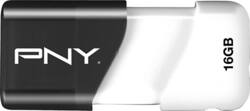
PNY - Compact Attaché 16GB USB 2.0 Flash Drive - Black/White
- Key Specs
- Storage Capacity: 16 gigabytes (Measured in megabytes (MB), gigabytes (GB) and terabytes (TB), this is the amount available for storing files, music, movies, photos and more. The total includes the capacity of the hard disk drive and solid state drive if both are included on the computer.)
- USB Generation: USB 2.0 (The specification (generation) of the USB standard. Generations are backwards compatible with previous specifications (provided that those devices have the necessary adapter to accommodate the connection type).)
- General
- Product Name: Compact Attaché 16GB USB 2.0 Flash Drive
- Brand: PNY
- Model Number: P-FD16GCOM-GE
- Capacity
- Storage Capacity: 16 gigabytes (Measured in megabytes (MB), gigabytes (GB) and terabytes (TB), this is the amount available for storing files, music, movies, photos and more. The total includes the capacity of the hard disk drive and solid state drive if both are included on the computer.)
- Connectivity
- USB Generation: USB 2.0 (The specification (generation) of the USB standard. Generations are backwards compatible with previous specifications (provided that those devices have the necessary adapter to accommodate the connection type).)
- Dimensions
- Product Weight: 0.04 ounces (The out of box weight of the item.)
- Warranty
- Manufacturer's Warranty - Parts: 1 year
- Manufacturer's Warranty - Labor: 1 year
- Other
- UPC: 751492529608
Take your files on the go with this PNY Compact Attaché 16GB flash drive that features a USB 2.0 interface for fast connections and is compatible with most PC and Mac laptop and desktop computers.
- 16GB storage capacity: Provides ample storage space for your music, movies and other files.
- USB 2.0 interface: For connecting devices.
- Sliding collar: Eliminates the need for a cap.
- Compact design: Allows easy portability.
- Compatible with Mac and PC: For flexible options and use with more than 1 computer.
Whats Included
- PNY Compact Attaché 16GB USB 2.0 Flash Drive
- Owner's manual
Q: how do I copy the pictures in my computer to the PNY flash drive?
A: insert flash drive into computer, then there will be a screen appear on desktop reflecting "open to view files". Now locate the items you wish to copy to flash drive. Drop and drag those items to the drive. Yes, you can do a full transfer by right clicking on the main title-scroll to 'copy' or 'send to' and entire contents will transfer.
A: you can use a USB 3.0 on your 2.0 port. but you will not be able to take advantage of the 3.0's data transfer ability. hope that helps
Q: I cannot copy a 8 gb video from my Mac hard drive to the PNY flash drive???
A: Make sure it's formatted using a standard other than FAT or FAT32. NTFS works great for Windows, don't know about Mac.