Logitech - MX ERGO S PLUS Wireless Ergonomic Trackball Mouse with 6 Programmable Buttons - Wireless - Graphite
Logitech - MX ERGO S PLUS Wireless Ergonomic Trackball Mouse with 6 Programmable Buttons - Wireless - Graphite
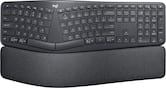
- Logitech - ERGO K860 Ergonomic Full-size Wireless Scissor Keyboard for Windows and Mac with Palm Rest - Black$129.99The price was $149.99
More Buying Options
Related Item

Specifications
- Lighting TypeNoneMaximum Sensitivity2048 dots per inchNumber of Buttons (Total)8Connection TypeWireless
- Key Specs
- Lighting Type: None
- Maximum Sensitivity: 2048 dots per inch (Mouse sensitivity is measured in dots per inch (DPI). The higher the DPI, the more sensitive the mouse is and may be more useful for high-density pixel screens. Lower DPI typically means more precision and accuracy in mouse movement.)
- Number of Buttons (Total): 8
- Connection Type: Wireless
- General
- Brand: Logitech
- Model Number: 910-007247
- Product Name: MX ERGO S PLUS Wireless Ergonomic Trackball Mouse with 6 Programmable Buttons
- Color: Graphite
- System Requirements: BluetoothⓇ Low Energy, Windows 10 or later, macOS 11 or later, iPadOS 14 or later, ChromeOS, Linux. Logi Bolt USB receiver, Required: Available USB Port, Windows 10 or later, macOS 11 or later, ChromeOS, Linux (The software that a product must have for it to be able to integrate with another product.)
- Features
- Mouse Type: Standard
- Lighting Type: None
- Performance
- Mouse Operation: Button(s), Scroll wheel
- Mouse Grip Style: Ergonomic (In comparison to many palm and claw grips, ergonomic grip mice are designed for a specific handedness and put the hand and wrist in a position to promote comfort. Customizable grips feature buttons/keys that can be configured to perform specific actions and may also have customizable calibration and sensitivity settings.)
- Handedness: Right-handed
- Tracking Method: Trackball (There are several types of computer mice, optical and laser being among the most common. Optical mice detect less detail and provide more precise and accurate movement. Laser mice detect more detail and can be used on a wider variety of surfaces, but are more sensitive to small movements.)
- Maximum Sensitivity: 2048 dots per inch (Mouse sensitivity is measured in dots per inch (DPI). The higher the DPI, the more sensitive the mouse is and may be more useful for high-density pixel screens. Lower DPI typically means more precision and accuracy in mouse movement.)
- Minimum Sensitivity: 512 dots per inch (Mouse sensitivity is measured in dots per inch (DPI). The higher the DPI, the more sensitive the mouse is. Lower DPI typically means more precision and accuracy in mouse movement, but higher DPI may be useful for high-density pixel screens.)
- Number of Buttons (Total): 8
- Number of Programmable Buttons: 6
- Adjustable Weight: false
- Connectivity
- Connection Type: Wireless
- Wireless Connectivity: Radio Frequency (RF - 2.4 Ghz/Low Latency), Bluetooth (The manner in which a device sends data to another device over a short distance without the use of wires or cables.)
- Maximum Wireless Range: 33 feet
- Operating System Compatibility: Windows, Mac, Apple iPadOS, Chrome, Linux, Android
- Plug and Play Operation: true
- Number of Devices Connectable Simultaneously: 2
- Power
- Mouse Power Source: Battery-powered
- On/Off Switch: true
- Rechargeable Battery (Mouse): true
- Battery Chemistry: Lithium
- Included
- Mouse Pad Included: false
- Dimensions
- Product Height: 5.22 inches (The out of box height of the item. Height is measured as the vertical distance from the bottom of the item to the top as it would be primarily used or placed.)
- Product Length: 2.02 inches (The out of box length of the item. Length is measured as the longest dimension of the item.)
- Product Width: 3.93 inches (The out of box width of the item. Width is measured as the horizontal distance from one side of the item to the other as it would be primarily used or placed.)
- Product Weight: 164 grams (The out of box weight of the item.)
- Warranty
- Warranty - Parts: 1 year limited
- Warranty - Labor: None
- Other
- UPC: 097855196668
The MX Ergo S Plus is Logitech’s most advanced ergonomic trackball mouse yet, with a 20-degree tilt angle and a 10-degree detachable wedge, and precise thumb control - user-tested and certified by United States Ergonomics. The MX Ergo S wireless ergonomic mouse is sculpted to fit the palm of your hand while keeping it relaxed, and it tilts 20 to 30 degrees for 27% less muscle activity in the forearm, providing elevated comfort throughout your day. Work faster with 6 customizable buttons and a DPI button to effortlessly switch between speed and high-precision tracking. Now with 80% quieter clicks. For even more control that's tailored to your needs, assign time-saving shortcuts and Smart Actions using the Logi Options+ App. Connect your wireless mouse to 2 devices via Bluetooth or the included Logi Bolt receiver and switch between devices with a click of the Easy-Switch button.
- Advanced thumb control: The MX Ergo S Advanced wireless trackball mouse gives more control with less movement; switch between speed and high-precision tracking at the tap of a button.
- 20-degree tilt angle or 30-degree with a detachable wedge: An advanced wireless ergonomic mouse with a tilt angle for better forearm posture, reducing muscle strain by 27%; now with 80% quieter clicks.¹ ⁵
- Contoured for your hand: The MX Ergo S Plus is certified by United States Ergonomics for improved comfort, with a sculpted ergonomic design, 20-degree tilt angle, and 10-degree detachable wedge.
- Boost your productivity using the Logi Options+ App: Experience enhanced control in your daily tasks with 6 customizable buttons, time-saving shortcuts, and Smart Actions.²
- Quick USB-C charging: Enjoy up to 24h of use from a 1 min charge or up to 120 days with a full charge; charges with a USB Type C to Type C or USB Type A to Type C cable (not included).³
- Dual wireless connectivity: Connect your rechargeable wireless mouse via Bluetooth or Logi Bolt USB receiver (included); switch between computers with a tap of the Easy-Switch button.
- Made with recycled plastic: The plastic parts in the MX Ergo S Plus wireless rechargeable mouse are made of 26% certified post-consumer recycled plastic.⁴
- Complete your advanced setup: Pair the MX Ergo S Plus with the ERGO K860 ergonomic split-curved keyboard, featuring an integrated cushioned palm rest for all-day comfort.
- 1-month of Adobe Creative Cloud on us (a value of $59.99)*: Pair two of the world’s top creative tools. Buy one MX Ergo S Plus and claim your free 1-month Adobe Creative Cloud membership. *Value calculated based on Adobe Creative Cloud All Apps monthly value of $59.99 valid on Adobe.com on Sept 12, 2024. Terms & Conditions apply.¹ ² ³
Whats Included
- Advanced Wireless Trackball
- Wedge
- Logi Bolt Receiver
- Quick Start Guide
- (Cable not included)
Disclaimers
- ¹ In the forearm with 20-degree angle, compared to a Logitech M650 mouse.
- ² Requires Logi Options+ app, available for recent versions of Windows and macOS at logi.com/optionsplus.
- ³ Battery life may vary based on user and computing conditions.
- ⁴ Excludes plastic in receiver, printed wiring assembly, cables, and packaging.
- ⁵ Sound level comparison between MX Ergo S and MX Ergo. Left click dBA measured by the Logitech internal lab at 1m.
Q: How long does the battery last on a single charge?
A: A full charge can last up to 120 days, and a quick 1-minute charge provides up to 24 hours of use.
Q: Is this mouse compatible with both Windows and Mac?
A: Yes, the mouse is compatible with Windows 10 or later, macOS 11 or later, iPadOS 14 or later, ChromeOS, and Linux.
Q: How many buttons can be customized on this mouse?
A: The MX Ergo S Plus mouse offers 6 customizable buttons for personalized settings.
Q: What type of connectivity does this mouse have?
A: This mouse has dual wireless connectivity options: Bluetooth and Logi Bolt USB receiver.
Q: Does this mouse have a tilt feature?
A: Yes, the mouse has a 20-degree tilt angle and comes with a detachable 10-degree wedge for a total of 30 degrees tilt.
Q: Is this mouse suitable for people with small hands and/or kids?
A: Kids CAN use it BUT I have pretty Big hands. Thats One of the major reasons I got it. But thats fairly subjective. Its definitely AWESOME to be able to SPIN the ball fast with a little flick of the thumb and it goes all the way across the screen if you wan it to!! GOOOD LUUCCK!! Yahusha(Jesus Original/ REAL NAME) Love us ALL!!!
Q: What power cord fits this MX ergo S Plus mouse?
A: The MX ERGO S Plus mouse can be charged using a USB-C cable.
Q: Does this version also have the terrible left button click reliability that the first version has?
A: As always the left button is the most used and is always subject to failure. The newest model appears to be a different button (at least it sounds and feels that way) so maybe it will hold up better. They seem to hold up for about 7 years which isn't too bad. I just got this one to replace my second one I had about 7 years and the one before that was about the same. I've been using these about 15 years and prior to that I had a Microsoft one that I used for about 7-8 years as well. Overall I've used the trackball models for about the past 35 years. Hope that helps!
Compare similar products

The MX Ergo S Plus is Logitech’s most advanced ergonomic trackball mouse yet, with a 20-degree tilt angle and a 10-degree detachable wedge, and precise thumb control - user-tested and certified by United States Ergonomics. The MX Ergo S wireless ergonomic mouse is sculpted to fit the palm of your hand while keeping it relaxed, and it tilts 20 to 30 degrees for 27% less muscle activity in the forearm, providing elevated comfort throughout your day. Work faster with 6 customizable buttons and a DPI button to effortlessly switch between speed and high-precision tracking. Now with 80% quieter clicks. For even more control that's tailored to your needs, assign time-saving shortcuts and Smart Actions using the Logi Options+ App. Connect your wireless mouse to 2 devices via Bluetooth or the included Logi Bolt receiver and switch between devices with a click of the Easy-Switch button.
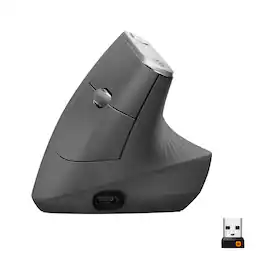
MX Vertical is an advanced ergonomic mouse that combines science-driven design with the elevated performance of Logitech’s MX series. The natural handshake position of MX Vertical reduces wrist pressure and forearm strain. The unique 57° vertical angle has been optimized for an ergonomic posture without compromising a pixel of performance. MX Vertical features a 4000 DPI high-precision sensor, resulting in 4x less hand movement and reducing fatigue. And the cursor speed switch allows you to instantly adjust DPI speed and accuracy with the touch of a button. MX Vertical stays powered for up to four months on a full charge – and gets three hours of use from a one-minute quick charge.
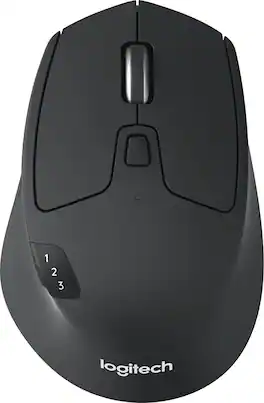
Ready, set go! Move between screens and straight through your to-do list with Logitech M720 Triathlon, the athletic mouse built for endurance, versatility, and comfort. With EASY-SWITCH technology you can pair your mouse with up to 3 computers and seamlessly switch between them with a click of a button. Reliable hyper-fast scrolling lets you fly through documents and web pages or switch to click-to-click scrolling when you need precision. A true athlete, this portable mouse is designed to endure, with buttons built to withstand up to 10 million clicks. Focus on what really matters thanks to the extended battery life of up to 24 months of power on a single AA battery. Simply connect M720 Triathlon wirelessly via the included Logitech Unifying receiver or via Bluetooth smart technology. Download Logitech Options Software to unlock the full range of personalization for your Logitech mouse.

Designed for Mac, made for comfort. Logitech Lift ergonomic vertical mouse for Mac is a comfy and intuitive Bluetooth wireless mouse with quiet clicks crafted specially for small to medium hands. This wireless small mouse's unique 57-degree angle elevates your wrist to give a feeling of relief — and sends a wave of comfort through the forearm and upper body. Scrolling on this quiet mouse feels like second nature with the silent SmartWheel, which seamlessly shifts from precision to speed-scroll. Customise your Logitech ergo mouse using intuitive Logi Options+ Software. Easily assign each of the quiet click mouse’s 4 easy-to-reach customisable buttons to a handy shortcut – and program them to change as you hop between apps.
| Pros for Logitech - MX ERGO S PLUS Wireless Ergonomic Trackball Mouse with 6 Programmable Buttons - Wireless - Graphite | |||
|---|---|---|---|
| Ergonomics, Overall Performance, Battery Life, Click Sound, Connectivity | Ergonomics, Ease of use, Battery Life, Overall Performance, Bluetooth | Ease of use, Bluetooth, Ergonomics, Battery Life, Size | There were no pros for this product— |
| Cons for Logitech - MX ERGO S PLUS Wireless Ergonomic Trackball Mouse with 6 Programmable Buttons - Wireless - Graphite | |||
| There were no cons for this product— | Wrist Pain, Size, Scroll Wheel, Price | Weight, Lag | There were no cons for this product— |
Specs

- SteelSeries - Arctis Nova Pro Wireless Multi Gaming Headset for PC, PS5, PS4, Switch - White$299.99The price was $379.99


Reviews
Customers are saying
Customers frequently mention the MX ERGO S PLUS Wireless Ergonomic Trackball Mouse's comfortable design, which alleviates stress from prolonged use. Users appreciate its overall performance and ease of use, along with the quiet click sound. The mouse also boasts excellent battery life and versatile connectivity options.
Customer Images
The vast majority of our reviews come from verified purchases. Reviews from customers may include My Best Buy members, employees, and Tech Insider Network members (as tagged). Select reviewers may receive discounted products, promotional considerations or entries into drawings for honest, helpful reviews.
- Rated 5 out of 5 stars
Comfortable to use in bed
I like the concept of ergomomic mouse, a slightly expensive product more than 100, I lost the receiver because it came outside the mouse inside the box and mistakenly throws the box away but connects without problems also by bluetoot
MarcoP Posted
- Rated 5 out of 5 stars
So Good, I Bought It Three Times!
After having carpal tunnel surgery, I needed to find truly ergonomic products. This mouse has been an absolute game-changer. It's so good that I now own three of them—for work, home, and travel! The trackball is incredibly responsive and the customization options are perfect. Whether I'm working or gaming, this mouse allows me to be highly productive with minimal hand movement, which has made a world of difference. Highly recommended!
SmokStacc Posted
- Rated 4 out of 5 stars
Logitech - MX Ergo Plus Wireless Mouse
I would give this 5 stars, however, after using this mouse for a while now, I've noticed that left click button doesn't work always. This is especially true when trying to highlight a word by double clicking. Instead I need to scroll over the whole word using the track ball. It's a nuisance. Still, I do enjoy many aspects of this mouse: the way it feels in my hand, the long-lasting battery, and the fact that it is rechargeable. These are all great features. It's also very comfortable. If you have pain in your wrist from using more conventional mice, I would recommend this mouse. That being said, if proper ergonomics is your main goal, I'm sure there are cheaper ones available that will have a similar effect.
GeoffreyP Posted