Questions & Answers
- Model:
- B09BZZ3MM7
- |
- SKU:
- 6522377
Highly rated by customers for: Overall Performance, Speed, Ease of use
$109.99Your price for this item is $109.99
Comp. Value: $139.99
The comparable value price is $139.99
Page Showing 41-60 of 126 questions
Q: QuestionIs this a dvr recorder as well
Asked by Jb60.
- A:Answer No. It doesn’t function as a DVR.
Answered by SlowStreamer
Q: QuestionDoes it have nfl channels?
Asked by Chuck.
- A:Answer Hello Chuck and thank you for your question! Yes, there are many different ways that you can watch the NFL on the Amazon Fire TV Cube. The Amazon app store has the NFL app available to download, you can also watch various NFL channels through the YouTube TV app or you can watch live over the air TV channels. Each of these have their own restrictions/subscriptions/regional requirements. Hope this helps! Have a great day!
Answered by Amazon Devices Customer Support
Q: QuestionCan I use this if I have DirectTV satellite service? Can the GeekSquad set it up for me and connect it?
Asked by cpitman.
- A:Answer Hi Cpitman, Yes, the Fire TV Cube works with DirectTV satellite service. You can connect your DirectTV box via the HDMI input or stream using the DirectTV app if you have an internet plan. Hope this helps!
Answered by Amazon Devices Customer Support
Q: QuestionCan I get regular tv , with this
Asked by Jeff.
- A:Answer Yes, after you connect to internet you can watch anything you want.
Answered by AlanM
Q: Questioncan i connect a HD with movies to this device?
Asked by robert.
- A:Answer Yes
Answered by user386338
Q: QuestionCan you use a tablo with this to record ota tv?
Asked by bigboy.
- A:Answer Hello bigboy and thank you for your question! According to tablos website: "with a Tablo whole-home DVR and the free Tablo app, you can enjoy live and recorded antenna TV and free streaming channels on any of the Amazon Fire TV devices in your home including: Fire TV Sticks. Fire TV Cubes. Fire TV-powered smart TVs." Hope this helps! Have a great day!
Answered by Amazon Devices Customer Support
Q: QuestionMissing HDMI Cable. On the outer packaging " What's Inside Box " it does not say its included so I assume no HDMI cable.
Asked by RikerMueyBono.
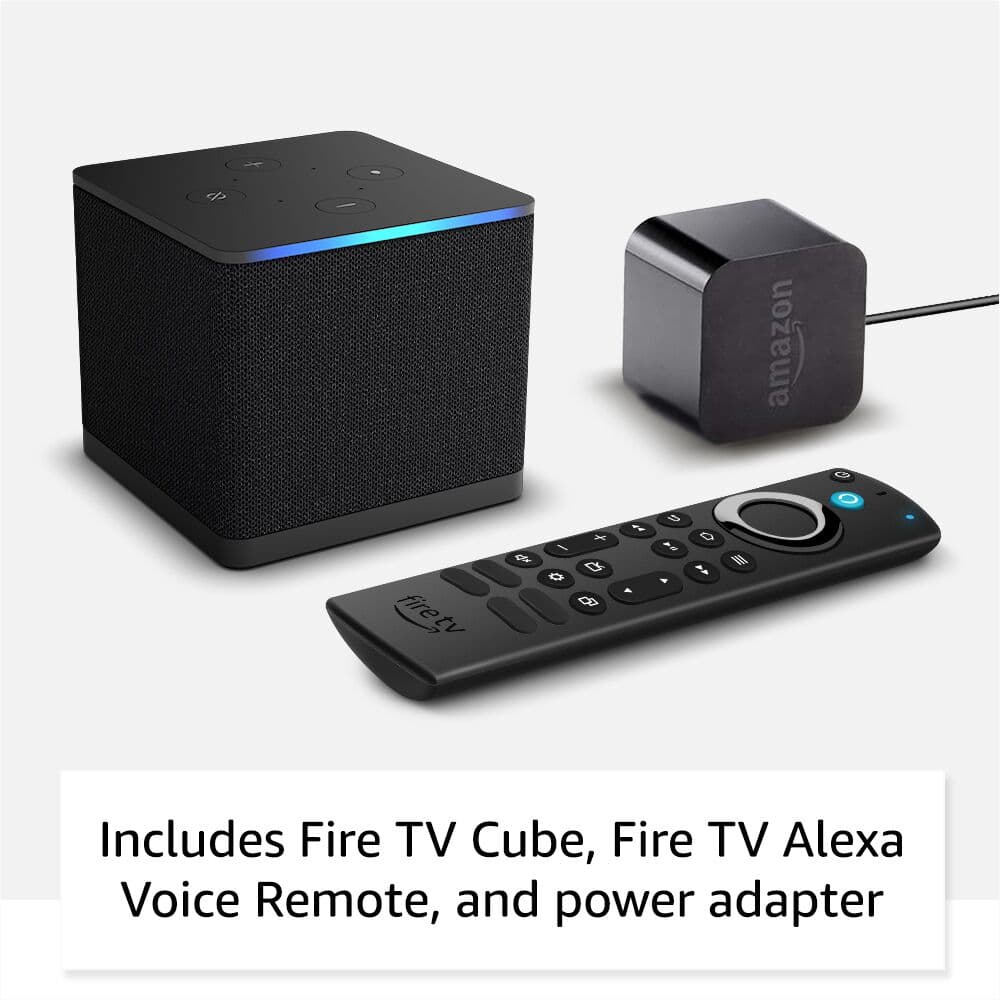
- A:Answer No, an HDMI cable is not included.
Answered by DavidA
Q: QuestionCan you hook more than one tv on this ? Do you need a smart tv? This is new to me
Asked by Kmac.
- A:Answer You can only connect to one TV at a time.
Answered by AlanM
Q: QuestionIs this like Tanggula for free TV?
Asked by Anonymous.
- A:Answer Certain things are free depending on your upload...
Answered by GOPRO
Q: QuestionI have a 3rd gen. Fire T V Cube with internet plugged into HDMI port 1 and cable TV plugged into HDMI port 2 . What are the different ways to ask Alexa to switch from one import to another or internet or cable?
Asked by Come2.
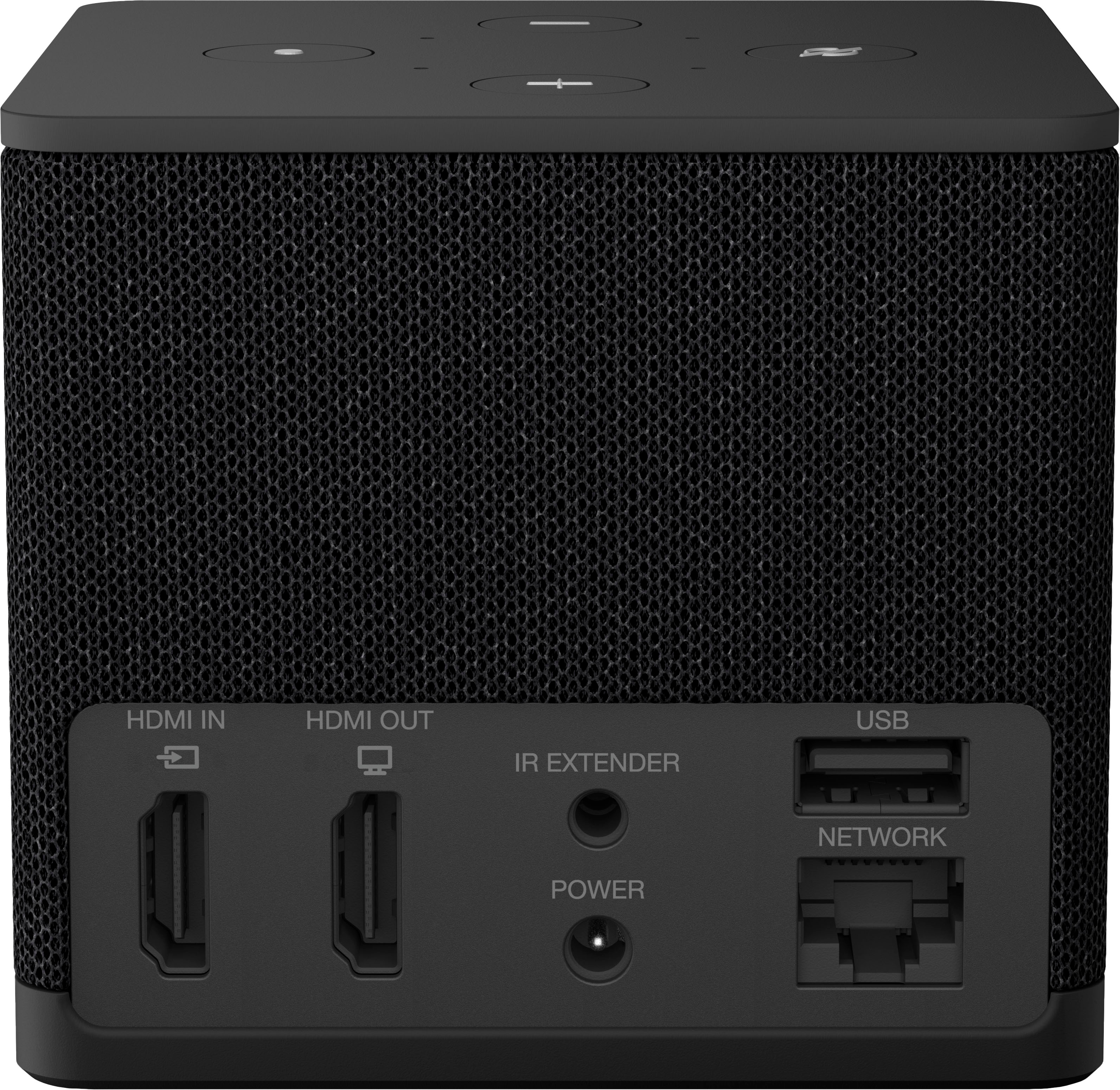
- A:Answer Hello Come2. Thank you for your question. The HDMI ports on the Fire TV Cube are not two inputs, but rather an input and an output. The one labeled output connects to your TV and the one labeled input can be used for a few things like a gaming console, one of the supported cable box, etc. The internet connection is either via WIFI or using an Ethernet cable connected in the Fire TV Cube directly. One example of commands for Alexa to switch to cable would be “Alexa, tune to ESPN on cable.”. Try also “Alexa, turn on the TV,” to start or “Alexa, open Prime Video,” to get to your favorite channels and apps with one command or use your voice to turn your volume up and down. Even from across the room and from any direction thanks to built-in mics and speakers. Try also “Alexa, play 'Transformers: EarthSpark.'“. Hope this helps. Have a great movie night!
Answered by Amazon Devices Customer Support
Q: QuestionI am trying to set up voice control for a quadriplegic who is unable to use their hands. I am wondering if this device would enable them to turn on TV, change between streaming services, select which show to watch, play, pause, etc. If not, other ideas?
Asked by Mario.
- A:Answer Hello Mario, Thank you for your question. A Fire TV Cube is a Fire TV device that would give you access to streaming apps such as Prime Video, Hulu, Sling TV, Netflix and many more. It allows you to only use and subscribe to the channels you want to use. It also has an Echo Dot built into it, so you can control your TV hands free just by asking Alexa. It comes with an IR reader in the box, so it will control devices in your home theater set up that use IR control, such as a gaming console, or cable box, or even some sound bars. So everything can be done with your voice. I hope this information helps. Have a great day!
Answered by Amazon Devices Customer Support
Q: QuestionWill this device connect to 2 tv's so they can stream content simultaneously? This has caused a delay with the tv's. I have 2 tv's in my basement and I only stream my watching content. No cable or satellite box/service. Hulu, Amazon Prime, ESPN+, etc.
Asked by Todd.
- A:Answer Hi Todd! The Fire TV Cube 3rd Gen only features a single HDMI-Out port, so if you want to display the same feed on multiple TVs you would need an HDMI splitter. This will allow you to double the signal so that it shows on both TVs. Keep in mind that this can be a bit more complicated than it sounds, due to the way that HDMI is designed to work as 2-way communication tool along with the amount of information being sent. You might have better luck with two dedicated devices (like the Fire TV Stick 4K Max) each streaming separately. This would work fine for something like a live streaming sports game where they'll automatically be synced up once the content is playing, but might be a pain trying to get a movie in the right place and you'll want to ensure that your streaming service allows you to have multiple simultaneous streams going at once. I hope that helps, have a great rest of your day!
Answered by Amazon Devices Customer Support
Q: Questionwhat if any are the charges for the monthly services for the channels.
Asked by Rick.
- A:Answer Hello Rick, there are no charges to use the Amazon Fire TV Cube. There are many options for free streaming services available to download, some apps do require a monthly fee such as Hulu, Netflix, Disney+, etc... The paid apps will say that before you use them and will require you to sign up. Have a great day!
Answered by Amazon Devices Customer Support
Q: QuestionCan you download direct TV?
Asked by Anonymous.
- A:Answer Hello and thank you for asking this question, you can absolutely download the direct tv application on the Fire Tv Cube from the Appstore available on the device. Just make sure to sign in after the application is installed to view all your content. I hope this answers your question and that you have a wonderful day.
Answered by Amazon Devices Customer Support
Best-selling streaming media players
- $21.99Your price for this item is $21.99$39.99The comparable value for this item is $39.99
- $129.99Your price for this item is $129.99
- $149.99Your price for this item is $149.99
- $39.99Your price for this item is $39.99$59.99The comparable value for this item is $59.99
- $24.99Your price for this item is $24.99$49.99The comparable value for this item is $49.99
- $15.99Your price for this item is $15.99$29.99The comparable value for this item is $29.99
- $29.99Your price for this item is $29.99$49.99The comparable value for this item is $49.99
- $19.99Your price for this item is $19.99$39.99The comparable value for this item is $39.99
- $79.99Your price for this item is $79.99$99.99The comparable value for this item is $99.99
- $14.99Your price for this item is $14.99
- $27.99Your price for this item is $27.99$34.99The comparable value for this item is $34.99
- $99.99Your price for this item is $99.99
- $59.99Your price for this item is $59.99
- $79.99Your price for this item is $79.99$99.99The comparable value for this item is $99.99
- $99.99Your price for this item is $99.99
- $199.99Your price for this item is $199.99
- $79.99Your price for this item is $79.99
- $29.99Your price for this item is $29.99