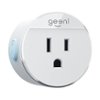
“Does this technology work through google assistant? I've only seen questions that pertain to Amazon Alexa.”
Answer This Question
1-3 of 3 Answers
Yes, it works through Google Assistant / Smart Speaker/Hub. You need to set up the Geeni devices with the downloadable application. Set up the Power Strip with a name and a 'room'. From there, each of the - individual outlets - can be assigned specific names. In my setup, I can say, "Hey, Google...Turn on "Power" [My name for the Power Strip"] and all of the outlets will turn on. As I have it set up, it controls the several printers I have for my computer setup. Canon Color Laser, HP Wide Format, Epson Photo, etc. So, I can say, "Hey, Google...Turn on "Canon" and the Canon Color Laser turns on promptly. I hope that helps. (BTW: I am not an Alexa fan. Many things specify "Works with Alexa" and don't mention Google Assistant. It's a marketing thing. THIS item DOES work [very well] with the Google Assistant devices/Hub.)
I would recommend:
Sorry, there was a problem. Please try again later.Yes. That's the way I have it set up. You can name each plug in the Google Home and turn them on or off using Google
Sorry, there was a problem. Please try again later.Hi, aside from Amazon Alexa, your device will also work with Google Assistant and Microsoft Cortana. "For further assistance, you may contact us at +1 (888) 232-3143 from Monday - Sunday at 9:00AM to 9:00PM EST (Due to the Holiday Season, we have extended our operating hours starting Dec 02,2019 and will be open Monday - Sunday from 7:00AM to 12:00 Midnight EST.) You can also send us an e-mail to [email protected] or visit our support site https://support.mygeeni.com to chat with our Support Team. "
Sorry, there was a problem. Please try again later.