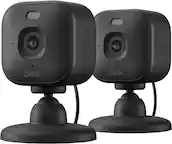
A:AnswerAs the item connects via 2.4/5 ghz Wi-Fi connection, your range is standard to the strength of a normal router and devices. Variations depend on materials the signal has to pas through, how many layers, total distance, etc. Personally I have three cameras set up across a two story home and have a single Wi-Fi access point (Google Nest Wi-Fi) with Verizon Fios at 2.4 and 5 bands and have had no connection issues to any of the cameras. Max distance, with a couple drywalls in between is approximately 30 feet for farthest camera. Check technical specs for maximums given.
A:AnswerUtilize better local lighting; resolution is based on night vision, lens aperture, light available and max resolution. Your best bet is to provide better lighting for the camera to use.
A:AnswerI believe so if you download the app to your laptop or computer. My son has similar set up around his house and has the views showing on computer monitor in his front room.
However he is in the business of electronic security so he knows the ins and outs of how to do such things.
Sorry couldn't be more help.
A:AnswerI connected mine to the charger cable and extension cord during my install. If my power goes out the camera will still work. I have a battery backup on modem and router
A:AnswerIt does color and night mode which is B&W, but you can control of you want night mode on automaticly, all the time, or off completely. Resolution is good and ot picks up sound crazy good.
A:AnswerThis is not yet supported. I have a Google TV with Chromecast and can stream the previous gen Hello Doorbell, but not the new Nest “battery” cameras. Based on a recent article I read, Google/Nest might be working on adding these features - no specifics or release dates confirmed.
A:AnswerAs of right now, there are only two lengths of waterproof cables. I would imagine amazon and other 3rd parties will have some options available but who knows if they will work consistently or safely.