Questions & Answers
- Model:
- GUD3C02
- |
- SKU:
- 6093801
Highly rated by customers for: USB-C, Compatibility, Ease of use
Page Showing 41-50 of 50 questions
Q: QuestionDo the laptop dimples fit the latest MacBook Pro 15”?
Asked by sbmako.
- A:Answer No it doesn’t I have the new Mac book pro 15 inch and it’s smaller and doesn’t fit the dimples .
Answered by Peacock
Q: QuestionIs there any parasitic draw if it is not connected to a computer?
Asked by Timo.
- A:Answer Disclaimer: I've not measured it. The hub does work when not connected to a power-supplying USB-C connection, so I would assume yes.
Answered by Beau
Q: QuestionIs this compatible with the HP Chromebook listed below? https://www.bestbuy.com/site/hp-2-in-1-14-touch-screen-chromebook-intel-core-i3-8gb-memory-64gb-emmc-flash-memory-hp-finish-in-ceramic-white-and-cloud-blue/6301869.p?skuId=6301869#
Asked by elvisjay.
- A:Answer IOGEAR Says: Thank you for choosing IOGEAR and we apologize for the inconvenience. To better service you and understand your set up, please feel to contact our customer support at 1-866-946-4327 or email us: [email protected]. Once again, thank you for choosing IOGEAR.
Answered by IOGEAR SUPPORT

Q: QuestionIs this docking station compatible with the MacBook Pro 2018?
Asked by cljames.
- A:Answer The product box says it is compatible for a PC or a MAC - if you are looking for specs - it states on the back that it requires a USB-C and has DP Alt-Mode Support. There is another description on the bottom that says "PD Pass-Thru requires USB-C charger from your laptop. A total of up to 60W can be charged to the laptop after deduction of the 15W is used by the dock."
Answered by NinasDad
Q: QuestionCan this be used with my Samsung Galaxy S8+.
Asked by Eddie.
- A:Answer IOGEAR says: The GUD3C02 require an OS and the device must support DP alt mode. The GUD3C02 will not work with a Samsung Galaxy S8. Thank you for choosing IOGEAR.
Answered by IOGEAR

Q: QuestionIs there a reason that my second monitor connected thru either HDMI or VGA/DVI do not work? how do you get a second monitor to work??
Asked by ashby.
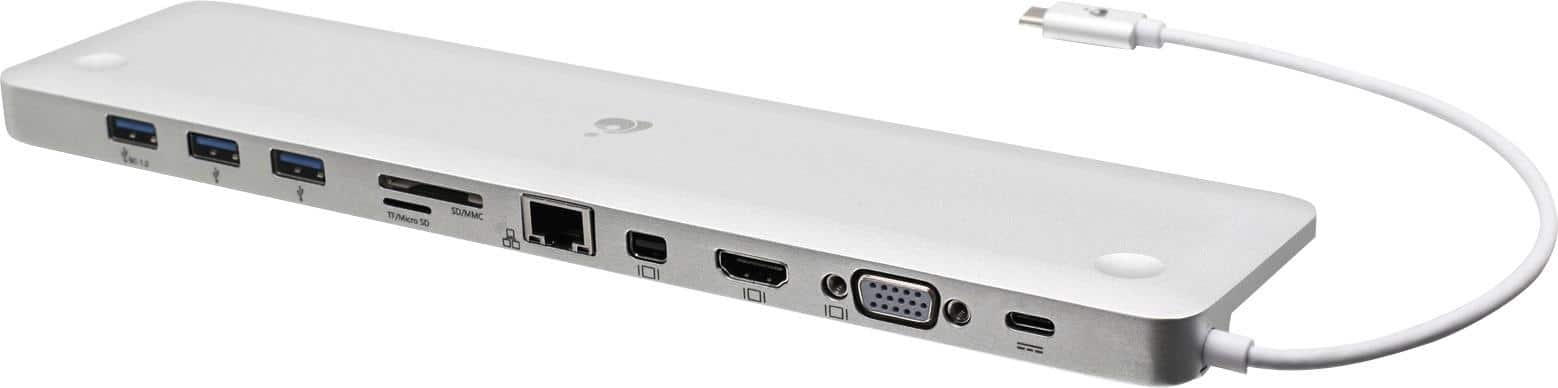
- A:Answer Perhaps, like me, you are using a Mac, in which case the product documentation clearly states that it only supports a single monitor. For Windows I believe that you have to use the HDMI and Mini DisplayPort to leverage two monitors. https://www.iogear.com/product/GUD3C02/
Answered by MostlyMac
Q: QuestionDoes this device every require any updates? I am getting a message that the USB device is malfunctioning and am wondering hoe do I fix it.
Asked by Donster.
- A:Answer We would need more information to help solve your issue. Please call technical support at 866-946-4327 7:30am - 6:00PM PST or email us at [email protected]. Thank you for choosing IOGEAR.
Answered by IOGEAR SUPPORT

Q: QuestionWill this provide power to recharge HP Envy 360 13t via USB C?
Asked by RKL128.
- A:Answer Thank you for choosing IOGEAR and we apologize for the inconvenience. It depends on the model of Doc and if it has a pass through port. It also depends on the power requirements of your laptop. To better service you and understand your set up, please feel to contact our customer support at 1-866-946-4327 or email us: [email protected]. Once again, thank you for choosing IOGEAR.
Answered by IOGEAR

Q: QuestionI purchased from Best Buy a Lenovo Yoga 920 2/1 13.9" 4K Core i7 16GB 512GB SSD. It does not have the ports I need. Is this computer compatible with IOGEAR - Ultra-Slim USB-C Docking Station with Power Delivery Pass-Through Model: GUD3C02
Asked by Timothy.
- A:Answer I have the same laptop and docking station combination. I had the laptop but just purchased the docking station. I lose all audio from the laptop when I connect the docking station to my laptop and no matter what I try, I cannot get the laptop audio back. When I disconnect the docking station from the laptop my laptop audio works fine. I tried the docking station in multiple USB-C ports and get the same results.
Answered by Doug
Q: QuestionIt will not charge a Dell XPS 2-in-1 13". The mini-display port is not functioning, as my dell cannot see the 2nd monitor. I cannot find support for these issues on the IOGEAR website. There do not seem to be drivers? help?
Asked by Winterneuro.
- A:Answer I was using this on my macbook pro. I noticed that display port would not work as well. on a mac this is supposed to be the same as lightning port and can display to a monitor. I bought this to convert my laptop into dual monitors and use as a desktop when needed . I was able to get a monitor of the hub using the HDMI but not from the mini display. the charge setup was the following. Charging was not an issue, had the hub receive the charge via usbc and then then hub into the computer. I assume if you had two usbc you could also charge via the extra usbc and leave the hub as just a transfer. without the hub doing the mini display it almost defeats the purpose for me. I will need to get basically one usbc hub that can receive a charge and has hdmi output, and then another single usbc to hdmi and try to get my dual monitor display from there. We are using two different computers so hard to compare, but this is where I am with my scenario .
Answered by Texag24
Page 3, Showing 41-50 of 50 questions