Questions & Answers
- Model:
- JCD381
- |
- SKU:
- 6201440
Highly rated by customers for: Ease of use, HDMI, Overall Performance
$84.99Your price for this item is $84.99
Comp. Value: $89.99
The comparable value price is $89.99
Page Showing 101-110 of 110 questions
Q: QuestionHow do I connect this to a MacBook Air? There isn't a compatible port on the laptop.
Asked by StaceyB.
- A:Answer If your Mac does not have USB-C ports on it, using a converter will not always work and in that case, we recommend the JUD380 instead and that will work for you. ** Feel free to contact the Technical Support team mentioned on the packaging for further assistance or if you have any other questions and someone will be glad to assist you.
Answered by J5create Team
Q: QuestionIs this compatible with HP model 14M-CD0003DX?
Asked by JB.
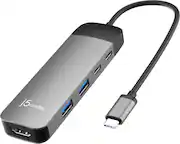
- A:Answer Yes, the JCD381 requires a driver to be downloaded and installed and that will work for you. ** Feel free to contact the Technical Support team mentioned on the packaging for further assistance or if you have any other questions and someone will be glad to assist you.
Answered by J5create Team
Q: QuestionMy Mini Dock doesn't seem to be recognized at all and also is not lighting up when I plug it into my USB-C. I already tried installing the driver. This is way too complicated. I really just wanted a simple plug and play port.
Asked by Anonymous.
- A:Answer The Mini Dock works best when plugged into an external charging device.
Answered by RussellM
Q: QuestionMy 4K HDMI port suddenly stopped working. What can I do to fix it?
Asked by KatB.
- A:Answer Please contact our Technical Support Team for further information about this question. Their information can be found on our website under the "Support" tab and a specialist will be ready to assist you. Thank you.
Answered by J5create Team
Q: QuestionJust got a new Dell Latitude 5521 running Win10 Pro, and when I try to run the j5-create-USB_Multi_Adapter-20.01.0620.3192.exe I get the following failure. Error Number 0x800440702 Description: Failed to load DLL: ISEx_ Setup will now terminate.
Asked by Latitude5521.
- A:Answer Please make sure to run the installation setup under the administrator. Download the drivers on j5create website under the "Support" tab > "Downloads/Drivers" without the device connected.
Answered by J5create Team
Q: QuestionI do not have a USB Type C, but if use a type USB 3.0 to USB c converter, will this work?
Asked by Vimal.
- A:Answer Unfortuatenly, not that will not work. You would need to be able to plug this device directly into your computer in order for the device to work properly.
Answered by J5create Team
Q: QuestionDo you plug this into the charging port on the laptop? The only USB C port I have on my laptop is for my charging cord. As this docking station can also charge your laptop, I want to make sure I'm buying what I need.
Asked by WorkatHome.
- A:Answer Yes, the JCD381 can indeed support charging for the laptop as well while using the HDMI monitors and Ethernet. ** Feel free to contact the Technical Support team mentioned on the packaging for further assistance or if you have any other questions and someone will be glad to assist you.
Answered by J5create Team
Q: QuestionDoes this work with a Lenovo ideapad 330s? I have purchased 2 docking stations already that won't support the dual monitors. I am starting to think my computer doesn't support Type C dual monitors.
Asked by helpneededasap.
- A:Answer Yes, the JCD381 will work with your Lenovo Ideapad 330S - simply download, install the driver and you're all set!
Answered by J5create Team
Q: QuestionWill this docking station work with a Dell latitude E7450? We bought and tried to set it up and the USB C cable will not fit into the Dell Mini Display port. Do I need a different adapter?
Asked by Schmid.
- A:Answer Dell mini display port is different than USB C, if there is not a USB C port on your computer you will need to purchase either the correct docking station or an adapter from dell mini port to USB C
Answered by Scott2020
Q: QuestionDoes this work with a Surface Pro? (5th generation)
Asked by KT.
- A:Answer In order to better understand which computer you have, we highly recommend contacting support on the casing to speak with a representative and be able to either confirm it is compatible, or suggest a different device that is. Thank you.
Answered by J5create Team
Top Rated
- Black Friday Deal$34.99Your price for this item is $34.99
- $139.99Your price for this item is $139.99
- $79.99Your price for this item is $79.99
- Black Friday Deal$37.99Your price for this item is $37.99
- Black Friday Deal$69.99Your price for this item is $69.99
- Black Friday Deal$55.99Your price for this item is $55.99
- $149.99Your price for this item is $149.99
- Black Friday Deal$55.99Your price for this item is $55.99
- $49.99Your price for this item is $49.99$64.99The comparable value for this item is $64.99
- $69.99Your price for this item is $69.99$99.99The comparable value for this item is $99.99
- $239.99Your price for this item is $239.99$299.99The comparable value for this item is $299.99
- $14.99Your price for this item is $14.99
- $159.99Your price for this item is $159.99$199.99The comparable value for this item is $199.99
- $25.49Your price for this item is $25.49$29.99The comparable value for this item is $29.99
- $39.99Your price for this item is $39.99$49.99The comparable value for this item is $49.99
- $61.99Your price for this item is $61.99$70.00The comparable value for this item is $70.00
- $29.99Your price for this item is $29.99$34.99The comparable value for this item is $34.99
- $189.99Your price for this item is $189.99$259.99The comparable value for this item is $259.99
- $79.99Your price for this item is $79.99$89.99The comparable value for this item is $89.99
- $75.99Your price for this item is $75.99$89.99The comparable value for this item is $89.99