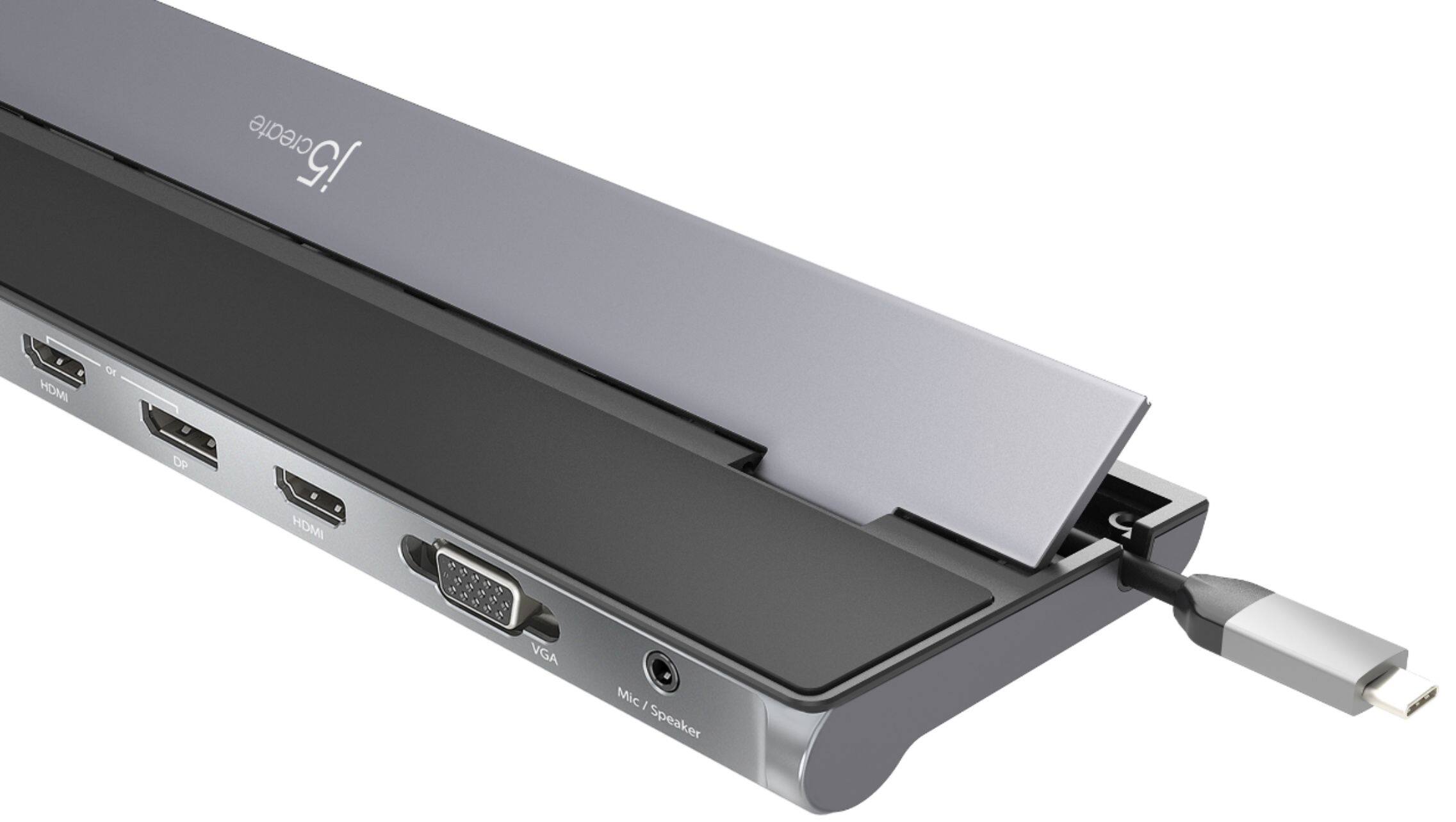
A:AnswerThe JCD543 can provide 1 additional display with not driver necessary. If you are trying to connect more then one display then yes, a driver is required.
A:AnswerUnfortunately, I would need the exact model number of your computer to see what type of ports your computer has. If the specifications say's that the computer has a Thunderbolt 3, then it will be compatible with JCD543P. Thank you, j5create.
A:AnswerThe JCD543 is compatible with macOS Big Sur on the Intel based Macs. If you are in possession of an M1 chip Mac, we do not have compatible software at this time. We are placing all customers in this situation on an "On-Hold" list and once those drivers are available, they will be notified. If you would like to learn more about this on-hold list, please feel free to reach out to the support team and an agent will be glad to help.
A:AnswerThe HDMI or DP port is Plug n Play and the other HDMI including VGA port requires a driver that you must download for proper functionality. So you will be able to use the HDMI, HDMI, VGA or DP, HDMI, VGA. Drivers are located on j5create website under the "Support" tab > "Downloads/Drivers". ** Feel free to contact j5create Technical Support if you require further assistance. Thank you.
A:AnswerSince the dock relies on DisplayPort Alt Mode from your laptop to drive external displays, you’ll want to confirm that your X Flip’s USB-C port supports that feature (HP’s official specs indicate it does for at least one of the ports).
You may also want to confirm USB Power Delivery to allow pass-through charge.
A:AnswerYes, the HP Pavilion 15-eg0081cl supports a Type-C 10Gbps signaling rate with USB Power Delivery and DisplayPort 1.4 to transmit audio and video signals and pass-through charge. This Dock will also require an installation of a driver for the VGA, Mic and the stand alone HDMI port for functionality. Drivers are available on j5create website under the "Support" tab. Thank you.
A:AnswerYes, the HP EliteBook 845 G8 supports "(2) USB 3.2 Gen 2 Type-C 10 Gbps signaling rate (USB Power Delivery, DisplayPort 1.4)" features to be able to transmit audio and video signals and provide pass-through charge. The Dock will also require an installation of a driver for the VGA, Mic and the stand alone HDMI port for functionality. Drivers are available on j5create website under the "Support" tab.
A:AnswerYou will be able to extend or mirror your display's. The USB-C Triple Display Docking Station with 100W PD Adapter will require an installation of a driver for the VGA and the stand alone HDMI port, while the HDMI or DP port are Plug n Play. Drivers are available on j5create website under the "Support" tab. Thank you.
A:AnswerSamsung's website states the Galaxy Book2 Pro 360 supports 1 Thunderbolt 4, 2 USB Type-C. The Thunderbolt 4 should also support DP Alt Mode and PD 2.0 or 3.0 features. The USB-C Triple Display Docking Station with 100W PD Adapter needs those two features to function properly, as well as an installation of a driver for the Mic, VGA and stand alone HDMI port. Drivers are available on j5create website under the "Support" tab..
A:AnswerHP website states the 15-dy2073dx supports "1 SuperSpeed USB Type-C 5Gbps signaling rate", will not support DisplayPort Alt Mode for video out and USB Power Delivery 2.0 or 3.0 through the USB-C port. The ports that will not work are the HDMI or DP ports, as well as the USB-C power-in port on the Dock. The Dock will also require an installation of a driver for the VGA, Mic, and stand alone HDMI port for proper functionality. However, the HP computer runs on Windows 11 Home in S mode. S mode runs only apps from Microsoft Store and will not allow third party drivers to be installed, you'll need to permanently switch out of S mode. If you make the switch, you won't be able to go back to Windows 11 in S mode.
A:AnswerUnfortunately, we were not able to find HP Model: 3Y058UA#ABA on Hp's website. The USB-C Triple Display Docking Station requires a computer to support DisplayPort Alt Mode and Power Delivery 2.0 or 3.0 over USB-C. Please refer to the manufacturer of your hardware for more information on your device. The Dock will also require an installation of a driver for the VGA, MIC, and stand alone HDMI port for proper functionality. Drivers are available on j5create website under the "Support" tab > "Downloads/Drivers". Thank you.
A:AnswerUnfortunately, Dell's website gives me a lot of XPS 159910 15 inches laptops. It's possible your USB-C may support DisplayPort Mode and Power Delivery over USB-C for plug n play devices. Please refer to the manufacturer of your hardware for more information on your device. The Dock also requires an installation of a driver for the HDMI, VGA, and Mic ports for proper functionality. ** Feel free to contact j5create Technical Support if you require further assistance. Their information can be found on our website under the "Support" tab. Thank you.
A:AnswerYou would need to install drivers for the HDMI, VGA, and Mic ports to function properly. The HDMI or DP ports are Plug n Play. However, your computer must support DisplayPort Mode for video out, including Power Delivery for pass-through charge when using the USB-C port. The USB-A and Ethernet are also PnP. ** If you require further assistance; please contact the j5create Technical Support team and we will be glad to further assist you. Their information can be found on our website under the "Support" tab. Thank you.
A:AnswerThe JCD543P is a PnP and driver base which can be located on our website under the "Support" tab. Please make sure your computer supports "DisplayPort Alt Mode" and "Power Delivery" for PnP capabilities. Please refer to the manufacturer of your hardware for more information on your device.
Thank you, j5.
A:AnswerUnfortunately, we cannot find your Asus VivoBook 15 F512 specs. Please contact Asus customer service support to verify if your USB-C port supports "DisplayPort Mode" and "Power Delivery" for full functionality using the JCD543 device.
A:AnswerPlease make sure the monitor is selected to the correct input source. If your using HDMI or DP at the same time, it will not work, it's one or the other. Try testing with another DP cable or monitor if possible. **For further trouble shooting, please contact our representative and they'll be glad to assist you with our device. Thank you, j5