Questions & Answers
- Model:
- OLED48B4PUA
- |
- SKU:
- 6584787
Q: QuestionIs this a smart tv and will it have apps I can click like apple, hulu, Youtube and Youtube TV. Are they preloaded?
Asked by Michael.
- A:Answer As implied in its tile when it says "Smart webOS", the LG 48" Class B4 Series OLED 4K UHD Smart webOS TV (2024), Model # OLED48B4PUA, IS a 'Smart TV'! Apple TV, Hulu, YouTube, Sling, Disney +, Prime Video, Netflix, Max, Tubi, Pluto TV, Paramount +, Brit Box, Twicth, and Starz, just to name a few are preinstalled apps on the TV. The YouTube TV app is compatible with the webOS 24 TV Platform/Operating System that the TV runs on and can be downloaded and installed on the TV through the LG Content Store (App Store) feature on the TV's home screen...^Ivan.
Answered by LG Digital Customer Care

Q: QuestionI'll be using the TV with a Mac Book Pro with M3 Pro processor. Will this TV risk burn in if I use full a motion screen saver such as the Humpback Whale?
Asked by Blacksmith.
- A:Answer Hi there. Thank you for sharing your question with us regarding your OLED48B4PUA. We understand your situation and appreciate you reaching out. When using a dynamic screensaver like the Humpback Whale on your MacBook Pro with the M3 Pro processor, the risk of burn-in is generally minimized due to the constantly changing images. However, to further safeguard your TV, we recommend verifying that the built-in Pixel Refresher is enabled in your settings. This feature is designed to help reduce any potential image retention. Additionally, adjusting the brightness settings to a comfortable level can be an effective troubleshooting step to ensure optimal performance. https://www.lg.com/us/tvs/lg-oled48b4pua-oled-4k-tv#pdp_specs Please send us a private message on Social Media @LGUSSupport so our team can explore additional solutions tailored to your setup. We appreciate your patience and are here to support you every step of the way. —Renzo
Answered by LG Digital Customer Care

Q: QuestionIs there audio inputs to plug in stero headphone?
Asked by Summer2024.
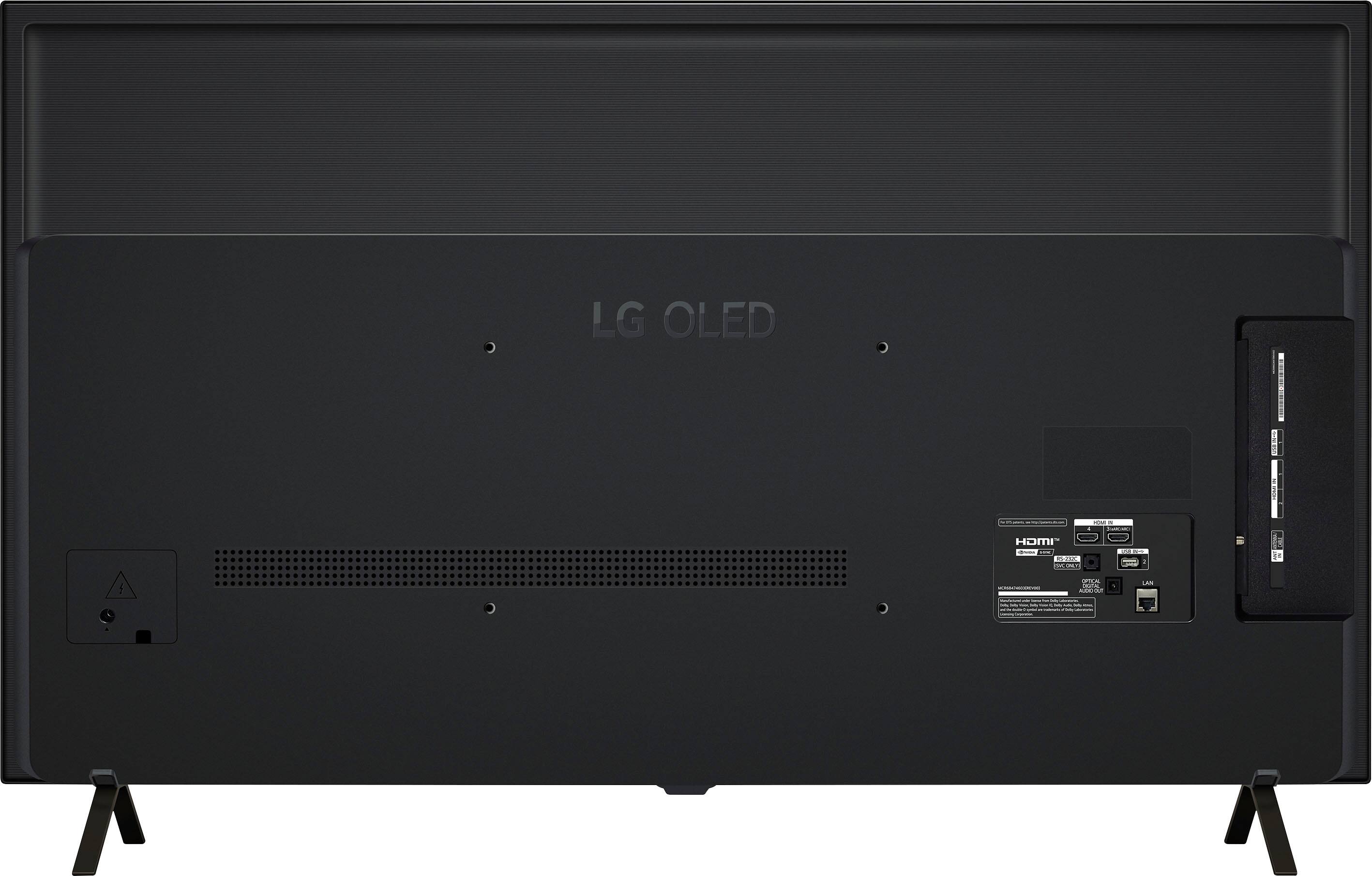
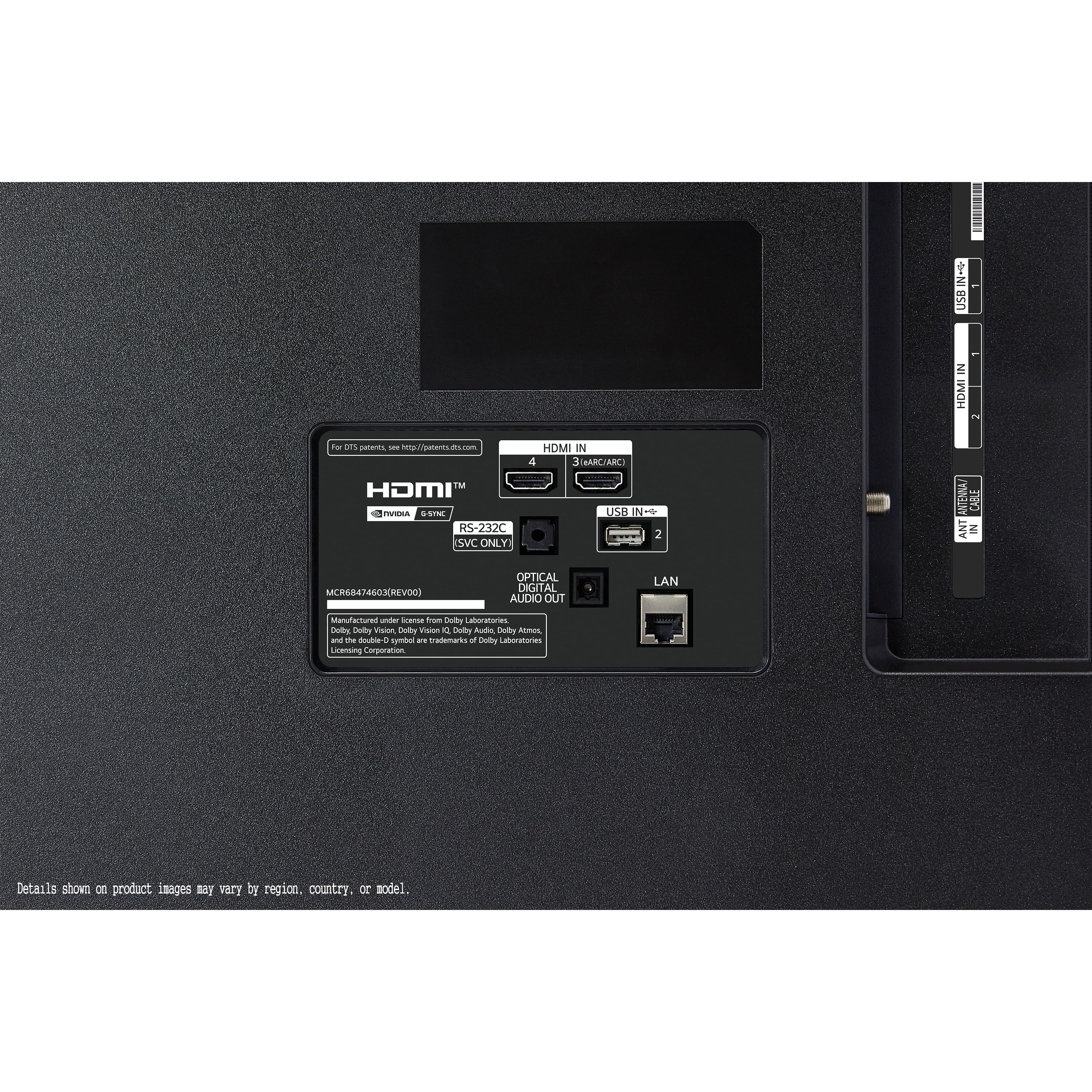
- A:Answer No, but it will connect to a wireless headset. If you absolutely must have a wired connection, you can always consider buying a wireless receiver that has headphone jack, and use that to connect to the TV.
Answered by YoungJedi
Q: QuestionWhy Can't you control TV with an Alexa device? I like the hands free option on my other TVs. It says this TV does not support hand free option. To use Alexa you must use the remote and the Alexa button. Not what I expected for this TV
Asked by Stevo.
- A:Answer Why would you ask why it doesn’t it support hands free when you know it doesn’t, obviously you need to find a model that does.
Answered by cgk1
Q: QuestionWhat are the display Nits on this TV? I have a C2 model that has an 800 Nit display. Is this the same?
Asked by Larry.
- A:Answer Hi there, Larry. We understand your inquiry about the LG OLED48B4PUA. Unlike the C2’s 800 nit peak, the B4 series reaches around 650–675 nits of peak HDR brightness (measured in a 10 % window), which provides excellent contrast and vibrant colors but isn’t quite as bright as the C2. As a quick troubleshooting tip, to maximize the HDR output on your OLED48B4PUA, please: Go to Settings > Picture > Picture Mode Settings and select Cinema Home or Game HDR depending on your content. Under Additional Settings, ensure HDR Brightness is set to High. Finally, verify you’re running the latest firmware by navigating to Settings > All Settings > Support > Software Update and choosing Check for Updates. https://www.bestbuy.com/site/lg-48-class-b4-series-oled-4k-uhd-smart-webos-tv-2024/6584787.p?skuId=6584787 If you’d like further assistance—such as fine‑tuning your picture modes, advanced calibration tips, or exploring additional settings—please send us a private message on social media @LGUSSupport and our team will be more than happy to explore possible solutions. We appreciate your patience and look forward to helping you get the most out of your new OLED TV! —Renzo
Answered by LG Digital Customer Care

Q: QuestionWhat’s the screen time or hours before it would go bad
Asked by Anonymous.
- A:Answer Hello there! We understand your inquiry about the expected lifespan of the LG 48" Class B4 Series OLED 4K UHD Smart webOS TV (Model OLED48B4PUA). OLED panels are designed for exceptional picture quality and longevity; under typical residential use, you can expect the panel to maintain at least 50% of its original peak brightness for up to 100,000 hours of cumulative operation—equivalent to watching TV 8 hours a day for over 34 years. To help preserve your screen’s performance over time, here’s a helpful tip: • Enable Pixel Refresher and Screen Shift – Go to Settings > All Settings > Picture > OLED Care, then activate Pixel Refresher and Screen Shift. Running Pixel Refresher periodically and keeping static elements from remaining still too long will minimize the risk of image retention and help maintain uniform brightness across the panel. https://www.bestbuy.com/site/lg-48-class-b4-series-oled-4k-uhd-smart-webos-tv-2024/6584787.p?skuId=6584787 If you have any further questions or would like personalized assistance, please send us a private message on social media @LGUSSupport and our team will be more than happy to explore possible solutions. —Renzo
Answered by LG Digital Customer Care

Q: QuestionWhat's the input lag on this TV and does it have G-sync compatibility or is this only Freesync?
Asked by Joung17.
- A:Answer Input lag is not an official spec advertised by most TV companies because it depends on two varying factors: the type of source of the image and the TV settings. The LG 48-inch Class OLED B4 Series TV with webOS 24, Model # OLED48B4PUA is both a Freesync™ and G-Sync Compatible (Nvidia) display...^Ivan.

Answered by LG Digital Customer Care

Q: QuestionWhat is the response time?
Asked by maniacmatt.
- A:Answer Hi, there. Thank you for reaching out to us. The LG TV (OLED48B4PUA) model has an excellent response time, typically around 1 ms (milliseconds), which is perfect for fast-paced action scenes and gaming. The fast response time helps reduce motion blur, providing a smoother viewing experience, especially for high-speed content. For more information about the product, you may visit https://www.lg.com/us/tvs/lg-oled48b4pua-oled-4k-tv. If you need more specific information or have any other questions, feel free to send us a private message on social media @LGUSSupport, and our team will be happy to assist you further. We appreciate your inquiry and are here to help. ^Juvy
Answered by LG Digital Customer Care

Q: QuestionHow do I get Roku tv active on my LG TV?
Asked by Kev.
- A:Answer Hello, Kev. The LG 48-inch Class OLED B4 Series TV with webOS 24, Model # OLED48B4PUA is not a Roku TV so it does not run on the Roku TV operating System. It runs on LG's webOS 24 TV operating system as indicated in its title so you will need a Roku Media Streaming device for content that can be found on the devices that is not offered through the preinstalled streaming apps on the TV...^Ivan.

Answered by LG Digital Customer Care

Q: QuestionDoes this LG have the LG channels? That is thew channels that include movies news and Zen Life etc?
Asked by Anonymous.
- A:Answer Hello there! Thank you for your question about the LG OLED48B4PUA TV. We understand you're asking about LG Channels—the service that offers movies, news, Zen Life, and more. Yes, this model does include LG Channels as part of its features. LG Channels is a free ad-supported streaming service that provides a variety of content, including movies, TV shows, news, and lifestyle channels like Zen Life, Movies, and more. You can access LG Channels directly through the webOS 24 platform on this TV, and it’s integrated seamlessly with your other streaming services and apps. https://www.lg.com/us/tvs/lg-oled48b4pua-oled-4k-tv#pdp_specs If you need more details or further assistance, please don’t hesitate to send us a private message on @LGUSSupport, and we’ll be happy to help you! —Renzo
Answered by LG Digital Customer Care

Q: Questionwhat is the weight of the TV?
Asked by Anonymous.
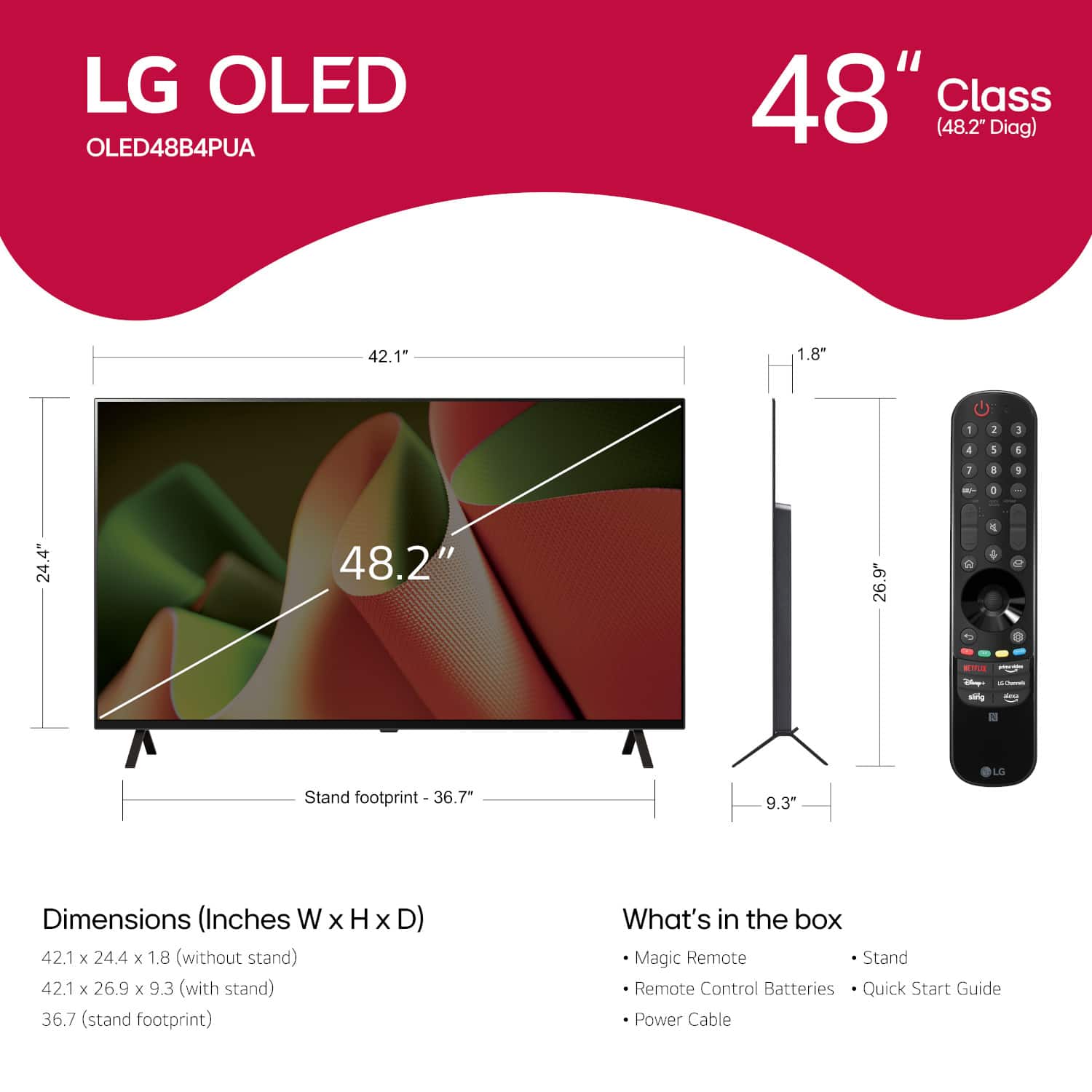
- A:Answer Hi there. Thank you for reaching out with your inquiry about the weight of your LG OLED48B4PUA TV. We understand your situation and are here to help clarify. This model weighs 25.8 pounds when the stand is attached and around 25.4 pounds without the stand. As a troubleshooting step, if you're planning a wall mount installation or need to verify shipping details, please make sure to reference the weight specification that aligns with your setup requirements. https://www.bestbuy.com/site/lg-48-class-b4-series-oled-4k-uhd-smart-webos-tv-2024/6584787.p?skuId=6584787 For further assistance or additional questions, please send us a private message on Social Media @LGUSSupport, and our team will be more than happy to explore possible solutions with you. —Renzo
Answered by LG Digital Customer Care

Q: QuestionDoes this unit have a sleep timer? If so, what increments…every 30 min?
Asked by C.
- A:Answer Hello there! Thanks for your question. The LG OLED48B4PUA 4K OLED TV does have a sleep timer feature, which allows you to set a timer for the TV to turn off automatically after a specific period. Regarding the timer increments, the TV typically provides options for the sleep timer in intervals like 15 minutes, 30 minutes, 1 hour, 2 hours, and possibly others. You can adjust this setting directly from the TV menu under the Settings > All Settings > General > Timers section. https://www.lg.com/us/tvs/lg-oled48b4pua-oled-4k-tv#pdp_specs If you need any further assistance or have more questions, feel free to reach out on social media @LGUSSupport! Hope this helps! —Renzo
Answered by LG Digital Customer Care

Q: QuestionWhat are the dimensions of the box? I’d like to find something to quickly wrap the box (like a bag) before I pick this up to keep this a surprise before Christmas. Thank you
Asked by BBcustomer.
- A:Answer Hello there! Thank you for your inquiry. We understand you're looking for the dimensions of the box for the LG OLED48B4PUA TV so you can wrap it before picking it up. The dimensions of the box are: Height: 28.9 inches Width: 50.4 inches Depth: 6 inches With these measurements, you should be able to find a bag or wrapping material that fits comfortably. https://www.bestbuy.com/site/lg-48-class-b4-series-oled-4k-uhd-smart-webos-tv-2024/6584787.p?skuId=6584787 If you have any further questions or need additional assistance, please send us a private message on Social Media @LGUSSupport, and our team will be happy to help! —Renzo
Answered by LG Digital Customer Care

Q: Questionlike the C1 does the LG - 48" Class B4 Series OLED 4K UHD Smart webOS TV (2024) have the dimming issue when connected to a gaming pc?
Asked by nightcap.
- A:Answer When running the tv in Game mode, yes.
Answered by Zito
Q: QuestionCan I airplay (not screen cast) on this tv from my iPhone?
Asked by NitShu.
- A:Answer Yes. You can AirPlay AND Screen Mirroring for iOS devices.
Answered by 2JayCee
Q: QuestionDoes this TV (48 inch B4 Oled) support Wow Orchestra when linked with a compatible LG soundbar?
Asked by richard758.
- A:Answer Hi there, Richard. Thank you for your question about the LG 48" B4 OLED TV and its compatibility with Wow Orchestra when linked with a compatible LG soundbar. We understand how important it is to have seamless audio and visual experiences! Yes, the LG 48" B4 OLED TV supports Wow Orchestra when connected to a compatible LG soundbar. This feature allows you to enhance your audio experience by leveraging the TV's built-in speakers alongside the soundbar for a more immersive sound performance. https://www.bestbuy.com/site/lg-48-class-b4-series-oled-4k-uhd-smart-webos-tv-2024/6584787.p?skuId=6584787 If you have any more questions about setting this up or any other features of your new TV, please feel free to reach out to us on social media at @LGUSSupport. We're here to assist you! —Renzo
Answered by LG Digital Customer Care

Q: QuestionWhat is the actual screen size (picture size) not cabinet size? Does this come with free access to LG IP channels?
Asked by PaulH.
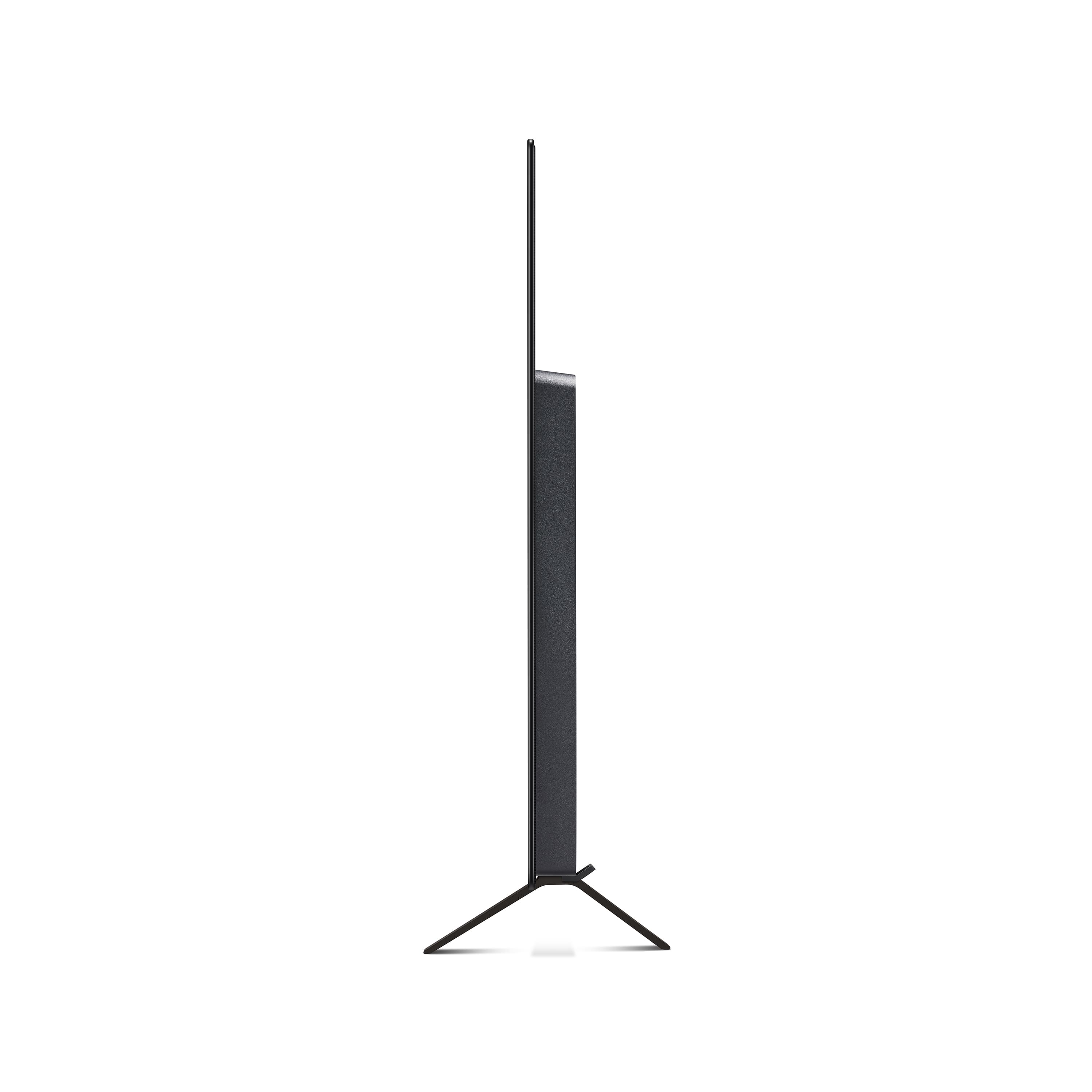
- A:Answer This 48" LG OLED diagonal screen size measures (drum roll....), 48"! Horizontal cabinet width is 42.25"!! LG IP channels-YES!!!
Answered by theo
Q: QuestionIs this a good tv to run Fubo on.
Asked by Lars.
- A:Answer It depends on what you're watching. I like watching sports events, science fiction, and superhero movies; I find it's excellent, as long as you're watching in HD or 4K, although 4K is better. Nice, crisp picture, and the frame rate is excellent, with good colors.
Answered by YoungJedi
Q: QuestionDoes this TV have the ability to do chroma subsampling 4:4:4 for use as a computer monitor?
Asked by Darren.
- A:Answer Hello there! Thank you for reaching out with your question. We understand the importance of chroma subsampling for a quality display, especially when using a TV as a computer monitor. The Model # OLED48B4PUA does support chroma subsampling 4:4:4. This means you can use it for detailed tasks like text editing and graphic design with minimal color distortion, similar to a high-quality computer monitor. If you need further assistance or have any other questions, please send us a private message on Social Media @LGUSSupport. Our team will be happy to provide additional information and support. We appreciate your patience. —Renzo
Answered by LG Digital Customer Care

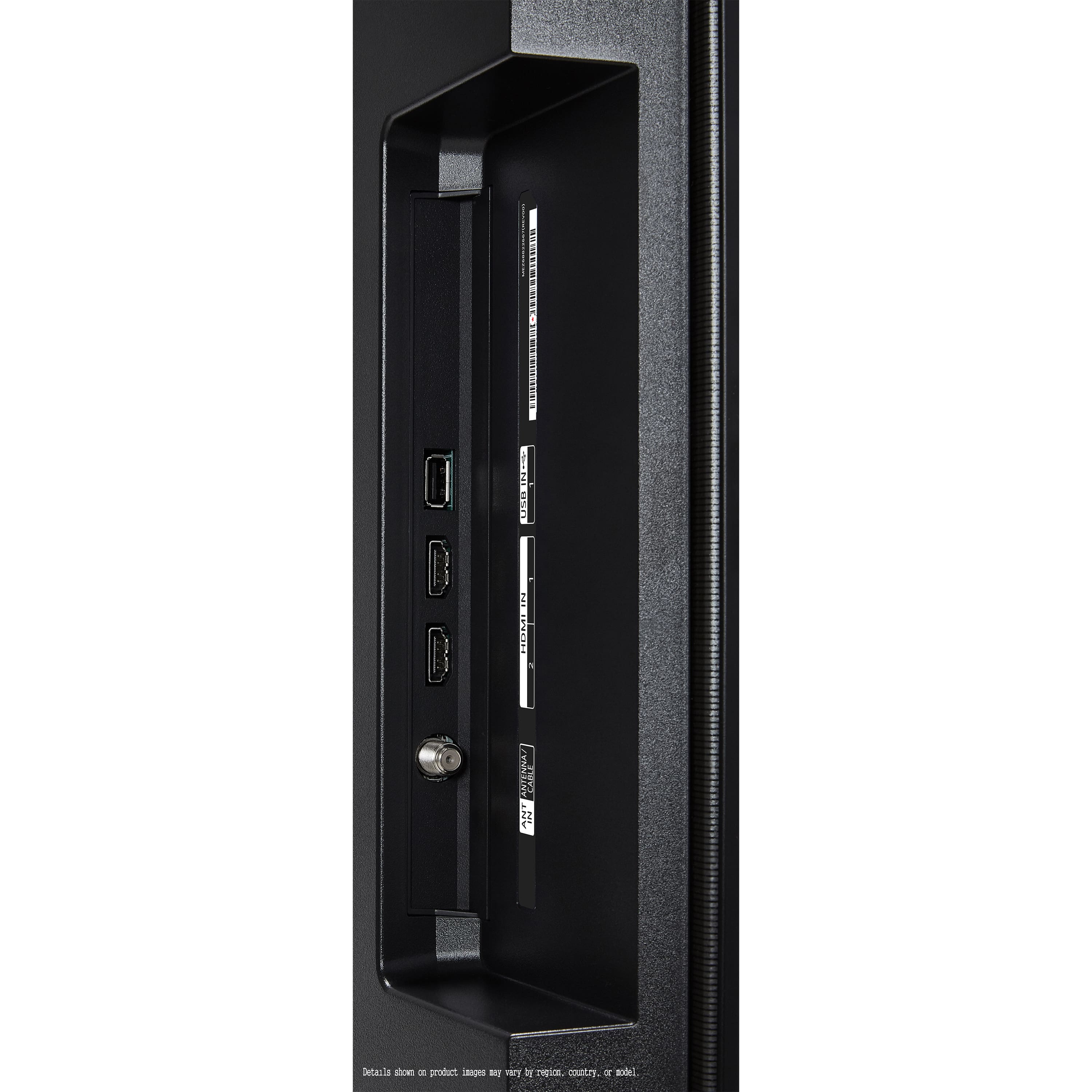
Q: QuestionIs this tv have hdmi 2.1 input for the tv? And what’s the input lag for this tv ?
Asked by Lalo.
- A:Answer Hi there! Thank you for reaching out with your questions. We understand that having the right inputs and minimal input lag is important for your viewing experience. The Model # OLED48B4PUA does indeed come with HDMI 2.1 inputs, which are perfect for high-definition video and gaming needs. As for input lag, this model is designed to offer an excellent gaming experience with low latency. For precise figures on input lag and to ensure you're getting the most out of your TV, please send us a private message on Social Media @LGUSSupport. Our team will be happy to provide you with detailed information and any additional support you may need. We appreciate your patience. —Renzo
Answered by LG Digital Customer Care

Best-selling TVs
- Doorbuster$169.99Your price for this item is $169.99
- Black Friday Deal$99.99Your price for this item is $99.99
- $89.99Your price for this item is $89.99$149.99The comparable value for this item is $149.99
- Black Friday Deal$189.99Your price for this item is $189.99
- Black Friday Deal$329.99Your price for this item is $329.99
- $249.99Your price for this item is $249.99$379.99The comparable value for this item is $379.99
- Black Friday Deal$349.99Your price for this item is $349.99
- Black Friday Deal$74.99Your price for this item is $74.99
- Black Friday Deal$449.99Your price for this item is $449.99
- Black Friday Deal$169.99Your price for this item is $169.99
- Black Friday Deal$69.99Your price for this item is $69.99
- Black Friday Deal$229.99Your price for this item is $229.99
- Black Friday Deal$329.99Your price for this item is $329.99
- Black Friday Deal$899.99Your price for this item is $899.99
- $549.99Your price for this item is $549.99$1,299.99The comparable value for this item is $1,299.99
- Black Friday Deal$299.99Your price for this item is $299.99
- Black Friday Deal$999.99Your price for this item is $999.99
- Black Friday Deal$1,399.99Your price for this item is $1,399.99
- Black Friday Deal$399.99Your price for this item is $399.99
- Black Friday Deal$499.99Your price for this item is $499.99