Questions & Answers
- Model:
- OLED65G5WUA
- |
- SKU:
- 6621810
Q: QuestionIs there a pedestal or feet so I set it on my tv stand? Thanks
Asked by Anonymous.
- A:Answer The LG OLED evo G5 TV Stand - 65-inch Class TV, Model # SA-G5SN65, is the compatible stand for the 65-inch Class LG OLED evo AI G5 4K Smart TV 2025 with Supplied Wall Mount, Model # OLED65G5WUA. You can buy it directly from its product page on Best Buy...^Ivan.
Answered by LG Digital Customer Care
Q: QuestionI purchased an LG model OLED55GXPUA. In July 2021. I am now being told that the 5 year panel warranty does not apply to this model. Is this true?
Asked by Rfw.
- A:Answer The 2020 LG GX 55-inch Class with Gallery Design 4K Smart OLED TV w/AI ThinQ® (54.6" Diag), Model # OLED55GXPUA, only comes with a One (1) year Limited Manufacturer's Warranty from the date of original retail purchase for Parts and Labor (internal/functional parts only). It does not have a 5-Year Display Panel Warranty. LG started offering a 5-Year Display Panel warranty for its OLED TVs in 2021, which applied to all the 55, 65 and 77-inch G1 screen sizes sold throughout the United States,...^Ivan.
Answered by LG Digital Customer Care
Q: QuestionEven thought this TV does not come with a stand, can you get a stand for it?
Asked by Anonymous.
- A:Answer yes I got one from amazon for 39.99 works great
Answered by MikepH
Q: QuestionWhat are my best options for a surround sound system for this television?
Asked by Soundguy.
- A:Answer The S95TR LG Home Theater Soundbar with Dolby Atmos® and Rear Speakers, 9.1.5 channel, Best OLED matching, S95AR LG Home Theater Soundbar for TV with Dolby Atmos® 9.1.5 channel, Best LG OLED matching, or the S90TR LG Home Theater Soundbar with Dolby Atmos® and Rear Speakers, 7.1.3 channel, Best OLED matching, are the best options for the LG 65-inch Class LG OLED evo AI G5 4K Smart TV 2025 with Supplied Wall Mount, Model # OLED65G5WUA...^Ivan.
Answered by LG Digital Customer Care
Q: QuestionHow deep are the 300x300 VESA holes for the M6 screws? I’m looking to use the correct M6 screw length for my mount.
Asked by Dave.
- A:Answer Hello there, Dave. We appreciate you reaching out to us. We understand your inquiry about the OLED65G5WUA TV. While we do not have the specific VESA hole depth, we can advise that the screw length needed for the wall mount is M6 x 10mm. If you need any further assistance, please send us a private message on Social Media @LGUSSupport and our team will be more than happy to explore possible solutions. https://www.bestbuy.com/site/lg-65-class-g5-series-oled-evo-ai-4k-uhd-smart-webos-tv-with-one-wall-design-2025/6621810.p?skuId=6621810 We appreciate your patience. —Renzo
Answered by LG Digital Customer Care
Q: QuestionHow can you hook up hdmi cables if the tv is flush to the wall?
Asked by Anonymous.
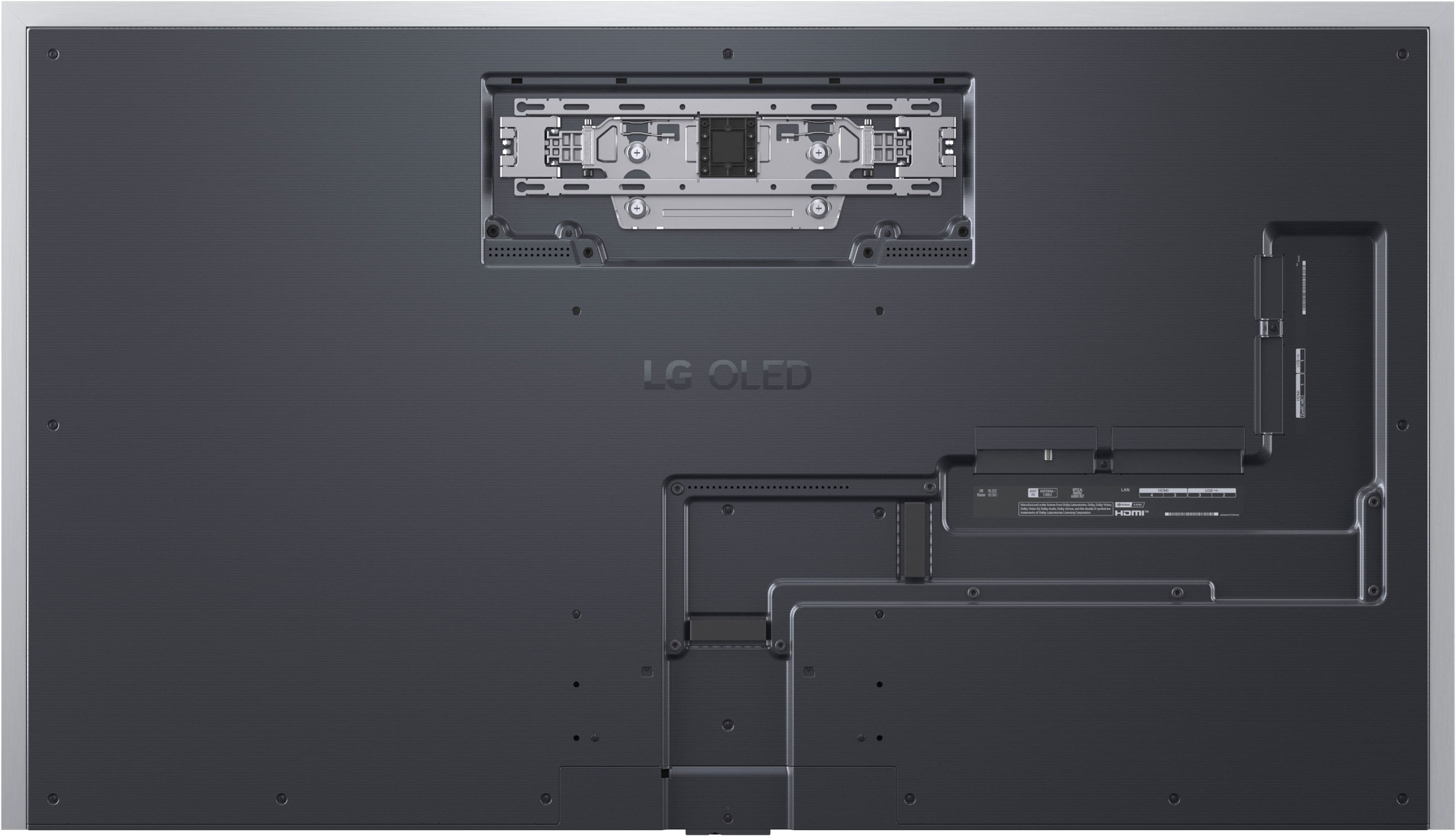
- A:Answer Hi, there. Thank you for reaching out with your question regarding the LG TV (OLED65G5WUA) model, connecting HDMI cables when it's mounted flush to the wall. This unit has a cool "zero-gap" wall mount that lets it sit really nicely against the wall. To keep things tidy, there's a little recessed area on the back of the TV for the ports. If you're going for that flush-mount look, a handy tip is to use right-angle or flat HDMI cables. They’re perfect for those snug spots and make it super easy to route without sticking out. For more information about the product, visit https://www.lg.com/us/tvs/lg-oled65g5wua-oled-4k-tv. If you need a bit more help, feel free to drop us a private message on social media @LGUSSupport, and our team would be more than happy to find some solutions. ^Juvy
Answered by LG Digital Customer Care

Q: Questionwhat does one wall design mean?
Asked by Trisha.
- A:Answer LG's One Wall Design for its G3, G4, and G5 series OLED TVs refers to a sleek and minimalist aesthetic that allows the TV to be mounted flush against the wall, creating a seamless look in your space. This design minimizes the appearance of wires and provides a clean aesthetic, making it feel like a part of your wall. The One Wall Design is particularly noted for its ultra-seamless feature, leaving virtually no gap between the TV and the wall when hung. This design approach enhances the overall viewing experience by providing a more integrated look for modern home decor...^IVan.
Answered by LG Digital Customer Care

Q: QuestionFor this price,why don't it come with a better remote?
Asked by Smooth.
- A:Answer Hello there. Thank you for sharing your experience with us. We understand your inquiry regarding the remote control included with your LG OLED65G5WUA TV. The LG Magic Remote for the G5 series is designed to offer intuitive control with features like pointing, wheel scrolling, and voice recognition, providing a seamless navigation experience for your smart TV. While we understand there are varying preferences, this design aims to streamline control for webOS and smart features. https://www.bestbuy.com/site/lg-65-class-g5-series-oled-evo-ai-4k-uhd-smart-webos-tv-with-one-wall-design-2025/6621810.p?skuId=6621810 If you have specific concerns about its functionality or wish to explore available options, please send us a private message on Social Media @LGUSSupport and our team will be more than happy to explore possible solutions. We appreciate your patience. —Renzo
Answered by LG Digital Customer Care

Q: QuestionDoes this TV support Auracast?
Asked by Larry.
- A:Answer Hi there, Larry. We understand your inquiry about the LG OLED65G5WUA 65" Class G5 Series OLED evo AI 4K UHD Smart webOS TV. This model does support Auracast® streaming via Bluetooth LE Audio, for accessible, low-latency broadcast audio directly to compatible hearing aids and headphones. As a troubleshooting step, please make sure your TV is up to date: Go to Settings > All Settings > Support > Software Update and select Check for Updates. Once updated, enable Auracast by navigating to Settings > Sound > Sound Out > Auracast and turning the feature On. https://www.bestbuy.com/site/lg-65-class-g5-series-oled-evo-ai-4k-uhd-smart-webos-tv-with-one-wall-design-2025/6621810.p?skuId=6621810 If you need any further assistance or run into issues, please send us a private message on Social Media @LGUSSupport and our team will be more than happy to explore possible solutions. We appreciate your patience. —Renzo
Answered by LG Digital Customer Care

Q: QuestionWhy does the refresh rate for this TV say it is 120hz? I have this TV and it is 165hz, not 120hz.
Asked by Parogar.
- A:Answer The LG 65" Class G5 Series OLED evo AI 4K UHD Smart webOS TV with One Wall Design (2025), Model # OLED65G5WUA has a native 120 Hz refresh rate and a 165Hz Refresh Rate for VRR with NVIDIA G-Sync, and AMD FreeSync Premium, and a PC with a 165Hz graphic card is required. The 120 Hz showing on the display is the refresh rate of your incoming signal...^Ivan.
Answered by LG Digital Customer Care

Q: QuestionLocation of magnolia stores
Asked by Ron.
- A:Answer Please contact Best Buy's Customer Support or your local Best Buy for assistance with the location of Magnolia stores...^Ivan.
Answered by LG Digital Customer Care

Q: QuestionHow to connect rf coax tv antenna
Asked by curious.
- A:Answer Hello there! We understand your inquiry about connecting an RF coax TV antenna to your LG OLED65G5WUA and are here to help you enjoy over-the-air channels. To get started, please follow these steps: Connect the coax cable securely to the RF ANTENNA INPUT on the back of your TV (labeled “ANT IN”). Power on the TV, then press the Home/Settings button on your Magic Remote. Navigate to All Settings > Channels > Auto Tuning, select Air, and start the channel scan. This will automatically detect and save all available over-the-air broadcasts. Troubleshooting tip: If you’re not receiving channels after the scan, make sure the antenna cable is firmly fastened and that the antenna is positioned near a window or higher up for better reception. https://www.bestbuy.com/site/lg-65-class-g5-series-oled-evo-ai-4k-uhd-smart-webos-tv-with-one-wall-design-2025/6621810.p?skuId=6621810 For any additional assistance with antenna placement, channel tuning, or advanced settings, please send us a private message on Social Media @LGUSSupport and our team will be more than happy to explore possible solutions. We appreciate your patience and look forward to helping you experience crystal-clear TV with your new OLED! —Renzo
Answered by LG Digital Customer Care

Q: QuestionWhat table stand can be used if I am not wall mounting this TV?
Asked by Alex.
- A:Answer Hello, Alex. The LG 65" Class G5 Series OLED evo AI 4K UHD Smart webOS TV with One Wall Design (2025), Model # OLED65G5WUA has not yet been released nor has the optional stand. The optional stand should be available at the time the TV is released or shortly after the TV is released...^Ivan.
Answered by LG Digital Customer Care
Q: QuestionDoes this TV actually exist? I placed a "pre-order" and it has been rescheduled twice now. It seems that delivery dates are just made up and not based in reality.
Asked by WaitingForG5.
- A:Answer Hello there. Thank you for sharing your experience with us. We understand your situation with the OLED65G5WUA pre‑order and want to help you get clarity on delivery. The LG OLED65G5WUA is indeed a genuine upcoming model, and availability is managed by our retail partner, Best Buy. Occasionally, delivery dates may shift based on stock levels and shipping updates at Best Buy. Troubleshooting Step: Please sign in to your Best Buy account, navigate to Order History, and review your OLED65G5WUA order details and expected shipment date. This will confirm the latest delivery estimate and any recent schedule changes. If you see further date adjustments or need assistance with your order status, we recommend contacting Best Buy Customer Care directly or via their online chat for the most up‑to‑date information. https://www.lg.com/us/tvs/lg-oled65g5wua-oled-4k-tv#pdp_specs Once your OLED65G5WUA arrives and you’re ready to set it up, please send us a private message on Social Media @LGUSSupport and our team will be more than happy to explore possible solutions and ensure you enjoy your new TV. We appreciate your patience as Best Buy works to deliver your unit to you. —Renzo
Answered by LG Digital Customer Care

Q: QuestionHas this TV released yet for the 65 inch version?
Asked by CrossCameron.
- A:Answer Hello, Cameron. Thank you for your interest in the LG 65" Class G5 Series OLED evo AI 4K UHD Smart webOS TV with One Wall Design (2025), Model # OLED65G5WUA. This TV may only be available at select Best Buy locations that have a Magnolia store. Magnolia stores offer top-of-the-line home theater products, including premium televisions, speakers, A/V receivers, and furniture. Please contact your local Best Buy store for assistance with the availability of the TV...^Ivan.
Answered by LG Digital Customer Care

Q: QuestionDoes the LG G5 65-inch TV come with a stand? If not, could you recommend a stand for this TV?
Asked by Jeff.
- A:Answer No currently only being sold overseas SA-G5SN65
Answered by gg0123
Q: QuestionWhen is this TV gonna be available?
Asked by Arcangel912.
- A:Answer Hi, Arcangel. Thank you for your interest in the LG TV (OLED65G5WUA) model. According to LG's official announcement, this model is available for pre-order on LG.com, with availability at authorized retailers expected later in March 2025. Please note that availability may vary by region and retailer. For the most accurate and up-to-date information, we recommend checking with local retailers or visiting LG's official website. For more information about the product, you may visit https://www.lg.com/us/tvs/lg-oled65g5wua-oled-4k-tv. If you have any further questions or need assistance, feel free to send us a private message on social media @LGUSSupport, and our team will be happy to assist you. ^Juvy
Answered by LG Digital Customer Care

Q: Questiondoes the tv come with a stand ?
Asked by halle.
- A:Answer $3000 for a television and they won’t include a stand for those who can’t or don’t want to wall mount? Insanity.
Answered by Timmy
Q: QuestionIs the wall mount the same as the wall mount on the g4? If not what differences are there?, dimensions? Placement of mounting holes. Placement of hooks for TV ? Thanks
Asked by Jim.
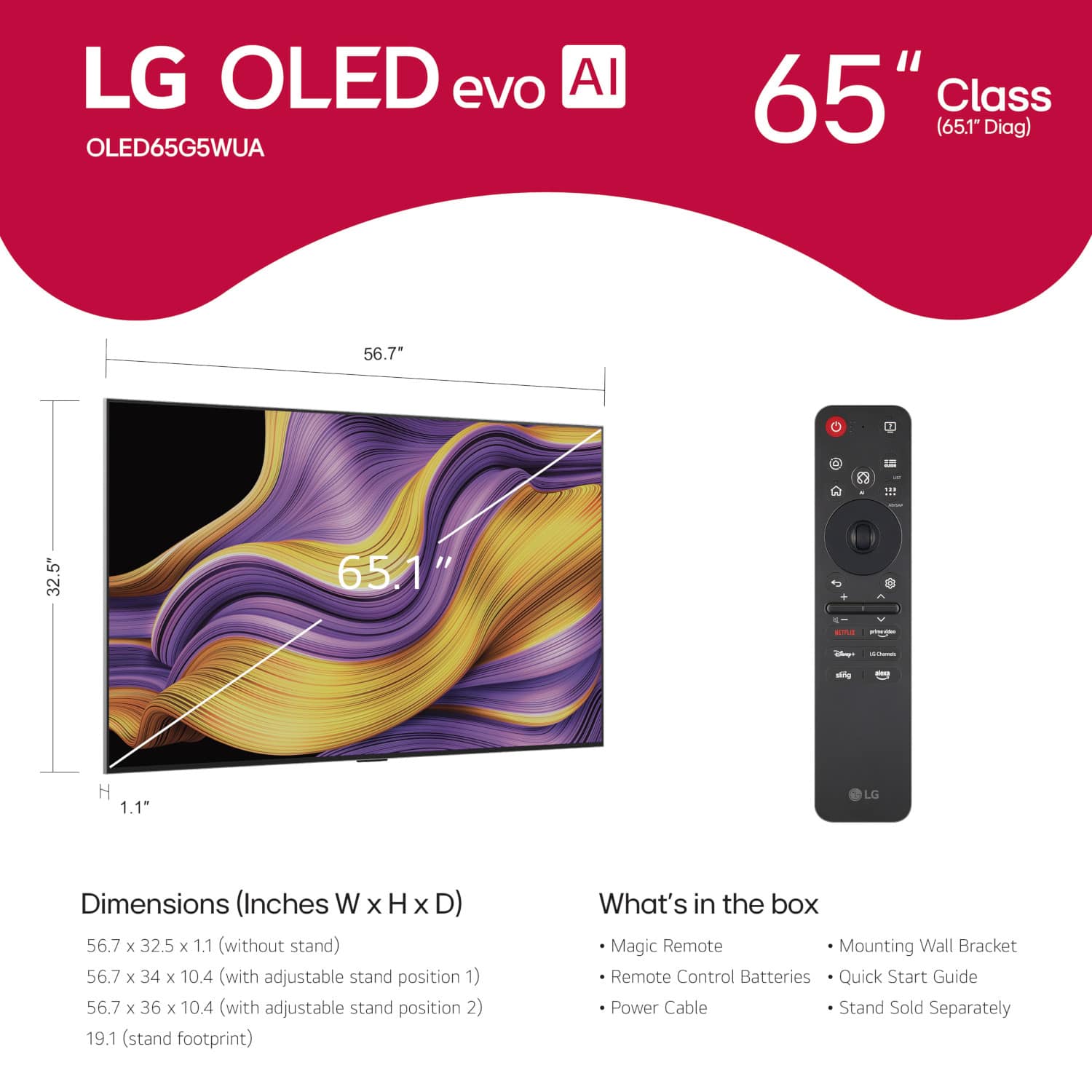
- A:Answer Hello there, Jim. We understand your inquiry about wall-mount compatibility between your LG OLED65G5WUA and the G4. Here’s what you need to know: Mounting Pattern & Dimensions Both the G5 (OLED65G5WUA) and the G4 use the standard VESA 300 × 300 mm hole pattern (11.8″ × 11.8″), so any UL-certified 300 × 300 bracket will align with both models. Depth difference: The G5 chassis is 1.0″ deep (without stand), whereas the G4 is approximately 0.9″. This means the hooks on your bracket may sit very slightly closer to the wall on the G5—just enough to note when selecting low-profile mounts. TV dimensions without stand: 56.7″ (W) × 32.5″ (H) × 1.0″ (D) for G5; G4 is similar in width and height but a hair shallower in depth. Hook & Hole Placement The horizontal and vertical center-to-center spacing of the mounting holes is exactly 300 mm on both models. The mounting brackets/hooks attach to the back plate in the same locations; however, due to the G5’s slightly thicker panel, you may need to: Loosen the bracket screws just enough to slide the bracket into the locking hooks. Level the bracket once it’s resting on the hooks before fully tightening to ensure a snug fit. Troubleshooting Step Before final installation, lay the TV face-down on a soft, flat surface, then: Use a tape measure to confirm the 300 mm × 300 mm hole spacing matches your bracket. With the bracket loosely attached, engage the hooks and ensure the TV sits flush; if it feels uneven, slightly adjust the bracket’s vertical position before tightening. https://www.lg.com/us/tvs/lg-oled65g5wua-oled-4k-tv#pdp_specs If you’d like personalized guidance or run into any roadblocks, please send us a private message on social media @LGUSSupport, and our team will be more than happy to explore possible solutions with you. We appreciate your patience and look forward to helping you get your G5 mounted perfectly! —Renzo
Answered by LG Digital Customer Care
Best-selling TVs
- Doorbuster$169.99Your price for this item is $169.99
- Black Friday Deal$189.99Your price for this item is $189.99
- $89.99Your price for this item is $89.99$149.99The comparable value for this item is $149.99
- Black Friday Deal$99.99Your price for this item is $99.99
- $249.99Your price for this item is $249.99$379.99The comparable value for this item is $379.99
- Black Friday Deal$329.99Your price for this item is $329.99
- Black Friday Deal$74.99Your price for this item is $74.99
- Black Friday Deal$129.99Your price for this item is $129.99
- Black Friday Deal$349.99Your price for this item is $349.99
- Black Friday Deal$169.99Your price for this item is $169.99
- Black Friday Deal$229.99Your price for this item is $229.99
- Black Friday Deal$449.99Your price for this item is $449.99
- Black Friday Deal$329.99Your price for this item is $329.99
- Black Friday Deal$999.99Your price for this item is $999.99
- Black Friday Deal$69.99Your price for this item is $69.99
- Black Friday Deal$399.99Your price for this item is $399.99
- $549.99Your price for this item is $549.99$1,299.99The comparable value for this item is $1,299.99
- Black Friday Deal$1,399.99Your price for this item is $1,399.99
- Black Friday Deal$499.99Your price for this item is $499.99
- Black Friday Deal$899.99Your price for this item is $899.99


. Independently Tested for Quality and Workmanship CheckPlus: 100 % Color Volume to DCI-P3 oi PSSEANE Intertek [www.IntertekCheck.com](http://www.IntertekCheck.com). 100% Color Fidelity and '100% Color Volume to DCI-P3' applies to 2025 OLED TVs. *LG OLED Display is verified by UL for Perfect Color measured to IDMS 11.5 Ring-light Reflection standards. *100% Color Volume is defined as the performance of display which is equal or greater than the size of DCI-P3 standard color volume as verified independently by Intertek. *The LG OLED Panel is certified by Intertek for 100% Color Fidelity, measured to IDMS 11.5 Ring-light Reflection standards.](https://pisces.bbystatic.com/image2/BestBuy_US/images/products/3661ed5e-8d92-47a9-baef-65aa6eb5dcb9.jpg;maxHeight=54;maxWidth=54;format=webp)