
















Main Content

Questions & Answers

$297.99
Page Showing 1-20 of 192 questions
  • QuestionWhat is the resolution of this Samsung TV?

    • Answer The resolution of the TV is 4K (2160p).
    This question and answer was generated by AI based on customer and product data.

  • QuestionHow does the 4K upscaling feature work on this TV?

    • Answer The 4K upscaling feature enhances the clarity of lower-resolution content by upgrading it to near 4K resolution, revealing more details.
    This question and answer was generated by AI based on customer and product data.

  • QuestionWhich voice assistant is built-in to this TV?

    • Answer This TV has Amazon Alexa built-in as a voice assistant.
    This question and answer was generated by AI based on customer and product data.

  • QuestionDoes this TV have a headphone jack?

    • Answer No, this TV does not have a headphone jack.
    This question and answer was generated by AI based on customer and product data.
  • QuestionWhat is the Motion Enhancement Technology used in this TV?

    • Answer This TV uses Motion Xcelerator technology.
    This question and answer was generated by AI based on customer and product data.
  • QuestionWhat is the benefit of Q-Symphony technology?

    • Answer Q-Symphony allows the TV and soundbar speakers to work together, providing optimized surround sound and a more cinematic experience.
    This question and answer was generated by AI based on customer and product data.

  • QuestionHow does the Object Tracking Sound Lite feature work?

    • Answer Object Tracking Sound Lite makes you feel like you're in the middle of the action with sound that follows objects on the screen. It uses a virtual top channel to place every sound in space and move it with the action, enhancing your sense of immersion.
    This question and answer was generated by AI based on customer and product data.
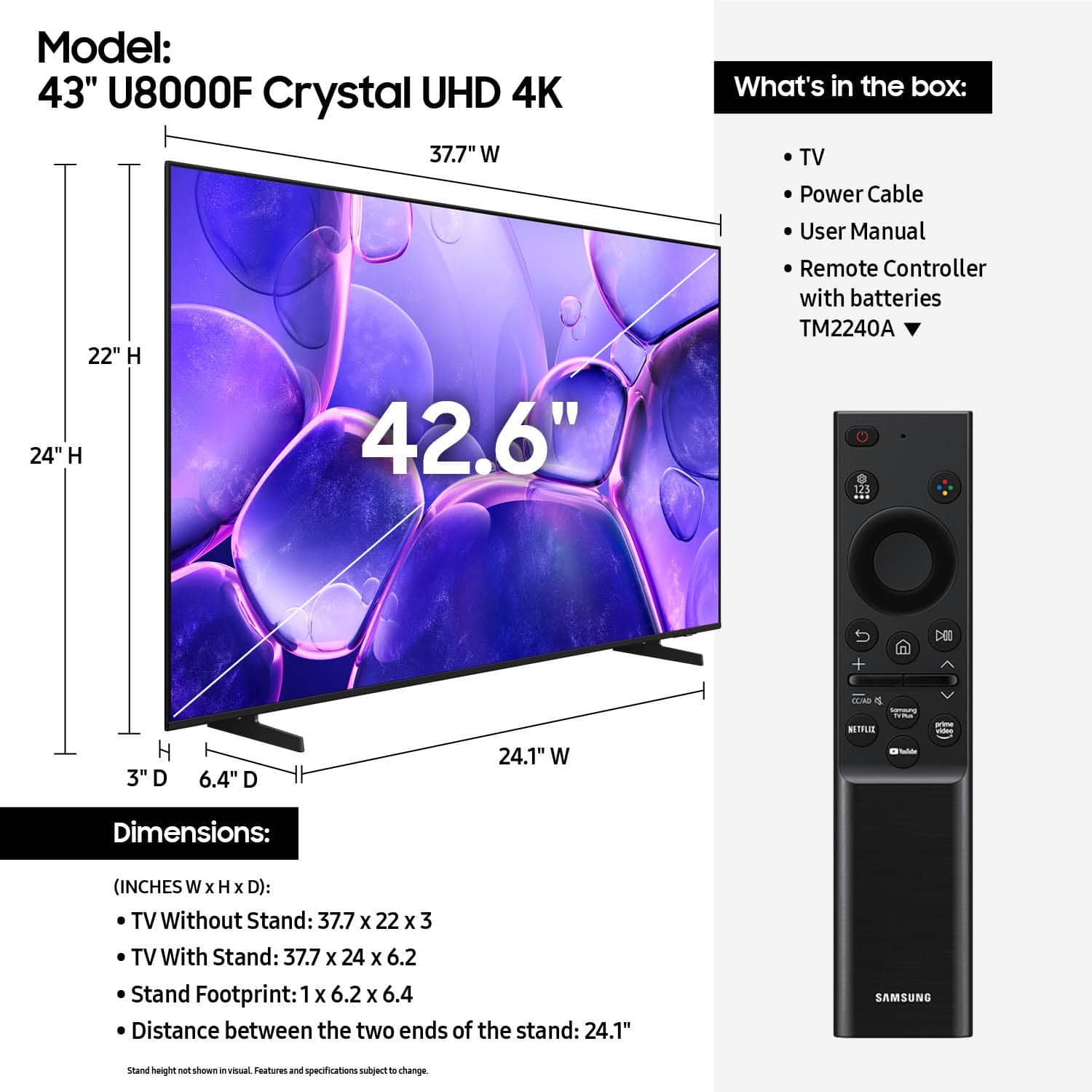
  • Questionwhat is the width of the stand (outside of the left leg to the outside outside of right)

    Asked by nickr.

    • Answer Hi nickr, The 43" U8000F feet are 24.1" apart. ~Samsung Advisor

      Answered by Samsung

  • Questiondoes it support internet access with a browser

    Asked by will.

    • Answer Hi Will, Yes, there is a built-in web browser. ~Samsung Advisor

      Answered by Samsung

  • QuestionWhat size mounting screws are needed to mount this?

    Asked by Eagle2.

    • Answer Hi Eagle2, The 43" U8000F TV requires M8x23-25mm screws for mounting. ~Samsung Advisor

      Answered by Samsung

  • QuestionCan this TV be set to return to the last used input when it powers on? Also, can this display volume numbers when using a sound-bar over eARC?

    Asked by Billy.

    • Answer Hi Billy, You can customize what happens when the TV powers on. Go to: Settings > All Settings > Advanced Features > Start Screen Option, then enable or disable: • Start with Smart Hub Home • Autorun Multi View Casting • Autorun Multi View Mirroring The TV will show volume numbers when connected to a soundbar. ~Samsung Advisor

      Answered by Samsung

  • QuestionDoes this television have a sleep timer

    Asked by Sandy.

    • Answer Hi Sandy, Yes, the U8000F TV offers a Sleep Timer. ~Samsung Advisor

      Answered by Samsung

  • QuestionDoes this have Bluetooth for headphones?

    Asked by Debbs71.

    • Answer Hi Debbs71, Yes, the U8000F TV is Bluetooth-enabled. ~Samsung Advisor

      Answered by Samsung

  • QuestionCan I turn off Alexa?

    Asked by Luddite62.

    • Answer Hi Luddite62, Yes. To disable the voice assistant, go to: Settings > All Settings > Advanced Features > Voice > Bixby Voice Settings > Voice Wake-Up = Off. If Alexa was previously enabled, you can turn it off by logging out of your Amazon account under: Settings > All Settings > Advanced Features > Voice > Amazon Alexa Settings. ~ Samsung Advisor

      Answered by Samsung

  • QuestionHow wide is the viewing angle?

    Asked by Frank13.

    • Answer Hi Frank13, The U8000F features Mega Contrast, which automatically adjusts brightness and contrast, enhancing the difference between light and dark areas on the screen, so you can enjoy stunning picture quality. If you are looking for a wide viewing angle, we recommend looking at the QN70F TV Series. ~Samsung Advisor

      Answered by Samsung

  • QuestionCan a sound bar be connected?

    Asked by Anonymous.

    • Answer Soundbars can be connected via a wired (HDMI) or wireless (Bluetooth, Wi-Fi) connection. ~ Samsung Specialist

      Answered by Samsung

  • QuestionWhat kind of sound box can I use with this tv?

    Asked by LorraineD.

    • Answer Hi Lorraine, You can use soundbars that are able to connect via an HDMI cable or Bluetooth. ~Samsung Advisor

      Answered by Samsung

  • Questioni need step by step directions to change the sounds on the television. I need to add more base I think, but not sure how to make that adjustment. I have a hard time understanding sometimes what people are saying.

    Asked by gramma.

    • Answer Hi Gramma, To start, we recommend making sure your TV is running the latest firmware, as updates can include improvements to sound performance: On your remote, go to Home > left directional key > Settings > Support > Software Update> Check for Updates If volume levels still seem too low, you can improve sound performance by adjusting a few key settings: First, on your remote, go to Settings > All Settings > Sound > Sound Mode and try Amplify to boost dialogue and upper tones. To adjust your Sound Mode: Navigate to: Settings > All Settings > Sound > Sound Mode. From there you can toggle between the various modes to pick one that suits the content you are watching. Next, check out the Auto Volume feature: This feature helps maintain consistent volume levels across content and input sources. Turn it on under: Settings > All Settings > Sound > Expert Settings > Auto Volume = On I hope this helps! For further assistance, contact Samsung Support at 1-800-SAMSUNG, 8AM – 12AM EST, 7 days a week. LiveChat agents are also available on our website under ‘Support.’ ~ Samsung Advisor

      Answered by Samsung

  • QuestionCan you airplay to this TV from an ipad?

    Asked by Gymoption.

    • Answer Hi Gymoption, Yes, Airplay is available on the U8000F. ~Samsung Advisor

      Answered by Samsung

  • QuestionDoes this tv come with voice search on its remote?

    Asked by Anonymous.

    • Answer Hi, Although the U8000F does not offer built-in voice assistants, you can use the SmartThings app or connect to an external Alexa device for voice commands. ~Samsung Advisor

      Answered by Samsung









