Questions & Answers
- Model:
- UN43U8000FFXZA
- |
- SKU:
- 10672062
Highly rated by customers for: Picture Quality, Setup Ease, Size
$297.99$297.99
Page Showing 21-40 of 195 questions
Q: QuestionDoes this tv have the capability to have audio from the tv and also audio through wireless Bluetooth at the same time? Thank you.
Asked by Bobby.
- A:Answer Bobby - The Multi-output Audio feature on the U8000F TV allows simultaneous audio from both the TV speaker and a paired Bluetooth headphone. For better comfort, the headphone volume can be adjusted independently. You can enable this option in: Settings > All Settings > General & Privacy > Accessibility > Multi-output Audio ~ Samsung Specialist
Answered by Samsung

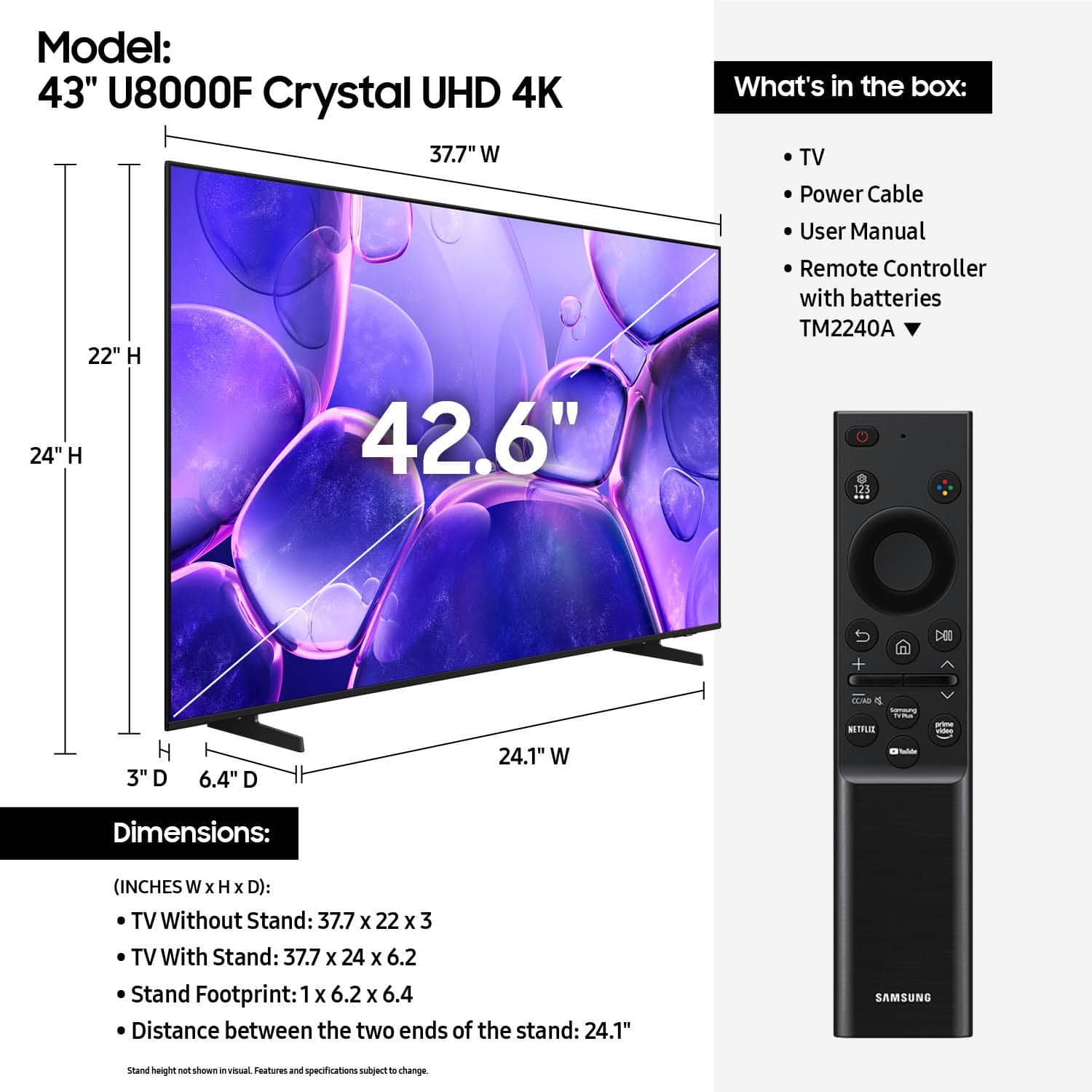
Q: QuestionHow far apart are the legs for the stand?
Asked by Hogan.
- A:Answer Hogan - The leg width of the 43" U8000F is 24.1”. ~ Samsung Specialist
Answered by Samsung

Q: QuestionDoes this tv require hdmi cable or what type of connection or cable are necessary?
Asked by Hdmi.
- A:Answer Hi, You would need an HDMI cable to connect external devices such as a cable box, soundbar or wired internet. However, you do not need an HDMI cable if you plan on using Wi-Fi and streaming apps. ~Samsung Advisor
Answered by Samsung

Q: QuestionIs there a place on tv to plug in earphones
Asked by Headphones.
- A:Answer Hi Headphones, You can connect headphones via Bluetooth or Wi-fi. ~Samsung Advisor
Answered by Samsung
Q: Questioncan it connect ear buds?
Asked by jimbob.
- A:Answer Hi jimbob, Yes, the U8000F TV is Bluetooth-enabled. ~Samsung Advisor
Answered by Samsung
Q: QuestionDoes this device support HDMI -CEC so that it can powered on/off from an Apple TV media player
Asked by Sam.
- A:Answer Hi Sam, Yes, the U8000F supports HDMI-CEC. ~Samsung Advisor
Answered by Samsung
Q: Questiondoes it have roku?
Asked by dre.
- A:Answer Hi dre, The U8000F is a Smart TV with built-in apps, an app store, an internet browser, and more. However, if you wish to use a Roku device, you can connect it via HDMI or USB port. ~Samsung Advisor
Answered by Samsung
Q: QuestionHow to access alexa
Asked by Bobby.
- A:Answer Hi Bobby, You can connect standalone Alexa devices such as an Echo speaker, to control compatible smart home devices and some experiences on your TV. Here are the steps: 1. Download both the Amazon Alexa and Samsung SmartThings apps, if you don't already have them. Both are available for iOS or Android devices. 2. Make sure your Alexa device and TV are both connected to the same Wi-Fi network. 3. Your TV must be enabled within the SmartThings app. If not, make sure you are signed in with your Samsung account on the TV: Settings > All Settings > Samsung Account 4. Log in to the SmartThings app with the same Samsung account. Tap Devices, and if your TV isn’t already shown, tap + to add it to the app. 5. In the Alexa app, enable the SmartThings skill and sign into your Samsung account. This will automatically connect your Samsung TV to Alexa and let you use voice commands to control your television. If you need more help, we’re here. Give us a call at 1-800-SAMSUNG. You can also chat with a LiveChat agent by clicking the ‘Support’ link on our website. ~Samsung Advisor

Answered by Samsung
Q: QuestionHow do I get the sound to go higher? It’s stuck on 15 and I can’t raise it any higher. Does it need a sound bar?
Asked by NewTVNickname.
- A:Answer Hi NewTVNickname, Please try the below troubleshooting steps: 1. Check for firmware updates – Keeping your TV up to date can resolve many performance issues: Home > left directional key > Settings > Support > Software Update > Update Now 2. Run Device Care – This tool checks system memory, frees up cached data, and closes background apps that could be slowing things down: Home > left directional key > Settings > Support > Device Care > Start Device Care 3. Cold boot your TV – With the TV powered on, press and hold the Power button on your remote for 5+ seconds until the TV restarts. This helps refresh the system. If you're still noticing performance issues after these steps, please contact Samsung Support at 1-800-SAMSUNG. You can also connect with a LiveChat agent via the ‘Support’ link on our website. ~ Samsung Advisor
Answered by Samsung
Q: QuestionCan you stream from an iPad onto this screen?
Asked by Anonymous.
- A:Answer Yes you can by using the screen mirror
Answered by BrandonR
Q: QuestionCan you use any soundbar brand with this tv or must you use a Samsung product
Asked by Anonymous.
- A:Answer I can't use the soundbar that I already had - there was no port for the connection I had.
Answered by user225226
Q: QuestionCan you download the MLB app on this tv model?
Asked by Tam.
- A:Answer Hi Tam, Yes, the MLB app is available for download on the U8000F. ~Samsung Advisor
Answered by Samsung
Q: QuestionWhere can I find the exact remote replacement?
Asked by TexasSweetAngel.
- A:Answer I need help on finding the exact remote replacement.
Answered by Anonymous
Q: QuestionIs this tv compatible with video game (Xbox/Playstation) consoles and mobile (i.e. Nintendo) video game devices?
Asked by Anonymous.
- A:Answer Hi, Yes, you can connect your external device via HDMI cable. ~Samsung Advisor
Answered by Samsung
Q: QuestionHow long are the base stand legs, and how far apart are they?
Asked by Rick.
- A:Answer Hi Rick, The 43" U8000F TV stand measurements are 1" x 6.4" x 6.2" (WxDxH), and the legs are 24.1" apart. ~Samsung Advisor
Answered by Samsung
Q: QuestionWill this have the Spectrum tv app?
Asked by MarkG.
- A:Answer Hi MarkG, Yes, the Spectrum TV app is available for download. ~Samsung Advisor

Answered by Samsung
Q: QuestionDoes this TV support 4x4x4 chroma for text clarity?
Asked by Chroma.
- A:Answer Hi Chroma, Yes, the U8000F TV supports Chroma 4:4:4 subsampling in both 1080p and 4K. ~ Samsung Advisor
Answered by Samsung
Best-selling TVs
- $199.99$199.99The price was $349.99
- $329.99$329.99The price was $469.99
- $179.99$179.99The price was $299.99
- $449.99$449.99The price was $649.99
- $249.99$249.99The price was $379.99
- $79.99$79.99The price was $129.99
- $279.99$279.99The price was $449.99
- $1,399.99$1,399.99The price was $2,699.99
- $149.99$149.99The price was $199.99
- $109.99$109.99The price was $149.99
- $139.99$139.99The price was $299.99
- $1,999.99$1,999.99The price was $3,699.99
- $99.99$99.99The price was $129.99
- $329.99$329.99The price was $379.99
- $329.99$329.99The price was $489.99
- $1,399.99$1,399.99The price was $2,499.99
- $899.99$899.99The price was $1,999.99