“why is my Backup Plus ejecting whenever Time Machine starts to back up? I bought the Seagate Backup Plus for Mac 500 usb 3.0 portable harddrive yesterday. I plugged it in and whenever Time Machine attempts to start the backup I get an error message "The disk was not ejected properly..." and everything stops ...Please help!! I have an IMAC running OS 10.8.3”
Answer This Question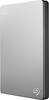
1-3 of 3 Answers
You should upgrade Mountain Lion to Yosemite to fix some bugs with the OS. That message usually occurs when you unplug the drive without ejecting it first, by a. dragging it to the trash, which changes to an eject symbol, or b. choosing File: Eject after first selecting the drive, or c. selecting the drive and then pressing Command + E on the keyboard.
Sorry, there was a problem. Please try again later.There is a manual on how to use it for Time Machine backup. Follow the procedures and the software and you should have no problem.
Sorry, there was a problem. Please try again later.Have you used this on a Windows yet? Because that's the message you usually get when you didn't eject it properly from a Windows computer. If not I don't know but if it was used on a Windows machine go back and try ejecting it properly by making sure you click (safely remove hardware) before fully ejecting the drive and then try running it on Time Machine again. Other people have run into this same scenario.
Sorry, there was a problem. Please try again later.