Everything for Back to School — and then someShop now

Main Content

Questions & Answers

$499.99
Page Showing 221-240 of 949 questions
  • QuestionDoes it have ARC

    Asked by Bijay.

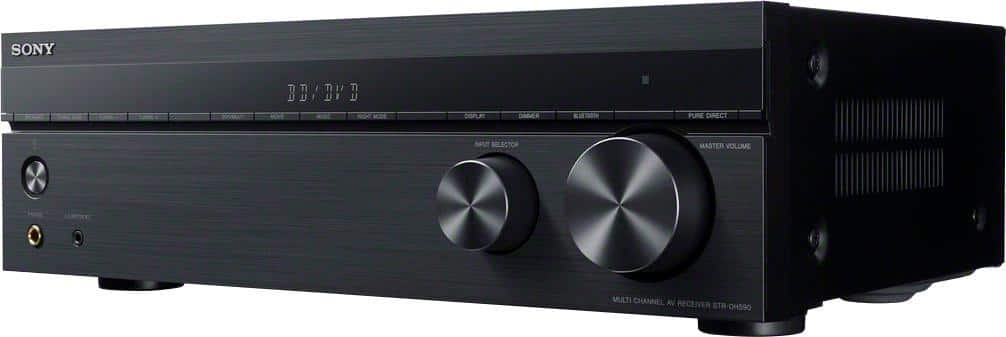
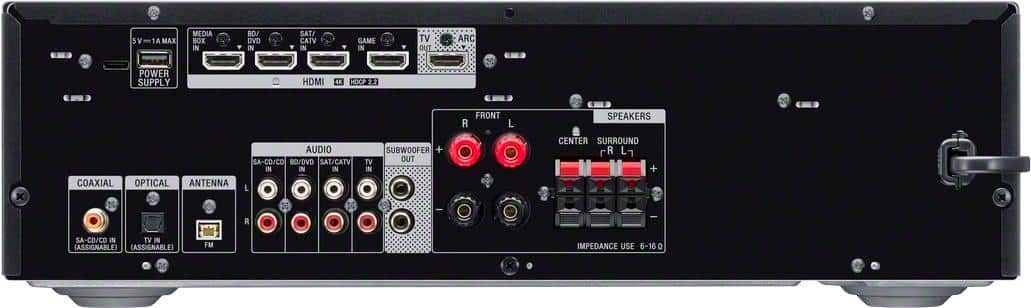
    • Answer Hi Bijay, Thank you for the inquiry! Great news! The receiver supports HDMI ARC. Upgrade your home entertainment system to work with the latest 4K TVs and HDR picture. Equipped with 4 HDMI inputs, HDCP 2.2 signal handling, and a host of advanced features the DH590 is the perfect combination of high performance video capability and superb sonic fidelity. Regards, Jess

      Answered by SonyListens

  • QuestionHi. Can this receiver be connected to a sound bar via HDMI versus speakers?

    Asked by Anonymous.

    • Answer Hi there, Thanks for your inquiry! We apologize, you cannot connect a soundbar to this AV Receiver. The HDMI port is used to connect audio/video devices such as TV, BD player, game console, media box and, cable box. This AV receiver only supports regular speakers. Only the STR-DH190 Bluetooth stereo receiver has an audio analog output for an active speaker or soundbar connection. Hope this helps. Regards, Jess

      Answered by SonyListens

  • Questiondoes it support DTS-X ?

    Asked by Broly.

    • Answer Hi Broly, Thank you so much for your inquiry. We are sorry, but the STR-DH590 doesn't support DTS:X. You can only enjoy High Bitrate Audio (DTS-HD Master Audio and Dolby TrueHD), DSD and Multi Channel Linear PCM with an HDMI connection. If playing object-based audio formats (DTS:X and Dolby Atmos) is your priority, you may want to consider getting the STR-DH790, STR-DN1080 or STRAN1000, STRAZ1000ES, STRAZ3000ES, STRAZ5000ES, STRAZ7000ES A/V receiver models. These receivers support the latest three-dimensional surround sound formats including Dolby Atmos and DTS: X, drawing you into the middle of the action you see on screen. Regards, Jess

      Answered by SonyListens

  • QuestionI have a Hysence tv with Bluetooth will I be able to connect to this receiver?

    Asked by Ted.

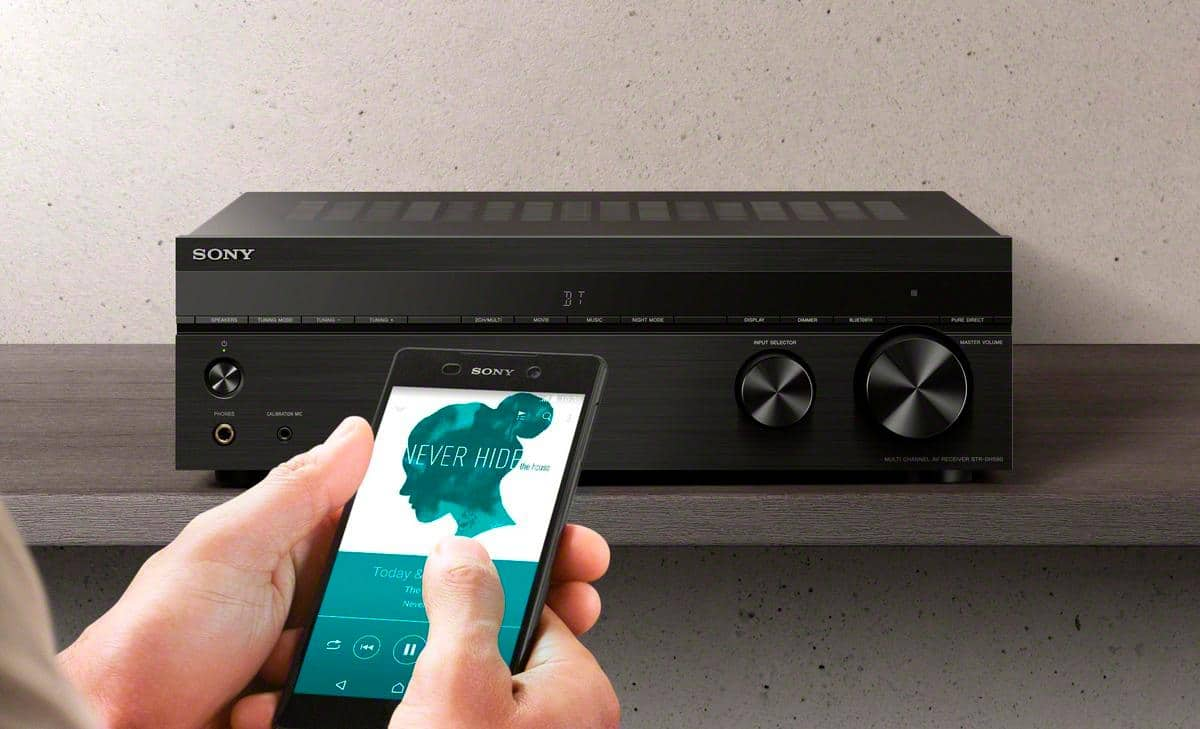
    • Answer Hi Ted, Thank you for your inquiry! If your TV supports A2DP (Advanced Audio Distribution Profile) Bluetooth profile, you should be able to connect it with this receiver. For more on "Playing Back Sound on a BLUETOOTH Device", see pages 31-32 of the manuals below. https://www.sony.com/electronics/support/res/manuals/4726/55cd375e0f9e7103f2b6baa747ed9072/47269061M.pdf Experience the bigger, clearer picture when you upgrade your home cinema setup with the STR-DH590. The 5.2ch AV receiver brings movies to life with 4K HDR pass through, Dolby® Vision and flexible surround sound. Bring all your devices together with BLUETOOTH® connectivity and multiple inputs. Regards, Jess

      Answered by SonyListens

  • QuestionHey!! Just bought this exact sound system and the sony turntable! Do these not pair together? I cannot seem to connect the music from the turntable to the speakers. What to do?!

    Asked by KoolKat.

    • Answer Hi KoolKat, We're sorry to hear this issue with your Sony STR-DH590 and turntable. To connect a turntable to directly to the receiver, the AV system should have a PHONO input. Since this AV receiver doesn't have a PHONO input, if the turntable is connected either through an audio input, the turntable signal will need amplification from an external pre-amplifier (or an inline amplifier). Without amplification of the turntable signal, low or no audio will occur. *The Sony STR-DH190 receiver has a dedicated PHONO input for connecting a turntable directly to the receiver. For us to better assist you with troubleshooting, can you tell us about your current setup? For this, you can email us at socialsupport@am.sony.com with the following details: Name: Best Buy Username: Model Number: Issue: Telephone Number: Regards, Jess

      Answered by SonyListens

  • QuestionDoes this unit pass a Digital output from Live TV and/or Streaming to exterior Bose Speakers?

    Asked by BB.

    • Answer Hi BB, Thanks for your question! You can connect speakers with a nominal impedance of 6 ohms to 16 ohms on this unit. The STRDH590 receiver has the capability to pass digital audio signals through its optical, coaxial or HDMI inputs to connected speakers. However, the ability to pass a digital output from live TV streaming to external speakers may depend on the specific setup and features of your TV. If your TV has a digital audio output (optical or coaxial), you can connect it to the corresponding input on the STR-DH590. Set the audio output settings on your TV or streaming device to optical, coaxial, or HDMI depending on the cable you're using, and the receiver should be able to pass the digital audio signal to your connected external speakers. Regards, Jess

      Answered by SonyListens

  • QuestionCan I get a STR-DH590 to work with a Pioneer elite tv if I use a hdmi to DVI-D cord? I have it set up and it does not seem to be working.

    Asked by Mathew.

    • Answer Hi Mathew, Thanks for reaching out to us. We're sorry you've been running into difficulty. HDMI-DVI conversion cable is not recommended. If you connect an HDMI-DVI conversion cable to a DVI-D device, you may lose audio and/or image. If the audio is not output correctly, connect the audio cable or digital connection cable and set the input jack again. If you connect to a TV that is not compatible with the Audio Return Channel (ARC) function or you want to select an audio signal using a cable other than an HDMI cable (e.g. via an optical digital cable or an audio cable), switch the audio input mode. For details, visit the help guide of our STR-DH590 on our Sony Support website and search for the following article: “Switching between digital and analog audio “IN MODE”.”. Unfortunately, due to the current Best Buy phishing protocol for your protection, we cannot provide a direct link of the help guide of the product as of now. If your TV does not support the System Audio Control function, press AMP MENU, then set “<HDMI>” - “AUDIO.OUT” to “TV+AMP” on the display panel to output the sound of the TV from the TV speaker and the speakers connected to the receiver. Regards, Jess

      Answered by SonyListens

  • QuestionJust bought this unit . The remote that came with it will not work . Changed the batteries. But the unit will respond to the Hisense TV remote . But I can or properly set up unit with TV remote. What can I do to fix ?? Help ! Thanks

    Asked by FredE.

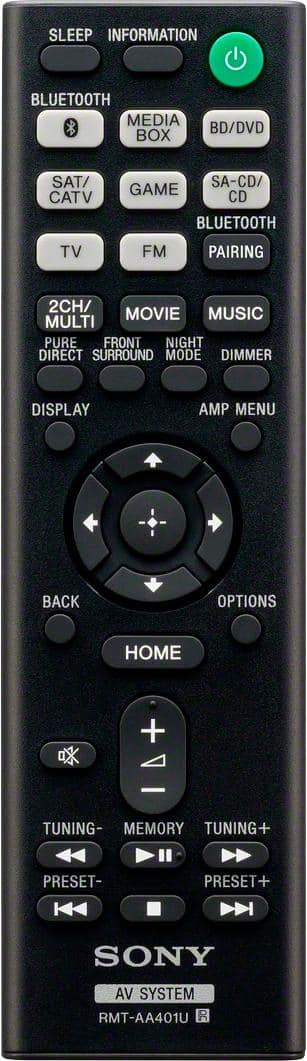
    • Answer Hi FredE We're sorry to hear that the remote doesn't work. Allow us to help and turn your experience around. Check the remote control after each step to determine if it is working. If you need model-specific information, check your manuals . 1. Remove any objects that may block the IR signal between your remote control and the device. 2. Check if the LED on the front of your device (TV) is blinking when pressing a remote button. If the LED blinks/flashes when pressing your remote buttons, the remote is sending a signal and the device is receiving it. 3. Reset the remote control. 4. Perform a power reset of the device. Additional troubleshooting is available on our support website. Please look for "The remote control doesn't work" article for more details. For further assistance, please email us at socialsupport@am.sony.com. Regards, Erin

      Answered by SonyListens

  • QuestionCan this reveiver be used with Bose surround s I und speakers that are already hard wired on my living room walls?

    Asked by Anonymous.

    • Answer Hi there, Thank you so much for your inquiry. If your Bose speakers supports a standard speaker wire connection and has a nominal impedance of 6 ohms to 16 ohms, yes, you can. We also recommend using speaker wires that are anywhere between 12 to 16 gauge. These are most commonly used for connecting speakers to an amplifier or an Audio/Video (A/V) receiver Experience the bigger, clearer picture when you upgrade your home cinema setup with the STR-DH590. The 5.2ch AV receiver brings movies to life with 4K HDR pass through, Dolby® Vision and flexible surround sound. Bring all your devices together with BLUETOOTH® connectivity and multiple inputs. Regards, Jess

      Answered by SonyListens

  • QuestionWhat is the height and width of the receiver?

    Asked by Anonymous.

    • Answer Hi there, Thank you for your inquiry. Here are the dimensions of the STR-DH590: Dimensions (width/height/depth) (Approx.): 430 mm × 133 mm × 297 mm (17 in × 5 1/4 in × 11 3/4 in) including projecting parts and controls Experience the bigger, clearer picture when you upgrade your home cinema setup with the STR-DH590. The 5.2ch AV receiver brings movies to life with 4K HDR pass through, Dolby® Vision and flexible surround sound. Bring all your devices together with BLUETOOTH® connectivity and multiple inputs. Regards, Jess

      Answered by SonyListens

  • QuestionI live in Central Florida. It’s humid and the receiver will be in a covered, screened in patio. I will have the device encased in a plastic box. Air can get in. Will the receiver survive in there conditions?

    Asked by Anonymous.

    • Answer Hi there, Thanks for your question. You can use the AV receiver outdoors but take note that the AV receiver is not weatherproof. Do not install near any heat sources such as radiators, heat registers, stoves, or other apparatus (including amplifiers) that produce heat. Place the receiver in a location with adequate ventilation to prevent heat buildup and prolong the life of the receiver. Also, do not use this apparatus near water IMPORTANT: The limited warranty of the AV receiver does not cover any kind of accidental or physical damage. Regards, Jess

      Answered by SonyListens

  • QuestionAfter few weeks usage stopped projecting picture to HD projector; only sound to speakers from cable box. Connected to HDTV & same thing, no picture from cable or Switch. Returned it and 5 months later same issue w/ new one? Is it a setting issue?

    Asked by Bcoland.

    • Answer Hi Bcoland, Thanks for reaching out to us and we are sorry you've been running into difficulty. To isolate and resolve the issue, make sure that cables are correctly and securely connected to devices. Disconnect the HDMI cable from the receiver and TV, and then reconnect the cable. Set “SIG. FMT.” of the selected input to “STANDARD” in the “<HDMI>” menu and Try to turn off the HDMI-CEC feature from the menu of the TV if the Sony receiver is not displaying a picture on a HDTV or Projector when using a HDMI connection. If the problem persists after turning off the HDMI-CEC feature, follow the additional troubleshooting steps on this article "The audio, video, or both goes out when using an HDMI connection" on our Sony Support website. If you're unable to resolve the issue, please follow the steps below for ways to contact us. Unfortunately, due to the current Best Buy phishing protocol for your protection, we cannot provide a direct link, email or phone number for customer support as of now. Please find Sony Electronics' Support information: Go to our support website > click on “Support” > scroll down click on “Contact Support” > click on "Home Audio" and from there you'll see different ways to reach us. Again, we are sorry you are experiencing this issue. Regards, Jess
      Answered by SonyListens

  • QuestionWill this receiver’s hdmi ports support 4k at 120h?? (with appropriate hdmi cables)

    Asked by Acs50.

    • Answer Hi Acs50, Thanks for your inquiry. Unfortunately, this receiver doesn't support 4K/120Hz passthrough. However, this unit is capable of 4K/60Hz passthrough and supports HDR (High Dynamic Range) contents passthrough. If your priority is 8K & 4K/120 HDMI Connectivity with HDMI 2.1 support, you may consider checking out the STRAN1000, STRAZ1000ES, STRAZ3000ES, STRAZ5000ES, and STRAZ7000ES A/V receiver models Regards, Jess

      Answered by SonyListens

  • QuestionI have digital audio coming from my TV to this receiver so I can have my powered subwoofer work. The ARC channel is connected to my sound bar but I am getting no sound. From what I understand ARC is a 2 directional video/audio channel so why does my sou

    Asked by Tonamy76.

    • Answer The ARC goes between the TV and the stereo reciever. The speakers are connected to the reciever.

      Answered by AndroidAutoSux

  • QuestionThis got 2 different answers so I'll ask again. Can this receiver do a 2.1 mode? So stereo mode while sending a signal to the subwoofer as well? If not, I'd rather go with the Yamaha which can.

    Asked by Dugan.

    • Answer Hi Dugan, Thank you for the inquiry! Yes. You can select the speaker pattern you want according to your speaker installation: “5.1”,“5.0”,“4.1”,“4.0”,“3.1”,“3.0”,“2.1”,“2.0. Be sure to set the speaker pattern to a “x.1” setting when you connect a subwoofer. For details on the speaker pattern, refer to the Operating Instructions of the receiver model at our Sony Support website. Regards, Jess

      Answered by SonyListens

  • QuestionDoes this receiver have automatic and manual speaker set-up?

    Asked by john.

    • Answer Hi john, Thank you for the inquiry! This AV receiver supports manual easy setup. Simply connect the HDMI cable to the TV from your AV receiver via HDMI ARC. Connect the wired speakers and perform auto calibration. Visit our Sony support website for more details. Equipped with 4 HDMI inputs, HDCP 2.2 signal handling, and a host of advanced features the STRDH590 is the perfect combination of high performance video capability and superb Sonic fidelity. High-Resolution Audio compatible. -David

      Answered by SonyListens

  • QuestionCan I use my older Sony speakers and sub woofer with this receiver?

    Asked by Boone.

    • Answer Yes

      Answered by Don1z1

  • QuestionI’m buying a Sony Bravia xr x90l tv & Sony strdh590 receiver. I have a Yamaha turntable with rca plugs. I want to connect 2 Polk bookshelf speakers. What equipment do I need to hook all this up and run all sound through the new speakers. Help !

    Asked by Kmomrich.

    • Answer This receiver does not come with a built-in phono pre-amp. You will need to purchase that component separately (several good choices under $100 that are designed to take RCA audio cables from your turntable). purchased a Fosi Audio tube pre-amp to use with my old Thorens turntable. I feed the RCA output cable from the pre-amp into the CD input (RCA connectors) on the Sony receiver. Also: if you only intend to just drive your two Polk speakers, you don't need to spend your money on a 5.1 Multi-channel receiver. A simple stereo tuner should suffice

      Answered by PeteD

  • QuestionCan you hook up a subwoofer wirelessly to this Receiver?

    Asked by Wireless.

    • Answer Yes if your subwoofer have Bluetooth capability

      Answered by ShekarS

  • QuestionJust want to make sure I can hook up two Sony active speakers to this Receiver. Was hearing you could than was hearing no you couldn't. Also heard you could be was only able to hear one Active sub playing at one time. I do see its called a 5.2.

    Asked by Julio.

    • Answer There are 2 mono ports in the back. So, I would assume you can connect 2 subs simultaneously. I think the manual references the two for “true” theater sound. Just be careful you don’t crack plaster!!

      Answered by Ed77077