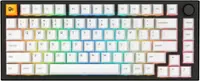
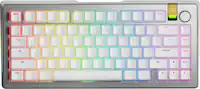
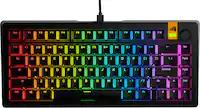
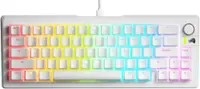
Razer - Joro Portable 75% Wireless Scissor Gaming Keyboard With Chroma RGB Backlighting - Black
 Razer - Basilisk Mobile Optical Gaming Mouse - Wireless - Black$89.99

Related Item

Specifications
- Lighting TypeRGBForm Factor75%Keyboard TechnologyScissorKey Switch BehaviorTactile, LinearConnection TypeWireless
- Key Specs
- Lighting Type: RGB
- Form Factor: 75% (The size, arrangement, and physical configuration of the product.)
- Keyboard Technology: Scissor (Type of technology that detects a key press.)
- Key Switch Behavior: Tactile, Linear (Refers to the mechanisms under the keycaps on a keyboard that enable you to type faster and more precisely. Linear switches move straight up and down without any sound or bump. Tactile switches provide a noticeable bump in the key press, and no sound. Clicky switches provide a bump in the key press and "clicky" sound.)
- Connection Type: Wireless
- General
- Brand: Razer
- Model Number: RZ03-02360200-R3U1
- Product Name: Joro Portable 75% Wireless Scissor Gaming Keyboard With Chroma RGB Backlighting
- Color: Black
- Features
- Lighting Type: RGB
- Customizable Lighting: true
- Numeric Keypad: false
- Touchpad: false
- Keyboard Type: Gaming, Programmable
- Palm Rest: false
- Spill Resistant: false (Designed to resist some degree of accidental liquid spill. The level of spill-resistance is indicated by the product manufacturer, but the degree of protection may not be guaranteed after normal wear of the product.)
- Foldable: false
- Keycap Material: ABS
- Maximum Number of Memory Profiles: 6
- Functions
- Form Factor: 75% (The size, arrangement, and physical configuration of the product.)
- Number Of Keys: 86
- Keyboard Technology: Scissor (Type of technology that detects a key press.)
- Dedicated Macro Keys: false (Perform shortcuts of key sequences to carry out commands with a single key. Key sequences may include key strokes, mouse actions, and/or menu actions.)
- Adjustable Tilt Function: false
- Key Switch Behavior: Tactile, Linear (Refers to the mechanisms under the keycaps on a keyboard that enable you to type faster and more precisely. Linear switches move straight up and down without any sound or bump. Tactile switches provide a noticeable bump in the key press, and no sound. Clicky switches provide a bump in the key press and "clicky" sound.)
- Rollover: Full-key (Refers to the number of keys that can be correctly registered when pressed simultaneously. Rollover may be referred to as n-key rollover (KRO) or anti-ghosting.)
- Multimedia Keys: true
- Internet Keys: false
- Actuation Distance: 2.0mm
- Actuation Force: 50g
- Connectivity
- Connection Type: Wireless
- Wireless Connectivity: Bluetooth (The manner in which a device sends data to another device over a short distance without the use of wires or cables.)
- Maximum Wireless Range: 32.81 feet
- Number Of USB Port(s): 1 (The total number of USB ports including all generations and versions.)
- Number of Devices Connectable Simultaneously: 3
- Compatibility
- Operating System Compatibility: Windows, Mac, Apple iPadOS, Apple iOS
- Plug and Play Operation: true
- Power
- Rechargeable Battery: true
- Battery Chemistry: Lithium-ion
- Batteries Included: true (Indicates whether the product comes with the required batteries for its operation.)
- On/Off Switch: true
- Dimensions
- Product Height: 0.65 inches (The out of box height of the item. Height is measured as the vertical distance from the bottom of the item to the top as it would be primarily used or placed.)
- Product Width: 4.4 inches (The out of box width of the item. Width is measured as the horizontal distance from one side of the item to the other as it would be primarily used or placed.)
- Product Depth: 11.7 inches (The out of box depth of the item. Depth is measured as the distance from the front of the item to the back as it would be primarily used or placed.)
- Product Weight: 12.8 ounces (The out of box weight of the item.)
- Mouse
- Mouse Included: false
- Warranty
- Warranty - Parts: 2 years
- Warranty - Labor: 2 years
- Other
- UPC: 840272920749
Game anywhere with the Razer Joro, an ultra-portable wireless gaming keyboard featuring multi-device Bluetooth pairing for seamless connectivity. Complete with ultra low-profile switches, a long battery life, and an ergonomic design, enjoy precision and control across all your gaming setups.
- Hyper-Thin, Hyper-Light, Hyper-Compact: The Razer Joro packs a function row and full-sized arrow keys into a hyper-slim, ultra-portable design. At just 374 g and 16.5 mm thin, it’s effortlessly lightweight and easy to carry anywhere.
- Powered by Razer Chroma RGB: With up to 16.8 million colors and a suite of RGB effects to choose from, personalize the keyboard and get access to dynamic lighting effects for hundreds of Chroma-integrated games.
- Ultra Low-Profile Switches: Built for all-day gaming and work, the ultra low-profile design minimizes strain. Gaming-grade keys provide quick, precise actuation with satisfying tactile feedback.
- Bluetooth 5.0 – Pair Up to Three Devices: Enjoy effortless wireless control anywhere. Connect up to three devices across multiple platforms, including Windows, Mac, handhelds, and mobile. Instantly switch setups with shortcuts for gaming and work.
- Long-Lasting Battery Life: Game longer and work smarter by activating Power Saving Mode. When it’s time to recharge, plug in the included USB cable and keep playing without interruptions.
- Razer Snap Tap: With Razer Synapse 4, prioritize inputs between two keys without releasing the previous one for faster, more responsive controls—perfect for near-instant directional changes in gameplay.
- Hyper-Thin, Hyper-Light, Hyper-Compact: The Razer Joro packs a function row and full-sized arrow keys into a hyper-slim, ultra-portable design. At just 374 g and 16.5 mm thin, it’s effortlessly lightweight and easy to carry anywhere.
- Powered by Razer Chroma RGB: With up to 16.8 million colors and a suite of RGB effects to choose from, personalize the keyboard and get access to dynamic lighting effects for hundreds of Chroma-integrated games.
- Ultra Low-Profile Switches: Built for all-day gaming and work, the ultra low-profile design minimizes strain. Gaming-grade keys provide quick, precise actuation with satisfying tactile feedback.
- Bluetooth 5.0 – Pair Up to Three Devices: Enjoy effortless wireless control anywhere. Connect up to three devices across multiple platforms, including Windows, Mac, handhelds, and mobile. Instantly switch setups with shortcuts for gaming and work.
- Long-Lasting Battery Life: Game longer and work smarter by activating Power Saving Mode. When it’s time to recharge, plug in the included USB cable and keep playing without interruptions.
- Razer Snap Tap: With Razer Synapse 4, prioritize inputs between two keys without releasing the previous one for faster, more responsive controls—perfect for near-instant directional changes in gameplay.
Whats Included
- Razer Joro Portable Wireless Gaming Keyboard
- USB Type C to Type C Cable
- Important Product Information Guide
- Razer Joro Portable Wireless Gaming Keyboard
- USB Type C to Type C Cable
- Important Product Information Guide
Compare similar products
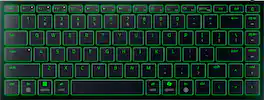
Game anywhere with the Razer Joro, an ultra-portable wireless gaming keyboard featuring multi-device Bluetooth pairing for seamless connectivity. Complete with ultra low-profile switches, a long battery life, and an ergonomic design, enjoy precision and control across all your gaming setups.

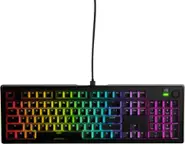
From enthusiast-level customization to ultra-low-latency performance, the complete package has never come this compact. Meet the Razer BlackWidow V4 Mini HyperSpeed—a wireless, hot-swappable 65% keyboard powered by Razer Chroma RGB, complete with stealth pudding keycaps for maximum illumination.

ROG Falchion RX Low Profile 65% compact wireless gaming keyboard with ROG RX low-profile optical switches, tri-mode connection with ROG SpeedNova wireless technology and Omni Receiver, protective cover, integrated silicone dampening foam, interactive touch panel, and MacOS support

Meet the CORSAIR K100 AIR Wireless RGB Mechanical Gaming Keyboard, an ultra-thin keyboard that places outstanding performance and productivity in a sleek brushed aluminum frame. Its unbelievably thin profile – just 11mm at its slimmest point – makes the K100 AIR the stylish centerpiece of your entire desktop and workspace. Hyper-fast, tactile CHERRY MX Ultra Low Profile mechanical keyswitches deliver a responsive, satisfying mechanical keyboard experience – you will want to use the keyboard for everything.The K100 AIR offers three ways to connect to your PC, Mac, and devices for optimal, hyper-fast wireless versatility: sub-1ms SLIPSTREAM WIRELESS, Bluetooth, or USB wired. Connect to multiple devices wirelessly and switch between them with the press of a button, with secure AES 128-bit encryption. Wired mode enables CORSAIR AXON Hyper-Processing Technology to transmit keystrokes up to 8x faster than standard gaming keyboards, helping you stay one step ahead of opponents during competition. The K100 AIR offers endlessly customizable lighting and workflows for total control over your setup. Four dedicated G keys are fully programmable to perform custom actions, shortcuts, and macros to elevate your productivity. The K100 AIR shines with brilliant per-key RGB backlighting, for nearly limitless customization for up to 20 lighting layers simultaneously, powered by AXON. Unlock full control over lighting, key remapping, and more with powerful CORSAIR iCUE software. With up to 200 hours of wireless battery life and all the premium features in CORSAIR’s thinnest gaming keyboard ever, the K100 AIR enables you to play elevated.
| Pros for Razer - Joro Portable 75% Wireless Scissor Gaming Keyboard With Chroma RGB Backlighting - Black | |||
|---|---|---|---|
| Portability, Battery Life, Connectivity, Build Quality, Typing Experience | Keyboard Quality, Portability, Battery Life, Key Feel, Size | There were no pros for this product— | Keyboard Quality, Key Feel, Battery Life, Connectivity, RGB Lighting |
| Cons for Razer - Joro Portable 75% Wireless Scissor Gaming Keyboard With Chroma RGB Backlighting - Black | |||
| Keyboard Angle, Key Feel | There were no cons for this product— | There were no cons for this product— | Price, Software |
Specs
Reviews
Customer Images
The vast majority of our reviews come from verified purchases. Reviews from customers may include My Best Buy members, employees, and Tech Insider Network members (as tagged). Select reviewers may receive discounted products, promotional considerations or entries into drawings for honest, helpful reviews.
- Rated 4 out of 5 stars
Feels like a nice laptop keyboard, detached
The Razer Joro feels to me less like a Gaming keyboard and more like a detached and super portable ultra lightweight laptop keyboard. It is literally the same size (see pictures) as my ROG Zephyrus G16 keyboard and while I don't have a Razer Blade, I wouldn't be surprised if it feels identical and is the same size as their high-end laptops. With that in mind, there are some pros/cons to the Joro: + It is TINY. Thin and Light, to the point it is as thin as an Ultralight laptop and weighs as much as my iPhone 15 Pro Max with its case on. I can just throw it in a bag with my work or my gaming laptop and take it with me. I still prefer not to type on my laptop bc of palm trackpad interference and also I wear a watch on my left hand which tends to scuff the aluminum body over time which irks me. + The Bluetooth 5.0 integration is the slickest I have ever seen. It supports 3 devices wirelessly and BT 5.0 is SUPER fast to the point you turn on the keyboard and every BT device detects it and pops up a notification that Joro is detected and to pair it. + Swapping Inputs with BT 5.0 is also super slick, you just hit the F1-F2-F3 keys that have little leds that indicate status/active input to toggle through all your paired devices. So I can pair this Joro to my laptop, my iPhone and my desktop all at the same time and just toggle through to change the input and the detection/input speed is INSTANT. Super awesome for those on the go. + USB-C for wired connectivity and charging adds a 4th method to connect and also to charge the Joro. + Great battery life, even with RGB backlighting. I've been using the Joro for work and gaming and general PC usage for a few days now and the battery life is still 80%. + Retains 75% Keyboard layout, but most importantly, has the arrow keys. I love TenKeyLess (TKL) keyboards since the minute they were invented, but the smaller ones like 60-65% did some weird stuff like remove the arrow keys, or home cluster, which was a non-starter for me because those arrow keys were super important for navigating forms and menus. Most 75% TKL designs have them smushed in now and the home cluster got smushed vertically so I have to hunt and find them, but they exist still which is better than not having them anymore. Not everything is great about the Joro or might not be for everyone. - As I mentioned, it feels like a laptop keyboard and with that means it is a scissor style keycap and actuation and not a mechanical switch. It doesn't feel cheap, in fact its the opposite, button press uniformity is excellent even for larger keys and spacebar, but the key travel and feel of the keys is lacking compared to mechanical which was obviously a trade-off to get to the low weight and low profile of the Joro. - The build quality is good, not great. It is an aluminum top plate veneer, just enough to feel cold to the touch, but the side and back are plastic. I would not want to see what happens if you dropped this keyboard on one of its sharp edges on anything hard, even hardwood floors. - The RGB is all one color, not a huge deal but something to be aware of. The backlight is also not super bright and is shine-through with noticeable gaps in the backlight when you peer down below the keys. Likely helps a lot with battery life. - There is no feet to raise the back end of the laptop, which is pretty uniform for any keyboard, or so I thought. There is a natural wedge incline built into the keyboard but I always liked having the keys raised up in the back. - Because these are scissor switches, you lose the capability and sensitivity of recent mechanical keyboards that use Hall Effect switches, which allow pressure to be registered on a key press. - Razer's software Synapse is required for full functionality, but not for basic functionality which is handled through HID protocols and BT. - No RF dongle. That means you have to have a BT capable device for wireless or use a cable if your PC doesn't have BT. While most PCs nowadays, even desktops, do have BT/WiFi combo wireless, older ones won't which means those folks will need to be plugged in to use it. Personally, I love this keyboard, just not for gaming. Its truly my road warrior companion for when I travel abroad, to work, or trade shows for work. It is so light and tiny and takes up almost no space at all. I just wish it had some kind of cover to protect it. Like some silicone mold that slides on top of the keys to protect them would be perfect!
Posted by TechBuyer
- Rated 5 out of 5 stars
Premium and Portable
This keyboard has exceeded my expectations in several ways. First off, its heavier than I pictured it to be. I figured a light flimsy plastic-feeling keyboard, but when I picked up the box I was like oh wow. I’m a fan of heavier products because it has a better quality feel to it, this goes for most electronics I use. Its definitely a premium aluminum feel to it, and the weight plus the rubber grips gives it stability when typing on different surfaces, preventing it from easily sliding around. Its also has a clean aesthetic to it, minimalist feel with quality mechanical typing. The main reason I wanted this was for typing on my iPad, but I’ve also been using it on my Windows PC. I can also see using this on my gaming laptop when I have it hooked to an external monitor and want to close the laptop lid and push it back to create a nice desktop space. The connections are super easy, for both wired and bluetooth. The wired connection works instantly on iPad and PC, straight plug and play. Bluetooth does not have any buttons you need to hold for X amount of time to put it in pairing mode which can be annoying, just simply move the switch the Bluetooth, find the Joro device, and pair. The keyboard stores 3 paired bluetooth devices you can switch to on the keyboard. The keyboard size is roughly about the same size as a laptop keyboard as you can see in my attached picture. At first it does feel a little cramped since I’m usually on my desktop keyboard, but I’ve adjusted to it quickly. My experience using it on my iPad has been good so far, I can even control the volume and brightness of my iPad from the keyboard. I will say there is a known issue with iPads not translating symbols from the keyboard properly, such as (*& showing up as different symbol, but that is a general ipad issue. That problem doesn’t exist on the PC. I do wish that it had fold out legs that would prop the keyboard up some, I’m actually surprised it didn’t, but I imagine its to give the keyboard a more simplistic style. The lights are a real nice touch on the keyboard, you don’t need to make any setting changes or software to run them, they turn on by themselves. You can cycle through lighting effects by using the FN & CTRL keys as described on their website. Also on the website, it gives you an idea of what to expect for battery life depending on your settings. I’m surprised the lights use that much battery, but on standard mode (with lights) you’ll still get 11 hours of usage out of it. With Power Saving Mode (FN + ESC) on, you get over 1800 hours! I’m surprised the standard mode uses that much power, but I like that you have the option to choose extended usage and visually enhanced modes, including brightness levels on the keyboard. Overall, it seems like a great companion accessory for mobile devices and laptops. It may take some time to get used to typing on the size of this, but I think its worth having. This will definitely bump my ipad to a more useful device moving forward, and is slim enough to pack it together easily. I typed this review using the keyboard and I really enjoy the quality-feel. Make sure to hook it up to a computer and get Synapse 4 setup, I had to update my firmware for it which I would recommend to get the best experience.
Posted by Jp223
- Rated 4 out of 5 stars
Laptop keyboard in mobile chassis
TLDR: Razer packaged a laptop keyboard in a beefy aluminum chassis that can withstand the rigors of travel PROS Surprising heft & sturdiness Up to 5 Profiles Up to 1800hrs of Battery Life Can Pair to 3 Different Products CONS No Angle Adjustment No Travel Case Included Still needs a firmware update to get some bugs out USE I wasn't sure how I would like the Joro when I requested it. I've been needing a good travel keyboard for a while, so I was glad when it came out. But for me and Razer products, it is a love/hate relationship. I either love them or completely hate them. There is little middle ground. Razer took one of their best laptop keyboards and put it in a very robust aluminum & plastic chassis. The keyboard is heavier and far sturdier than I was expecting. It was a pleasant surprise. The aluminum top plate is what accounts for the heft. I would typically ding a manufacturer for adding extra weight and heft to their products, but with the Joro, it was totally needed. The aluminum makes a world of difference in the keyboard. Its chassis is stiff and extremely rigid, providing a solid typing experience. Razer also nailed the keys. Not so much with their actuation. At heart, they are just membrane keys, but the laser etching, font, and backlighting are nearly perfect in my opinion. Lettering is precise and clean. Some of the best lighting and font on any of the keyboards I have. BATTERY LIFE Razer claims up to 1800hrs of battery life on power saving mode!! That is amazing for a product that is so slim. I really appreciate the website they created for the Joro too. Most important is the battery life estimator, as using even a fair bit of backlight drastically reduces the overall battery life. How much? It goes from up to 1800hrs to an estimated 26 hours with only 20% backlight. So that Chroma RGB lighting pays a heavy price. CONS I would like to see some form of adjustment on the bottom of the Joro. I like a little more tilt to my keyboards. The angle of the Joro is non-adjustable. I would also like to see a travel case included with purchase. If you travel with a keyboard, it is going to take punishment, no matter how careful you are. It is inevitable. A semi-rigid travel case should be included with a travel keyboard. Lastly, the Joro is still a firmware update or two away from prime time. I'm still having trouble getting it to pair initially with devices. It takes a minimum of two attempts, sometimes more, before a successful pairing. However, once connected, Bluetooth remains rock solid and I have experienced no random glitches or extra key presses like I have when paired to other manufacturers' keyboards. FINAL THOUGHTS I like the Joro more than I thought I would. It is a great combination of size and portability. It is within millimeters of the keyboard on my 15" laptop without the extra heft and bulkiness of a laptop. The Joro is just big enough without feeling cramped. Razer still needs another firmware update to make pairing the Joro a more seamless experience and all will be good. My final overall rating reflects my frustrations with pairing, but while those frustrations are enough to keep it from a 5-star rating, they aren't enough to keep it from getting a recommended rating. RECOMMENDED
Posted by NAMO