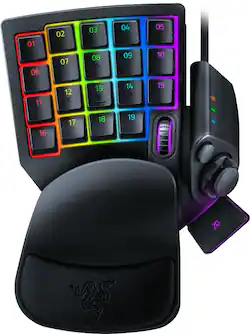
Razer - Tartarus Pro Optical Switch Keypad - Black
- Key Specs
- Wireless: false
- Compatible Platform(s): Mac/Windows
- General
- Product Name: Tartarus Pro Optical Switch Keypad
- Brand: Razer
- Number Of Keys: 32
- Model Number: RZ07-03110100-R3U1
- Connectivity
- USB Port(s): false
- Dimensions
- Cord Length: 72 inches
- Compatibility
- Compatible Platform(s): Mac/Windows
- Features
- Adjustable Hand/Palm Rests: true
- Backlit Keypad: true (Integrated lights allow for visibility of the keys in low-light conditions.)
- Touchpad: false
- Additional Features: Unlimited macro lengths; unlimited game profiles; Razer Synapse enabled; 1000Hz ultrapolling
- Other
- UPC: 811659035318
Upgrade your gaming rig with this Razer Tartarus Pro optical switch keypad. The 32 programmable keys enable customized commands so you can execute shots quickly, while an adjustable palm rest provides comfort during marathon gaming sessions. This backlit Razer Tartarus Pro optical switch keypad features an eight-way directional thumb pad for seamless navigation.
- Razer analog optical switches: Provide a deep degree of control, similar to controller thumbsticks, and can register scaling levels of input in the same keystroke.
- Customizable backlight: The Razer Tartarus Pro keypad features programmable backlit keys, all easily set via Razer Synapse.
- Adjustable actuation: Allows you to calibrate the keypad for speed, control, or balance of both, and enhance your playstyle by tuning it to be as sensitive as you want.
- Ergonomic construction: Razer was designed with the adjustable hand and palm rests to let you customize a comfortable experience during marathon gaming sessions.
- 32 programmable keys, 8-way directional thumbpad: You can add a large number of macros or keybinds to customize your playstyle.
- Dual-function keys: Allow you to bind two functions to each key: one that triggers on a partial keystroke, and another on a full keystroke.
- Eight quick-toggle profiles: Instantly change your profile using the button on the side of the keypad.
- Unlimited macros length and profile storage: Make your skill rotations and gameplay more efficient owing to the easy process of creating macros, and prepare the perfect setup for any game situation with the collection of stored profiles.
- Windows and Mac compatible: For use with your existing computer.
Whats Included
- Razer Tartarus Pro Optical Switch Keypad
- Owner's manual
A: No. There's no right-handed version. Furthermore, you can make use of the MOUSE FUNCTION option in Synapse which allows you to change any key into a mouse function. Some of the available functions you can choose are the Left Click, that performs a left mouse click using the assigned button; and the Right Click, that performs a right mouse click using the assigned button.
Q: Does this come with a mouse
A: No. It’s just a keypad.
Q: Can you costumes the buttons?
A: Yes the buttons are fully customizable
Q: can I keybind this with wasd?
A: Yes it’s just like a normal keyboard only quarter of the size
Q: Will best buy get this in stock again?
A: undefined
A: The Keypad is supported by synapse. I'm running it as we speak. I would make sure you are using the most up to date synapse, or correct version.
A: Yes,.....bind the keys to the game....Enjoy
A: you absolutely can. But being honest, I'd assume that you are just swapping. My advice would be to embrace the wasd for atleast a few months, push through the frustration. Cause then your entire thumbstick can be used for keyboards and modifiers.






















