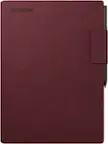
reMarkable - 2 - Type Folio keyboard for your 10.3'' paper tablet - Sepia Brown
reMarkable - 2 - Type Folio keyboard for your 10.3'' paper tablet - Sepia Brown
Related Item

About This Item
- General
- Brand: reMarkable
- Model Number: RM710
- Product Name: reMarkable 2 - Type Folio keyboard for your 10.3'' paper tablet - Sepia Brown
- Color: Sepia Brown
- Accessory Type: Case
- Number of Units Per Package: 1
- Dimensions
- Product Height: 0.75 inches (The out of box height of the item. Height is measured as the vertical distance from the bottom of the item to the top as it would be primarily used or placed.)
- Product Length: 8.58 inches (The out of box length of the item. Length is measured as the longest dimension of the item.)
- Product Width: 10.12 inches (The out of box width of the item. Width is measured as the horizontal distance from one side of the item to the other as it would be primarily used or placed.)
- Product Weight: 15.84 ounces (The out of box weight of the item.)
- Warranty
- Warranty - Parts: 1 year limited
- Warranty - Labor: 1 year limited
- Other
- UPC: 7090045257104
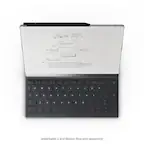
Experience comfortable, focused typing on reMarkable 2 with Type Folio. Seamlessly combine or switch between handwriting and typing. Get the convenience of a slim, tactile keyboard with the protection of a stylish cover that connects to your paper tablet magnetically. No pairing, charging, or cables, just distraction-free writing.
- Thin profile, neatly hidden keyboard: Add comfortable, focused typing to your paper tablet with a slim, tactile keyboard. When not in use, the keyboard neatly folds away, leaving a stylish cover to protect your paper tablet.
- Type with focus: With a simple design, minimalistic formatting options, and flexible page lengths, nothing gets in the way of you and your thoughts. It's a typewriter with digital powers.
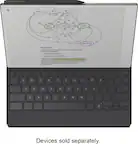
- Combine typing and freehand: Add extra thoughts and comments in the margins, sketch between paragraphs, or highlight passages with your Marker as you type. Handwriting, typing, sketching - all seamlessly integrated.
- Find the right angle: Type Folio for reMarkable 2 offers two typing modes: an upright position and a near-flat position perfect for combining handwriting and typed text. Reading documents or writing by hand? Fold away the keyboard and open your folio up like a book.
- Take notes anywhere: Type and edit notes across your smart devices with our mobile and desktop apps. Add new thoughts on the go, or pick up where you left off. All your work’s available and ready to build on, wherever you are.
- A smarter accessory: When you open the Type Folio, your reMarkable 2 automatically rotates its display to landscape mode for typing. Handwritten notes anchor intelligently to your typed text, even as it moves around the page. And with no charging, pairing, or cables, writing’s always hassle-free.
- Tactile, comfortable typing: Type Folio’s keyboard boasts a generous 1.3 mm of key travel (similar to many laptops) and full-size letter keys. reMarkable's Canvas digital paper display, which mimics the matte look and immediate response of paper, means you can type for hours without glare or eye strain.
- Keep your reMarkable safe: Smart and functional protection for your paper tablet. Type Folio for reMarkable 2 is available in Ink Black and Sepia Brown and designed exclusively to fit your reMarkable 2.
Disclaimers
- *A Connect subscription gives you access to seamless note-taking across devices, with unlimited cloud storage and sync. Activate Connect at my.remarkable.com and start your 100-day free trial. Cancel anytime.
Q: Does it work with the IPad?
A: undefined
Q: What does this come with? Does it include a charger and cable?
A: If you are referring to the keyboard, it does not need charging. Just attach it to the Remarkable and type! Hope that helps.
Q: Does this keyboard work with the 10.3" model.
A: Hi! If you are referring to our reMarkable 1 version being compatible to the reMarkable 2 Type Folio, they are unfortunately not compatible, as our version 1 do not have this feature on its hardware. Please also be aware that our new reMarkable Paper Pro will not be compatible with the Type Folio of reMarkable 2 because of size differences and new technology being incorporated. If you'd like to learn more, please feel free to check our support page: https://support.remarkable.com/s/
Q: Is a folio keyboard available for the remarkable paper pro?
A: Hi there! Yes, a new Book Folio and Type Folio is available for our reMarkable Paper Pro, due to the size difference that has been made, making the reMarkable 2 Type Folio not compatible to the new remarkable Paper Pro. You can check for more information with regard to this through this link: https://support.remarkable.com/s/article/About-Type-Folio-for-reMarkable-Paper-Pro
Q: Are the documents compatible with word?
A: Hi! Exported documents from the reMarkable 2 can be converted to PDF, PNG, or SVG formats. Although direct export to Word format is not currently available, you can convert the exported PDFs to Word documents using additional software. Best, Stina
Q: Can Google pixel slate external keyboard work with the remarkable 2 pepper tablet?
A: Hi! The reMarkable 2 does not support external keyboards other than the Type Folio. /Stina
Q: How does this hookup to the remarkable 2?
A: Magnetically - hope this answers it..
Reviews
Customers are saying
Customers commend the 2 - Type Folio keyboard for your 10.3'' paper tablet, highlighting its pleasant keyboard and sturdy build quality. Users appreciate the added versatility the keyboard brings to the tablet. However, some users have noted the added weight.
Customer Images
The vast majority of our reviews come from verified purchases. Reviews from customers may include My Best Buy members, employees, and Tech Insider Network members (as tagged). Select reviewers may receive discounted products, promotional considerations or entries into drawings for honest, helpful reviews.
Compare similar products

Experience comfortable, focused typing on reMarkable 2 with Type Folio. Seamlessly combine or switch between handwriting and typing. Get the convenience of a slim, tactile keyboard with the protection of a stylish cover that connects to your paper tablet magnetically. No pairing, charging, or cables, just distraction-free writing.

Magic Keyboard for iPad Pro delivers an amazing typing and trackpad experience in a sleek, portable new design with an aluminum palm rest. The keyboard includes a 14-key function row for quick access to screen brightness, volume controls, and other features, and a USB-C connector for pass-through charging. The floating cantilever design smoothly adjusts to multiple viewing angles. A new larger trackpad with haptic feedback is perfect for precision tasks like editing a spreadsheet and selecting text, or simply navigating your iPad with intuitive and familiar Multi-Touch gestures. And a durable outer cover provides front and back protection, perfect for taking iPad Pro anywhere. Magic Keyboard works with Apple iPad Pro (M5) 11" 2025.

Experience comfortable, focused typing on reMarkable Paper Pro with Type Folio. Seamlessly combine or switch between handwriting and typing on the same page. No pairing, charging, or cables, just distraction-free writing.

Type comfortably and work on a large trackpad with Magic Keyboard Folio. Quickly adjust the volume or search for a file using the function key row. The versatile two-piece design has a detachable keyboard and a protective back panel with an adjustable stand for flexible viewing.
| Pros for reMarkable - 2 - Type Folio keyboard for your 10.3'' paper tablet - Sepia Brown | |||
|---|---|---|---|
| Keyboard, Build Quality, Portability | There were no pros for this product— | Design, Typing Performance, Overall Performance | Design, Ease of use, Keyboard Quality, Connectivity, Protection |
| Cons for reMarkable - 2 - Type Folio keyboard for your 10.3'' paper tablet - Sepia Brown | |||
| Weight | There were no cons for this product— | Weight, Backlight | Compatibility, Price, Color |